Restore a MySQL database
After you back up a MySQL database to a backup vault using Cloud Backup , you can restore the data to the source MySQL database or another registered MySQL database in the same region under the same account.
Prerequisites
Before you begin, make sure that:
A MySQL database is backed up in the Cloud Backup console. For more information, see Back up MySQL.
The target MySQL database is in the Online state. If the target database is in an abnormal state, the restore job fails. For more information, see FAQ about the database backup feature of Cloud Backup.
Billing
Restore is free of charge.
Usage notes
Backup speed and recovery speed figures from Cloud Backup are measured in a test environment and are for reference only. For details, see Backup speed and recovery speed.
To restore data to a different MySQL database, register that database in the Cloud Backup console first and make sure it is in the Online state.
Create a restore job
Log on to the Cloud Backup console.
-
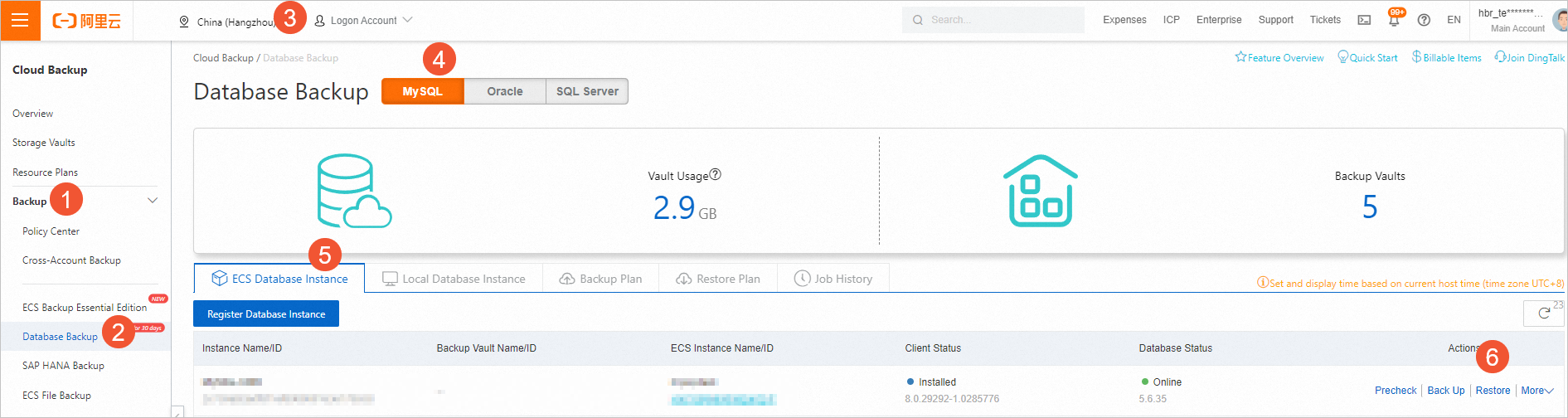
In the left-side navigation pane, choose . In the top navigation bar, select a region. On the Database Backup page, click the MySQL tab. Click the ECS Database Instance or Local Database Instance tab. Find the MySQL database and click Restore in the Actions column.
-
In the Create Restore Job dialog box, complete the following steps.
-
Configure Restore Items and click Next.
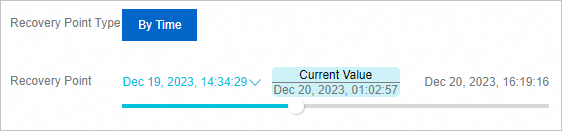
Drag the slider for Recovery Point to the point in time you want to restore the database to.
-
Enter a Plan Name for the restore job and start the job immediately. Then, click Next.
You can only start the restore job immediately. You cannot specify the restoration time.
-
Configure Restore Config and click Next.
The following table describes the restore configuration parameters.
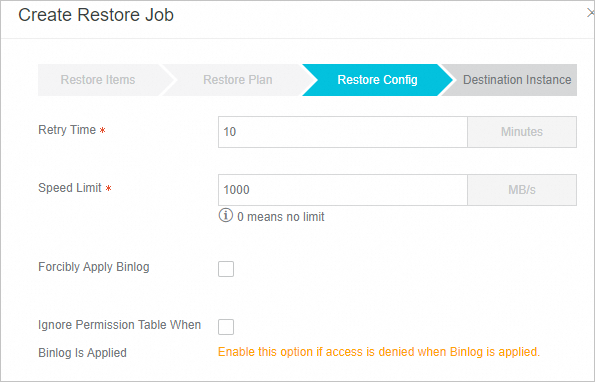
Parameter
Description
Retry Time
The interval between reconnection attempts if the database disconnects during restoration, in minutes.
Speed Limit
The maximum data throughput during restoration, in MB/s. Set to 0 for unlimited speed. Set a limit to avoid affecting database performance during restoration.
Force Apply Binlog
Force the use of binary logs (binlog) for restoration even if errors occur. Binlogs record all data definition language (DDL) and data manipulation language (DML) changes in the database.
Skip grant tables when applying binlog
Skip the permission check when accessing binary logs during restoration. Enable this option if log access is denied due to insufficient permissions.
-
Select the target database and click Create.
By default, the last backed-up MySQL database is selected. To restore to a different database, select another registered MySQL database.
NoteSelect the Only Check Offline Instance option to include offline instances in the list. You can restore data from these instances to a new instance where the client is installed, enabling cross-instance data restoration. For more information, see Description of the Only Check Offline Instance feature.
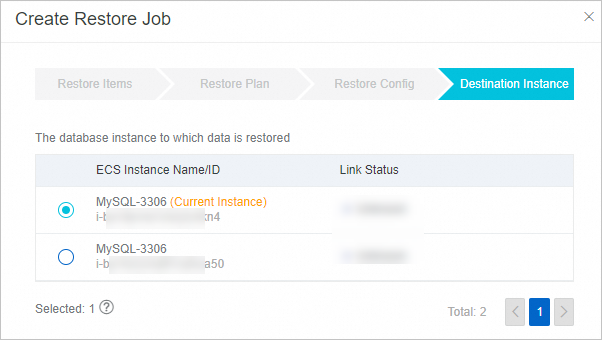
The restore job starts automatically. On the Restore Plan tab, you can monitor the job status. When the job completes, the status changes to Completed.

Log in to the MySQL database to verify that the data is restored correctly.
-