Best practices for configuring CloudBox compute resources
This topic describes how to configure CloudBox compute resources to meet your business needs, reduce costs, and enhance resilience against hardware threats.
Background information
CloudBox hardware is designed with the following safeguards:
Network devices: A dual-device, dual-uplink redundant design ensures high network continuity within CloudBox and eliminates single points of failure.
Data remains secure and reliable even if two storage servers fail at the same time.
Compute devices: Support for breakdown migration and hot migration ensures business continuity when sufficient redundant resources are available.
This topic focuses on how to select the right compute SKUs to meet business needs while configuring redundant resources to ensure business continuity.
Recommendations for configuring compute resources
CloudBox compute resources are provided as standard compute SKUs, each with a default configuration that combines different instance families. When you select an SKU, consider your computing power requirements, cost, and the need for redundancy. The following are our recommendations:
For more information about the compute SKUs that CloudBox supports, see Compute SKU specifications. If the available SKUs do not meet your business needs, you can also contact Alibaba Cloud technical support to request a custom SKU.
Select the right SKU configuration to reduce costs
When you select an SKU, choose one with a vCPU-to-memory ratio that matches your business requirements.
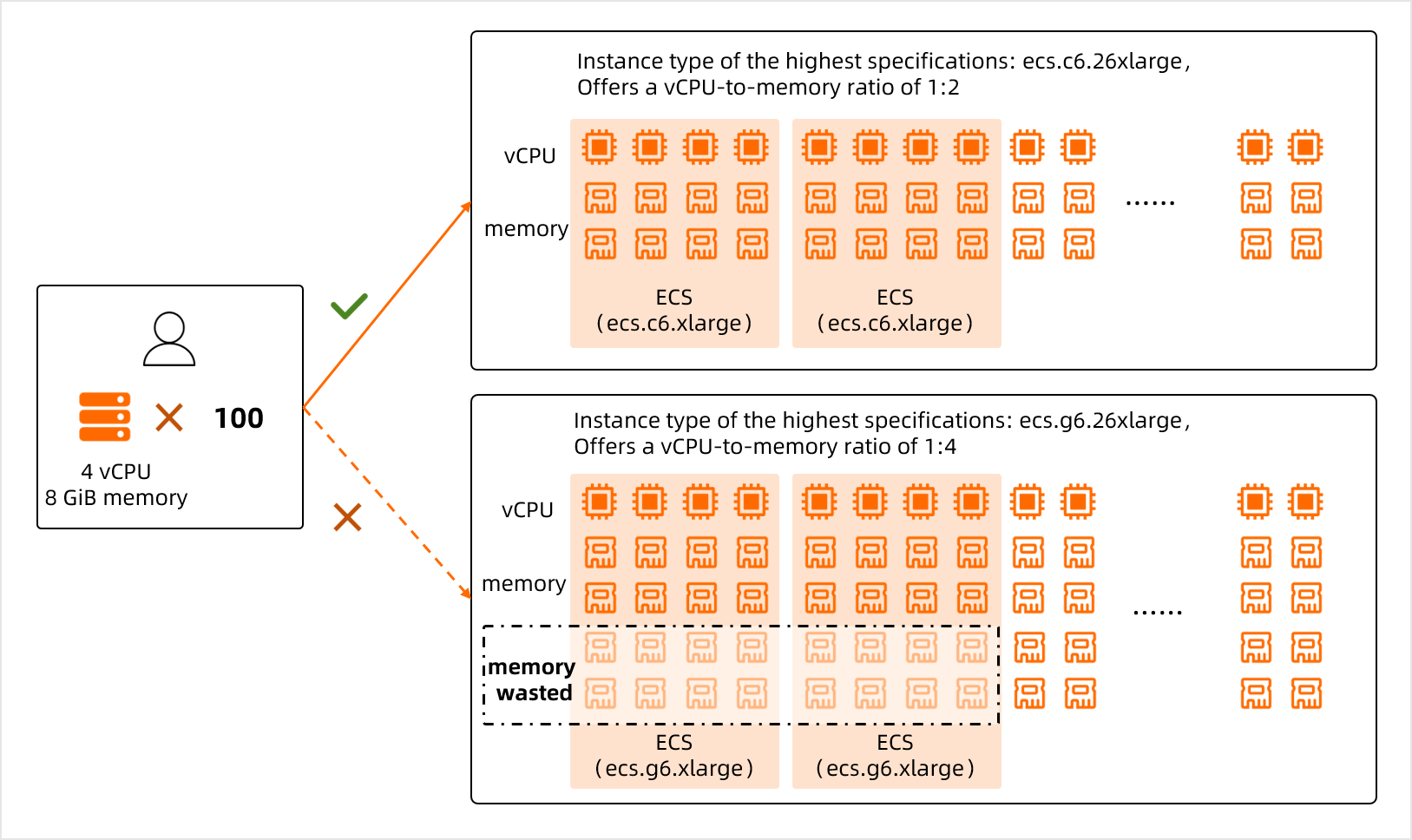
For example, your business requires 100 ECS instances with 4 vCPUs and 8 GiB of memory each. This totals 400 vCPUs and 800 GiB of memory. The required vCPU-to-memory ratio is 1:2. In this case, you can select an SKU that includes the ecs.c6.26xlarge instance type. This instance family has a 1:2 vCPU-to-memory ratio, which meets your needs and prevents memory waste. In contrast, if you select an SKU that includes the ecs.g6.26xlarge instance type, memory is wasted because that instance family has a 1:4 vCPU-to-memory ratio.
If your business requires ECS instances with different vCPU-to-memory ratios, you can select an SKU that combines multiple instance families to reduce resource waste.
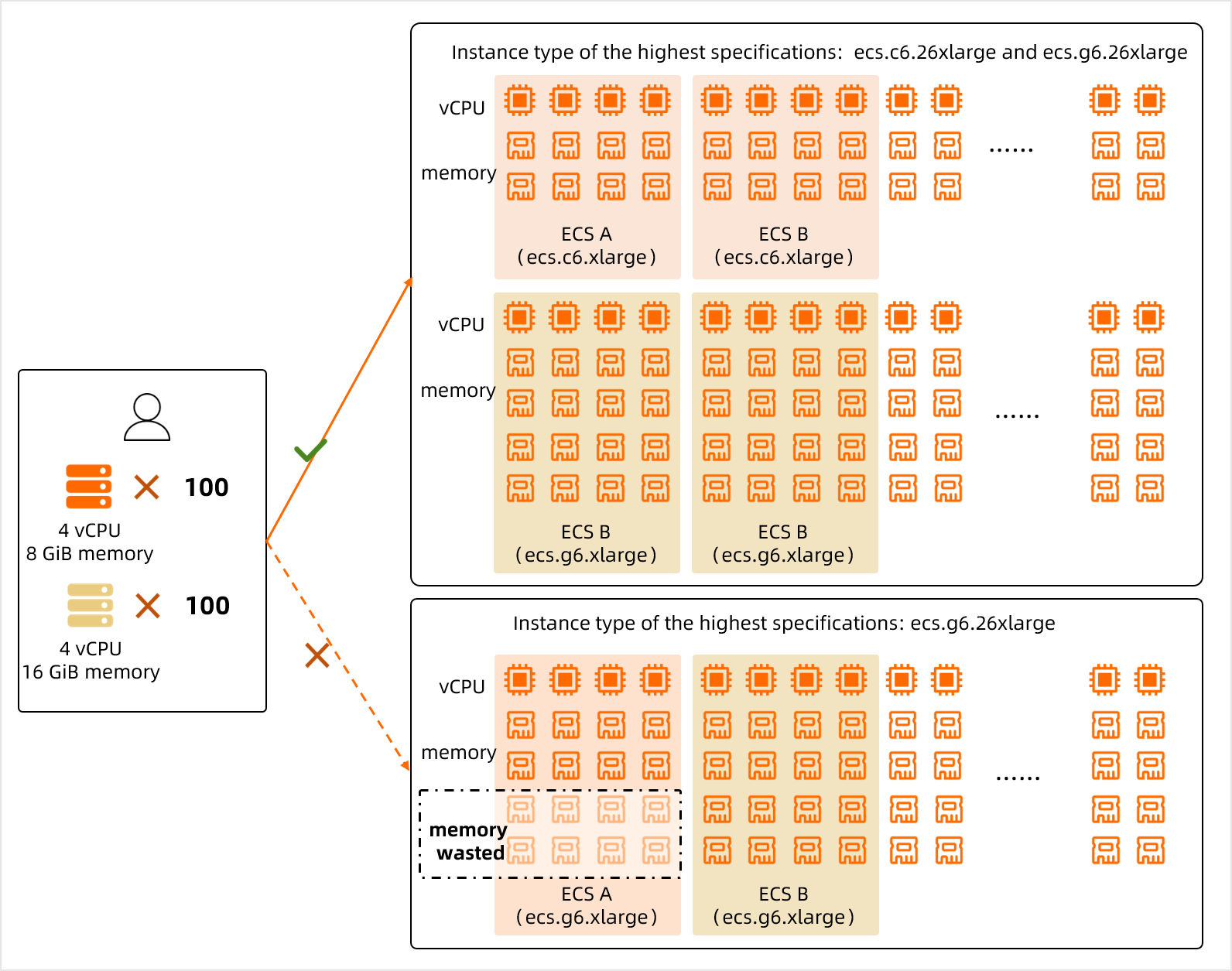
For example, your business requires 100 ECS instances with 4 vCPUs and 8 GiB of memory, and another 100 instances with 4 vCPUs and 16 GiB of memory. This totals 800 vCPUs and 2,400 GiB of memory. In this scenario, avoid selecting an SKU that consists of only ecs.g6.26xlarge instances (104 vCPUs and 384 GiB of memory each). Instead, based on the vCPU-to-memory ratios of the two required instance types, select an SKU that combines two instance families, such as one that includes both ecs.c6.26xlarge and ecs.g6.26xlarge instance types.
Configure redundant computing power to improve hardware threat response
The stability of the CloudBox Infrastructure-as-a-Service (IaaS) layer relies on cloud-based algorithms that predict hardware failures, in addition to breakdown migration and hot migration capabilities. These features enhance the resilience of the CloudBox IaaS layer against failures and threats. However, they require redundant resources to promptly migrate services when a hardware device fails.
You can use one of the following two methods to increase redundant resources for the CloudBox IaaS layer and ensure business continuity.
When you select SKUs, you can provision additional resources for redundancy based on your business needs.
These redundant resources are available for your use and can be used at any time to create ECS instances or other cloud product instances. This method provides operational flexibility but does not guarantee that backup resources are available during a hardware failure.
Purchase a Service-Level Agreement (SLA) value-added service package to obtain an SLA guarantee for your compute resources.
The SLA value-added service package automatically provisions suitable redundant resources based on your current resource configuration. These redundant resources are not directly accessible to you but are automatically started during a hardware failure. This ensures that resources are available to handle hardware threats and improves business continuity.
When a CloudBox hardware device fails, services are migrated to redundant resources to ensure business continuity. At the same time, Alibaba Cloud sends you a CloudBox maintenance event notification. You must grant authorization for Alibaba Cloud to perform on-site hardware replacement and repair. For more information about how to grant authorization and the maintenance flow, see Respond to a CloudBox maintenance event and CloudBox faulty server maintenance flow.