Get started
Web Hosting is a website hosting service. The product comes pre-installed with runtime environments for common web development languages, databases, and management tools, allowing you to host websites easily and cost-effectively. This topic describes the fundamentals of Web Hosting, the purchasing and usage process, basic console operations, and frequently asked questions.
Web Hosting overview
The following figure shows the product structure of Cloud Web Hosting.
Yunxiang hosts, which include Fengyun, Xiangyun, and Duxiang hosts, are no longer available for purchase. To restart a host or reset a password, see Restart Cloud Web Hosting and Yunxiang hosts and Reset the administrator account password for a Yunxiang host.
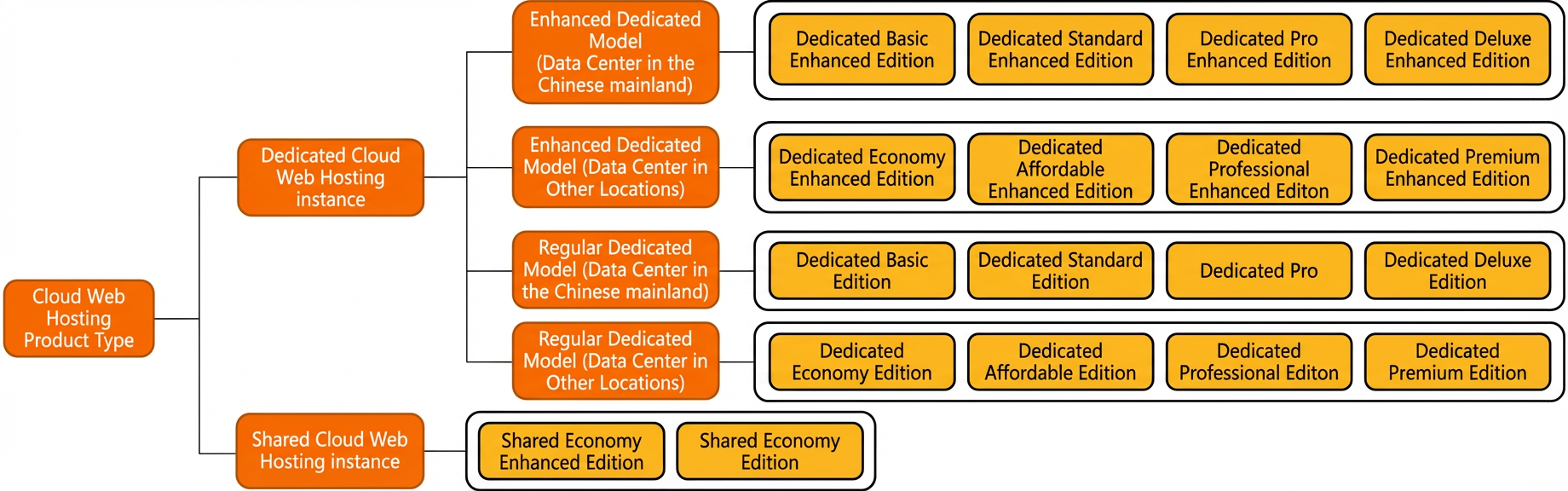
You can learn more about Web Hosting by exploring its concepts, advantages, types, use cases, and limitations. For more information, see the following topics:
Quick start
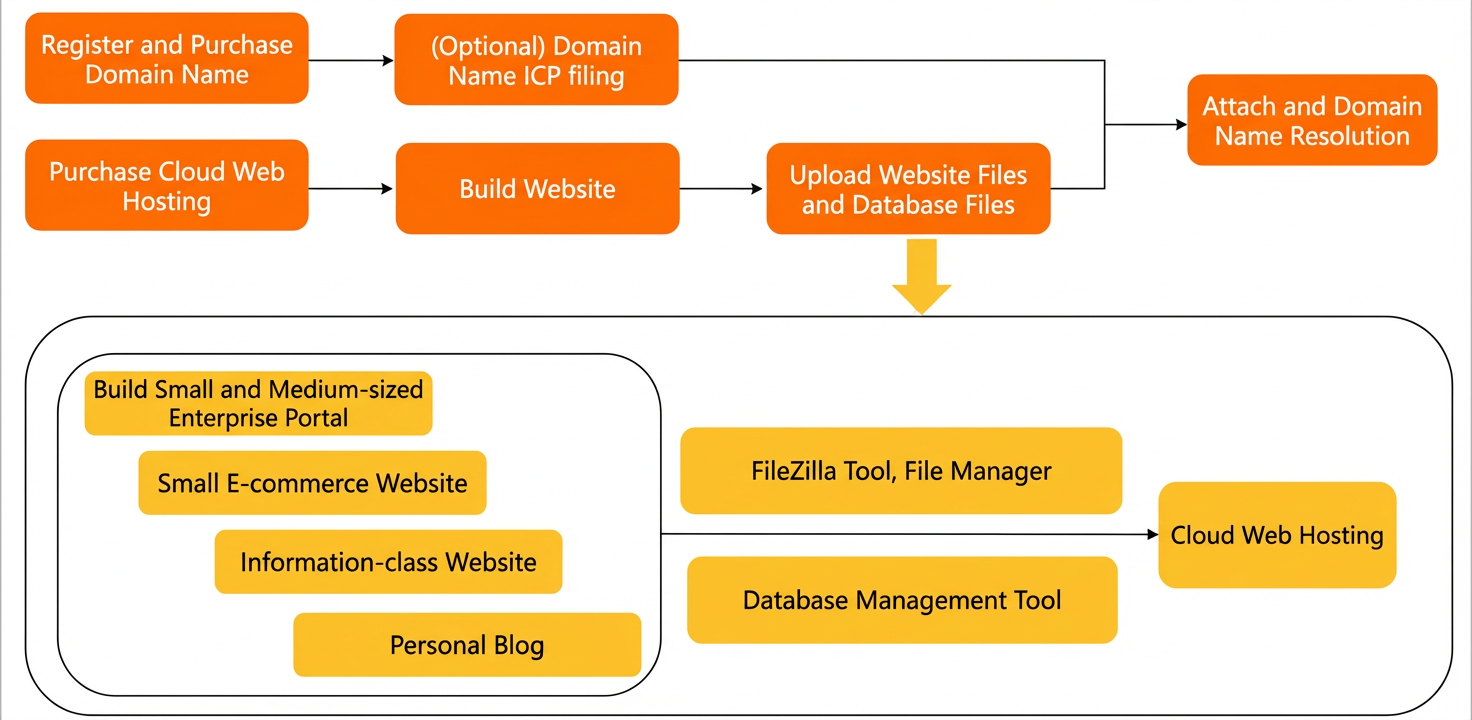
The following figure shows the workflow for using Web Hosting.
-
Prepare a domain name and a Web Hosting instance.
-
Purchase a domain name and complete ICP filing.
-
Register and purchase a domain name: If you need to provide public access to your website or web application, we recommend that you register or purchase your own domain name. For more information, see Alibaba Cloud Domain Name Service.
NoteYou can skip this step if a temporary domain name is sufficient for testing your website and providing services. However, for ease of use, we recommend that you purchase your own domain name for long-term operations.
-
(Optional) ICP filing: After registering or purchasing a domain name, you do not need to apply for an ICP filing if your domain name is used for services outside the Chinese mainland. If your domain name is used for services within the Chinese mainland, you must apply for an ICP filing. Your website can go live only after the filing is approved. A first-time filing takes about 20 business days. To learn more about ICP filing, see What is ICP filing?.
-
-
Purchase a Web Hosting instance.
Alibaba Cloud offers both shared web hosting and dedicated web hosting. You can choose a Web Hosting instance that meets your needs based on your budget, website scale, traffic volume, and other performance and security requirements. For detailed instructions, see Purchase a Web Hosting instance.
-
-
Develop your website program (including the database program).
After you have your own domain name and Web Hosting instance, you can develop your website program or hire a third-party provider.
-
Upload your website and database files.
After your website is developed, you must upload the website and database files to your Web Hosting instance. You can use the file manager feature or an FTP client to upload files. For detailed instructions, see the following topics:
-
Bind and resolve your domain name.
If your domain name is registered and its ICP filing is complete before you launch your website, bind your domain name in the Web Hosting console and configure its DNS resolution. For detailed instructions, see the following topics:
NoteYou can skip this step if a temporary domain name is sufficient for testing your website and providing services. Before you launch your website, make sure to bind and resolve your own domain name.
For more information about launching a website on a Web Hosting instance, see Website launch process. This topic uses a WordPress installation as an example to provide a step-by-step guide on how to set up a website on a Web Hosting instance. For detailed instructions, see How do I set up a website on a Web Hosting instance?.
Console guide
Familiarize yourself with the console pages to quickly learn the basic operations. The Web Hosting console not only helps you perform basic operations such as website configuration but also provides resource monitoring services with real-time data analysis.
-
Web Hosting management page: This page includes the All Hosts and Hosts to Renew tabs. It provides an entry point to Create Host and a search function to filter hosts by name. The host list displays information such as the name, type, configuration, domain name, IP/CNAME address, operating system, and expiration time for each host. It supports operations such as Renew, Upgrade, Manage, and Change Operating System.
-
Web Hosting console features page
The following description is for demonstration purposes only. The actual console UI may differ. Key features are described as follows:
The left-side navigation pane is a feature menu that includes items such as Site Information, Database Information, Host Information, Domain Management, Basic Environment Settings, Advanced Environment Settings, File Management, Traffic Status, Tools, Value-added Services, Self-service Diagnosis, and Operation Logs. The top of the page provides shortcuts, including Common Documents, Create Host, Renew, Upgrade, Restart Server, and Stop Site, as well as links to Submit a Ticket and Log Out. The main content area contains the following information modules. Server Monitoring displays CPU usage, memory usage, and bandwidth data. Website Information shows the running status, web space, folder count, traffic, and database space usage. Account Information displays the bound mobile number, login credentials for the console and FTP, and an option to reset your password. Database Information shows the database name, username, a password reset entry, the database address, and its type.
For more information about the features of the Web Hosting console, see Console feature guide.
FAQ
Hot topics
By module
For more frequently asked questions, see FAQ and troubleshooting.
Feedback and suggestions
If you have any questions or suggestions about Alibaba Cloud Web Hosting, you can provide feedback through the following channels:
-
To report issues with the documentation, you have several options. For general problems, click Feedback on the right side of the page. To make a suggestion, describe it at the bottom of the page and click Submit Suggestion. To comment on specific content, select the text and click Documentation Feedback.
-
Content errors
-
Outdated content
-
Broken links
-
Missing code or image examples
-
Content is too simple or steps are incomplete
-
Other suggestions
-
-
If you have product-related questions, contact Online Support or submit a ticket.