What is CloudSSO
CloudSSO provides unified identity management and access control for multiple accounts in an Alibaba Cloud Resource Directory (RD). You can use CloudSSO to centrally manage enterprise users who access Alibaba Cloud, configure single sign-on (SSO) between your corporate identity provider and Alibaba Cloud, and centrally manage access permissions to all accounts in your RD.
Prerequisites
Before you read this topic, make sure that you understand the following concept: What is single sign-on (SSO)?
Features
Centrally manage users who access Alibaba Cloud
CloudSSO provides a native CloudSSO directory where you can manage all users who need to access Alibaba Cloud. You can manually manage users and user groups. You can also use the System for Cross-domain Identity Management (SCIM) protocol to synchronize users and user groups from your corporate identity provider to the CloudSSO directory.
Configure unified single sign-on with your corporate identity provider
You can allow users in the CloudSSO directory to access Alibaba Cloud using their usernames, passwords, and MFA. However, a better approach is to use SSO with your corporate identity provider. This optimizes the user experience and reduces security risks. CloudSSO supports enterprise-grade SSO based on the SAML 2.0 protocol. You can set up SSO by performing a one-time configuration in CloudSSO and your corporate identity provider.
Configure uniform access permissions for accounts in a resource directory
Because CloudSSO is deeply integrated with Resource Directory (RD), you can centrally configure access permissions for users and user groups to member accounts in your RD. A CloudSSO administrator can select member accounts based on the organization chart of the RD. Then, the administrator can assign users or user groups and specific access permissions to these accounts. These permissions can be modified or deleted at any time.
Unified user portal
CloudSSO provides a unified CloudSSO user portal. After users log on to the user portal, they can view a list of all accounts in the RD to which they have access. They can then directly log on to the Alibaba Cloud Management Console and easily switch between multiple accounts.
CLI integration
CloudSSO is integrated with the Alibaba Cloud command-line interface (CLI). In addition to using a browser to log on to the CloudSSO user portal, users can also log on to CloudSSO using the Alibaba Cloud CLI. After logging on, users can select the desired account and permission set in the RD, and then use the command line to access Alibaba Cloud resources.
Free of charge
CloudSSO is a free service. You can enable and use it at no cost.
Service architecture
CloudSSO users can access cloud resources in an account in the RD as a RAM role or a RAM user.
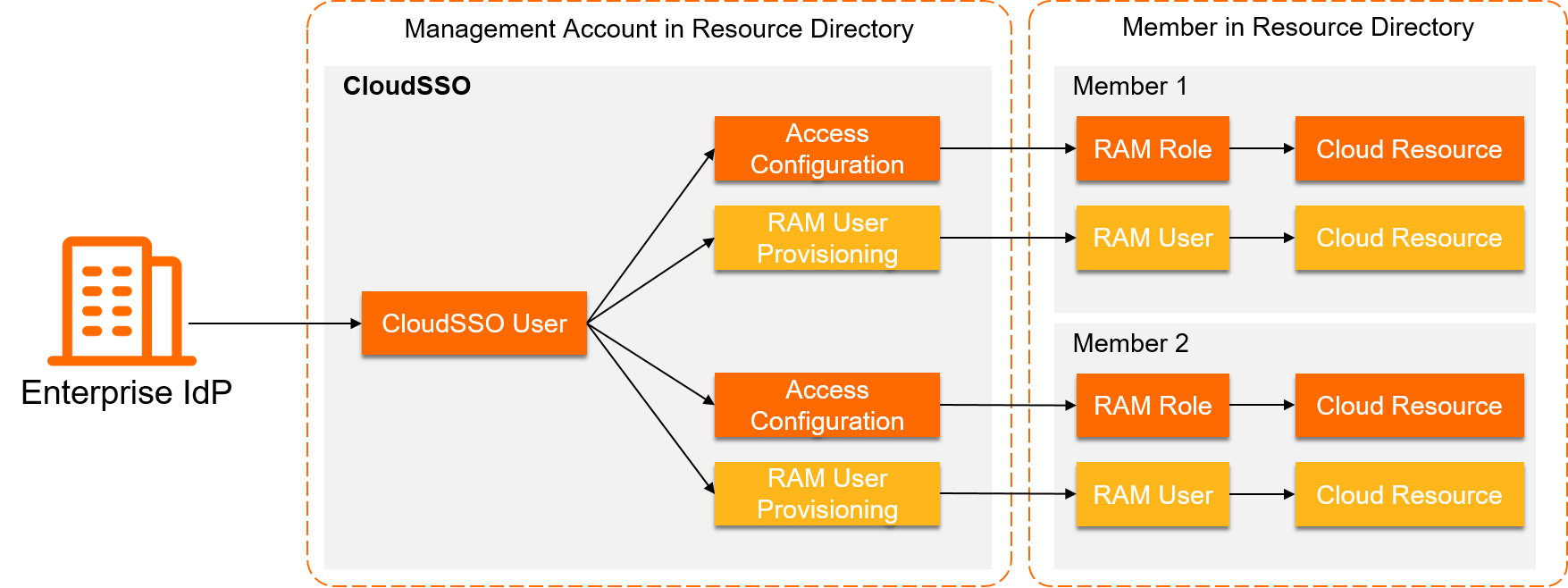
The following table describes the scenarios for the two access methods.
Access method | Description | Scenarios | References |
Log on as a RAM role | Users who are centrally managed in CloudSSO can use SSO to assume a RAM role in a member account of the RD. This is achieved using access configurations and multi-account authorization. After a user assumes the role, the user can access cloud resources in the account. | Applicable to Alibaba Cloud services that support RAM roles. | |
Log on as a RAM user | Users who are centrally managed in CloudSSO are synchronized to a member account in the RD as RAM users. The users can then log on as RAM users to access cloud resources in the account. | Applicable to Alibaba Cloud services that do not support RAM roles. |
A CloudSSO user can be granted permissions on an account in the RD through an access configuration and also be configured for RAM user synchronization. In this case, the user can access cloud resources in the account as both a RAM role and a RAM user.
Relationship between CloudSSO and Resource Access Management (RAM)
Resource Access Management (RAM) provides identity and permission management within a single Alibaba Cloud account. RAM provides features such as identity management (including users, user groups, and roles), permission management, and SSO configuration. However, these features apply only to a single Alibaba Cloud account. If your enterprise has multiple Alibaba Cloud accounts, you must use RAM in each account to manage identities, configure SSO, and configure permissions. This separation of management can be challenging.
CloudSSO provides unified identity and permission management for multiple accounts within an RD. CloudSSO lets you perform a one-time configuration to manage identities, SSO, and permissions for multiple Alibaba Cloud accounts. To achieve this, CloudSSO provides a CloudSSO directory that is independent of RAM. However, its permission management feature reuses the policy syntax from RAM system policies and custom policies. For more information, see Overview of access configurations. In addition, when a CloudSSO user accesses an account in the RD, the user assumes a RAM role in that account through an SSO process. For more information, see Overview of multi-account authorization.
After you start using CloudSSO for unified identity and permission management for accounts in your RD, you no longer need to use RAM to manage each account individually. However, in some cases, you can continue to use RAM within a single account. For example, you can use RAM if you have existing RAM users or RAM roles, or to use an AccessKey pair to programmatically access Alibaba Cloud resources. Using CloudSSO does not limit the original features of RAM. You can use both services at the same time.