Monitor DNS resolution issues with site monitoring
Use site monitoring to check DNS resolution for a domain name from various regions and network environments. If an issue occurs, analyze its cause based on the alert notifications and use the detection results for troubleshooting. This topic demonstrates how to check for DNS resolution issues by testing a domain name from the networks of China's three major carriers: China Mobile, China Telecom, and China Unicom.
How DNS resolution works
DNS resolution is the process of converting a human-readable domain name into a network IP address. Because domain names are easy to remember and often represent a brand, they serve as public-facing addresses for online services. When a user accesses a domain name, their device performs a DNS lookup to find the corresponding IP address and then connects to that address. The following figure illustrates the DNS resolution process.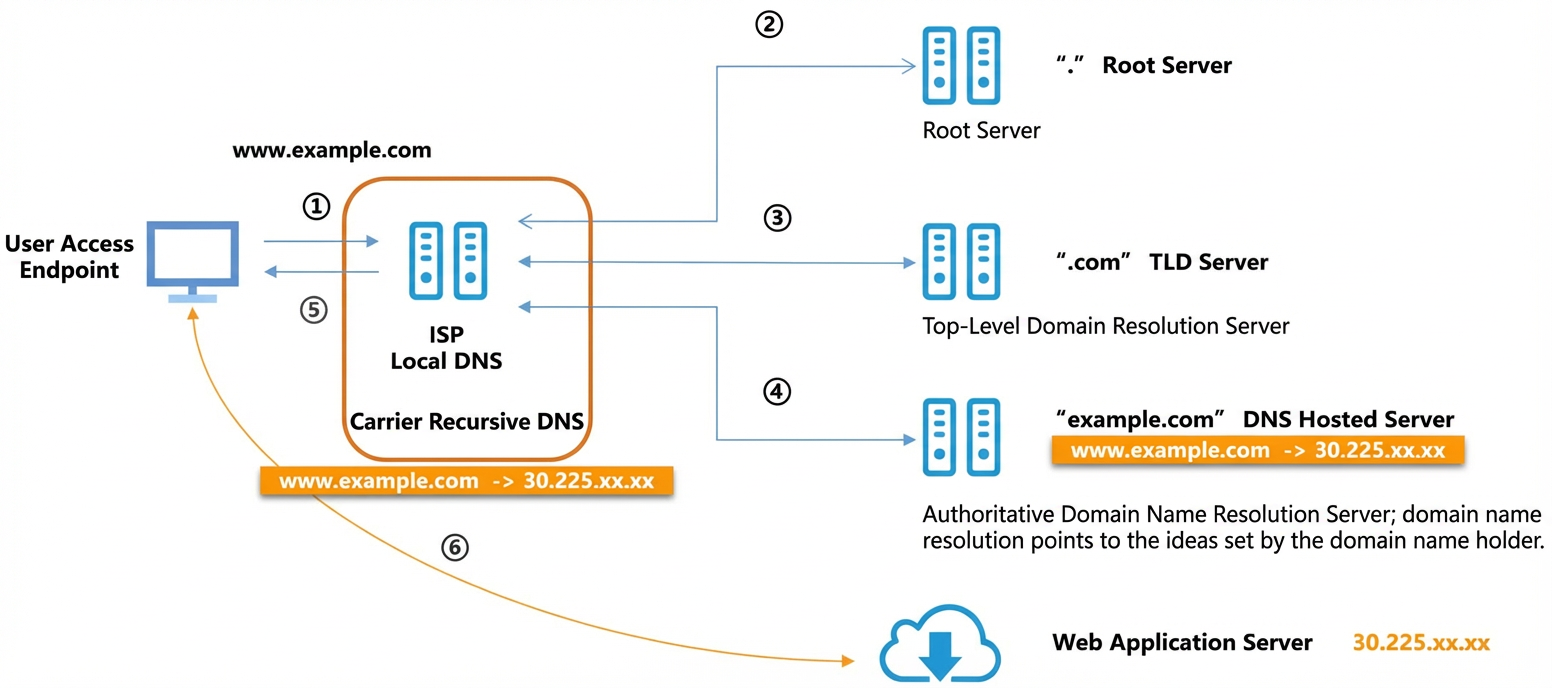
DNS resolution is handled by the carrier's recursive DNS. The recursive DNS queries a series of servers, starting from root servers down to the authoritative DNS server for the domain, to find the target IP address (Steps 2, 3, and 4 in the figure). The default DNS server IP address assigned to a user's device is typically that of the carrier's recursive DNS, which is also known as a public DNS. Carriers often build their recursive DNS services on a per-province basis. Therefore, if a recursive DNS service fails, all users on that carrier's network within the affected province can be affected.
Use cases
When users access a domain name, they receive the resolved IP address from their carrier's recursive DNS. However, the result from the recursive DNS is not always correct. It might differ from the IP address configured by the domain name owner on the authoritative DNS server. This discrepancy can be caused by issues such as DNS poisoning, DNS hijacking, or authoritative DNS service failures. As a result, users may be unable to access the intended service. To prevent this, owners of critical online services must monitor whether users in different regions and on different carrier networks receive the correct DNS resolution results, ensuring nationwide service accessibility.
Prerequisites
Ensure you have activated Network Analysis and Monitoring. For more information, see Activate Network Analysis and Monitoring.
Step 1: Create a site monitoring task
Create a DNS monitoring task using site monitoring to check whether DNS resolution for a target domain name is correct for users in different provinces on the networks of China's three major carriers: China Mobile, China Telecom, and China Unicom.
-
Log on to the Cloud Monitor console.
-
In the left-side navigation pane, choose .
-
On the Monitoring Tasks tab, click Create Task.
-
On the Create Task page, configure the parameters for the DNS monitoring task.
-
In the Basic Information section, set Task Type to DNS. Enter dns_task for Task Name and aliyun.com for Monitored Address. For DNS Server, select Carrier DNS Corresponding to Detection Point. For Expected Resolution Result, enter the target IP address, for example, 192.168.XX.XX. Use the default values for all other parameters.
-
In the Select Detection Points section, select all detection points for China Mobile, China Telecom, and China Unicom. Use the default values for all other parameters.
-
In the Configure Alert Rules section, use the default alert rule.
-
In the Select Alert Contact Groups section, select an alert contact group.
-
-
Click Create.
Step 2: View site monitoring results
After creating the DNS monitoring task, if you receive an alert for a resolution issue, analyze the cause based on the alert details and use the detection results for troubleshooting.
-
On the Monitoring Tasks tab, click the name of the target monitoring task.
-
On the Overview page, view alerts for resolution issues and the details of abnormal resolution results.
Site monitoring uses error codes and messages to help you identify the cause of an alert. The following are common error messages:
-
ErrorCode 615 : not match: This error indicates that the DNS resolution result from the monitoring task does not match the expected resolution result you configured. Click Troubleshooting in the Actions column to run another test for verification. -
ErrorCode 610 : read udp i/o timeout: This error indicates that the DNS resolution process timed out. This may be caused by a network issue or a query timeout on the DNS server. You can use the PING Tests and DNS Tests features in Synthetic Tests to check whether the network connection to the DNS server is stable. If DNS detection fails multiple times, contact your authoritative DNS provider to verify the service configuration and status. -
ErrorCode 613 : server misbehaving: This error indicates a general communication failure during DNS resolution. -
ErrorCode 616 : dns server answer empty: This error indicates that the DNS server returned an empty response.NoteThis alert is triggered only when an Expected Resolution Result is specified for the monitoring task. Otherwise, a result of
ErrorCode 0is normal.
-