Compute Nest provides a one-click deployment solution for Qwen3 series models. Specify a few parameters to get a private, enterprise-exclusive inference endpoint in minutes — no manual environment setup or cloud resource orchestration required.
Prerequisites
Before you begin, ensure that you have:
An Alibaba Cloud account with a RAM user that has the following policies attached (grant permissions to a RAM user):
Policy name Permission AliyunECSFullAccess Manage Elastic Compute Service (ECS) AliyunVPCFullAccess Manage Virtual Private Cloud (VPC) AliyunROSFullAccess Manage Resource Orchestration Service (ROS) AliyunComputeNestUserFullAccess Manage Compute Nest user-side operations Sufficient ECS GPU instance quota for your target model:
Model Required instance type Notes Qwen3-8B — Qwen3-32B ecs.gn7i-8x.16xlarge Qwen3-235B-A22B ecs.ebmgn8v.48xlarge Requires submitting a ticket to request access
Billing
Compute Nest is free of charge. You are billed for the Alibaba Cloud resources used to run the service:
GPU-accelerated ECS instance
Elastic block storage
Public bandwidth
Choose pay-as-you-go or subscription billing based on your needs. For pricing details, see Billable items and Billing methods.
Deploy a Qwen3 model
Go to the LLM Inference Service-ECS instance creation page.
On the Create Service Instance page, configure the following parameters. Adjust other parameters as needed.
LLM Inference Service-ECS EditionParameter Description Select Template Select one ecs. Model Type Select Qwen. Model Name Select Qwen3-32B. Valid values: Qwen3-235B-A22B, Qwen3-32B, Qwen3-8B. Instance Type Select ecs.gn7i-8x.16xlarge. To deploy the Qwen3-235B-A22B model, select ecs.ebmgn8v.48xlarge by . Select open or close public network Set to true for performance testing. Click Next: Confirm Order. Review the Service Instance Information and Price Preview sections, then click Create Now.
NoteDeployment time varies by model.
Test the service instance.
Go to the Compute Nest - Service Instance page and click the instance you created.
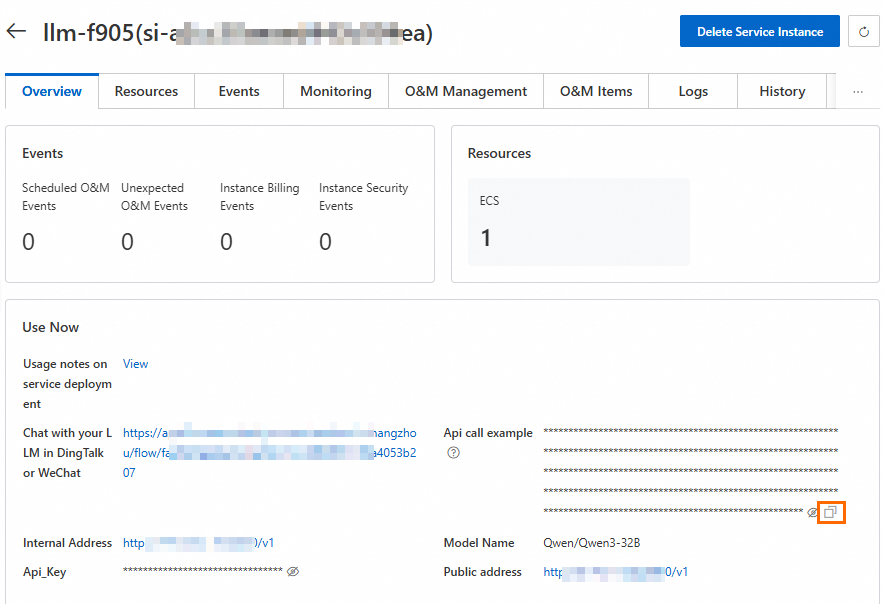
On the Overview tab, under Use Now, copy the Api Call Example.
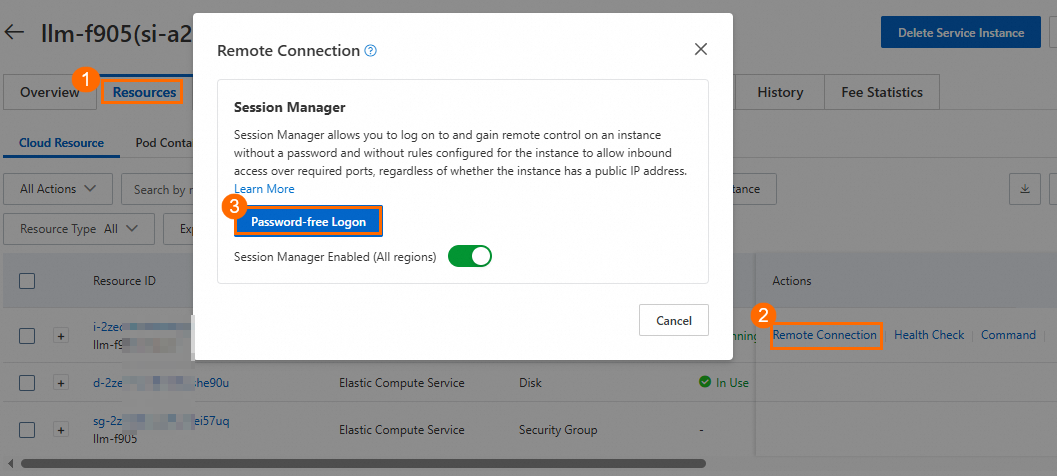
On the Resources tab, click Remote Connection in the Actions column. In the dialog box, click Password-free Logon to connect to the ECS instance.
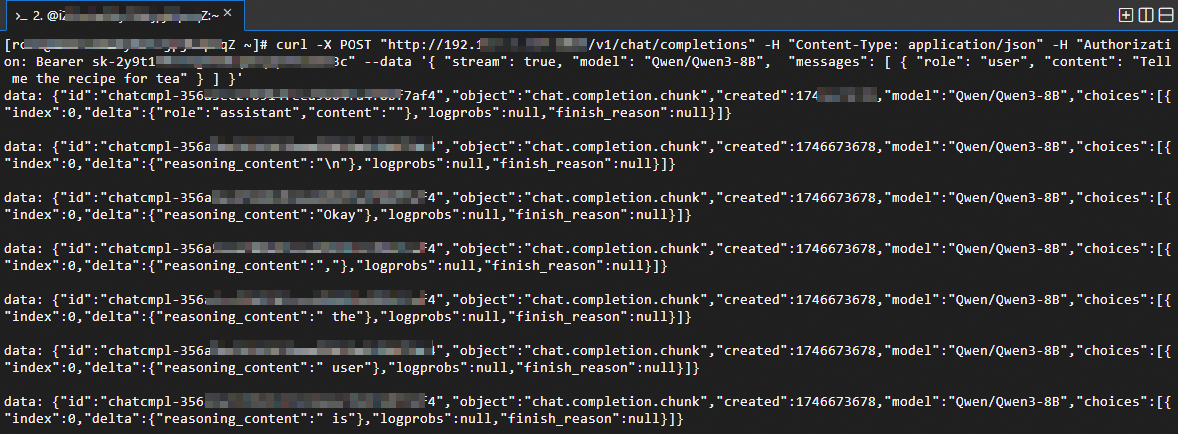
Paste the API call example and press Enter. A streaming response is returned.
 Note
NoteTo disable streaming, change
streamtofalsein the API call. Non-streaming responses may take longer for complex requests.
Alternatively, call the model directly from your terminal or application using the OpenAI-compatible API. Replace
<YOUR_ENDPOINT_IP>and<YOUR_API_KEY>with the values from the Api Call Example on the Overview tab.cURL:
curl http://<YOUR_ENDPOINT_IP>:8080/v1/chat/completions \
  -H "Content-Type: application/json" \
  -H "Authorization: Bearer <YOUR_API_KEY>" \
  -d '{
    "model": "Qwen3-32B",
    "messages": [{"role": "user", "content": "Hello, what can you do?"}],
    "stream": true
  }'
Python (openai SDK):
from openai import OpenAI

client = OpenAI(
    base_url="http://<YOUR_ENDPOINT_IP>:8080/v1",
    api_key="<YOUR_API_KEY>",
)

response = client.chat.completions.create(
    model="Qwen3-32B",
    messages=[{"role": "user", "content": "Hello, what can you do?"}],
    stream=True,
)

for chunk in response:
    if chunk.choices[0].delta.content:
        print(chunk.choices[0].delta.content, end="", flush=True)
Advanced operations
Query model deployment parameters
On the Logs tab, find ALIYUN::ECS::RunCommand in the Resource Type column, copy and click the Associated ID to go to the ECS Cloud Assistant page.
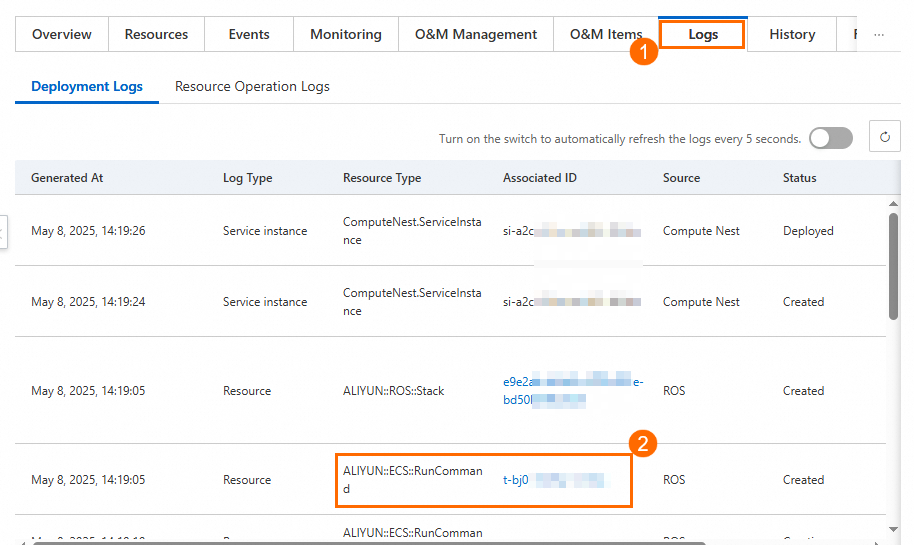
On the ECS Cloud Assistant page, go to the Command Execution Result tab. Paste the associated ID and click the search icon.
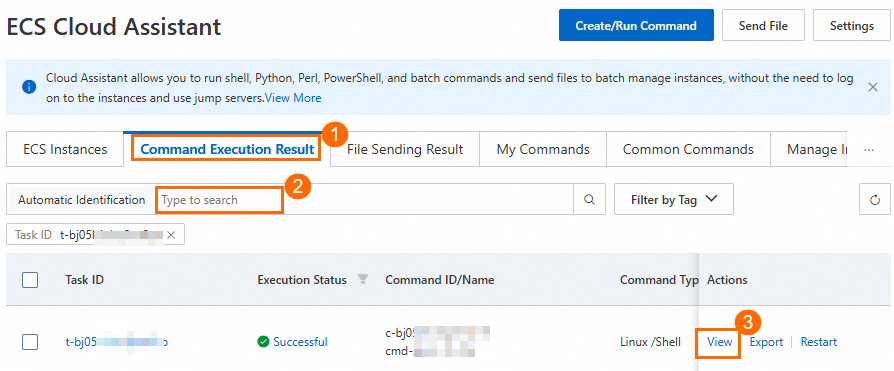
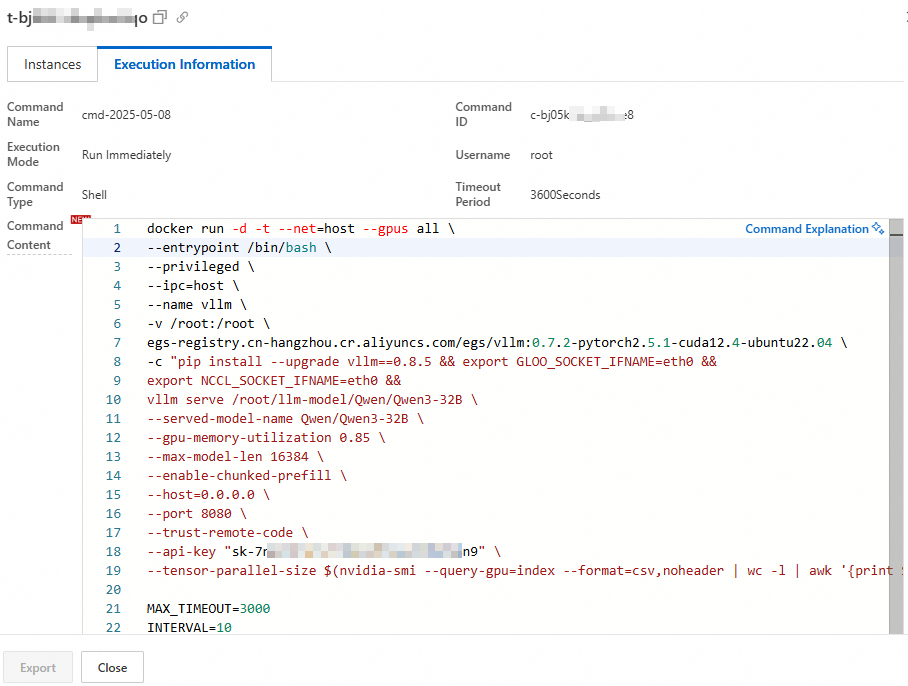
Click View in the Actions column. On the Execution Information tab, review the model deployment parameters in the Command Content section.

Deploy models with custom parameters
To redeploy with custom parameters:
On the Resources tab, click Remote Connection in the Actions column. In the dialog box, click Password-free Logon to connect to the ECS instance.
Stop the running model service.
WarningStopping the service causes a service interruption. Perform this operation during off-peak hours.
sudo docker stop vllm
sudo docker rm vllm
Run the model with custom parameters using vLLM or SGLang.
NoteRedeployment takes about 10 minutes.
vLLM
sudo docker run -d -t --net=host \
  --gpus all \
  --entrypoint /bin/bash \
  --privileged \
  --ipc=host \
  --name vllm \
  -v /root:/root \
  egs-registry.cn-hangzhou.cr.aliyuncs.com/egs/vllm:0.7.2-pytorch2.5.1-cuda12.4-ubuntu22.04 \
  -c "pip install --upgrade vllm==0.8.2 && \
  export GLOO_SOCKET_IFNAME=eth0 && \
  export NCCL_SOCKET_IFNAME=eth0 && \
  vllm serve /root/llm-model/${ModelName} \
  --served-model-name ${ModelName} \
  --gpu-memory-utilization 0.98 \
  --max-model-len ${MaxModelLen} \
  --enable-chunked-prefill \
  --host=0.0.0.0 \
  --port 8080 \
  --trust-remote-code \
  --api-key \"${VLLM_API_KEY}\" \
  --tensor-parallel-size $(nvidia-smi --query-gpu=index --format=csv,noheader | wc -l | awk '{print $1}')"
Key parameters:
Parameter Description Default --gpu-memory-utilizationFraction of GPU memory reserved for the model. Setting this too high may cause out-of-memory (OOM) errors in other processes. Valid range: 0–1.0.98--max-model-lenMaximum sequence length. Valid range depends on the model. — --api-keyAPI key for the inference endpoint. Remove this flag if authentication is not needed. — --tensor-parallel-sizeNumber of GPUs used for tensor parallelism. All available GPUs GLOO_SOCKET_IFNAME/NCCL_SOCKET_IFNAMERequired for VPC network communication. Do not change these values. eth0pip install --upgrade vllm==0.8.2vLLM version to install. Change the version number to customize (for example, vllm==0.7.1).— SGLang
# Pull the SGLang image
sudo docker pull egs-registry.cn-hangzhou.cr.aliyuncs.com/egs/vllm:0.7.2-sglang0.4.3.post2-pytorch2.5-cuda12.4-20250224

sudo docker run -d -t --net=host \
  --gpus all \
  --entrypoint /bin/bash \
  --privileged \
  --ipc=host \
  --name llm-server \
  -v /root:/root \
  egs-registry.cn-hangzhou.cr.aliyuncs.com/egs/vllm:0.7.2-sglang0.4.3.post2-pytorch2.5-cuda12.4-20250224 \
  -c "pip install sglang==0.4.3 && \
  export GLOO_SOCKET_IFNAME=eth0 && \
  export NCCL_SOCKET_IFNAME=eth0 && \
  python3 -m sglang.launch_server \
  --model-path /root/llm-model/${ModelName} \
  --served-model-name ${ModelName} \
  --tp $(nvidia-smi --query-gpu=index --format=csv,noheader | wc -l | awk '{print $1}') \
  --trust-remote-code \
  --host 0.0.0.0 \
  --port 8080 \
  --mem-fraction-static 0.9"
Key parameters:
Parameter Description Default --tpNumber of GPUs used for tensor parallelism. All available GPUs --mem-fraction-staticFraction of GPU memory reserved for the model. Setting this too high may cause OOM errors. Valid range: 0–1.0.9GLOO_SOCKET_IFNAME/NCCL_SOCKET_IFNAMERequired for VPC network communication. Do not change these values. eth0pip install sglang==0.4.3SGLang version to install. Change the version number to customize. — Sample successful request:
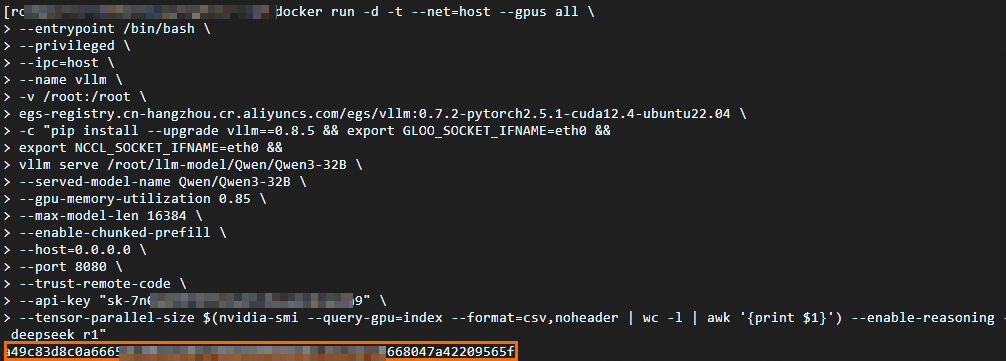
Verify that the model service is running.
sudo docker ps
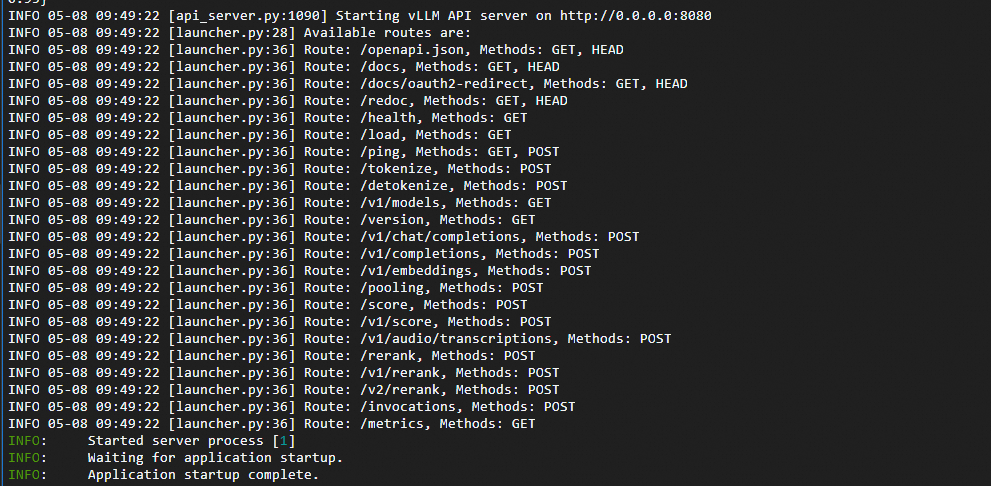
sudo docker logs vllm
If the output matches the following figures, the model service is successfully redeployed.

Performance test results
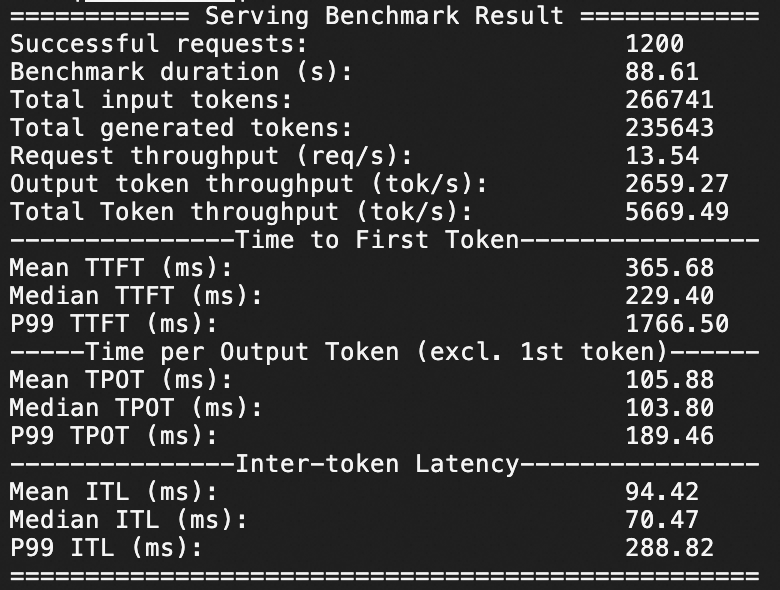
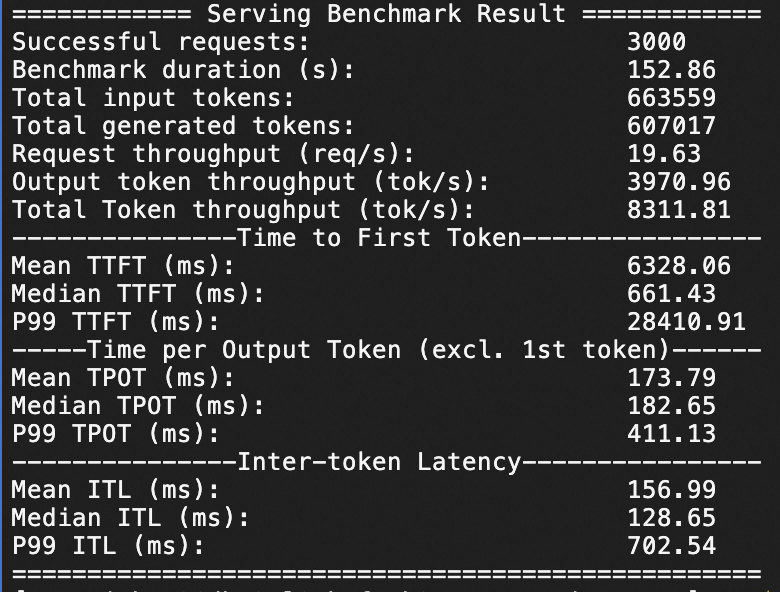
Qwen3-235B-A22B stress test
The following results show inference performance of Qwen3-235B-A22B on an ecs.ebmgn8v.48xlarge instance at 20 and 50 queries per second (QPS) over a 1-minute stress test.
QPS 20: 1,200 requests sent within 1 minute
QPS 50: 3,000 requests sent within 1 minute
Qwen3-32B stress test
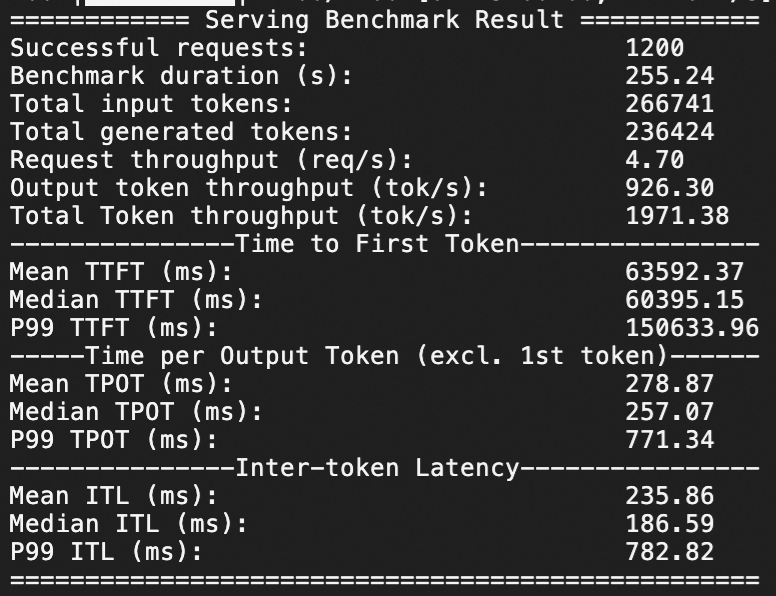
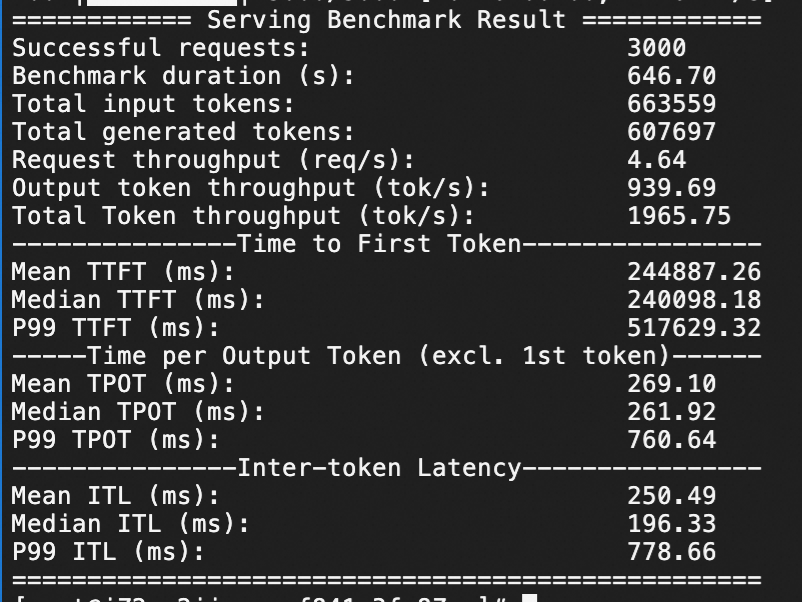
The following results show inference performance of Qwen3-32B on an ecs.gn7i-8x.16xlarge instance at 20 and 50 QPS over a 1-minute stress test.
QPS 20: 1,200 requests sent within 1 minute
QPS 50: 3,000 requests sent within 1 minute
For the full stress test methodology, see Stress testing process description.Stress testing procedure
Troubleshooting
| Symptom | Cause | Resolution |
|---|---|---|
| Model service fails to start | Insufficient GPU memory for the selected model | Check that the instance type matches the model requirements. Review logs with sudo docker logs vllm. |
| Out-of-memory (OOM) errors | GPU memory utilization set too high | Reduce --gpu-memory-utilization (vLLM) or --mem-fraction-static (SGLang). Alternatively, reduce --max-model-len. |
| Slow inference | Complex or long requests | Non-streaming responses may take extended time for complex requests. Consider using a larger instance type. |
| API connection errors | Network or authentication misconfiguration | Verify that Select open or close public network is set to true and that the API key matches the value set in --api-key. |