GPU-HPN topology-aware scheduling
Container Compute Service (ACS) allocates GPU devices to pods based on the GPU topology of each GPU-HPN node model. Pods that run on the same node exchange data over channels such as NVLink, and the partition constraints keep GPU communication efficient and fair.
Prerequisites
This feature supports only pods that use the gpu-hpn compute class (compute-class) and the corresponding GPU-HPN node types.
Background
Within a GPU-HPN node, GPU devices connect and communicate over one or more channels, and pods that request different numbers of GPUs can run on the same node. To keep GPU communication efficient and fair and to prevent pods from disrupting each other, ACS schedules pods based on the GPU topology of the node. It divides the GPU devices into partitions that match the GPU counts that pods request, and then allocates the optimal partition to each pod.
The following figure shows a node with eight GPUs. Every four GPUs form one group. The GPUs within a group are directly interconnected, and the two groups are connected through PCIe.
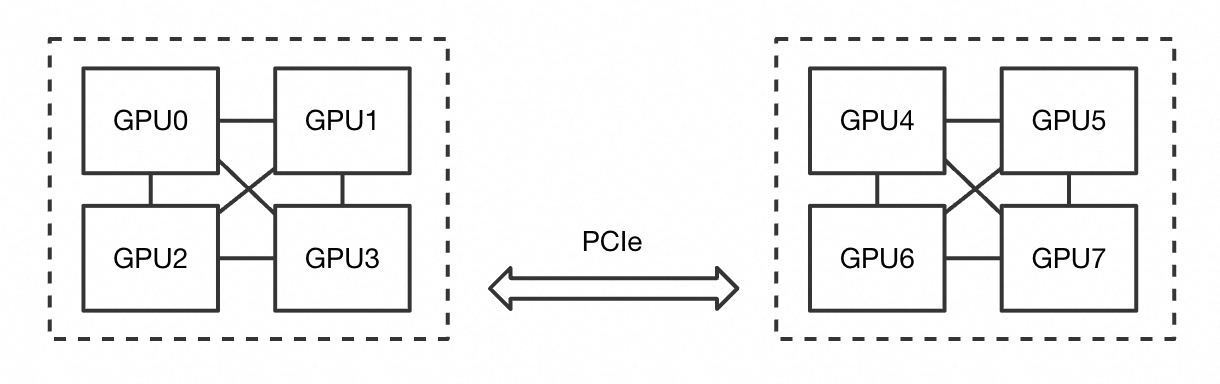
ACS divides the devices of this node into the following partitions:
GPUs requested by the pod | Available device allocation results |
8 | [0,1,2,3,4,5,6,7] |
4 | [0,1,2,3], [4,5,6,7] |
2 | [0,1], [2,3], [4,5], [6,7] |
1 | [0], [1], [2], [3], [4], [5], [6], [7] |
Repeated creation and deletion of pods on a node can cause partition fragmentation, which can prevent new pods from being scheduled, leaving them in the Pending state. To free the devices that a pending pod requires, review the device allocation results of the pods on the node and evict some of them based on your business priorities. The FAQ of this topic describes how to plan node resources to avoid partition fragmentation, how to select pods for eviction, and how the scheduler type, version, and configuration affect the extent to which partitions are taken into account during scheduling.
Partitions of GPU-HPN node types
Partitions and GPU models differ across the GPU-HPN node types that ACS provides. To check which partitions are in use on a node, view the device allocation results of the pods that run on that node.
gpu.p16en-16XL
This node type has 16 GPUs of the P16EN model. The following table lists the partitions for the GPU counts that pods request.
GPUs requested by the pod | Available device allocation results |
16 | [0,1,2,3,4,5,6,7,8,9,10,11,12,13,14,15] |
8 | [0,1,2,3,4,5,6,7], [8,9,10,11,12,13,14,15] |
4 | [0,1,2,3], [4,5,6,7], [8,9,10,11], [12,13,14,15] |
2 | [0,3], [1,2], [4,7], [5,6], [8,11], [9,10], [12,15], [13,14] |
1 | [0], [1], [2], [3], [4], [5], [6], [7], [8], [9], [10], [11], [12], [13], [14], [15] |
View the scheduling results of a pod
Device allocation result
For a GPU-HPN pod, the device allocation result is recorded in the pod annotations, in the following format:
apiVersion: v1
kind: Pod
metadata:
  annotations:
    alibabacloud.com/device-allocation: '{"gpus": {"minor": [0,1,2,3]}}'
Scheduling failure message caused by partition fragmentation
A pod that cannot be scheduled stays in the Pending state. Run the following command to view the scheduling failure message:
kubectl describe pod pod-demoExpected output, with other content omitted:
...
Events:
  Type     Reason            Age    From               Message
  ----     ------            ----   ----               -------
  Warning  FailedScheduling  26m    default-scheduler  0/5 nodes are available: 2 Node(s) Insufficient Partitioned GPU Devices, 1 Node(s) xxx, 2 Node(s) xxx.
In a message similar to 0/5 nodes are available: xxx, Insufficient Partitioned GPU Devices indicates that scheduling failed because of partition fragmentation on the node.
FAQ
How do I plan node resources and policies to avoid partition fragmentation?
Plan node resources and policies as follows:
Group nodes by requested GPU count — Set different labels on your nodes to manage resources based on the number of GPUs that your pods request. For example, schedule pods that request 8 GPUs and pods that request 1 GPU to different nodes.
Free idle devices when pods are already Pending — When partition fragmentation leaves pods in the Pending state in your cluster, use mechanisms such as descheduling to evict some low-priority pods and free idle devices for the pending pods.
Reserve capacity when you cannot plan node labels — If you have only a few nodes or cannot plan node labels, and your pods request a wide range of GPU counts, reserve capacity to meet the resource requirements of your applications. For more information, see GPU pod capacity reservation.
How do I select pods for eviction when I resolve partition fragmentation?
Identify the number of GPUs that the pending pod requests, for example, 8 GPUs.
On the target node, read the
alibabacloud.com/device-allocationannotation of each pod to determine which devices are already allocated. For more information, see device allocation result.Decide which pods to evict based on the allocation results, and make sure that the devices freed by the eviction meet both the requested GPU count and the partition constraints of the pending pod. For example, a request for 8 GPUs on P16EN requires that device IDs [0,1,2,3,4,5,6,7] or [8,9,10,11,12,13,14,15] are all unallocated.
Evict the pods by running a command such as
evictordelete.
What do I need to know about partitions when I use a custom scheduler?
After a custom scheduler assigns a pod to a node, ACS allocates the devices for the pod on that node. During device allocation, ACS packs devices as densely as possible to avoid partition fragmentation.
A custom scheduler only needs to consider the total GPU capacity of a node. For GPU resources, prefer a node bin-packing policy MostAllocated), which reduces partition fragmentation.
Which schedulers are aware of GPU-HPN partition topology?
Use the following table to determine whether your scheduler is aware of the partition topology of GPU-HPN nodes.
Scheduler type | Conditions | Description |
ACS default scheduler | All of the following conditions are met:
and any one of the following version conditions is met:
For supported versions, see kube-scheduler. | The scheduler is aware of the partition allocation status of the current node and excludes nodes whose partitions cannot meet the request. The pod scheduling failure event includes the |
ACK default scheduler | All of the following conditions are met:
You can find the supported versions in kube-scheduler. | The scheduler is aware of the partition allocation status of the current node and excludes nodes whose partitions cannot meet the request. The pod scheduling failure event includes the |
Other scheduler types | The scheduler type, conditions, or configuration do not meet the preceding requirements. | The scheduler is not aware of the partition topology. The GPU-HPN node allocates devices as densely as possible. If the partitions cannot meet the request, the pod stays in the Pending state on the node until the partitions can meet it, and the pod scheduling failure event includes the |