Configure JVM garbage collection (GC) and Just-In-Time (JIT) compilation thread parameters to fully use the CPU Burst resources that ACS provides during Java application startup. This topic covers recommended values for ParallelGCThreads, ConcGCThreads, and CICompilerCount, and walks you through applying them to a Deployment.
Background
Java application startup is CPU-intensive. The JVM must load classes, compile bytecode, and optimize hot methods — a process that can take tens of minutes for large applications. During this phase, the JVM consumes more than half of the available CPU on non-application work. Once the application reaches a steady state, CPU usage drops sharply.
The situation is worse in small containers. The JVM reads the CPU count from the container's cgroup limits at startup. If the container has fewer than 2 vCPUs and less than 1792 MB of memory, the JVM classifies the environment as a client-class machine and defaults to the Serial GC instead of G1 GC, significantly hurting startup performance.
Kubernetes CPU limits compound the problem. A limit of 1 CPU means the kernel grants the container 100 ms of runtime per 100 ms window (a CFS time quota). If the JVM spawns too many GC and JIT threads, they exhaust that quota faster, freezing all threads until the next window. This is why thread count tuning matters: each unnecessary thread competes for the same fixed time budget.
ACS addresses this with CPU Burst (in-place scaling), which temporarily doubles the container's CPU allocation during the startup phase. Combining CPU Burst with correctly sized JVM thread parameters lets you run more GC and JIT threads during startup — when they are most needed — and then scale back to normal operation.
Three thread types run on the JVM: compiler threads, user threads, and garbage collection threads. The proportion each consumes shifts across the application lifecycle.
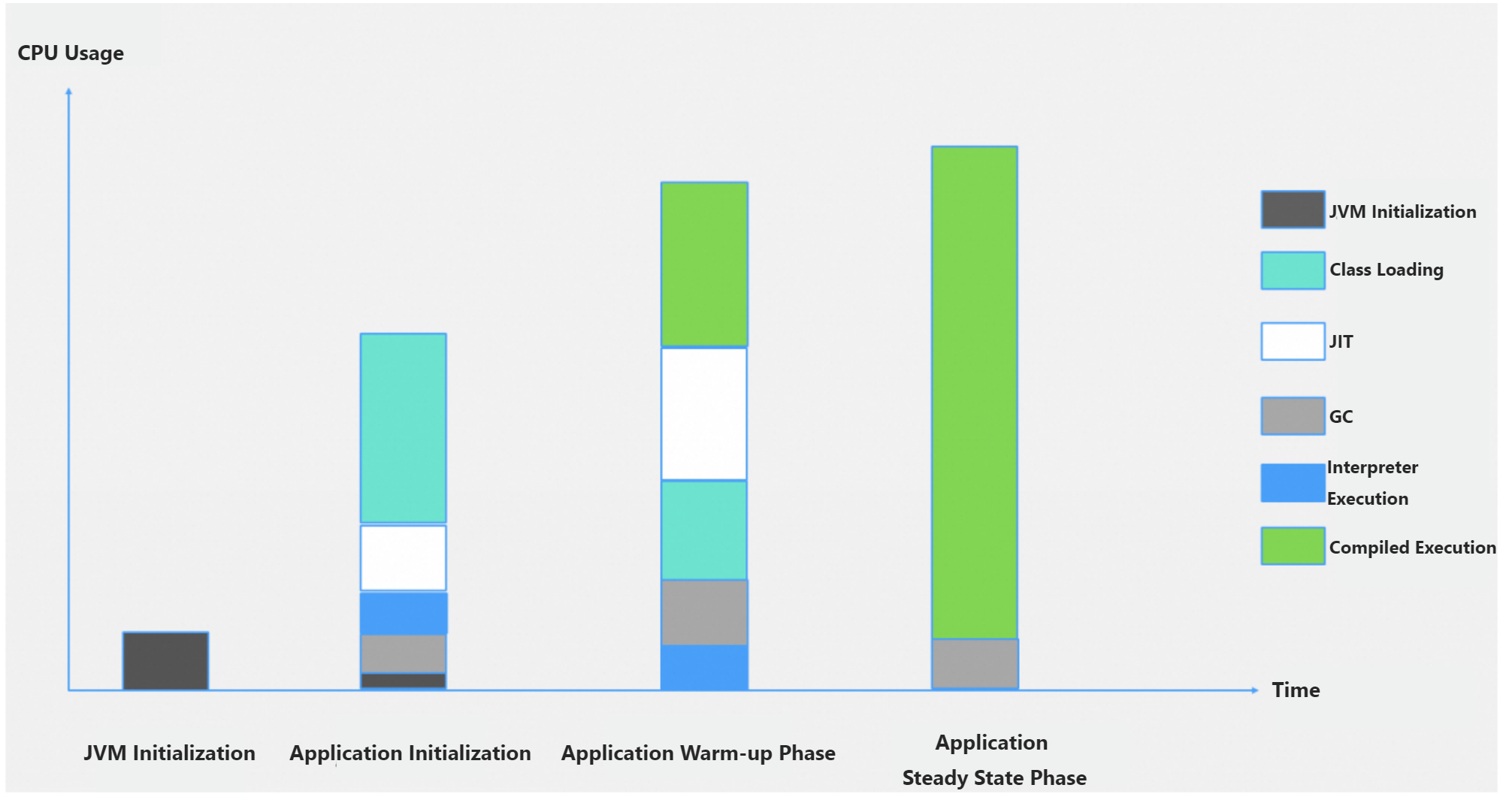
Recommended JVM settings
Set thread parameters based on the burst CPU count Y (the scaled vCPU count), not the normal count X. This lets the JVM fully use the extra vCPUs (Y - X) during startup. Keep values reasonable: once CPU Burst ends and vCPUs drop back to X, oversized thread pools will compete for the smaller CPU budget and degrade performance. Also ensure the burst duration lasts long enough for startup to complete before the scale-down happens.
ParallelGCThreads
Controls the number of parallel (stop-the-world) GC threads.
If Y <= 8 vCPUs, set
-XX:ParallelGCThreads=Y.If Y > 8, set
-XX:ParallelGCThreads=8+(Y-8)*(5/8).
ConcGCThreads
Controls the number of concurrent GC threads — threads that run alongside the application to reduce pause time. Too few threads make GC pauses longer; too many steal CPU from application work.
Set
-XX:ConcGCThreads=1/4*ParallelGCThreads(one quarter of the parallel GC thread count).
CICompilerCount
Controls the number of JIT compiler threads. Too few threads slow method compilation and increase CPU overhead during startup; the right count lets JIT compilation keep pace with class loading.
|
vCPUs (Y) after scaling |
CICompilerCount |
|
1 |
2 |
|
2 |
2 |
|
4 |
3 |
|
8 |
3 |
|
16 |
8 |
|
32 |
10 |
|
64 |
12 |
Tip: Instead of setting each thread parameter individually, use -XX:ActiveProcessorCount=N to tell the JVM how many CPUs are available. The JVM then derives all thread pool sizes automatically from that count. This is the simplest approach if you want the JVM to calculate defaults based on the burst CPU count rather than tuning each parameter separately.
Quick reference: recommended values for 2x CPU Burst
The following table shows the recommended JVM parameter values when you double the vCPU count with CPU Burst.
|
Original vCPUs |
vCPUs after CPU Burst |
ParallelGCThreads |
ConcGCThreads |
CICompilerCount |
|
0.5 |
1 |
1 |
1 |
2 |
|
1 |
2 |
2 |
1 |
2 |
|
2 |
4 |
4 |
1 |
3 |
|
4 |
8 |
8 |
2 |
3 |
|
8 |
16 |
13 |
3 |
8 |
Apply the JVM parameters
Step 1: Verify the current JVM defaults
Before overriding thread settings, check what the JVM currently selects for your container. Run the following command inside the container:
java -XX:+PrintFlagsFinal -version | grep ParallelGCThreadsTo see all system properties the JVM detects — including the effective CPU count and memory limits — run:
java -XshowSettings:system -versionStep 2: Configure the Deployment
ACS supports in-place scaling to temporarily double the CPU resources when it creates an instance for a Java application. The burst lasts until the application enters the Ready state, giving the JVM extra CPU exactly when startup needs it most. Extend the burst duration if your application performs additional initialization — such as loading libraries or running warmup logic — beyond basic JVM compilation.
If the application performs warmup after the CPU scales down, the GC and JIT threads may compete with the application for CPU resources, because these threads were allocated based on the higher burst CPU count. To avoid this, ensure that your application completes its warmup before the CPU Burst ends.
apiVersion: apps/v1
kind: Deployment
metadata:
  labels:
    app: spring-with-burst
  name: spring-with-burst
  namespace: default
spec:
  replicas: 1
  selector:
    matchLabels:
      app: spring-with-burst
  minReadySeconds: 400 # Set a value that is greater than one during the CPU Burst duration. This way, you can verify the status of the instance after the CPU Burst ends.
  template:
    metadata:
      annotations:
        alibabacloud.com/startup-cpu-burst-factor: '2' #Set the CPU Burst factor to 2. The original 1 vCPU is scaled to 2 vCPUs during the startup.
        alibabacloud.com/startup-cpu-burst-duration-seconds: "300" #The default value (30 seconds) is too short. Most Java applications need 10 minutes or less to start up and another 5 minutes to complete the warmup. We recommend that you set a larger value.
        scaling.alibabacloud.com/enable-inplace-resource-resize: 'true' # Enable in-place scaling.
      labels:
        alibabacloud.com/compute-class: general-purpose
        alibabacloud.com/compute-qos: default
        app: spring-with-burst
    spec:
      containers:
        - image: 'registry.cn-hangzhou.aliyuncs.com/acs-demo-ns/demo-java:java-with-metrics-v1'
          imagePullPolicy: IfNotPresent
          name: spring
          ports:
            - containerPort: 8080
              protocol: TCP
          resources:
            limits:
              cpu: 1
              memory: 4Gi
            requests:
              cpu: 1
              memory: 4Gi
Step 3: Set the JVM parameters in the boot command
If the defaults differ significantly from the recommended values, add the parameters to the Java boot command. For a container with 1 vCPU scaled to 2 vCPUs:
java -XX:ParallelGCThreads=2 -XX:ConcGCThreads=1 -XX:CICompilerCount=2 -jar app.jar