Access DAS from DBGateway using a proxy
Updated at:
This solution helps resolve network connectivity issues.
The DBGateway environment cannot
directlyconnect to the DAS endpoint in the Alibaba Cloud environment because of network security domain partitioning.The public network quality between the DBGateway environment and the DAS endpoint is poor. A private network channel is available to route DBGateway traffic through Nginx, which then forwards the traffic to the DAS endpoint.
Nginx deployment solution
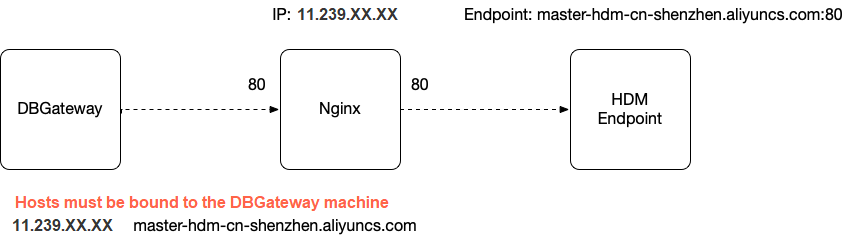
wget http://nginx.org/download/nginx-1.17.4.tar.gz
tar -zxvf nginx-1.17.4.tar.gz
cd nginx-1.17.4
# Compile and install Nginx with stream support.
./configure --with-http_ssl_module --with-http_v2_module  --with-stream
make
sudo make install
# By default, Nginx is installed in /usr/local/nginx/. Add the new configuration.
sudo sh -c bash
cat << EOF >  /usr/local/nginx/conf/hdm-master.conf
worker_processes auto;
events {
    worker_connections  1024;
}
stream {
    upstream backend {
        #  DAS endpoint
        server master-hdm-cn-shenzhen.aliyuncs.com:80            max_fails=3 fail_timeout=30s;
        hash $remote_addr consistent;
    }
    server {
        listen 80;
        # To prevent DBGateway task timeouts, set the value to more than 7 seconds.
        proxy_connect_timeout 10s;
        proxy_timeout 10s;
        proxy_pass backend;
    }
}
EOF
# Run Nginx.
sudo /usr/local/nginx/sbin/nginx -c /usr/local/nginx/conf/hdm-master.confIs this page helpful?