Anomaly detection
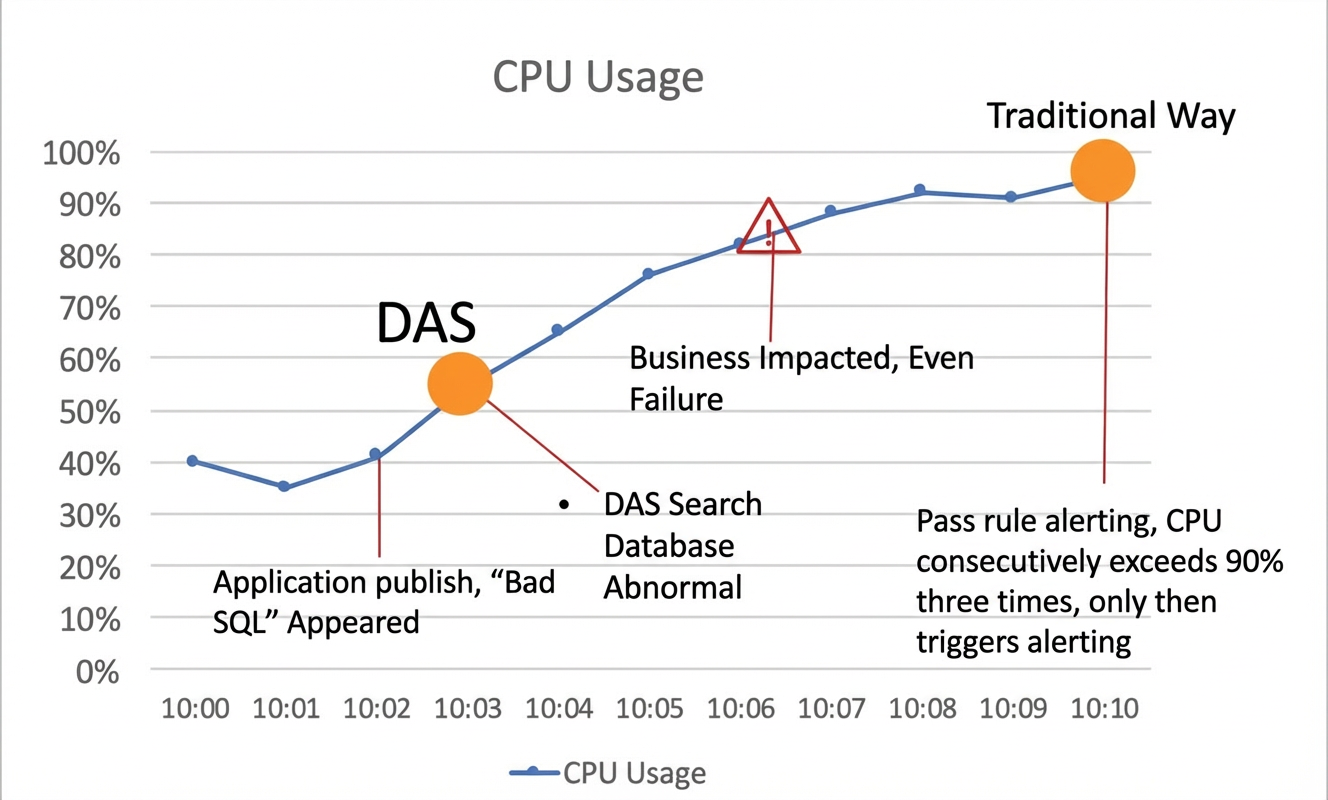
Timely detection of database anomalies is critical to daily database O&M. Database Autonomy Service (DAS) provides an anomaly detection feature that uses machine learning and fine-grained monitoring data to automatically detect anomalies 24/7 without manual activation. Compared with rule-based or threshold-based alerting, this feature detects abnormal changes in databases more promptly.
Prerequisites
The target database instance is one of the following types:
Database
Region
ApsaraDB RDS for MySQL
MyBase for MySQL
Public cloud
China (Hangzhou), China (Shanghai), China (Shenzhen), China (Heyuan), China (Guangzhou), China (Qingdao), China (Beijing), China (Zhangjiakou), China (Hohhot), China (Ulanqab), China (Nanjing - Local Region - Decommissioning), China (Fuzhou - Local Region - Decommissioning), China (Chengdu), China (Zhengzhou), China (Hong Kong), Japan (Tokyo), South Korea (Seoul), Singapore, Malaysia (Kuala Lumpur), Malaysia (Johor), Indonesia (Jakarta), Philippines (Manila), Thailand (Bangkok), UAE (Dubai), Saudi Arabia (Riyadh), Germany (Frankfurt), US (Silicon Valley), US (Virginia), UK (London), and Mexico
Finance Cloud
China East 1 Finance, China East 2 Finance, China South 1 Finance, and China North 2 Finance (invitation-only preview)
Alibaba Gov Cloud
China North 2 Ali Gov 1
General Industry Cloud
China (Ulanqab)
ApsaraDB RDS for PostgreSQL
Public cloud
China (Hangzhou), China (Shanghai), China (Shenzhen), China (Heyuan), China (Guangzhou), China (Qingdao), China (Beijing), China (Zhangjiakou), China (Hohhot), China (Ulanqab), China (Chengdu), China (Hong Kong), Japan (Tokyo), South Korea (Seoul), Singapore, Malaysia (Kuala Lumpur), Indonesia (Jakarta), Philippines (Manila), UAE (Dubai), Germany (Frankfurt), US (Silicon Valley), US (Virginia), and UK (London)
Finance Cloud
China East 1 Finance, China East 2 Finance, and China South 1 Finance
Alibaba Gov Cloud
China North 2 Ali Gov 1
ApsaraDB RDS for SQL Server
Public cloud
China (Hangzhou), China (Shanghai), China (Shenzhen), China (Heyuan), China (Qingdao), China (Beijing), China (Zhangjiakou), China (Hohhot), China (Ulanqab), China (Chengdu), China (Hong Kong), Japan (Tokyo), Singapore, Malaysia (Kuala Lumpur), Indonesia (Jakarta), UAE (Dubai), Germany (Frankfurt), US (Silicon Valley), US (Virginia), and UK (London)
Finance Cloud
China East 1 Finance, China East 2 Finance, and China South 1 Finance
Alibaba Gov Cloud
China North 2 Ali Gov 1
PolarDB for MySQL Standard Edition and Enterprise Cluster Edition
Public cloud
China (Hangzhou), China (Shanghai), China (Shenzhen), China (Heyuan), China (Guangzhou), China (Qingdao), China (Beijing), China (Zhangjiakou), China (Hohhot), China (Ulanqab), China (Chengdu), China (Hong Kong), Japan (Tokyo), South Korea (Seoul), Singapore, Malaysia (Kuala Lumpur), Indonesia (Jakarta), Philippines (Manila), Germany (Frankfurt), US (Silicon Valley), US (Virginia), and UK (London)
Finance Cloud
China East 1 Finance, China East 2 Finance, China South 1 Finance, and China North 2 Finance (invitation-only preview)
Alibaba Gov Cloud
China North 2 Ali Gov 1
Tair (Redis-compatible)
MyBase Redis
Community Edition
Tair (Enterprise Edition) Memory-optimized
Public cloud
China (Hangzhou), China (Shanghai), China (Shenzhen), China (Heyuan), China (Guangzhou), China (Qingdao), China (Beijing), China (Zhangjiakou), China (Hohhot), China (Chengdu), China (Hong Kong), Japan (Tokyo), South Korea (Seoul), Singapore, Malaysia (Kuala Lumpur), Malaysia (Johor), Indonesia (Jakarta), Philippines (Manila), Thailand (Bangkok), UAE (Dubai), Saudi Arabia (Riyadh), Germany (Frankfurt), US (Silicon Valley), US (Virginia), and UK (London)
Finance Cloud
China East 1 Finance, China East 2 Finance, China South 1 Finance, and China North 2 Finance (invitation-only preview)
Alibaba Gov Cloud
China North 2 Ali Gov 1
Tair (Enterprise Edition) Persistent memory-optimized and disk-based
Public cloud
China (Hangzhou), China (Shanghai), China (Shenzhen), China (Beijing), China (Zhangjiakou), China (Hong Kong), Singapore, Germany (Frankfurt), and US (Virginia)
Alibaba Gov Cloud
China North 2 Ali Gov 1
MongoDB
Public cloud
China (Hangzhou), China (Shanghai), China (Shenzhen), China (Heyuan), China (Guangzhou), China (Qingdao), China (Beijing), China (Zhangjiakou), China (Hohhot), China (Ulanqab), China (Chengdu), China (Hong Kong), Japan (Tokyo), South Korea (Seoul), Singapore, Malaysia (Kuala Lumpur), Indonesia (Jakarta), Philippines (Manila), Thailand (Bangkok), Malaysia (Johor), Germany (Frankfurt), UK (London), Saudi Arabia (Riyadh), UAE (Dubai), Mexico, US (Virginia), US (Atlanta), and US (Silicon Valley)
The target database instance is registered with DAS and the connection status is Normal Access.
NoteFor more information about how to register a database instance, see Connect an Alibaba Cloud database to DAS.
Features
This feature uses machine learning and fine-grained monitoring data to provide automatic 24/7 anomaly detection without manual activation. Compared with rule-based or threshold-based alerting, it detects abnormal database changes more promptly.
Item | Traditional alerting | DAS anomaly detection |
Method | Rule-based and threshold-based. | AI-based. |
Detection scope | Primarily monitoring metrics. | Monitoring metrics, SQL statements, logs, locks, and O&M events. |
Timeliness | At least 5 minutes, potentially up to a day. | Near real-time. |
Detection principle | Fault-driven. | Anomaly-driven. |
Periodic pattern recognition | Not supported. | Automatic. |
Adaptability | Cannot adapt to business characteristics. | Adapts to business characteristics. |
Predictive capability | Not available. | Available. |
View anomaly detection results
In the DAS Autonomy Center, view the anomalous events detected within a specified time range.
Log on to the DAS console.
In the navigation pane on the left, click .
Find the target instance and click the instance ID to open the instance details page.
In the navigation pane on the left, click Autonomy Center.
Select a time range to view the anomalous events detected within that period.
Enable event alerts
After you enable event alerts, DAS sends notifications through your configured channels, such as SMS messages, when anomalous events are detected. This helps you promptly identify abnormal database changes. For more information, see Configure alerts.
When you configure an alert rule, set Type to Autonomy Events and Event Type to Exceptions in Monitoring Metrics. This enables alerts for detected anomalous events.
FAQ
In the Anomaly Snapshots of a Monitoring Metric Anomaly Detection (Time Series Anomaly Detection) event, how is the change multiple for metrics in Analysis of Abnormal Metrics calculated?
Change multiple = Actual metric value / Predicted metric value. DAS uses historical hourly data from the database instance to predict the current metric value. The predicted value serves as a baseline and is compared with the actual metric value to calculate the change multiple. In the Related Information table on the Anomaly Snapshot > Analysis of Abnormal Metrics page, the Related Metrics column displays each metric name along with its percentage change multiple, such asmysql.innodb_rows_read↑112890276.00%,mysql.innodb_rows_updated↑122309.00%,mysql.select_ps↑576.00%,mysql.cpu_usage↑8444.00%, andmysql.active_session↑1711.00%.Why does a newly created instance or node with stable traffic trigger many Monitoring Metric Anomaly Detection (Time Series Anomaly Detection) events?
The DAS anomaly detection feature first builds a prediction model based on the historical data of the instance and then uses this model for anomaly detection. For a newly created instance or node, the baseline performance data is relatively low. As a result, the prediction model built from this data also has a low baseline. When business operations begin, metrics may deviate significantly from the model predictions for a period, causing false spikes and triggering frequent anomaly detection events.
NoteAfter sufficient data is accumulated, DAS automatically rebuilds a more accurate prediction model, and the Monitoring Metric Anomaly Detection (Time Series Anomaly Detection) events caused by false spikes will stop occurring.
Why is a Monitoring Metric Anomaly Detection (Time Series Anomaly Detection) event not triggered even though instance performance metrics show obvious anomalies within a few seconds?
The DAS anomaly detection feature uses minute-level average data for detection. Anomalies that last only a few seconds may be smoothed out due to their minimal impact on the averaged data, which prevents detection and does not trigger a Monitoring Metric Anomaly Detection (Time Series Anomaly Detection) event.
Related documentation
Use the autonomy features of DAS to automatically handle database anomalies.