Parameter diagnostics
Database Autonomy Service (DAS) analyzes the modifiable parameters of your ApsaraDB RDS for MySQL instance and surfaces optimization recommendations, along with a 7-day parameter modification history.
Prerequisites
Before you begin, make sure that:
Your ApsaraDB RDS for MySQL instance runs MySQL 5.6, 5.7, or 8.0
Billing
No fees are involved.
How it works
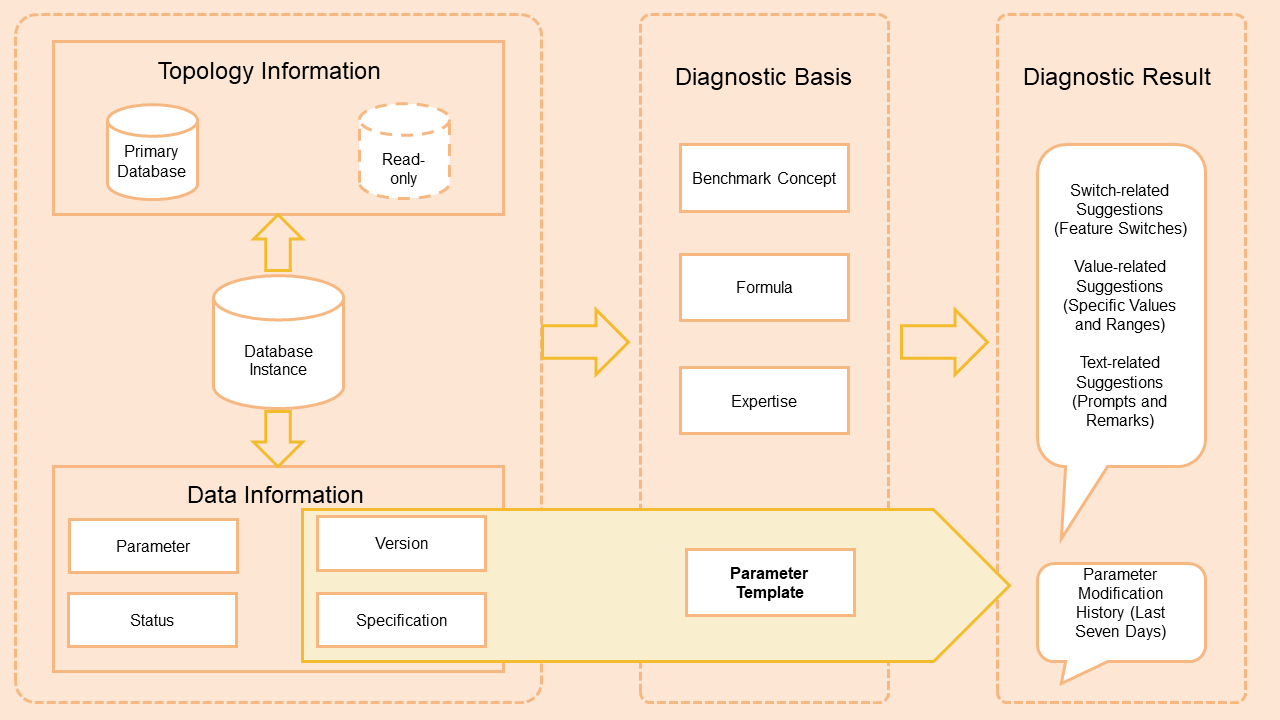
DAS retrieves the topology of the database instance and analyzes both the primary instance and read-only instances.
DAS evaluates parameter settings against the instance status, parameter templates, benchmark concepts, calculation formulas, and domain expertise.
DAS returns a static parameter diagnosis and the parameter modification records from the past seven days.
Limits
Only one parameter diagnostics task can be triggered within any three-minute window. If two tasks run within a short interval, the results may be identical.
Parameter diagnostics analyzes only the parameters that are modifiable in the ApsaraDB RDS console. You cannot modify parameters directly in the DAS console.
Usage notes
Some parameters are static and require a database instance restart to take effect. Schedule parameter changes during off-peak hours, and make sure your application supports automatic reconnection before restarting.
Run parameter diagnostics
Log on to the DAS console.
In the left-side navigation pane, choose Intelligent O&M Center > Instance Monitoring.
Find the instance you want to manage and click the instance ID.
In the left-side navigation pane, click Diagnostics.
Click the Parameter Diagnostics tab.
Click Analyze to start a diagnostics task. You can view the created task in the Parameter Diagnostics section.
View diagnosis results
In the Parameter Diagnostics section, find the task and click Details in the Actions column.
(Optional) Specify a time range to filter the parameter diagnostics records.
Review the recommendations. Each recommendation is assigned one of three levels:
Level Meaning Critical Modify this parameter immediately. Warn Modify this parameter based on your business requirements. Notice The current value differs from the default in the ApsaraDB RDS for MySQL parameter template. To apply a recommendation, click Parameter Settings on the details page. You are directed to the Modifiable Parameters tab in the ApsaraDB RDS console, where you can make the change. For more information, see Modify instance parameters.
What's next
Modify instance parameters — Apply the recommendations in ApsaraDB RDS.