Alibaba Finance Cloud data migration
Alibaba Cloud Data Online Migration is a data migration service. You can use it to migrate data between different Alibaba Finance Cloud regions or between Alibaba Finance Cloud and Alibaba Cloud. This topic details these scenarios.
Data Online Migration does not guarantee the consistency between source data and migrated data during data migration. Make sure that you verify the migrated data at the destination data address after a migration task is complete. If you delete the data at the source data address before you verify the migrated data at the destination data address, you are liable for the losses and consequences caused by any data loss.
Migration process
The following figure shows the data migration process: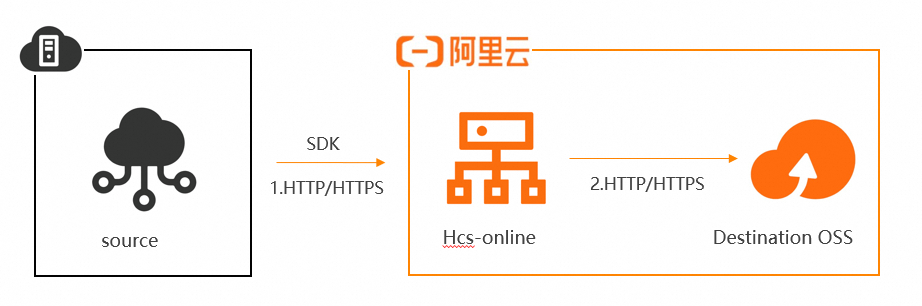
To ensure data security and consistency, we recommend that you use HTTPS URLs.
After a data migration task is complete, you must check whether the data at the destination data address is consistent with the data at the source data address.
Supported Alibaba Finance Cloud regions
Region | OSS region ID | Public endpoint | Internal endpoint |
China East 1 Finance | oss-cn-hangzhou | oss-cn-hzfinance.aliyuncs.com | oss-cn-hzfinance-internal.aliyuncs.com |
China East 2 Finance | oss-cn-shanghai-finance-1 | oss-cn-shanghai-finance-1-pub.aliyuncs.com | oss-cn-shanghai-finance-1-pub-internal.aliyuncs.com |
China South 1 Finance | oss-cn-shenzhen-finance-1 | oss-cn-szfinance.aliyuncs.com | oss-cn-szfinance-internal.aliyuncs.com |
China North 2 Finance | oss-cn-beijing-finance-1 | oss-cn-beijing-finance-1-pub.aliyuncs.com | oss-cn-beijing-finance-1-pub-internal.aliyuncs.com |
Migration tutorial
If you create a data address using an Alibaba Finance Cloud public domain name, you do not need an agent.
The migration tutorial for data migration of Alibaba Finance Cloud is the same as that for data migration between Alibaba Cloud Object Storage Service (OSS) buckets. For more information, see Migrate data between Alibaba Cloud OSS buckets.
NoteWhen creating a data address for Alibaba Finance Cloud, select Custom Domain Name on the configuration page. Then, enter the Alibaba Finance Cloud domain name and the specific OSS region ID in the Region field.
If you create a data address using an Alibaba Finance Cloud internal domain name, you must use an agent.
For more information about how to create a proxy, see Manage agents.
For more information about the migration tutorial, see Migrate data between Alibaba Cloud OSS buckets.
NoteWhen configuring the agent network, verify that the agent's host can connect to Alibaba Cloud Data Online Migration.