Overview
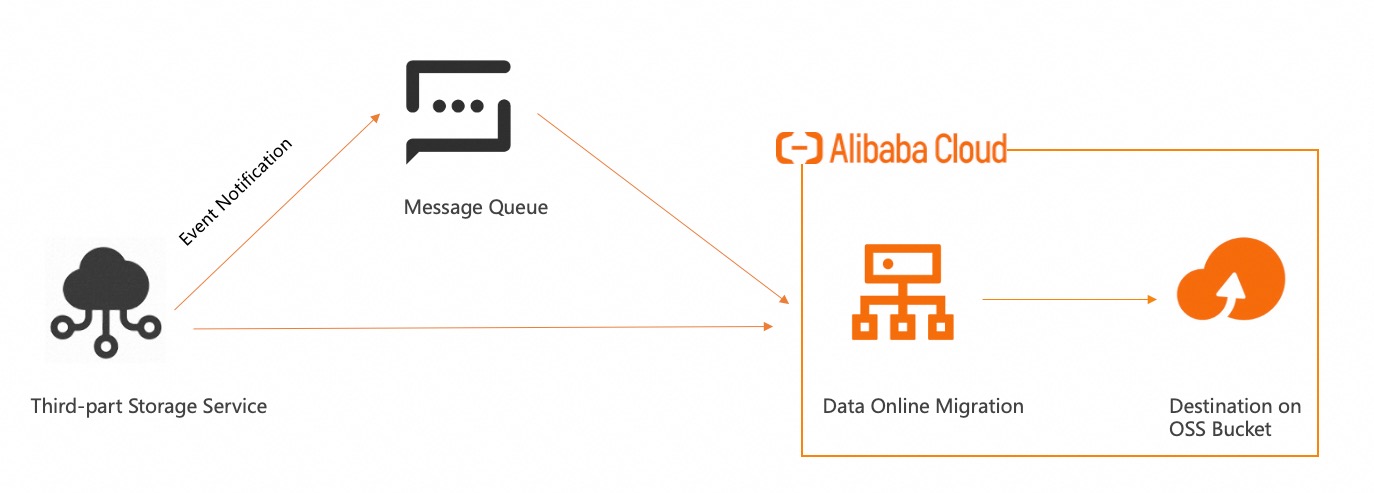
Online Migration supports migrating data to the cloud using a message queue. If your business requires near real-time data synchronization and periodic scheduling cannot meet your needs, you can use a message queue to receive data change events from the source. These events trigger the migration service to synchronize the data. This topic describes the use cases and procedure for migrating data using a message queue.
The synchronization task feature is currently available on an allowlist basis. To use this feature, submit a ticket to request access.
Use cases
This method is ideal for scenarios that require continuous incremental data migration. The source storage system receives object change events, such as creations or updates, through a message queue. The migration service then reads these events to automatically trigger data synchronization, enabling continuous migration for a specified bucket or prefix.
This approach is ideal when your business continuously generates new data that must be promptly synchronized. Examples include real-time data backup, cross-platform data distribution, or the continuous synchronization of new data during a large-scale storage migration. To use this method, you must configure event notifications on the source storage system and link it to a message queue. The migration service reads events from this queue to trigger synchronization tasks.
-
When you use a message queue for data migration, you may be charged for the source storage and message queue services. For billing details, see the pricing information of each service provider. Before you proceed, evaluate the potential costs based on your business requirements.
Message queue usage limitations
The following limitations apply to data addresses and migration tasks that use a message queue.
-
A source data address must be associated with a message queue, but a destination data address does not.
-
A source data address associated with a message queue can only be used to create synchronization tasks. It cannot be used for standard migration tasks.
-
A message queue can be associated with only one synchronization task. This queue can migrate data only from its associated bucket, not from other buckets. If you specify a prefix when you create the data address and need to migrate data from other prefixes in the same bucket, you must use a standard migration task.
Procedure
Before you create a data address, you must create a message queue and configure event notifications in your source storage service. Verify that the event notification is working correctly by uploading a test file. For instructions on creating a message queue and configuring event notifications, see Message queue configuration.
Follow these steps in the Online Migration console to migrate data using a message queue: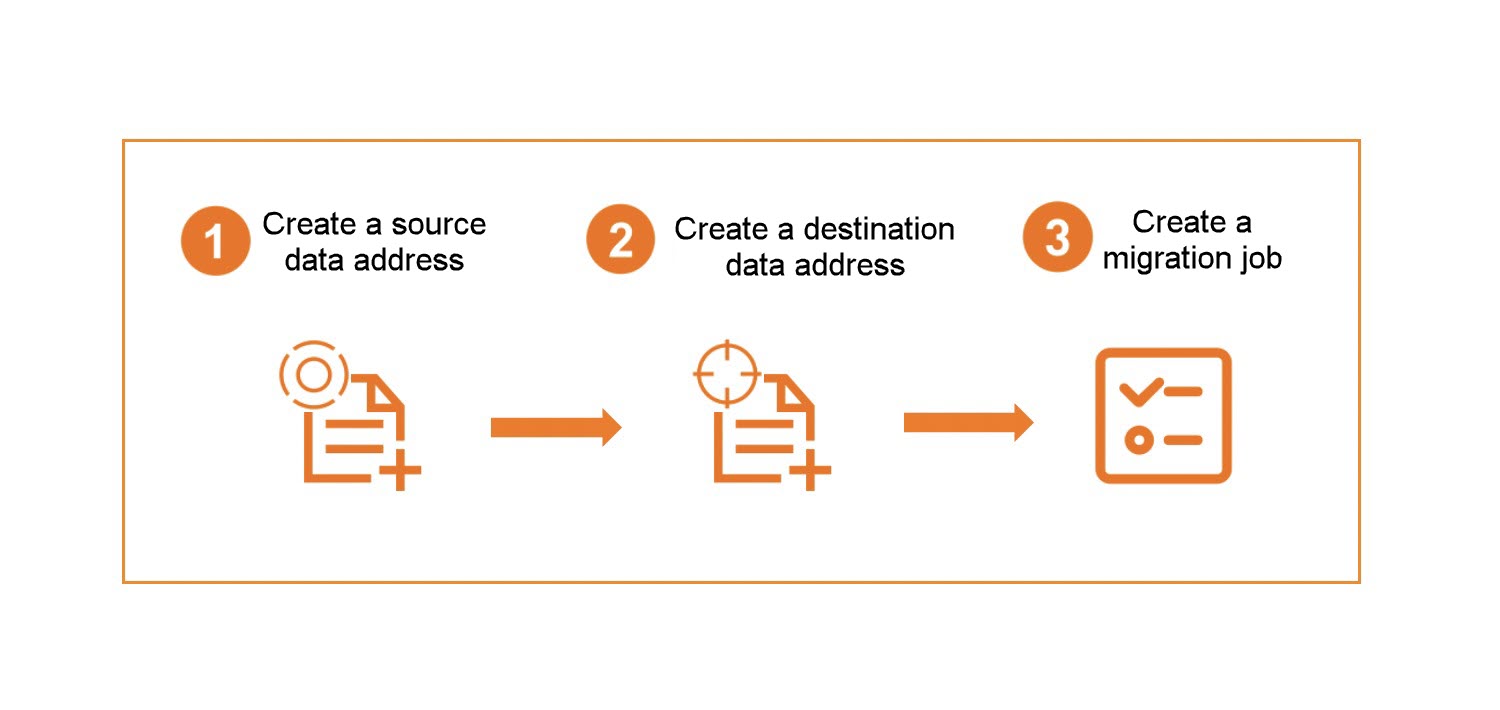
-
Create a source data address. Follow the migration guide for your source data type. For example, if your source data is in AWS S3, see Step 2: Create a source address. When you create the source address, configure the message queue parameters. The following examples are for reference only. Replace the sample values with your actual values.
Parameter
Required
Description
Endpoint
Yes
The endpoint of the message queue.
-
SQS example: https://sqs.ap-southeast-1.amazonaws.com/{AwsRootUid}}/{SqsName}
-
SMQ example: http://{AliyunUid}}.mns.cn-wulanchabu.aliyuncs.com
Queue name
Yes
The name of the message queue.
-
SQS example: test-aws-sqs
-
SMQ example: test-oss-smq
Region
Yes
The region where the message queue is located.
-
SQS example: ap-southeast-1
-
SMQ example: cn-wulanchabu
AccessKeyId
Yes
The AccessKeyId for the message queue.
-
SQS example: AK******78
-
SMQ example: AK******66
SecretAccessKey
Yes
The SecretAccessKey for the message queue.
-
SQS example: 6B******Vh
-
SMQ example: 6A******Wz
-
-
Create a destination data address. Follow the migration tutorial for your source data type. For example, if you are migrating data from AWS S3 to Alibaba Cloud OSS, see Migration implementation for instructions on creating the destination data address.
-
Create a data migration task. Follow the migration tutorial for your source data type. For example, if you are migrating data from AWS S3 to OSS, see Step 4: Create a migration task. When you create the task, select the synchronization task tab and follow the provided instructions.
Next steps
After you create a synchronization task, you can manage it in the following ways:
-
View the migration report. For example, if your source data is in AWS S3, the service generates and stores the migration report in the specified OSS bucket. For details, see View migration report.
-
View migration logs. For example, if your source data is in AWS S3, you can view logs in SLS. For details, see View migration logs.
-
Synchronization tasks do not currently support retries for failed files. You can only pause the task and restart it later.
The migration report for a synchronization task may remain in a pushing state for an extended period because the system continuously updates its content in real time. Reports are generated daily. Report generation has the following behaviors:
-
Latency
Reports are generated daily, but they are not guaranteed to be available within a fixed time after the period ends. High message volumes during peak hours can delay the generation process due to data merging and pushing. Therefore, a daily report for Day T may not be available on Day T+1. -
Completeness indicator
A manifest.json file in the report directory indicates that the report for that time period is complete and ready for download or processing. -
Serial generation
The system generates reports chronologically, prioritizing earlier time periods. The system completes the report for one period before starting the next. This chronological order also applies when pushing reports to your bucket.