Agent-based migration overview
Deploy a Data Online Migration agent on a Linux machine to migrate data to Alibaba Cloud over a leased line or VPN, or from self-managed storage such as FTP servers and local file systems.
When to use an agent
Agents are required in the following scenarios but not for migrations from third-party cloud storage to Alibaba Cloud or between Alibaba Cloud OSS buckets.
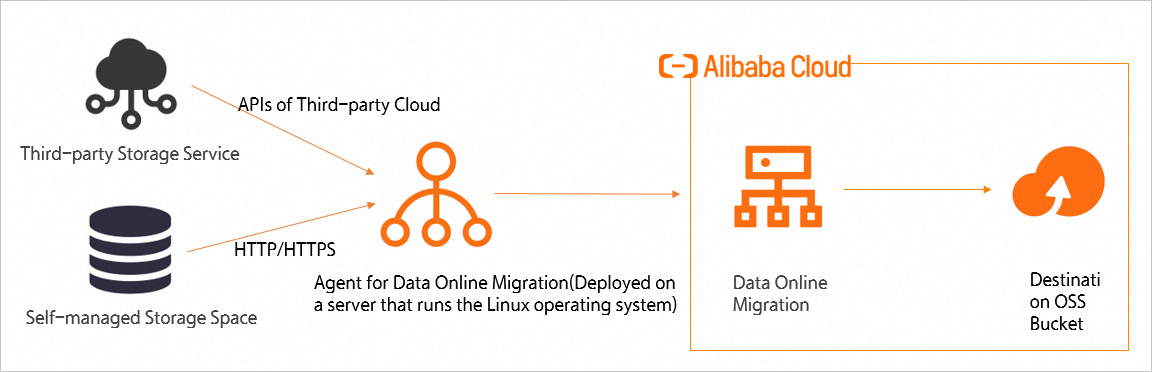
-
Deploy the agent on an Alibaba Cloud Elastic Compute Service (ECS) instance for optimal performance.
-
If you select VPC as the network type, verify that the ECS instance connects to an Alibaba Cloud VPC through a leased line or VPN and resides in the same region as the Data Online Migration console. Cross-region connections may cause network instability.
Channel-agent relationship
Before deploying an agent, create a channel and associate the agent with it. The channel-agent relationship follows these rules:
-
A tunnel can be associated with multiple agents at a time. You can specify the maximum bandwidth of the tunnel and the maximum number of requests per second over the tunnel to throttle the overall transmission for the agents associated with the tunnel.
-
Each agent supports only one channel association. The agent bandwidth is limited by the total bandwidth of the associated channel.
Procedure
To migrate data by using an agent, complete the following steps: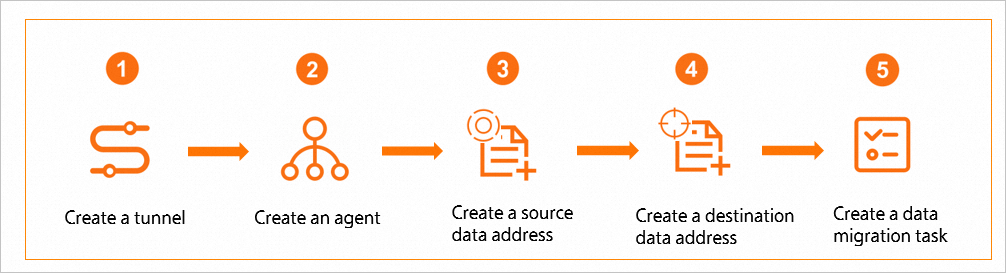
-
Create a channel. See Channel management.
-
Create an agent. See Agent management.
-
Create a source data address. Select the migration tutorial that matches your source data type. For example, to migrate from AWS S3, see Create a source address.
-
Create a destination data address. Select the migration tutorial that matches your source data type. For example, to migrate from AWS S3 to Alibaba Cloud OSS, see Migration implementation.
-
Create a migration task. Select the migration tutorial that matches your source data type. For example, to migrate from AWS S3 to Alibaba Cloud OSS, see Create a migration task.