This topic describes the process of using a Data Transport III device for offline data migration. The process covers migrating data from an on-premises data center to Alibaba Cloud and from Alibaba Cloud to an on-premises data center.
On-premises data center to Alibaba Cloud flow
Data Transport III devices can be rented only in regions in the Chinese mainland, China (Hong Kong), Singapore, and Indonesia (Jakarta).
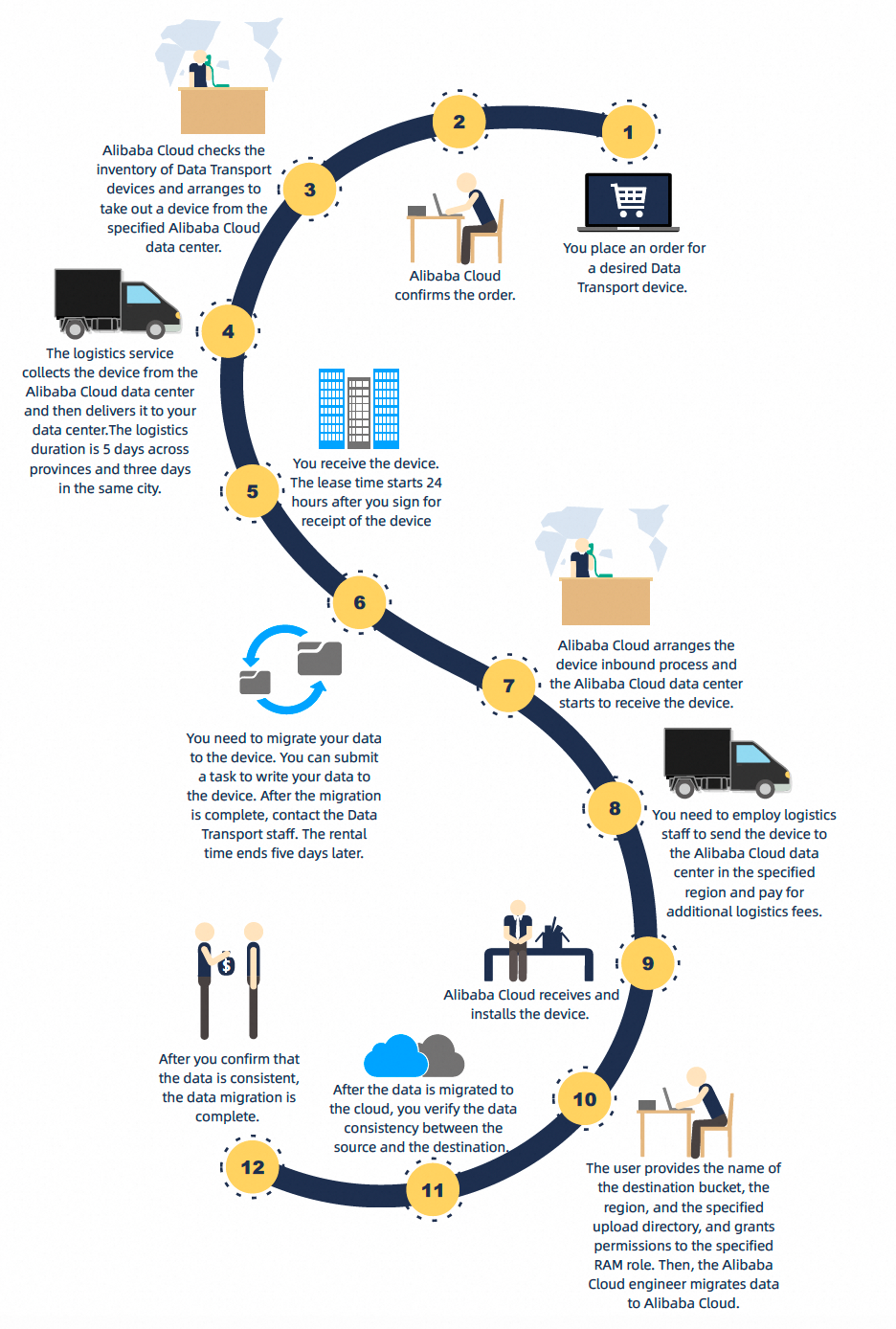
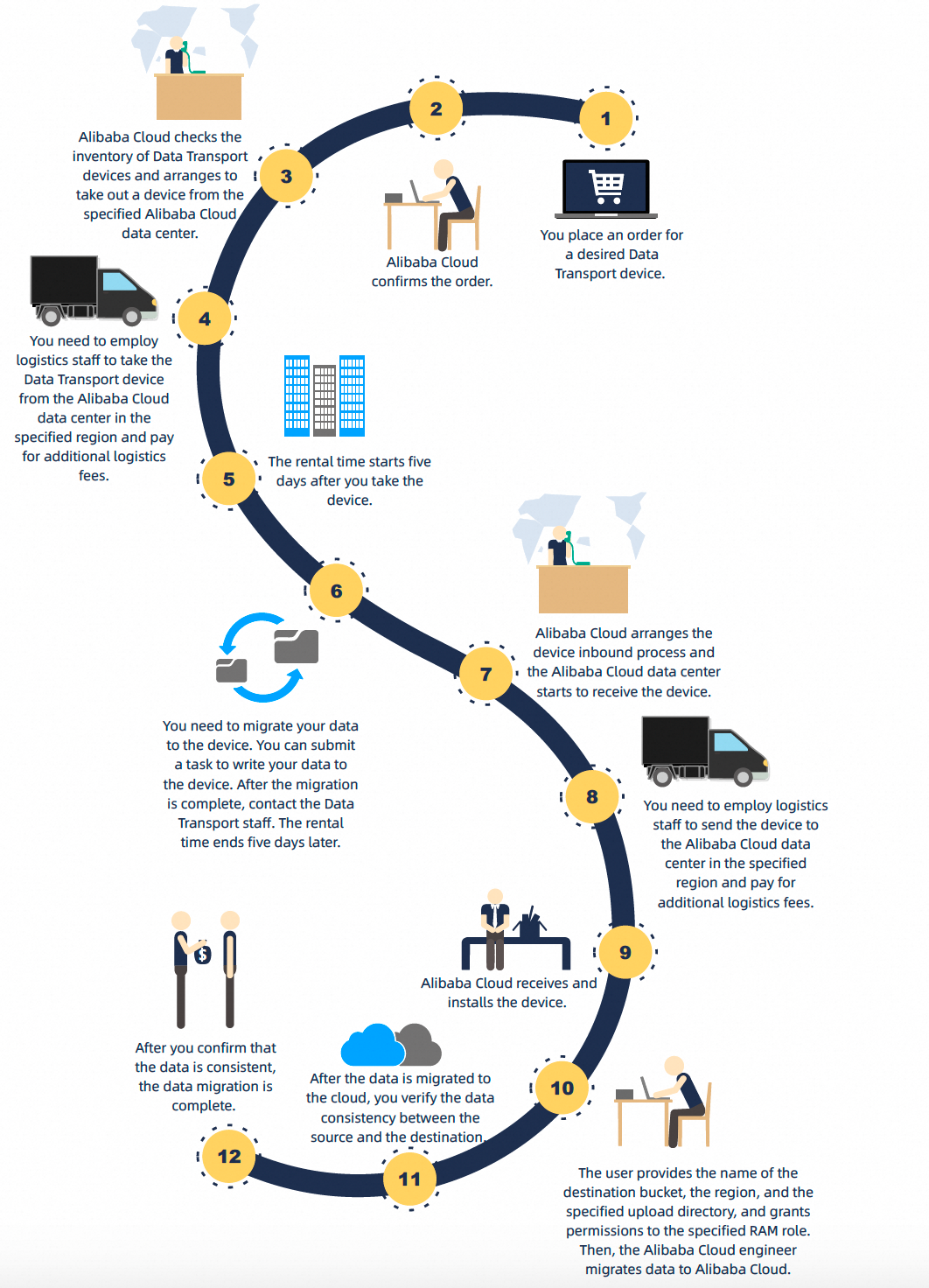
The procedure for using the device is different for regions in the Chinese mainland and regions outside the Chinese mainland. For more information, see the following figures.
Procedure for regions in the Chinese mainland
Procedure for regions outside the Chinese mainland
On-premises data center to Alibaba Cloud
Create an order and complete the payment. For more information, see Create an order.
NoteRegions in the Chinese mainland:
After the order is created, Alibaba Cloud staff prepare and mail a Data Transport device to the address specified in the order.
Regions outside the Chinese mainland:
After the order is created, Alibaba Cloud staff prepare a Data Transport device for pickup. You must arrange for logistics to pick up the device from the data center in the specified region and pay the additional logistics fees.
Create an OSS bucket. For more information, see Create a bucket.
After you receive the Data Transport III device and confirm it is not damaged, install the hardware. For more information, see Install the hardware.
Mount the source data address. For more information, see Mount a source data address.
Create and run a data migration task to migrate local data to the Data Transport III device. For more information, see Copy local data.
Power off the device and prepare it for return. For more information, see Upload data to the cloud and verify.
NoteRegions in the Chinese mainland:
After the local migration is complete, Alibaba Cloud staff perform the following two steps.
Alibaba Cloud staff arrange for a designated logistics provider to pick up the Data Transport device and transport it to an Alibaba Cloud data center.
They rack the Data Transport device in the Alibaba Cloud data center and start a data migration task to migrate the data to Alibaba Cloud OSS.
Regions outside the Chinese mainland:
After the local migration is complete, the following steps are required.
Alibaba Cloud staff notify the data center in the specified region to prepare to receive the device.
You must arrange for logistics to deliver the device to the data center in the specified region and pay the additional logistics fees.
Alibaba Cloud staff rack the Data Transport device in the Alibaba Cloud data center and start a data migration task to migrate the data to Alibaba Cloud OSS.
After the migration is complete, Alibaba Cloud staff provide a migration report. The report includes the total number and volume of successfully uploaded files, and the locations of the lists for all migrated and failed files. The migration report is for reference only. You must verify the data consistency between the source data and the cloud data. After the data migration is complete, promptly revoke your RAM authorization role.
Alibaba Cloud to on-premises data center flow
This scenario is supported only in regions in the Chinese mainland.
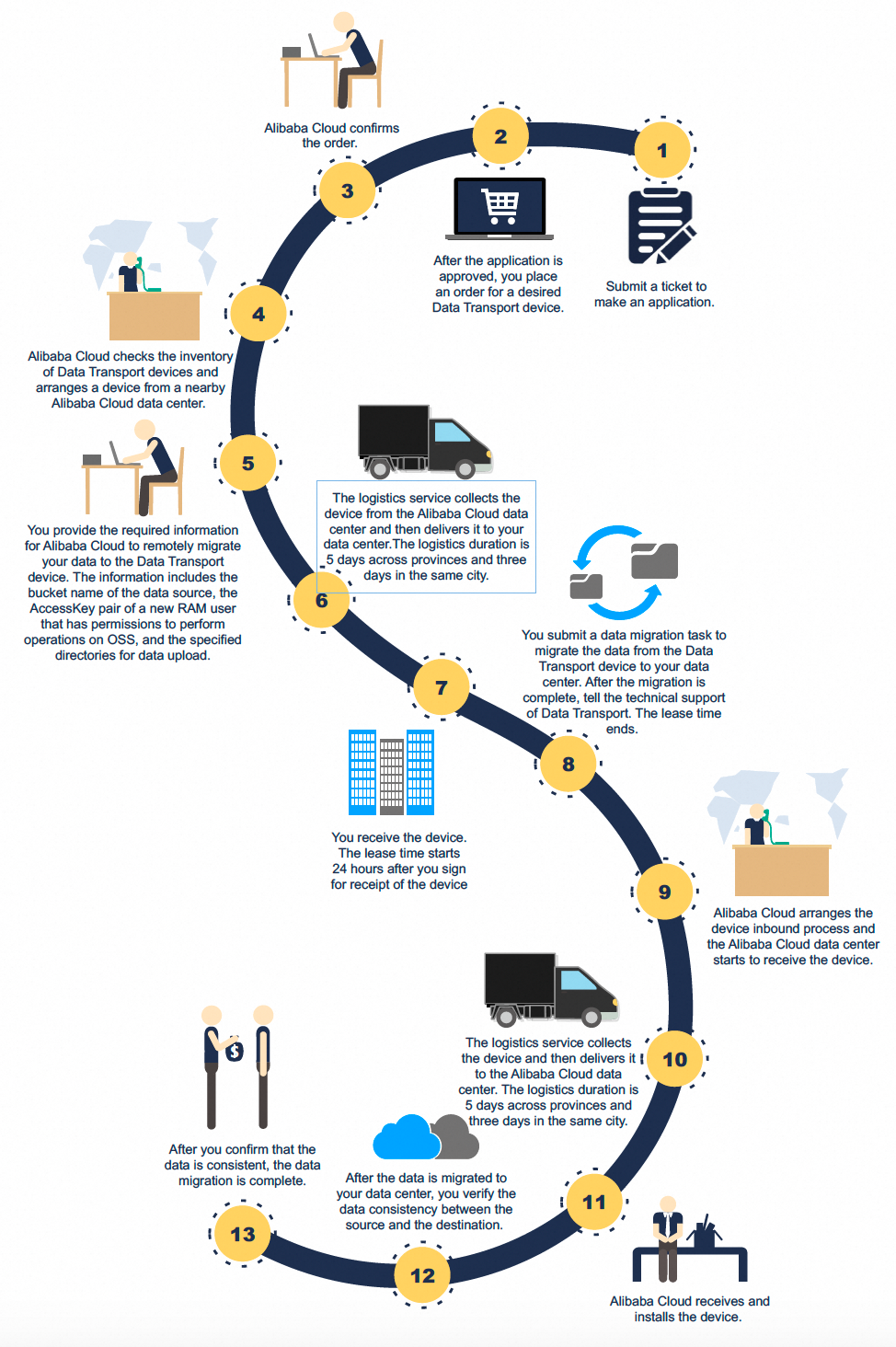
Alibaba Cloud to on-premises data center
The fee for using Data Transport to migrate data from Alibaba Cloud to an on-premises data center is CNY 200 per TB. The minimum data volume is 10 TB. If the data volume is less than 10 TB, it is billed as 10 TB.
Using Data Transport involves downloading data over the public network. In addition to the Data Transport rental fee, OSS-related fees are incurred. These fees include data egress traffic fees and request fees. For more information, see OSS billing overview.
If your source data is of the Archive storage class, you must restore it before migration. Use Data Transport for data migration only after the data is restored. Note the following when you restore data:
Complete the restore operation before you start the data migration.
Ensure the restoration duration is long enough for the total data volume to be migrated. This prevents the data from returning to a frozen state during migration.
The restore operation incurs data retrieval fees. Some restore services have high fees. For more information, see OSS billing overview.
Before placing an order, submit a request by opening a ticket. Provide your UID and the reason for the data migration in the request.
After the request is approved, select the Backup Data to On-premises IDC mode in the console. Then, create an order and complete the payment.
Provide the source bucket name, the AccessKey ID and AccessKey secret of a new RAM user that has OSS permissions, and the specified download folder. Alibaba Cloud staff then remotely migrate the data to the specified Data Transport device.
After the data is downloaded to the Data Transport III device, Alibaba Cloud staff provide a migration report. The report includes the total number and volume of files successfully migrated to the device, and the locations of the lists for all migrated and failed files. The migration report is for reference only. Alibaba Cloud staff also arrange for a logistics provider to send the device to the specified address.
After you receive the Data Transport III device and confirm it is not damaged, install the hardware. For more information, see Install the hardware.
Mount the data address of your on-premises data center. For more information, see Mount a source data address.
Create and run a data migration task to migrate data from the Data Transport III device to your on-premises data center. For more information, see Copy local data.
NoteSubmitting a migration task is supported only if your on-premises data center uses a remote file system, such as a Windows file system, Linux file system, or NAS server. If your on-premises data center uses the Hadoop Distributed File System (HDFS) or another storage class, you must use other tools for the migration.
Power off the device and notify Alibaba Cloud to retrieve it. For more information about how to power off the device and arrange for its retrieval, see Upload data to the cloud and verify.
After the data migration is complete, verify the data consistency between the cloud and your on-premises data center.