Key concepts
Offset service
The offset service lets you save consumption offsets to the server. An offset consists of a sequence and a timestamp. The sequence is an incrementally increasing number corresponding to a unique record. The timestamp indicates when the record was written to DataHub, in milliseconds (ms).
After creating a subscription and consuming data from a topic, you can commit the offset. The next time the task starts, it can fetch the last committed offset and resume consumption from the next record. Storing offsets on the server is required for coordinated consumption, as it ensures that consumption can continue from the last committed offset after a shard is reassigned.
You do not have to manage offsets manually. In the config, you can set an interval for committing offsets. When records are read, previous records are considered processed. If the time since the last commit exceeds the configured interval, a new commit is attempted by the consumer. If a commit fails and the task stops unexpectedly, the offset may not be updated, which can cause data to be re-consumed.
Coordinated consumption
Coordinated consumption automatically distributes shards among multiple consumers that are reading from the same topic. This simplifies client-side logic, as coordinating shard assignments across different machines can be complex. Consumers using the same subscription ID (Sub Id) form a consumer group. Within a consumer group, a shard is assigned to only one consumer at any given time.
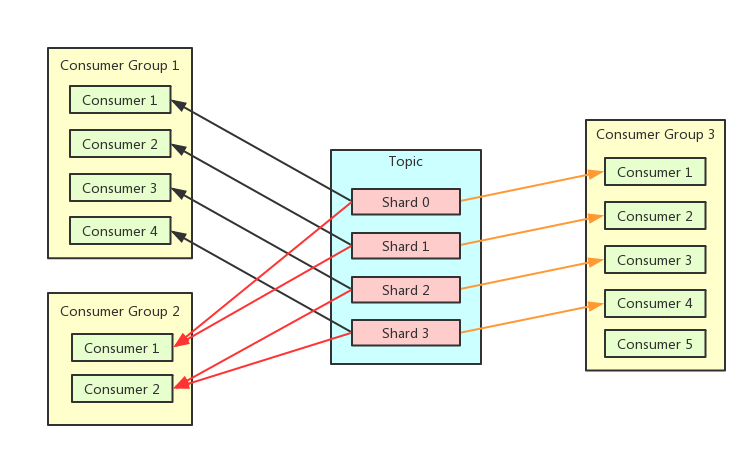
Example scenario
Assume there are three consumer instances (A, B, and C) and a topic with 10 shards.
Consumer instance A starts and is assigned all 10 shards.
Consumer instances B and C start. The shards are rebalanced, resulting in a 4-3-3 shard distribution.
One shard is split. After the client fully consumes the parent node, it releases it. When the two child nodes join, the shards are reassigned to a 4, 4, and 3 distribution.
Consumer instance C stops. Its shards are redistributed between instances A and B, resulting in a 6-5 shard distribution.
Heartbeat
Coordinated consumption relies on a heartbeat mechanism. Each consumer instance sends heartbeats to the server to report its status, its currently assigned shards, and any shards it needs to release. If the server does not receive a heartbeat from a consumer instance within a specified interval, it considers the instance offline. When the status of a consumer instance changes, the server rebalances the shards. The new assignment plan is sent back to clients through the heartbeat response, so clients experience a delay before they learn about shard changes.
Prerequisites
Your Java development environment must be version 1.8 or later.
Add the following Maven dependencies to your project:
<dependency>
    <groupId>com.aliyun.datahub</groupId>
    <artifactId>aliyun-sdk-datahub</artifactId>
    <version>2.25.1</version>
</dependency>
<dependency>
      <groupId>com.aliyun.datahub</groupId>
      <artifactId>datahub-client-library</artifactId>
      <version>1.4.3</version>
</dependency>
Note In datahub-client-library version 1.4 and later, the producer and consumer are thread-safe, which allows you to use a single producer or consumer instance across multiple threads. In versions earlier than 1.4, the producer and consumer are not thread-safe. For multi-threaded usage with older versions, see the Multi-threaded read and write examples section.
Authentication
Background
An AccessKey is a credential that Alibaba Cloud provides for verifying your identity when you make OpenAPI calls. An AccessKey consists of an AccessKey ID and an AccessKey Secret. You must keep your AccessKey secure. If your AccessKey is leaked, all resources in your Alibaba Cloud account are at risk. Hardcoding a plaintext AccessKey in your code can lead to leaks if repository permissions are not managed properly.
Alibaba Cloud Credentials is a credential management tool for Alibaba Cloud developers. By configuring the default credential provider chain, you can avoid hardcoding a plaintext AccessKey in your application code when making OpenAPI calls. This helps protect your cloud resources.
Prerequisites
Use an existing AccessKey or create a new one. For more information, see Create an AccessKey. Note: To reduce the risk of an AccessKey leak, the AccessKey Secret is displayed only when you create it and cannot be viewed again. Store it securely.
Important A leaked AccessKey for an Alibaba Cloud account (root account) compromises the security of all resources under that account. To ensure account security, create AccessKeys for RAM users. Do not create AccessKeys for your Alibaba Cloud root account unless necessary.
The AccessKey Secret for a RAM user is displayed only when the AccessKey is created and cannot be viewed afterward. After creating an AccessKey, save the AccessKey Secret promptly and securely.
The Alibaba Cloud SDK Credentials tool is installed.
To install using Maven (use the latest version of Credentials):
<dependency>
 <groupId>com.aliyun</groupId>
 <artifactId>credentials-java</artifactId>
 <version>0.2.11</version>
</dependency>
The JDK version is 1.7 or later.
Configuration
This document provides an example of configuring credentials by using environment variables. For other methods, see Configure environment variables.
Note If you use a configuration file, ensure that the ALIBABA_CLOUD_ACCESS_KEY_ID and ALIBABA_CLOUD_ACCESS_KEY_SECRET environment variables are not set in your system. If they are set, the configuration file will be ignored.
The Alibaba Cloud SDK allows you to create a default credential provider by setting the ALIBABA_CLOUD_ACCESS_KEY_ID and ALIBABA_CLOUD_ACCESS_KEY_SECRET environment variables. When your application calls an API, it automatically reads these credentials to complete authentication.
Configure automatic authentication
Configure the ALIBABA_CLOUD_ACCESS_KEY_ID and ALIBABA_CLOUD_ACCESS_KEY_SECRET environment variables.
On Linux and macOS
Run the following commands:
export ALIBABA_CLOUD_ACCESS_KEY_ID=AccessKey ID
export ALIBABA_CLOUD_ACCESS_KEY_SECRET=AccessKey Secret
Replace AccessKey ID with your AccessKey ID and AccessKey Secret with your AccessKey Secret.
On Windows
Create an environment variable file. Add the environment variables ALIBABA_CLOUD_ACCESS_KEY_ID and ALIBABA_CLOUD_ACCESS_KEY_SECRET, and set their values to your AccessKey ID and AccessKey Secret.
Restart Windows for the changes to take effect.
Code example
    Client credentialClient = new Client();
    String accessKeyId = credentialClient.getAccessKeyId();
    String accessKeySecret = credentialClient.getAccessKeySecret();
Code examples
Producer code examples
Synchronous write
import com.aliyun.credentials.Client;
import com.aliyun.datahub.client.common.DatahubConfig;
import com.aliyun.datahub.client.exception.DatahubClientException;
import com.aliyun.datahub.client.http.HttpClient;
import com.aliyun.datahub.client.model.BlobRecordData;
import com.aliyun.datahub.client.model.RecordEntry;
import com.aliyun.datahub.clientlibrary.common.ExceptionChecker;
import com.aliyun.datahub.clientlibrary.config.ProducerConfig;
import com.aliyun.datahub.clientlibrary.producer.DatahubProducer;
import java.nio.charset.StandardCharsets;
import java.util.ArrayList;
import java.util.List;
import org.slf4j.Logger;
import org.slf4j.LoggerFactory;

public class SimpleProducer {

  private static final Logger LOGGER = LoggerFactory.getLogger(SimpleProducer.class);

  public static void main(String[] args) throws Exception {
    // Specifies whether to enable memory metrics. If enabled and log4j is configured, memory metrics are printed to the log.
    // ClientMetrics.startMetrics();

    // Example for the China (Hangzhou) region.
    String endpoint = "https://dh-cn-hangzhou.aliyuncs.com";
    Client credentialClient = new Client();
    String accessKeyId = credentialClient.getAccessKeyId();
    String accessKeySecret = credentialClient.getAccessKeySecret();
    String projectName = "";
    String topicName = "";

    ////////////////////////////// STEP 1. Create a DatahubProducer //////////////////////////
    ProducerConfig config = new ProducerConfig(endpoint, accessKeyId, accessKeySecret);
    DatahubProducer datahubProducer = new DatahubProducer(projectName, topicName, config);
    RecordSchema schema = datahubProducer.getTopicSchema();
    ///////////////////// STEP 2. Build records for a BLOB (unstructured data) or TUPLE (structured data) topic. ////////////
    List<RecordEntry> recordList = new ArrayList<>();
    // Build records for unstructured data (BLOB).
    for (int i = 0; i < 10; ++i) {
      RecordEntry record = new RecordEntry();
      // Build a record with unstructured data (BLOB).
      BlobRecordData data = new BlobRecordData("HelloWorld".getBytes(StandardCharsets.UTF_8));
      // Build a record with structured data (TUPLE).
     //TupleRecordData data = new TupleRecordData(schema);
     //data.setField("f1", "f1_" + i);

      record.setRecordData(data);
      record.addAttribute("key1", "value1"); // Optional: Add attributes to the record.

      recordList.add(record);
    }

    ///////////////////////// STEP 3: Write data in a loop /////////////////////////
    try {
      for (int i = 0; i < 10000; ++i) {
        try {
          String shardId = datahubProducer.send(recordList);
          LOGGER.info("Write shard {} ok, record count:{}", shardId, recordList.size());
        } catch (DatahubClientException e) {
          if (!ExceptionChecker.isRetryableException(e)) {
            LOGGER.info("Write data fail", e);
            break;
          }
          // Sleep and retry.
          Thread.sleep(1000);
        }
      }
    } finally {
      // Close producer resources.
      datahubProducer.close();
    }

    // Call the global cleanup function when the process exits.
    HttpClient.close();

//        ClientMetrics.stopMetrics();
  }
}
Asynchronous write
public class SimpleProducerAsync {
    private static final Logger LOGGER = LoggerFactory.getLogger(SimpleProducerAsync.class);

    public static void main(String[] args) throws Exception {
        // Specifies whether to enable memory metrics. If enabled and log4j is configured, memory metrics are printed to the log.
        // ClientMetrics.startMetrics();
        // Example for the China (Hangzhou) region.
        String endpoint = "https://dh-cn-hangzhou.aliyuncs.com";
        Client credentialClient = new Client();
        String accessKeyId = credentialClient.getAccessKeyId();
        String accessKeySecret = credentialClient.getAccessKeySecret();
        String projectName = "";
        String topicName = "";

        ////////////////////////////// STEP 1. Create a DatahubProducer //////////////////////////
        ProducerConfig config = new ProducerConfig(endpoint, accessKeyId, accessKeySecret);
        config.setMaxAsyncBufferTimeMs(30000); // Set the buffer time.
        DatahubProducer datahubProducer = new DatahubProducer(projectName, topicName, config);

        RecordSchema schema = datahubProducer.getTopicSchema();

        // You can register a callback for asynchronous writes.
        WriteCallback callback  = new WriteCallback() {
            @Override
            public void onSuccess(String shardId, List<RecordEntry> records,
                                  long elapsedTimeMs, long sendTimeMs) {
                LOGGER.info("Message sent successfully");
            }

            @Override
            public void onFailure(String shardId, List<RecordEntry> records,
                                  long elapsedTimeMs, DatahubClientException e) {
                LOGGER.error("Message sent fail", e);
            }
        };

        // Optional: Configure a data partitioning strategy.
        // The final shard ID is determined in the following order of priority: shardId, hashKey, and then partitionKey of the RecordEntry.
        RecordPartitioner partitioner = new DefaultRecordPartitioner();

        ///////////////////////// STEP 2: Asynchronously write data in a loop /////////////////////////
        try {
            for (int i = 0; i < 1000; ++i) {
                try {
					// Write structured data (TUPLE).
                    RecordEntry record = new RecordEntry();
                    TupleRecordData data = new TupleRecordData(schema);
                    data.setField("f1", "f1_" + i);
					          // Write unstructured data (BLOB).
					          //BlobRecordData data = new BlobRecordData("HelloWorld".getBytes(StandardCharsets.UTF_8));
                    record.setRecordData(data);
                    record.addAttribute("key1", "value1"); // Optional: Add attributes to the record.
                    // Send a single record. You can specify whether to partition the data.
                    datahubProducer.sendAsync(record, callback, partitioner);
                } catch (DatahubClientException e) {
                    if (!ExceptionChecker.isRetryableException(e)) {
                        LOGGER.info("Write data fail", e);
                        break;
                    }
                    // Sleep and retry.
                    Thread.sleep(1000);
                }
            }

            // Block until all buffered data is successfully sent.
            datahubProducer.flush(true);
        } catch (Exception e) {
            LOGGER.warn("Write fail", e);
        } finally {
            // Close producer resources.
            datahubProducer.close();
        }

        // Call the global cleanup function when the process exits.
        HttpClient.close();
//        ClientMetrics.stopMetrics();
    }
}
Coordinated consumption code example
Configuration parameters
Parameter | Description |
autoCommit | Specifies whether to automatically commit offsets. The default is true. When enabled, offsets are committed by a background thread at the configured interval. The auto-commit logic assumes that when you call the read method, all previously fetched data has been processed. If this is set to false, you must acknowledge (ack) each record after it is processed. The background commit process ensures that all records before the committed offset have been acknowledged. |
offsetCommitTimeoutMs | The interval for committing the offset, in milliseconds. The default is 30,000. The valid range is [3000, 300000]. |
sessionTimeoutMs | The session timeout, in milliseconds. The heartbeat interval is set to two-thirds of this value. If the server receives no heartbeat within this period, it considers the client offline and reassigns its shards. The default is 60,000. The valid range is [60000, 180000]. |
fetchSize | The number of records to fetch asynchronously for each shard. The consumer maintains a buffer that caches up to twice this number of records. An asynchronous task fetches more data whenever the buffer is not full. The default is 1,000. The value must be greater than 0. |
import com.aliyun.credentials.Client;
import com.aliyun.datahub.client.common.DatahubConfig;
import com.aliyun.datahub.client.exception.DatahubClientException;
import com.aliyun.datahub.client.http.HttpClient;
import com.aliyun.datahub.client.model.*;
import com.aliyun.datahub.clientlibrary.common.ExceptionChecker;
import com.aliyun.datahub.clientlibrary.config.ConsumerConfig;
import com.aliyun.datahub.clientlibrary.consumer.DatahubConsumer;
import org.slf4j.Logger;
import org.slf4j.LoggerFactory;

public class SimpleConsumer {
    private static final Logger LOGGER = LoggerFactory.getLogger(SimpleConsumer.class);

    public static void main(String[] args) throws Exception {
        // Specifies whether to enable memory metrics. If enabled and log4j is configured, memory metrics are printed to the log.
        // ClientMetrics.startMetrics();


        // Example for the China (Hangzhou) region.
        String endpoint = "https://dh-cn-hangzhou.aliyuncs.com";
        Client credentialClient = new Client();
        String accessKeyId = credentialClient.getAccessKeyId();
        String accessKeySecret = credentialClient.getAccessKeySecret();
        String projectName = "";
        String topicName = "";
        String subId = "";

        ////////////////////////////// STEP 1. Create a DatahubConsumer //////////////////////////
        ConsumerConfig config = new ConsumerConfig(endpoint, accessKeyId, accessKeySecret);
        DatahubConsumer datahubConsumer = new DatahubConsumer(projectName, topicName, subId, config);
        ///////////////////////// STEP 2: Read data in a loop /////////////////////////
        try {
            while (true) {
                try {
                    RecordEntry record = datahubConsumer.read(3000);
                    if (record == null) {
                        // No data was read in 3 seconds. This might mean: (1) no new data is available, or (2) the consumer is not ready (e.g., no shard is assigned).
                        continue;
                    }

                    RecordData recordData = record.getRecordData();
                    // Process the record based on whether the topic uses unstructured data (BLOB) or structured data (TUPLE). A topic can only have one data type.
                    if (recordData instanceof TupleRecordData) {
                        TupleRecordData data = (TupleRecordData) recordData;
                        RecordSchema schema = data.getRecordSchema();
                        // This example simply concatenates the fields into a string.
                        StringBuilder sb = new StringBuilder();
                        for (int i = 0; i < schema.getFields().size(); ++i) {
                            sb.append(data.getField(i)).append(",");
                        }
                        LOGGER.debug("Read record. shardId:{}, seq:{}, ts:{}, batchIndex:{}, batchSize:{}, data:{}",
                                record.getShardId(), record.getSequence(), record.getSystemTime(), record.getSegmentIndexForBatch(),
                                record.getSegmentSizeForBatch(), sb);
                    } else {
                        BlobRecordData data = (BlobRecordData) recordData;
                        LOGGER.debug("Read record. shardId:{}, seq:{}, ts:{}, batchIndex:{}, batchSize:{}, data:{}",
                                record.getShardId(), record.getSequence(), record.getSystemTime(), record.getSegmentIndexForBatch(),
                                record.getSegmentSizeForBatch(), new String(data.getData()));
                    }
                } catch (DatahubClientException e) {
                    if (!ExceptionChecker.isRetryableException(e)) {
                        LOGGER.info("Read data fail", e);
                        break;
                    }
                    // Sleep and retry.
                    Thread.sleep(1000);
                }
            }
        }  catch (Exception e) {
            LOGGER.warn("Read data fail", e);
        } finally {
            // Close consumer resources.
            datahubConsumer.close();
        }

        // Call the global cleanup function when the process exits.
        HttpClient.close();

//        ClientMetrics.stopMetrics();
    }
}
Multi-threaded read and write
Example of multiple threads sharing one consumer/producer (for versions 1.4 and later)
package com.aliyun.datahub.clientlibrary.example;

import com.aliyun.credentials.Client;
import com.aliyun.datahub.client.common.DatahubConfig;
import com.aliyun.datahub.client.exception.DatahubClientException;
import com.aliyun.datahub.client.http.HttpClient;
import com.aliyun.datahub.client.model.BlobRecordData;
import com.aliyun.datahub.client.model.RecordEntry;
import com.aliyun.datahub.clientlibrary.common.ExceptionChecker;
import com.aliyun.datahub.clientlibrary.config.ConsumerConfig;
import com.aliyun.datahub.clientlibrary.config.ProducerConfig;
import com.aliyun.datahub.clientlibrary.consumer.DatahubConsumer;
import com.aliyun.datahub.clientlibrary.producer.DatahubProducer;
import org.slf4j.Logger;
import org.slf4j.LoggerFactory;

import java.util.ArrayList;
import java.util.List;
import java.util.Map;
import java.util.concurrent.ConcurrentHashMap;
import java.util.concurrent.atomic.AtomicInteger;

public class MultiThreadReadWrite {
    private static final Logger LOGGER = LoggerFactory.getLogger(MultiThreadReadWrite.class);

    public static void main(String[] args) throws Exception {
        try {
//            testProducer();
            testConsumer();
        } finally {
            // Call the global cleanup function when the process exits.
            HttpClient.close();
        }
    }

    private static void testProducer() throws Exception {
        List<RecordEntry> records = new ArrayList<>();
        String endpoint = "https://dh-cn-hangzhou.aliyuncs.com";
        Client credentialClient = new Client();
        String accessKeyId = credentialClient.getAccessKeyId();
        String accessKeySecret = credentialClient.getAccessKeySecret();
        String projectName = "";
        String topicName = "";
        for (int i = 0; i < 2; ++i) {
            RecordEntry record = new RecordEntry();
            BlobRecordData data = new BlobRecordData(("HelloWorld-" + i).getBytes());
            record.setRecordData(data);
            record.addAttribute("key1", "value1");

            records.add(record);
        }

        ProducerConfig config = new ProducerConfig(endpoint, accessKeyId, accessKeySecret);
        config.getDatahubConfig().setProtocol(DatahubConfig.Protocol.BATCH); // Specifies whether to enable batch writing. We recommend that you enable it.

        Map<String, AtomicInteger> shardCountMap = new ConcurrentHashMap<>();

        DatahubProducer producer = new DatahubProducer(projectName, topicName,config);
        List<Thread> threads = new ArrayList<>();
        for (int i = 0; i < 10; ++i) {
            ProducerThread thread = new ProducerThread(producer, records, shardCountMap);
            thread.start();
            threads.add(thread);
        }

        for (int i = 0; i < 10; ++i) {
            threads.get(i).join();
        }

        producer.close();
        // print write count
        for (Map.Entry<String, AtomicInteger> entry : shardCountMap.entrySet()) {
            LOGGER.info("ShardId:{}, count:{}", entry.getKey(), entry.getValue());
        }
    }

    private static class ProducerThread extends Thread {
        private final DatahubProducer producer;
        private final List<RecordEntry> records;
        private final Map<String, AtomicInteger> shardCountMap;

        public ProducerThread(DatahubProducer producer,
Example of multiple consumer/producer threads (for versions earlier than 1.4)
package com.aliyun.datahub.clientlibrary.example;

import com.aliyun.credentials.Client;
import com.aliyun.datahub.client.common.DatahubConfig;
import com.aliyun.datahub.client.exception.DatahubClientException;
import com.aliyun.datahub.client.http.HttpClient;
import com.aliyun.datahub.client.model.BlobRecordData;
import com.aliyun.datahub.client.model.RecordEntry;
import com.aliyun.datahub.clientlibrary.common.ExceptionChecker;
import com.aliyun.datahub.clientlibrary.config.ConsumerConfig;
import com.aliyun.datahub.clientlibrary.config.ProducerConfig;
import com.aliyun.datahub.clientlibrary.consumer.DatahubConsumer;
import com.aliyun.datahub.clientlibrary.producer.DatahubProducer;
import org.slf4j.Logger;
import org.slf4j.LoggerFactory;

import java.util.ArrayList;
import java.util.List;
import java.util.Map;
import java.util.concurrent.ConcurrentHashMap;
import java.util.concurrent.atomic.AtomicInteger;

public class MultiProducerAndConsumer {
    private static final Logger LOGGER = LoggerFactory.getLogger(MultiProducerAndConsumer.class);

    public static void main(String[] args) throws Exception {
        try {
//            testProducer();
            testConsumer();
        } finally {
            // Call the global cleanup function when the process exits.
            HttpClient.close();
        }
    }

    private static void testProducer() throws Exception {
        List<RecordEntry> records = new ArrayList<>();
        for (int i = 0; i < 2; ++i) {
            RecordEntry record = new RecordEntry();
            BlobRecordData data = new BlobRecordData(("HelloWorld-" + i).getBytes());
            record.setRecordData(data);
            record.addAttribute("key1", "value1");

            records.add(record);
        }
        String endpoint = "https://dh-cn-hangzhou.aliyuncs.com";
        Client credentialClient = new Client();
        String accessKeyId = credentialClient.getAccessKeyId();
        String accessKeySecret = credentialClient.getAccessKeySecret();
        ProducerConfig config = new ProducerConfig(endpoint,accessKeyId ,accessKeySecret);
        config.getDatahubConfig().setProtocol(DatahubConfig.Protocol.BATCH); // Specifies whether to enable batch writing. We recommend that you enable it.

        Map<String, AtomicInteger> shardCountMap = new ConcurrentHashMap<>();


        List<Thread> threads = new ArrayList<>();
        for (int i = 0; i < 3; ++i) {
            ProducerThread thread = new ProducerThread(config, records, shardCountMap);
            thread.start();
            threads.add(thread);
        }

        for (int i = 0; i < 3; ++i) {
            threads.get(i).join();
        }

        // print write count
        for (Map.Entry<String, AtomicInteger> entry : shardCountMap.entrySet()) {
            LOGGER.info("ShardId:{}, count:{}", entry.getKey(), entry.getValue());
        }
    }

    private static class ProducerThread extends Thread {
        private final DatahubProducer producer;
        private final List<RecordEntry> records;
        private final Map<String, AtomicInteger> shardCountMap;
        String projectName = "";
        String topicName = "";
        public ProducerThread(ProducerConfig config,
                              List<RecordEntry> records,
                              Map<String, AtomicInteger> shardCountMap) {
            this.producer = new DatahubProducer(projectName, topicName, config);;
            this.records = records;
            this.shardCountMap = shardCountMap;
        }

        @Override
        public void run() {
            try {
                for (int i = 0; i < 100; ++i) {
                    try {
                        String shardId = producer.send(records);
                        shardCountMap.putIfAbsent(shardId, new AtomicInteger(0));
                        AtomicInteger cnt = shardCountMap.get(shardId);
                        cnt.incrementAndGet();
                    } catch (DatahubClientException e) {
                        LOGGER.info("Producer send fail", e);
                        if (!ExceptionChecker.isRetryableException(e)) {
                            break;
                        }
                        // Sleep and retry.
                        try {
                            Thread.sleep(1000);
                        } catch (InterruptedException ex) {
                            // ignore
                        }
                    } catch (Exception e) {
                        LOGGER.info("Producer send fail", e);
                        break;
                    }
                }
            } finally {
                producer.close();
            }
        }
    }

    private static void testConsumer() throws Exception {

        ConsumerConfig config = new ConsumerConfig(ExampleConstants.ENDPOINT, ExampleConstants.ACCESS_ID, ExampleConstants.SUB_ACCESS_KEY);
        config.getDatahubConfig().setProtocol(DatahubConfig.Protocol.BATCH); // Specifies whether to enable batch writing. We recommend that you enable it.

        Map<String, RecordEntry> firstMap = new ConcurrentHashMap<>();
        Map<String, RecordEntry> lastMap = new ConcurrentHashMap<>();
        Map<String, AtomicInteger> shardCountMap = new ConcurrentHashMap<>();

        List<Thread> threads = new ArrayList<>();
        for (int i = 0; i < 3; ++i) {
            ConsumerThread thread = new ConsumerThread(config, firstMap, lastMap, shardCountMap);
            thread.start();
            threads.add(thread);
        }

        for (int i = 0; i < 3; ++i) {
            threads.get(i).join();
        }

        // print start and end sequence
        for (RecordEntry first : firstMap.values()) {
            RecordEntry last = lastMap.get(first.getShardId());
            AtomicInteger cnt = shardCountMap.get(first.getShardId());
            LOGGER.info("ShardId:{}, startSeq:{}, endSeq:{}, cnt:{}",
                    first.getShardId(), first.getSequence(), last.getSequence(), cnt);
        }
    }

    private static class ConsumerThread extends Thread {
        private final DatahubConsumer consumer;
        private final Map<String, RecordEntry> firstMap;
        private final Map<String, RecordEntry> lastMap;
        private final Map<String, AtomicInteger> shardCountMap;

        public ConsumerThread(ConsumerConfig config,
                              Map<String, RecordEntry> firstMap,
                              Map<String, RecordEntry> lastMap,
                              Map<String, AtomicInteger> shardCountMap) {
            this.consumer = new DatahubConsumer(ExampleConstants.PROJECT_NAME, ExampleConstants.TOPIC_NAME, ExampleConstants.SUB_ID, config);;
            this.lastMap = lastMap;
            this.firstMap = firstMap;
            this.shardCountMap = shardCountMap;
        }

        @Override
        public void run() {
            try {
                while (true) {
                    try {
                        RecordEntry record = consumer.read(30000);
                        if (record == null) {
                            // In this demo, the test exits if no data is read for 30 seconds.
                            break;
                        }
                        String shardId = record.getShardId();
                        firstMap.putIfAbsent(shardId, record);
                        lastMap.put(shardId, record);
                        shardCountMap.putIfAbsent(shardId, new AtomicInteger(0));
                        AtomicInteger cnt = shardCountMap.get(shardId);
                        cnt.incrementAndGet();
                    } catch (DatahubClientException e) {
                        if (!ExceptionChecker.isRetryableException(e)) {
                            LOGGER.info("Read data fail", e);
                            break;
                        }
                        // Sleep and retry.
                        try {
                            Thread.sleep(1000);
                        } catch (InterruptedException ex) {
                            // ignore
                        }
                    } catch (Exception e) {
                        LOGGER.warn("Read fail.", e);
                        break;
                    }
                }
            } finally {
                consumer.close();
            }

        }
    }
}