When a consumer fails mid-stream, resuming from the exact stop point requires saving checkpoint data to an external store and keeping that store highly available. The DataHub subscription service eliminates this overhead by storing checkpoints on the server side, so your consumer can resume data consumption from a specific point after a failover without managing checkpoint storage yourself.
How the subscription service works
The subscription service manages checkpoints on the server side and guarantees at-least-once consumption semantics. With the subscription service, your consumer can:
Resume consumption from the last saved checkpoint after a failover
Reset the checkpoint to any point in time to re-consume data from a specific period
Detect checkpoint resets automatically and resume without restarting
If your application encounters an issue processing data from a specific time window, reset the checkpoint to that time. The consumer detects the change automatically and starts re-consuming from the new position, without a restart.
Create a subscription
Before creating a subscription, confirm that your account has permission to subscribe to topics in the target project. See Access control.
-
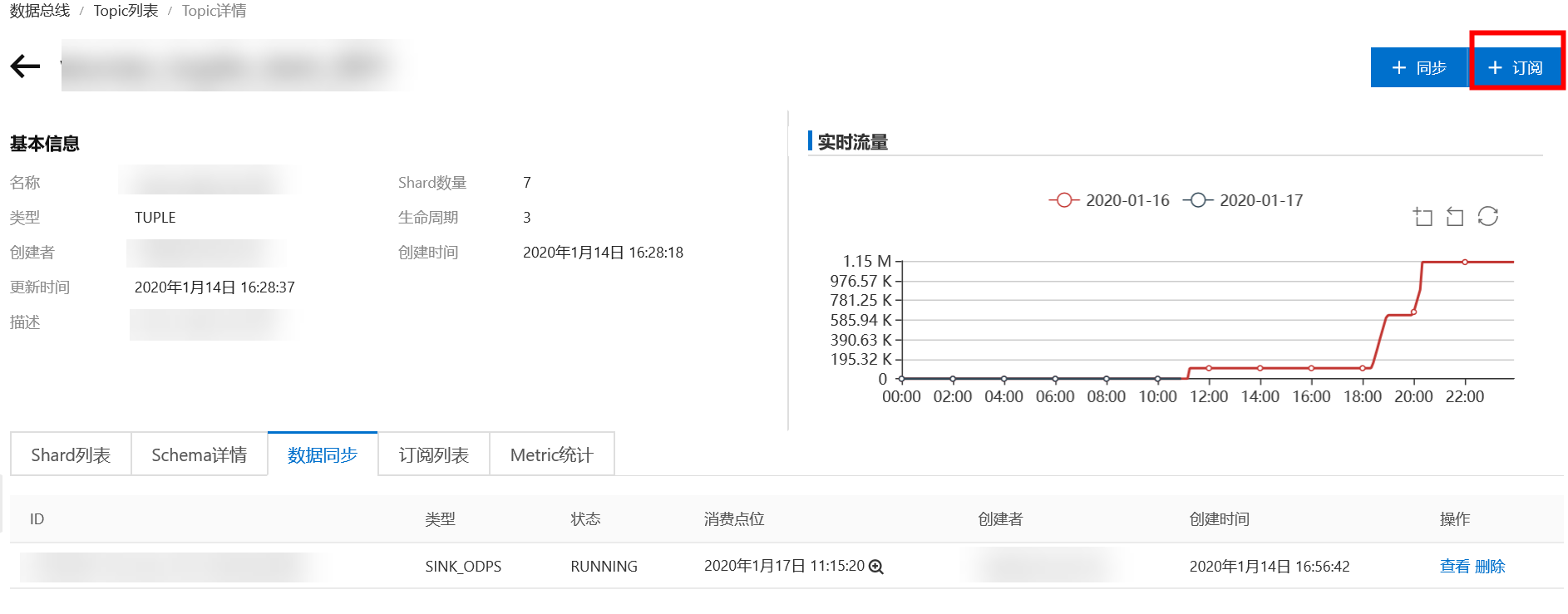
Go to the Topic page and click the subscription button in the upper-right corner.
-
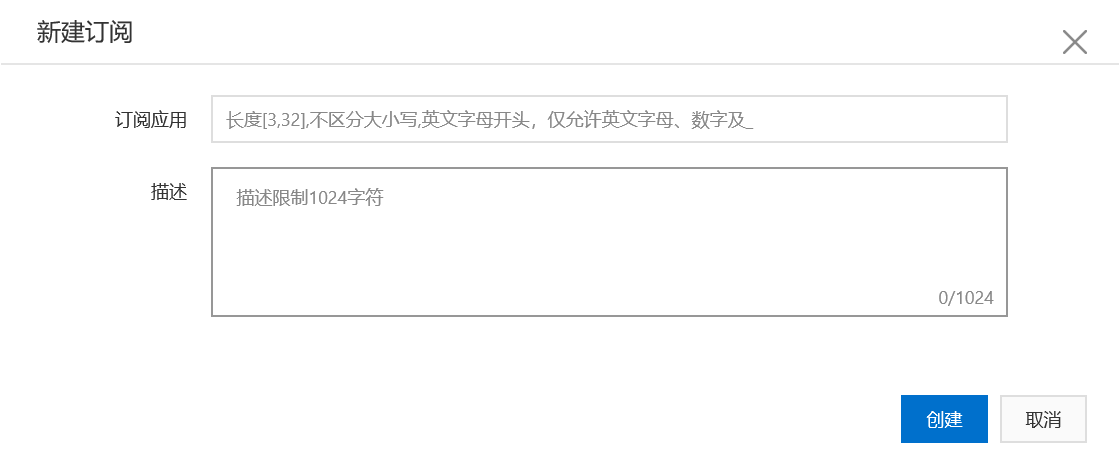
Enter the subscription details and click Create.
Subscription Application: The name of the application for the current subscription.
Description: A detailed description of the current subscription.
-
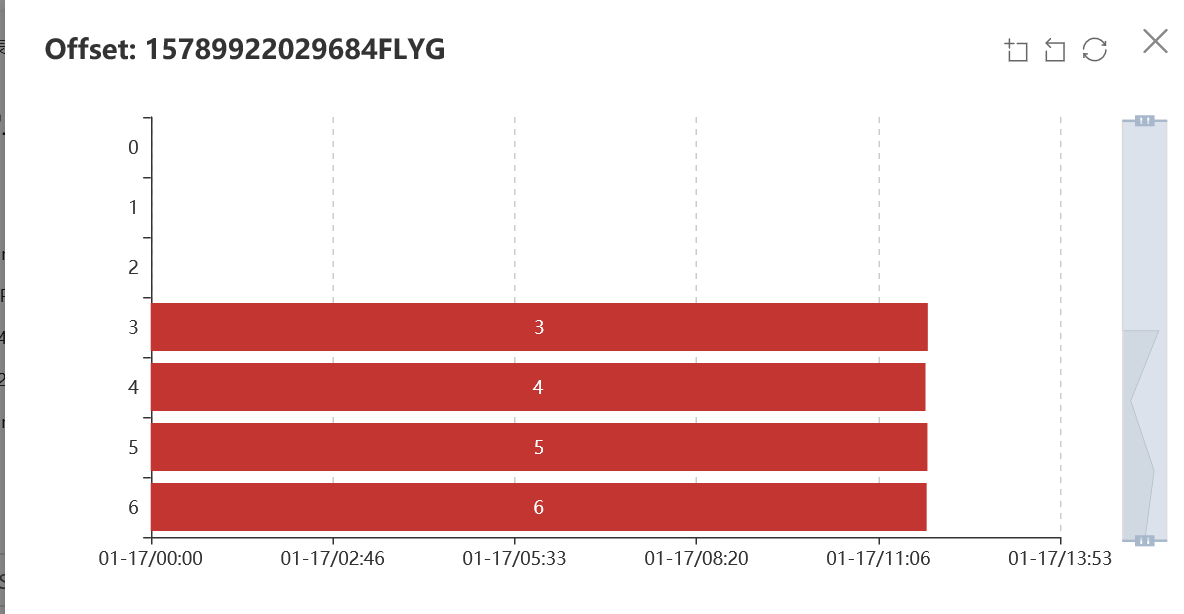
To view the consumption status of all shards, click the search button below the checkpoint.

Sample code
The subscription feature stores checkpoints independently of DataHub's read and write operations. For SDK reference, see Java SDK. You can combine the subscription feature with read operations when you need to store a checkpoint immediately after reading data.
Prerequisites
Configure the AccessKey ID and AccessKey secret for your project using environment variables or a configuration file. See Manage access credentials.
datahub.endpoint=<yourEndpoint>
datahub.accessId=<yourAccessKeyId>
datahub.accessKey=<yourAccessKeySecret>An AccessKey that belongs to an Alibaba Cloud account has permissions to access all APIs. Use a Resource Access Management (RAM) user for API access or daily O&M.
Do not hardcode your AccessKey ID and AccessKey secret in your project code. This practice can lead to an AccessKey leak and compromise the security of all resources in your account.
Reference code
The following example implements checkpoint consumption using the subscription service. The code opens a subscription session, resolves the starting cursor based on the saved checkpoint, reads records in batches, and commits the offset every 1,000 records.
Cursor strategy at startup
Before reading, the code determines where to start based on the checkpoint state:
|
Checkpoint state |
Cursor strategy |
|
No data consumed yet (sequence < 0) |
|
|
Checkpoint exists and data is within retention |
|
|
Checkpoint exists but data has expired ( |
Fall back to |
Checkpoint reset recovery
When a SubscriptionOffsetResetException is thrown, the checkpoint was manually reset via the console. The code refreshes the SubscriptionOffset and resolves a new cursor using the following fallback sequence: SEQUENCE → SYSTEM_TIME → OLDEST.
Tradeoff: Committing offsets after processing (rather than before) guarantees at-least-once delivery. If the consumer crashes between processing a record and committing the checkpoint, those records are re-consumed on restart. Ensure your record processing logic is idempotent.
// This is a sample for checkpoint consumption and for committing checkpoints during consumption.
@Value("${datahub.endpoint}")
String endpoint ;
@Value("${datahub.accessId}")
String accessId;
@Value("${datahub.accessKey}")
String accessKey;
public void offset_consumption(int maxRetry) {
    String projectName = "<YourProjectName>";
    String topicName = "<YourTopicName>";
    String subId = "<YourSubId>";
    String shardId = "0";
    List<String> shardIds = Arrays.asList(shardId);
    // Create a DatahubClient instance.
    DatahubClient datahubClient = DatahubClientBuilder.newBuilder()
            .setDatahubConfig(
                    new DatahubConfig(endpoint,
                            // Specifies whether to enable binary data transfer. This feature is supported by the server from version 2.12.
                            new AliyunAccount(accessId, accessKey), true))
            .build();
    RecordSchema schema = datahubClient.getTopic(projectName, topicName).getRecordSchema();
    OpenSubscriptionSessionResult openSubscriptionSessionResult = datahubClient.openSubscriptionSession(projectName, topicName, subId, shardIds);
    SubscriptionOffset subscriptionOffset = openSubscriptionSessionResult.getOffsets().get(shardId);
    // 1. Get the cursor of the current checkpoint. If the checkpoint has expired or no data has been consumed, get the cursor of the first record within the lifecycle.
    String cursor = "";
    // A sequence number less than 0 indicates that no data has been consumed.
    if (subscriptionOffset.getSequence() < 0) {
        // Get the cursor of the first record within the lifecycle.
        cursor = datahubClient.getCursor(projectName, topicName, shardId, CursorType.OLDEST).getCursor();
    } else {
        // Get the cursor for the next record.
        long nextSequence = subscriptionOffset.getSequence() + 1;
        try {
            // Calling getCursor using SEQUENCE may return a SeekOutOfRange error. This error indicates that the data for the current cursor has expired.
            cursor = datahubClient.getCursor(projectName, topicName, shardId, CursorType.SEQUENCE, nextSequence).getCursor();
        } catch (SeekOutOfRangeException e) {
            // Get the cursor of the first record within the lifecycle.
            cursor = datahubClient.getCursor(projectName, topicName, shardId, CursorType.OLDEST).getCursor();
        }
    }
    // 2. Read data and save the checkpoint. This example reads tuple data and saves the checkpoint for every 1,000 records.
    long recordCount = 0L;
    // Read 1,000 records at a time.
    int fetchNum = 1000;
    int retryNum = 0;
    int commitNum = 1000;
    while (retryNum < maxRetry) {
        try {
            GetRecordsResult getRecordsResult = datahubClient.getRecords(projectName, topicName, shardId, schema, cursor, fetchNum);
            if (getRecordsResult.getRecordCount() <= 0) {
                // No data is returned. The thread sleeps for one second before the next read.
                System.out.println("no data, sleep 1 second");
                Thread.sleep(1000);
                continue;
            }
            for (RecordEntry recordEntry : getRecordsResult.getRecords()) {
                // Consume data.
                TupleRecordData data = (TupleRecordData) recordEntry.getRecordData();
                System.out.println("field1:" + data.getField("field1") + "\t"
                        + "field2:" + data.getField("field2"));
                // After processing the data, set the checkpoint.
                recordCount++;
                subscriptionOffset.setSequence(recordEntry.getSequence());
                subscriptionOffset.setTimestamp(recordEntry.getSystemTime());
                // commit offset every 1000 records
                if (recordCount % commitNum == 0) {
                    // The checkpoint to be committed.
                    Map<String, SubscriptionOffset> offsetMap = new HashMap<>();
                    offsetMap.put(shardId, subscriptionOffset);
                    datahubClient.commitSubscriptionOffset(projectName, topicName, subId, offsetMap);
                    System.out.println("commit offset successful");
                }
            }
            cursor = getRecordsResult.getNextCursor();
        } catch (SubscriptionOfflineException | SubscriptionSessionInvalidException e) {
            // Exit. Offline: The subscription is offline. SessionChange: The subscription is consumed by another client at the same time.
            e.printStackTrace();
            throw e;
        } catch (SubscriptionOffsetResetException e) {
            // The checkpoint is reset. You must get the SubscriptionOffset version information again.
            SubscriptionOffset offset = datahubClient.getSubscriptionOffset(projectName, topicName, subId, shardIds).getOffsets().get(shardId);
            subscriptionOffset.setVersionId(offset.getVersionId());
            // After the checkpoint is reset, you must get the checkpoint again. The method to get the checkpoint must be the same as the one used to reset it.
            // If both sequence and timestamp were set when the checkpoint was reset, you can get the checkpoint using either SEQUENCE or SYSTEM_TIME.
            // If only the sequence was set when the checkpoint was reset, you can only get the checkpoint using SEQUENCE.
            // If only the timestamp was set when the checkpoint was reset, you can only get the checkpoint using SYSTEM_TIME.
            // In most cases, use SEQUENCE first, and then use SYSTEM_TIME. If both methods fail, use OLDEST.
            cursor = null;
            if (cursor == null) {
                try {
                    long nextSequence = offset.getSequence() + 1;
                    cursor = datahubClient.getCursor(projectName, topicName, shardId, CursorType.SEQUENCE, nextSequence).getCursor();
                    System.out.println("get cursor successful");
                } catch (DatahubClientException exception) {
                    System.out.println("get cursor by SEQUENCE failed, try to get cursor by SYSTEM_TIME");
                }
            }
            if (cursor == null) {
                try {
                    cursor = datahubClient.getCursor(projectName, topicName, shardId, CursorType.SYSTEM_TIME, offset.getTimestamp()).getCursor();
                    System.out.println("get cursor successful");
                } catch (DatahubClientException exception) {
                    System.out.println("get cursor by SYSTEM_TIME failed, try to get cursor by OLDEST");
                }
            }
            if (cursor == null) {
                try {
                    cursor = datahubClient.getCursor(projectName, topicName, shardId, CursorType.OLDEST).getCursor();
                    System.out.println("get cursor successful");
                } catch (DatahubClientException exception) {
                    System.out.println("get cursor by OLDEST failed");
                    System.out.println("get cursor failed!!");
                    throw e;
                }
            }
        } catch (LimitExceededException e) {
            // limit exceed, retry
            e.printStackTrace();
            retryNum++;
        } catch (DatahubClientException e) {
            // other error, retry
            e.printStackTrace();
            retryNum++;
        } catch (Exception e) {
            e.printStackTrace();
            System.exit(-1);
        }
    }
}
View the results
When you start the application for the first time, it consumes data from the earliest record. While the application is running, refresh the subscription page in the web console to see the shard checkpoints advance.
If you reset the checkpoint from the console, the consumer detects the change automatically. The client catches the
SubscriptionOffsetResetExceptionexception, callsgetSubscriptionOffsetto retrieve the latestSubscriptionOffsetfrom the server, and resumes consumption from the new checkpoint.
Do not use multiple consumer threads or processes to consume the same shard under the same subscription simultaneously. Concurrent consumers overwrite each other's offsets, leaving the server-side offset in an undefined state. The server throws an OffsetSessionChangedException in this case. Catch this exception in your client, exit the process, and review your application design for logic that may cause duplicate consumption.