Error codes
This topic describes common Dataphin error codes, their causes, and solutions.
Category | Details |
Bbox | |
TaskScheduler | |
OS | |
Project | |
DataProcess | |
ComputeEngine | |
DataSource |
DPN.Bbox.Any
Cause: Internal system error.
Solution: You can submit a ticket or contact Dataphin helpdesk for assistance.
DPN.Bbox.MetaCenterServiceError
The fault occurs because the global meta service is unavailable.
Solution: You can submit a ticket or contact Dataphin helpdesk for assistance.
DPN.Bbox.ModelNotFound
Cause: The system cannot find the model that corresponds to the specified ID.
Solution: You can submit a ticket or contact Dataphin helpdesk for assistance.
DPN.Bbox.ServerError
Cause: Internal system error.
Solution: You can submit a ticket or contact Dataphin helpdesk for assistance.
DPN.Commons.InternalError
Cause: Internal system error.
Solution: You can submit a ticket or contact Dataphin helpdesk for assistance.
DPN.Os.InternalError
Cause: Internal system error.
Solution: You can submit a ticket or contact Dataphin helpdesk for assistance.
DPN.TaskScheduler.Api.AccessTokenNotFound
Cause: Internal system error.
Solution: You can submit a ticket or contact Dataphin helpdesk for assistance.
DPN.DataProcesss.SqlLogicValidationError
Cause: An error occurred during SQL statement validation.
Solution: Verify that the SQL statement is correct.
DPN.TaskScheduler.Global.UncategorizedError
Cause: Internal error in the CDN mapping system.
Solution: You can submit a ticket or contact Dataphin helpdesk for assistance.
DPN.TaskScheduler.Util.GsonDeserializeError
Cause: An error occurred during Gson deserialization.
Solution: You can submit a ticket or contact Dataphin helpdesk for assistance.
DPN.Bbox.AttributeMissing
Cause: The statistical period identifier field of the atomic metric was deleted. As a result, the system cannot find the corresponding logical field using the field ID.
Solution: You can reset the statistical period identifier field for the atomic metric. For more information, see Create an atomic metric.
DPN.Bbox.CatalogNotFound
Cause: The common English name of the business segment or project is incorrect.
Solution: Check the SQL code for misspellings in the common English name of the business segment or project.
DPN.Bbox.DimensionNotFound
Cause: The system cannot find the dimension that corresponds to the specified ID.
Solution: In the Standard Modeling module, you can search for the dimension by its English name to check whether it exists.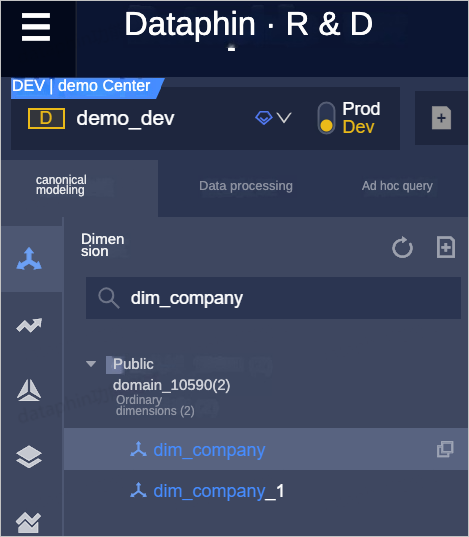
If the dimension is deleted, you can modify the current task object and submit or publish it again.
If the dimension is unpublished, you can publish or submit the dimension again.
If the error persists after you perform these steps, you can submit a ticket or contact Dataphin helpdesk for assistance.
DPN.Bbox.FieldNotFound
Cause: The system cannot find the field that corresponds to the specified name.
Solution: Check whether the field exists in the corresponding model. You can search for the table in Asset Map to view its details and check whether the field from the error message exists. For more information about how to search for a table, see Search for data.
DPN.Bbox.IllegalSql
Cause: The SQL code segment is invalid.
Solution: Check whether the SQL segment in the error message is valid within the entire SQL statement. For more information about the MaxCompute syntax that Dataphin supports, see Common commands.
DPN.Bbox.LogicModelException
Cause: The definition of the logical table violates the rules.
Solution: You can modify the model based on the error message.
DPN.Bbox.MetadataNotFound
Cause: The system cannot find the metadata that corresponds to the specified table name.
Solution: Ensure that you enter the correct table name. You can search for the table in Asset Map to view its details and check whether the table exists and whether its name is spelled correctly. For more information about how to search for a table, see Search for data.
DPN.Bbox.PublishFail
The job failed to publish.
Solution: You can troubleshoot the issue based on the error message in the publish record.
DPN.Bbox.UnsupportedCatalogVariable
Cause: The common English name of the business segment or project, which is automatically used as a variable, is incorrect.
Solution: You can modify the variable name in the SQL statement to the common English name of the business segment or project. The placeholder for the common English name of a project is ${Project Common English Name}. The placeholder for the common English name of a business segment is ${Business Segment Common English Name}.
DPN.ComputeEngine.ConfigRepeat
Cause: The configuration of the data source that you want to create or edit is identical to an existing configuration.
Solution: You can modify the data source configuration.
DPN.ComputeEngine.MaxComputeAkNotMatchCurrentTenant
The AccessKey of the MaxCompute data source does not belong to the Alibaba Cloud account that owns the Dataphin instance. Check whether the AccessKey of the MaxCompute data source is configured correctly.
The MaxCompute project and the Dataphin instance must belong to the same Alibaba Cloud account.
DPN.ComputeEngine.MaxComputeAkQueryMainAccountError
Cause: An error occurred when retrieving the Alibaba Cloud account for the AccessKey of the MaxCompute data source.
Solution: Check whether the AccessKey of the MaxCompute data source is configured correctly.
DPN.DataSource.UrlSsrfCheckFailed
Cause: Access to the internal Dataphin system is not allowed.
Solution: You can check the URL configuration of the data source.
DPN.DataProcess.NodeOutputNameAlreadyExistWithNodeName
Cause: The output name of the node already exists.
Solution: You can modify the output name of the node. For more information, see Configure basic information for a node.
DPN.Os.CatalogNotFound
Cause: The system cannot find the catalog specified before the table name.
Solution: You can check the following items:
Check whether the Dataphin project or business segment exists.
Check the variable reference format in the query statement:
${Project Common English Name}.Physical Tableor${Business Segment Common English Name}.Logical Table.
DPN.Os.ColumnAmbiguous
Cause: The field in the SQL code is ambiguous.
Solution: You can add the table name before the field name or modify the SQL code.
DPN.Os.ColumnAuthCheckFailed
Cause: You do not have permission to access the field.
Solution: You can request permissions on the field. For more information, see Request, renew, and release table permissions.
DPN.Os.ColumnNotFound
Cause: The system cannot find the specified field.
Solution: You can analyze the cause of the error based on the following scenarios:
If the error is reported when you submit the node, check whether the table exists in the development environment.
If the error is reported when you publish the node, check whether the table exists in the production environment.
DPN.Os.SqlParserFailed
Cause: SQL parsing failed.
Solution: Check the SQL statement for syntax errors. For more information about the MaxCompute syntax that Dataphin supports, see Common commands.
DPN.Project.DisplayNameDuplicated
Cause: The name of the project that you want to create or edit is identical to an existing project name.
Solution: You can modify the project name. For more information, see Add a project member.
DPN.Project.NoPermission
Cause: The current member does not have administrative permissions on any project.
Solution: You can contact a super administrator or another project administrator to add the member as an administrator of a project.
DPN.Project.ParameterError
Cause: Invalid project parameter.
Solution: Check the error parameter returned by the system. If you need help, you can submit a ticket or contact Dataphin helpdesk for assistance.
DPN.Project.ProjectComputeEngineValidateFailed
Cause: The data source failed to be validated during project creation.
Solution: You can analyze the cause of the error based on the following scenarios:
Check the connectivity of the data source. For more information, see Network connectivity solutions.
Check whether the data source is configured correctly.
DPN.TaskScheduler.Api.RequestError
Cause: An error occurred when sending a remote request.
Solution: This may be a server-side network issue. You can retry the operation or contact Dataphin helpdesk for assistance.
DPN.TaskScheduler.Client.ApiError
Cause: An error occurred when calling a CDN mapping system API. For more information, see the error details.
Solution: You can find the solution based on the error code in the error details. If you need help, you can contact Dataphin helpdesk for assistance.
DPN.TaskScheduler.Task.TaskToRerunNotFinished
Cause: You cannot rerun an instance that is in the running state.
Solution: You can rerun the instance after it finishes running. For example, you can rerun an instance if its status is successful or failed.
DPN.TaskScheduler.Node.NodeParamParseError
Cause: The node parameter settings failed to be parsed. For example, KeyA=$KeyB
Solution: You can check the node parameter settings and make sure that the parameter values can be correctly parsed.
DPN.TaskScheduler.Node.IllegalNodeIdFormat
Cause: The format of the provided node ID is incorrect. It should be [n_Number].
Solution: You can check the node ID format and initiate the call again. If the same error persists, you can submit a ticket or contact Dataphin helpdesk for assistance.
DPN.TaskScheduler.Node.NodeDependencyCycleDetected
Cause: A circular dependency exists in the upstream nodes.
Solution: You can check for and remove the circular dependency from the upstream dependencies before you submit or publish the node again.
DPN.TaskScheduler.Node.NodeNotFoundByIdAndTenantId
Cause: The system cannot find the node that corresponds to the specified node ID.
Solution: Check whether the node ID is correct, or whether the corresponding node has been deleted or unpublished.
DPN.TaskScheduler.Node.NodeNotFoundByNodeId
Cause: The system cannot find the node that corresponds to the specified node ID.
Solution: Check whether the node ID is correct, or whether the corresponding node has been deleted or unpublished.
DPN.TaskScheduler.Node.NodeNotFoundByOutputName
Cause: The system cannot find the node that corresponds to the specified output name.
Solution: Check whether the output name of the node is correct, or whether the corresponding node has been deleted or unpublished.
DPN.TaskScheduler.Node.NodeNotFoundByOutputNameAndTenantId
Cause: The system cannot find the node that corresponds to the specified output name.
Solution: Check whether the output name of the node is correct, or whether the corresponding node has been deleted or unpublished.
DPN.TaskScheduler.Node.NodeOutputNameEmpty
Cause: The output name of the node is empty.
Solution: Specify an output name for the node. For SQL tasks, the recommended output name format is [project_name].[table_name].
The output name of a node must be unique in the system.
DPN.TaskScheduler.Node.NodeOutputNameOccupied
Cause: The specified output name for the node is already in use.
Solution: The specified output name for the node is already used by another task. For SQL tasks, the recommended format for the output name is [ProjectName].[TableName].
The output name of a node must be unique in the system.
DPN.TaskScheduler.Node.NodeToDeleteContainsDownstreams
Cause: A downstream dependency was detected for the node that you are trying to delete.
Solution: You can remove the dependency of the downstream node on the current node and retry the operation.
DPN.TaskScheduler.Node.OutputNameToUpdateContainsDownstream
Cause: A downstream dependency was detected for the current output name when you tried to modify it.
Solution: You can remove the dependency of the downstream node on the current output name and retry the operation.
DPN.TaskScheduler.Resource.ResourceNotFoundByResourceCode
Cause: The system cannot find the resource that corresponds to the specified name. Possible causes include an invalid resource name, a deleted resource, or an unavailable resource service.
Solution: Make sure that the resource exists in the current project and that the resource reference format is correct. The format for a resource reference is @resource_reference{"[resourcecode]"};. If the issue persists, you can contact Dataphin helpdesk for assistance.
DPN.TaskScheduler.Task.IllegalTaskIdFormat
The format of the specified Task ID is invalid.
Solution: Check whether the instance ID is in the [t_Number] format and initiate the call again.
DPN.TaskScheduler.Task.TaskNotFoundByTaskId
Cause: The system cannot find the instance that corresponds to the specified instance ID. Check whether the instance has been deleted or whether the provided parameter is correct.
Solution: Confirm that the instance exists before you proceed. If you are performing the operation on a page, you can refresh the page and try again. The instance retention policies are as follows:
The retention period for recurring instances and their operational logs is 15 days.
One-time instances, data backfill instances, and their operational logs are retained permanently.
DPN.TaskScheduler.Task.TaskNotFoundByTaskIdAndTenantId
Cause: The system cannot find the instance that corresponds to the specified instance ID. Check whether the instance has been deleted or whether the provided parameter is correct.
Solution: Confirm that the instance exists before you proceed. If you are performing the operation on a page, you can refresh the page and try again. The instance retention policies are as follows:
The retention period for recurring instances and their operational logs is 15 days.
One-time instances, data backfill instances, and their operational logs are retained permanently.
DPN.TaskScheduler.Task.TaskRunning
Cause: You cannot rerun an instance that is in the running state.
Solution: You can rerun the instance after it finishes running. You can rerun only instances that are in the successful or failed state.
DPN.TaskScheduler.Task.TaskToKillHasFinished
Cause: You cannot stop an instance that is not in the running state.
Solution: The instance has finished running and does not need to be stopped.
DPN.TaskScheduler.Task.TaskToResumeNotPaused
Cause: You cannot resume an instance that is not in the paused state.
Solution: The job is not paused, so resuming scheduling is not necessary.
DPN.TaskScheduler.Tenant.DatasourceNotFoundById
Cause: The system cannot find the data source that corresponds to the specified ID. The data source may have been deleted.
Solution: Check whether the data source exists, or contact the node owner to check the datasource config of the node.
DPN.TaskScheduler.Tenant.FetchProjectDatasourceError
Cause: Failed to retrieve the project data source. The Dataphin data source service may be temporarily unavailable.
Solution: Failed to retrieve the project data source. The Dataphin data source service may be temporarily unavailable. You can contact Dataphin helpdesk for assistance.
DPN.TaskScheduler.Tenant.FetchTenantDatasourceError
Cause: Failed to retrieve the project data source. The Dataphin data source service may be temporarily unavailable.
Solution: Failed to retrieve the project data source. The Dataphin data source service may be temporarily unavailable. You can contact Dataphin helpdesk for assistance.
DPN.TaskScheduler.Tenant.InvalidTenantId
Cause: The current tenant is inactive. This may be because your subscription has expired or you have not activated Dataphin.
Solution: You can activate or renew Dataphin. For more information, see Activate Dataphin or Renewal.
DPN.TaskScheduler.Node.NodeParamCycleReferenceDetected
Cause: A circular dependency exists in the node parameter settings, such as KeyA=$KeyB; KeyB=$KeyA or bizdate=$bizdate.
Solution: Check whether statements such as KeyA=$KeyB; KeyB=$KeyA or bizdate=$bizdate exist in the node parameter settings.