Add traffic mirror source
This topic explains the process of adding a traffic mirror source for Python third-party packages.
Permission description
Installation, upgrade, or deletion of traffic mirror sources is restricted to super administrators and system administrators only.
Procedure
Navigate to the Dataphin home page and select the top menu bar Management Center with a single click.
To access the Traffic Mirror Source dialog box, follow the steps below:
Single click System settings -> Python third-party packages -> Traffic Mirror Source -> Add Traffic Mirror Source.
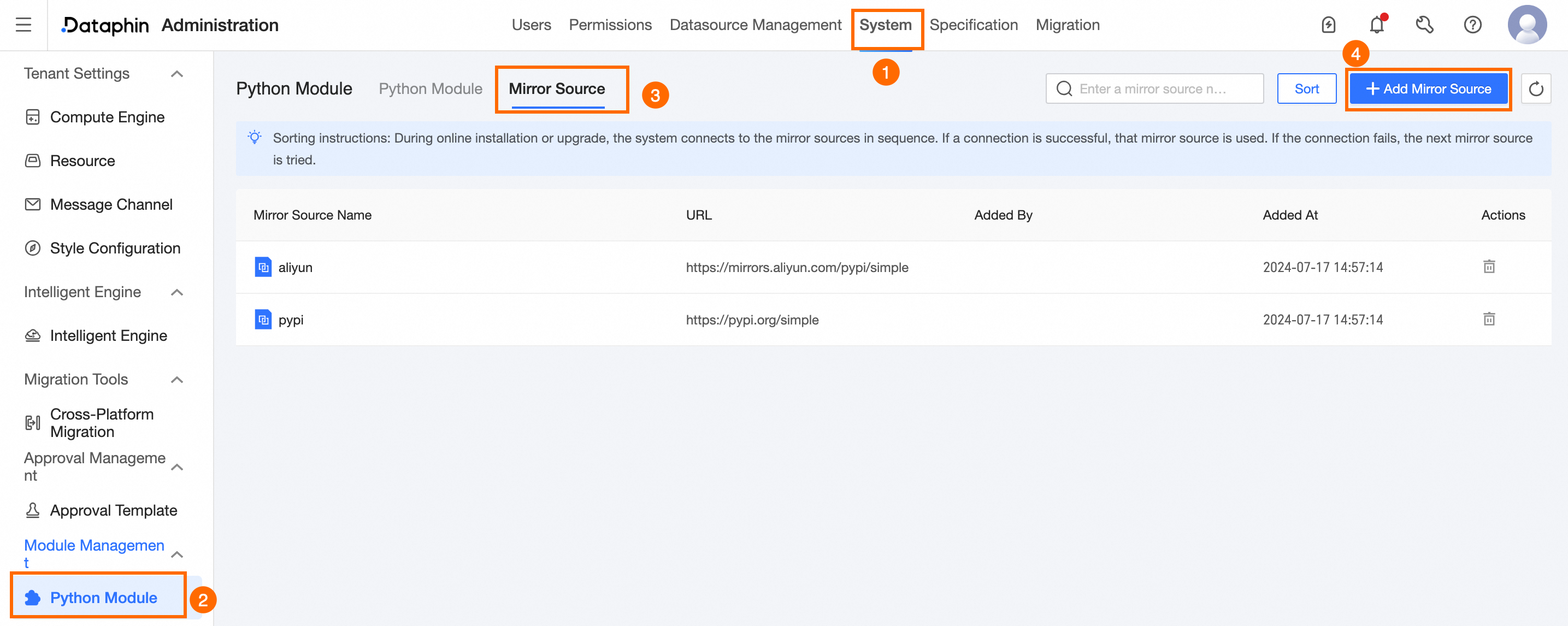
In the New Traffic Mirror Source dialog box, set the required parameters as follows:
Parameter
Description
Traffic Mirror Source Name
Specify the name for the traffic mirror source, limited to 64 characters.
URL
Provide a valid URL for the traffic mirror source.
NoteMaintain at least one traffic mirror source to ensure proper operation.
The default traffic mirror source is pre-approved in the network whitelist, eliminating the need for additional whitelist configuration.
Click Connectivity Test to verify the URL's connectivity with Dataphin.
Upon successful testing, click OK to finalize the addition of the traffic mirror source.
What to do next
Once the traffic mirror source is added, you can proceed with the online installation of Python modules on the Python Module page within Python third-party packages. For more information, see Install Python Module.