Customize resources for Alibaba Blink in real-time mode
Resource customization for real-time jobs is an expert mode (BETA) that provides fine-grained resource configuration for real-time computing in Flink. This new resource configuration mode is available in fully managed Flink and lets you control job resources with high granularity to meet throughput demands. The system automatically runs jobs in native Kubernetes (K8s) mode based on your resource configurations. The system also determines the specifications and number of technology managers (TMs) based on slot specifications and job concurrency. This topic describes how to customize resources for Alibaba Blink real-time jobs in Dataphin.
Access the Alibaba Blink resource customization page
Follow the instructions in Data Development entry point to go to the Data Development page.
On the Data Development page, follow the steps shown in the figure below to open the custom resource configuration page for the BLINK_SQL task.

Configuration details
The resource configuration page displays a topology graph. Each box in the graph represents a computing node that you can configure independently. A group represents nodes that can be placed on a single machine for computation. This placement avoids network data transfer and improves performance.

The system displays the recommended resource configuration by default.
Configure group runtime parameters
Click the
 icon in the upper-right corner of the group that you want to configure, and then configure the parameters in the Customize Group Runtime Parameters dialog box.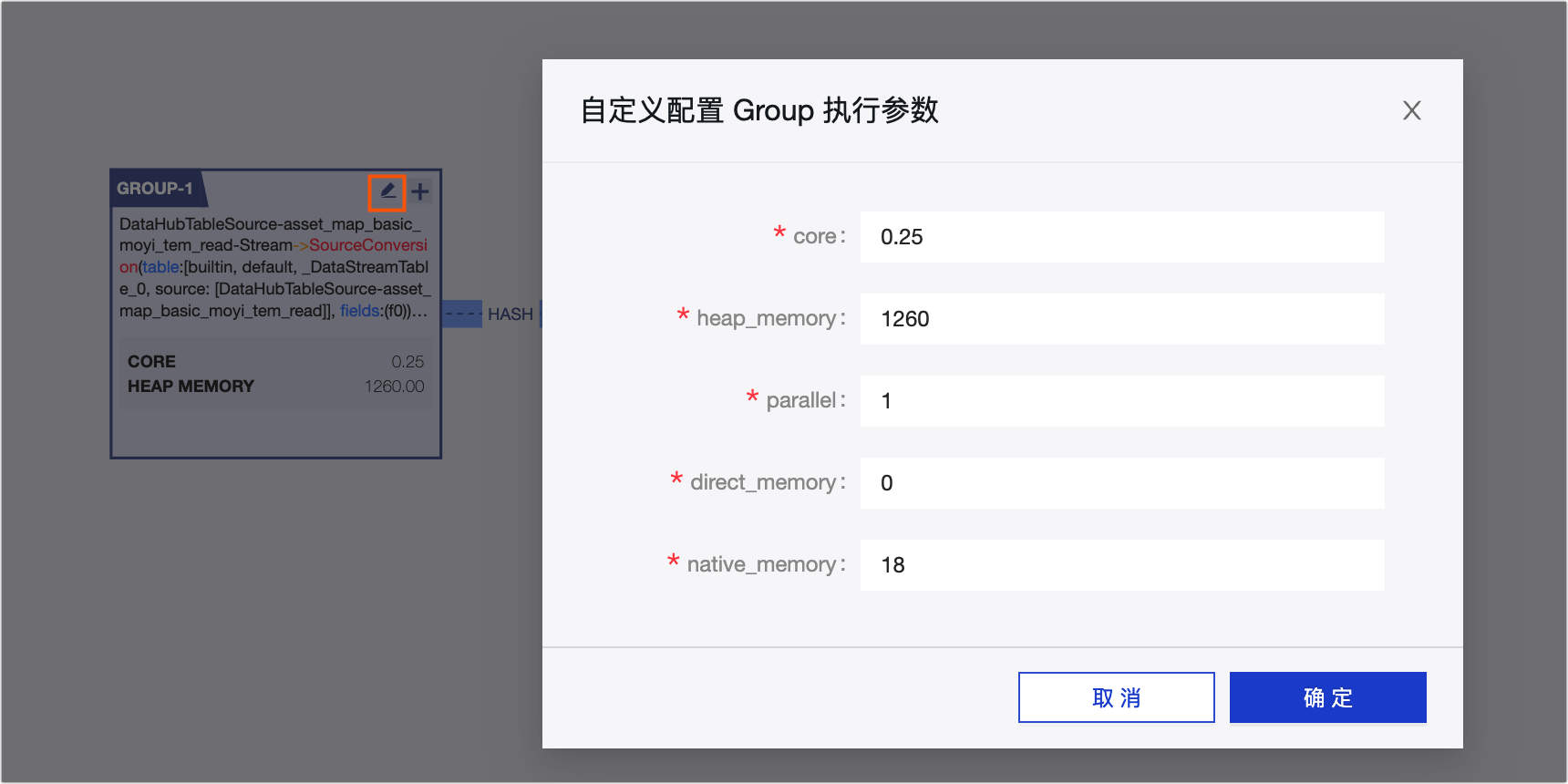
Parameter
Description
core
Typically, set core to 0.25. This means one CPU can support four concurrent threads. Therefore, the value of core cannot exceed 1.
heap_memory
The unit is MB. This is heap memory used by the Java application.
You can control the size of heap_memory and its internal components using a series of Java Virtual Machine (JVM) command-line parameters. A typical Blink program requires some heap_memory overhead, such as for program caches. You can set the size based on the scale of your program.
parallel
The number of concurrent threads. Select a suitable number to run your job. A larger value is not always better. A larger value means you request more resources, which can suppress performance. Typically, a simple computing node can process 2,000 to 4,000 data entries per second.
ImportantIf the source is `tt`, the queue size of the `tt` source determines the upper limit for `parallel`. Do not exceed this number, or the program will report an error.
direct_memory
The unit is MB. Direct memory is not part of the JVM runtime data area, nor is it a memory region defined in the Java Virtual Machine Specification. However, this memory is used frequently and can also cause an OutOfMemoryError. If your program uses iGraph or Swift, set this to an appropriate size, such as 16 MB to 32 MB.
Java New Input/Output (NIO) introduced an I/O method based on channels and buffers. Direct memory can use a native function library to directly allocate off-heap memory. A DirectByteBuffer object stored in the Java heap then acts as a reference to this memory for operations. This can significantly improve performance in some scenarios because it avoids copying data back and forth between the Java heap and the native heap.
native_memory
The unit is MB. No specific parameter controls the size of native memory. Its size depends on the operating system process limit (3 GB to 4 GB for 32-bit systems, with variations across systems), the size of the generated Java bytecode, the number of threads created, the size of Java object state information for garbage collection (GC), and some third-party packages.
Native memory stores the following four types of information:
State data for managing the Java heap (for GC).
Java Native Interface (JNI) calls, also known as the Native Stack.
The Just-In-Time (JIT) compiler uses native memory during compilation. The JIT input (Java bytecode) and output (executable code) are also stored in native memory.
NIO direct buffers.
After you configure the parameters, click OK.
Configure operator runtime parameters
Follow the steps shown in the figure to open the Customize Operator Runtime Parameters dialog box and configure the parameters.
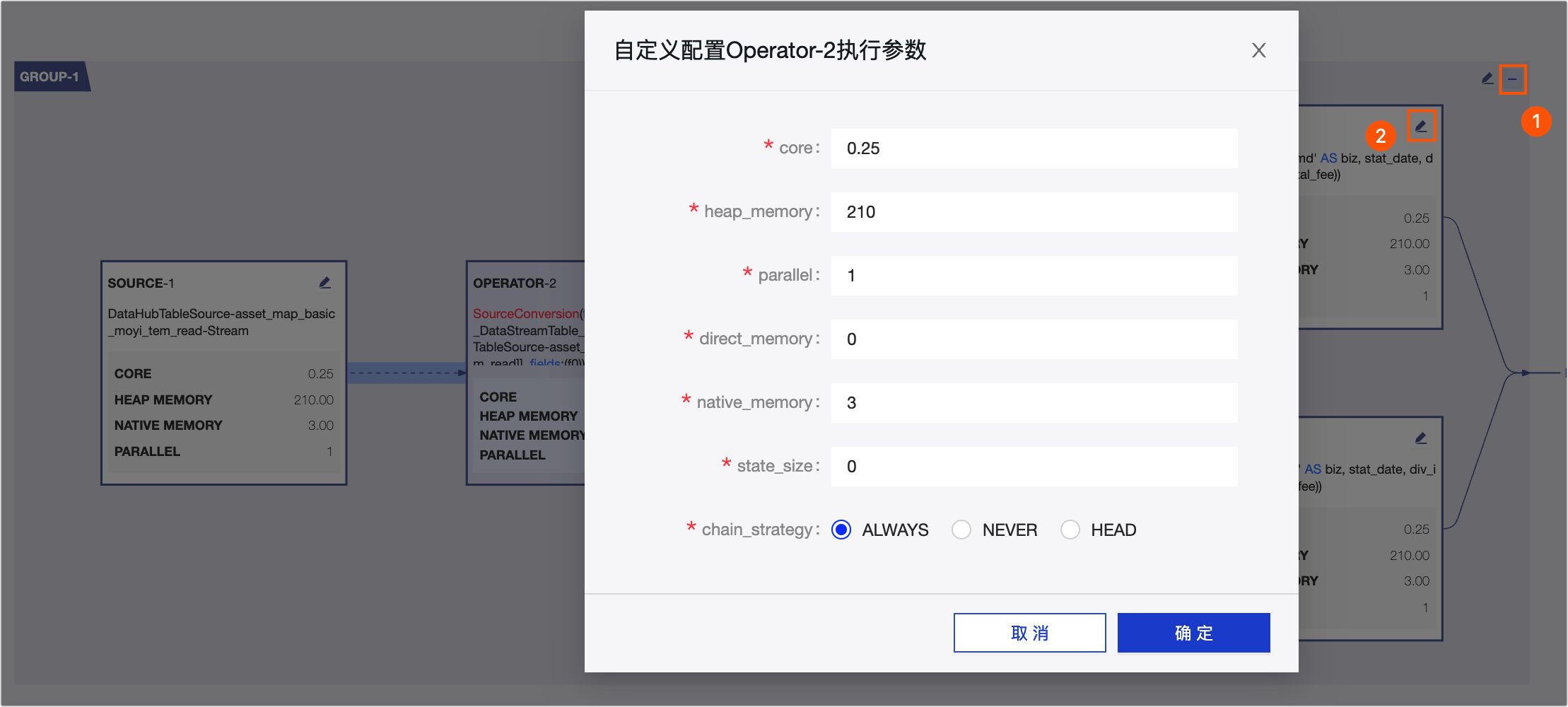
For descriptions of the core, heap_memory, parallel, direct_memory, and native_memory parameters in the Customize Operator Runtime Parameters dialog box, see Configure group runtime parameters. The following table describes only the state_size and chain_strategy parameters.
Parameter
Description
state_size
The size of the state data used during job execution. The default value is 0.
chain_strategy
The chaining strategy for multiple nodes. Dataphin supports the following chaining strategies:
Always: The default parameter. The node is deployed on the same machine as other nodes, with no special requirements.
Never: The node is not placed on the same machine as other nodes and requires a separate deployment.
Head: The node can be placed on the same machine as other nodes, but only as the head node of a group.
ImportantHead and Never are rarely used. The default is Always.
After you configure the parameters, click OK.