Configure runtime parameters for real-time templates
Dataphin lets you configure runtime parameters for real-time templates. Real-time jobs created from these templates inherit the configured parameters. This topic describes how to configure runtime parameters for real-time templates.
Procedure
Refer to Data Studio entry point and then navigate to the Data Studio page.
On the Data Development page, select the real-time template whose historical versions you want to view and manage to open its version management page.
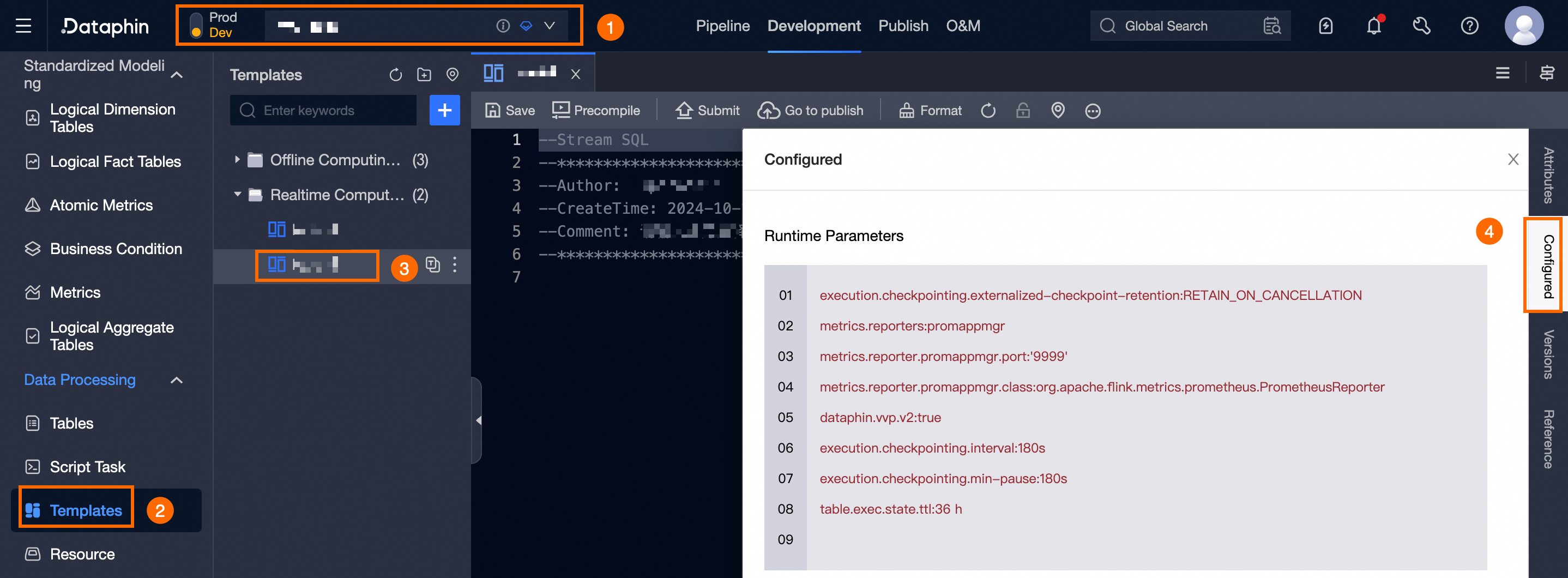
In the Configuration dialog box, you can configure the runtime parameters.
The default runtime parameters for real-time templates are as follows:
Ververica Flink real-time computing engine
execution.checkpointing.externalized-checkpoint-retention: RETAIN_ON_CANCELLATION
metrics.reporters: promappmgr
metrics.reporter.promappmgr.port: '9999'
metrics.reporter.promappmgr.class: org.apache.flink.metrics.prometheus.PrometheusReporter
dataphin.vvp.v2: true
execution.checkpointing.interval: '180s'
execution.checkpointing.min-pause: '180s'
table.exec.state.ttl: 36 h
Parameter merge and priority rules:
Jobs created from a template use the template's runtime configuration by default.
The parameters for a new job are a merge of the default job runtime parameters and the project's job runtime parameters.
The parameters for a new template are a merge of the default job runtime parameters and the project's job runtime parameters.
If a parameter exists in both the default and project configurations, the project's parameter value overwrites the default value.
Jobs created from a template inherit its parameters. If the template's parameters are not customized, the job uses the standard parameters for a new job. If the template's parameters are customized, the job uses those custom parameters.
When you apply a new version of a template to a job, existing parameter values are preserved and new parameters are added.
Click OK to save the runtime parameter settings.