Create an API with service orchestration
Service orchestration lets you combine multiple APIs into a new, single API. This topic describes how.
Step 1: Select an API creation method
In the top navigation bar of the Dataphin homepage, choose Service > API Development.
In the upper-left corner, select a service project. In the left-side navigation pane, click API Service. On the API page, click + New API.
In the New API dialog box, select Composite API.
Step 2: Configure API parameters
On the New API page, configure the parameters.
Parameter
Description
Basic information
API name
The API name must follow these rules:
Must contain only Chinese characters, letters, digits, or underscores (_).
Must be 4 to 100 characters in length.
Must start with a letter.
Must be globally unique.
Operation type
Only GET is supported.
GET: Requests a specified resource from the server.
Data update frequency
Defines how often the data returned by the API is updated. This helps callers understand data freshness. Supported values are Daily, Hourly, Minutely, and Custom. If you select Custom, you can enter up to 128 characters.
API group
Select an API group configured in the current project. To create one, see Create a service group.
Mode
The API supports Basic and Dev-Prod modes.
In Basic mode, the development, submission, and publishing phases all access the production database.
In Dev-Prod mode, the development and submission phases access the development database, while the publishing phase accesses the production database.
Description
Enter a brief description of the API. The description can be up to 128 characters long.
Protocol
The protocol for the data API. HTTP and HTTPS are supported.
HTTP: The Hypertext Transfer Protocol.
HTTPS: If the gateway is an Alibaba Cloud API Gateway instance (dedicated or shared), you can select HTTPS. Make sure that the SSL certificate for the custom domain is valid to prevent call failures. To configure an SSL certificate, choose Platform Management Network Configuration and go to the Network Configuration page.
Timeout
The maximum duration for an API call. If an API call exceeds the specified timeout, an error is reported. This helps you identify and handle exceptions in API calls. For more information about how to view exceptions, see Manage and Monitor API.
Cache settings
You can Enable or Disable caching. If enabled, you must configure the Cache Duration. The default value is 300 seconds. You can set it to an integer from 60 to 1,000,000.
Version number
Enter a unique version number (up to 64 characters) for the API. Version numbers are used to compare different API configurations.
Return type
The default value is JSON.
Service orchestration
API reference
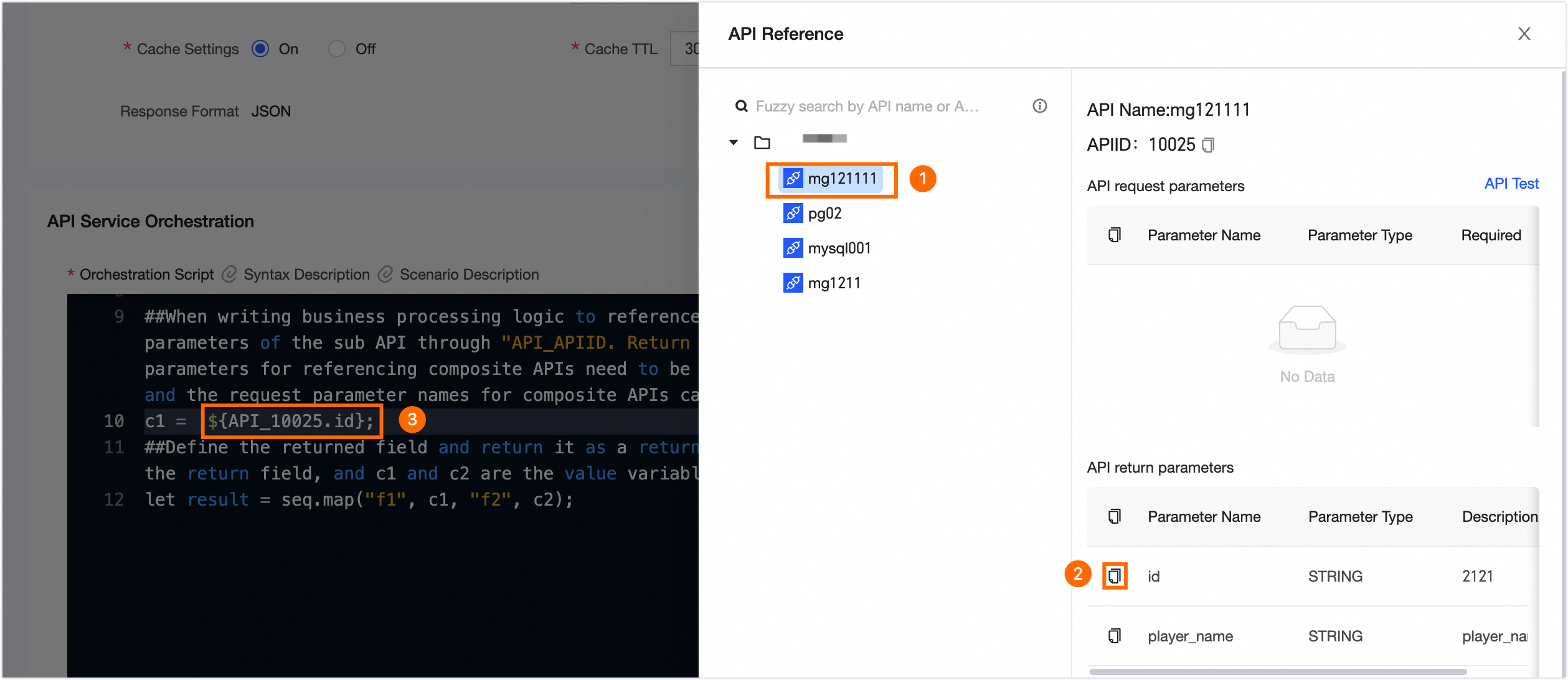
In the API Reference pane, you can view the name, API_ID, request parameters, and return parameters of a sub-API. Click the Copy icon to copy the API_ID and field names. Click API Test to verify the sub-API's parameters and prevent reference failures.
You can follow the instructions in the following figure to quickly add return parameters for the script.
 Note
NoteA composite API can reference another API only if the following conditions are met:
You must have personal use permission for the API. For more information, see Manage API permissions.
The API cannot be a composite API; it must be a direct-connect API, logical table API, registered API, or model API.
The API uses the GET request method and is a published API in synchronous invocation mode.
Orchestration script
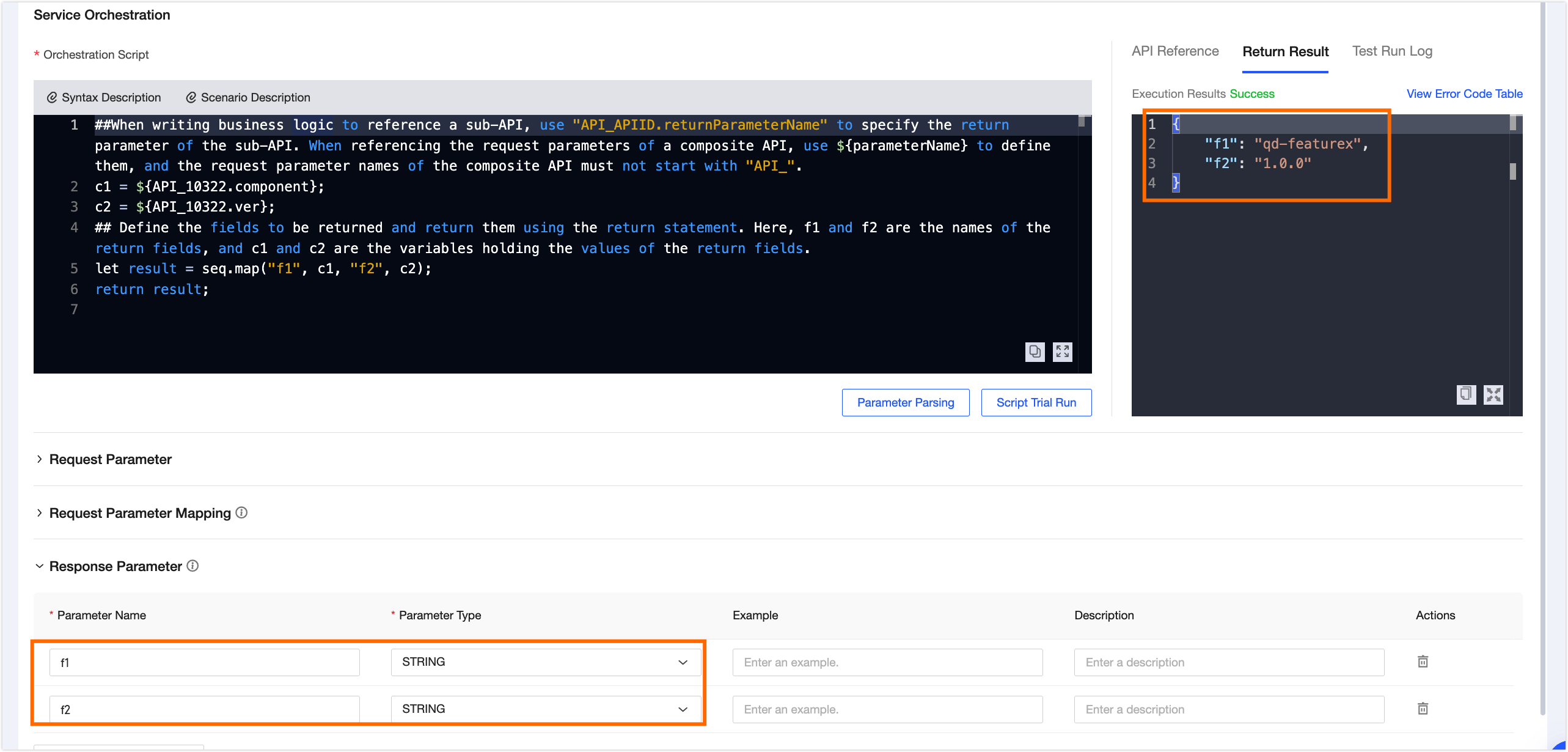
In the script editor, write the script based on the system prompts. Replace the parameters in ${} with the names of the return parameters from the sub-APIs, and then enter the defined fields (for example, f1 and f2) in the return parameter list.
Script syntax:
AviatorScript 5.0 is supported. When writing scripts, refer to the programming guide for version 5.0.
AviatorScript supports only single-line comments starting with
##. To comment out multiple lines, add##at the beginning of each line.In AviatorScript, you must assign a value when you define a variable.
a = 1;let p = 2;When you write business logic that references a sub-API, use
API_APIID.return_parameter_nameto specify the sub-API's return parameter. To reference the composite API's request parameters, use${parameter_name}. A composite API's request parameter name cannot start withAPI_.c1 = ${API_APIID.c1};c2 = ${API_APIID.c2};c3 = c1 + c2 + ${p3};Define the fields to be returned by the composite API and use a return statement. In the following example,
f1andf2are the names of the return fields, andc1andc2are the variables that store their values.let result = seq.map("f1", c1, "f2", c2);return result;Script scenarios:
Scenario 1: Call multiple APIs and return their results together.
## Write a script based on your business needs. Use "API_APIID.return_parameter_name" to specify the sub-API's return parameter.
c1 =${API_00001.c1}
c2 = ${API_00002.c1}
let result = seq.map("f1", c1, "f2", c2);
return result;
Scenario 2: Call different APIs based on a condition.
## Write business logic to call different APIs and get different results based on a condition.
c1='';
if (${p3} == "linlin"){
## Use the 'number' value returned by API_00001 as a return parameter for the composite API.
c1=${ API_00001.number}; }
else {
## Use the 'number' value returned by API_00002 as a return parameter for the composite API.
c1= ${API_00002.number}; }
let result = seq.map("f1", c1);
return result;
Scenario 3: Call multiple APIs and perform calculations on their return values.
## Write business logic to calculate the sum and average of the return values from multiple APIs.
## Calculate the sum of the 'number' values returned by API_00001 and API_00002, and use the result as a return parameter for the composite API.
total = ${API_00001.number} + ${API_00002.number};
## Calculate the average of the 'number' values returned by API_00001 and API_00002, and use the result as a return parameter for the composite API.
average = (${API_00001.number} + ${API_00002.number}) / 2;
let result = seq.map("f1", total,"f2",average);
return result;
Parse parameters
After you finish writing the script, click the Parse Parameters button to validate the syntax and parse the request parameter mappings for the referenced sub-APIs. If you modify the script, you must parse it again.
Script trial run
You must first add the parameters defined in the script editor (such as f1 and f2) to the return parameter list. Then, click Test Run. In the Request Parameter Input dialog box, enter test values and click OK. You can view the actual SQL statements executed during the test run in the run log.
Request parameters
Parameter name
The parameter exposed to the user who calls the API. The name cannot start with API_ and can be up to 128 characters long.
Parameter type
Supported types are Array(int), Array(string), DOUBLE, FLOAT, STRING, DATE(yyyy-MM-dd HH:mm:ss), BOOLEAN, INT, LONG, SHORT, and BIGDECIMAL. Select the type that matches the bound field for the parameter name.
Example
Enter an example value for the request parameter to help developers understand its usage.
Description
Enter a brief description of the request parameter. The description can be up to 1,000 characters long.
Required
Specifies whether the parameter is required. If a required parameter is omitted from a call, the call fails.
Request parameter mappings
Map the request parameters of the composite API to those of the sub-APIs. During a call, the system uses these mappings to pass the correct input values to each sub-API. You must map all required sub-API parameters.
Return parameters
Parameter name
The return parameter name must be the same as the return field name defined in the script. Otherwise, the corresponding field value will not be returned.
Parameter type
The supported types include DOUBLE, FLOAT, STRING, DATE(yyyy-MM-dd HH:mm:ss), BOOLEAN, INT, LONG, SHORT, BIGDECIMAL, Array(int), and Array(string). Select the type that corresponds to the field bound to the parameter.
Example
Enter an example value for the return parameter to help developers understand its usage. The example can be up to 1,000 characters long.
Description
Enter a brief description of the return parameter. The description can be up to 1,000 characters long.
Associated row-level permissions
Row-level permissions are automatically inherited from referenced sub-APIs that have this feature enabled. This section lists the inherited permissions.
Click Submit to create the API.
Next steps
After you create an API, you must test it and publish it to the data service market so that it can be called by applications. For more information, see Test and publish an API.
To delete the API, manage its versions, transfer ownership, or perform other operations, see Manage APIs.