Data Service Marketplace
The Data Service Marketplace displays information about all APIs published in the service projects in your account. You can apply for permissions, view documentation, and perform other operations. This topic introduces the Data Service Marketplace.
Prerequisites
You must purchase the data service feature.
Permissions
Project administrators and development users of a service project can create APIs.
Data service marketplace
In the top navigation bar of the Dataphin homepage, choose Service > API Marketplace.
The API asset market page opens by default. On this page, you can view details about each API and perform related operations. The following table describes the sections of the page.
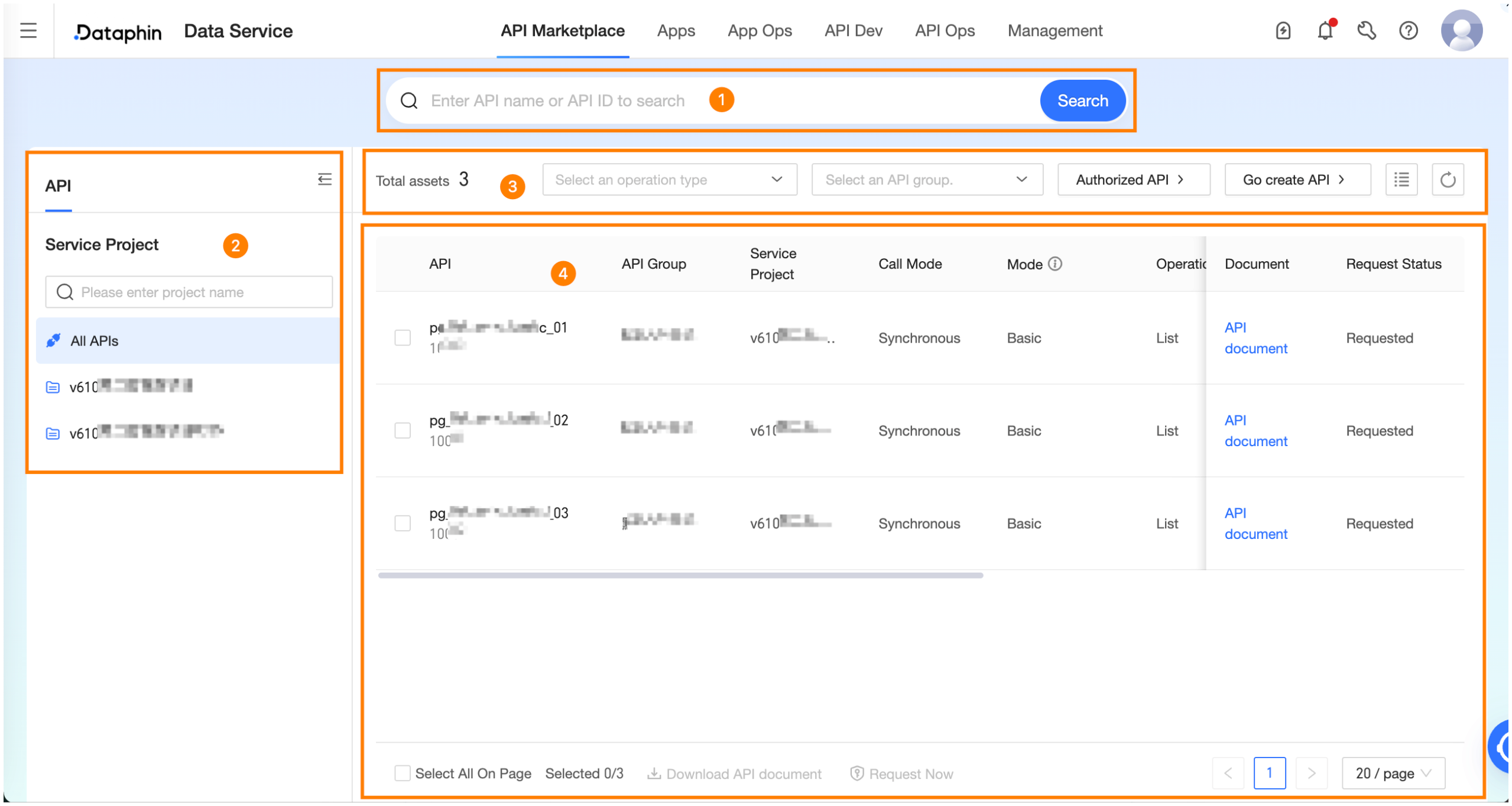
Area
Description
① Search area
Search for APIs by API name or API_ID.
② Asset category
View APIs from different projects.
Click the API tab, then select a project. The list on the right shows all APIs in that project. To see all APIs, click All APIs.
③ Filters and functions
Filter: Filters APIs by operation type and API group.
Authorized APIs: Opens the Service > API Calls > Authorized API Services page, where you can view the APIs you have permission to use.
Create API: Opens the Service > API Development > API Services page to create APIs.
Customize columns: Click the
 icon to select which columns to display in the list and to reorder them.
④ API list
List information:
The API list displays the Name/ID, API group, service project, calling mode, mode (environment), operation type, data volume, service status, publishing information, and API description for each API.
Operations:
Perform operations on APIs, such as viewing documentation and applying for permissions.
API documentation: In the Operations column for an API, click API Documentation to view its documentation for the production environment.
Apply Now: Click Apply Now in the Operations column for an API. Alternatively, select one or more APIs from the list and click Apply Now at the bottom of the page. This action redirects you to the Management Center > Permission Management > Data Service Permission page to apply for permissions.
Download API documentation: Select one or more APIs from the list and click Download API Documentation at the bottom of the page to download their documentation in bulk.