Tag Factory Beginner's Guide
This topic provides an overview of the offline tag development and application process using Tag Factory, designed to help you quickly become proficient with Tag Factory.
Overview of Tag Factory
Dataphin Tag Factory offers a suite of features including entity and entity ID definition, tag asset market category management, behavior analysis, and tag processing and management services. It enables the accumulation of core tag assets that are straightforward to develop, discover, utilize, and of significant value.
Process guide
Outlined below is the basic process for offline tag development and application using Tag Factory.
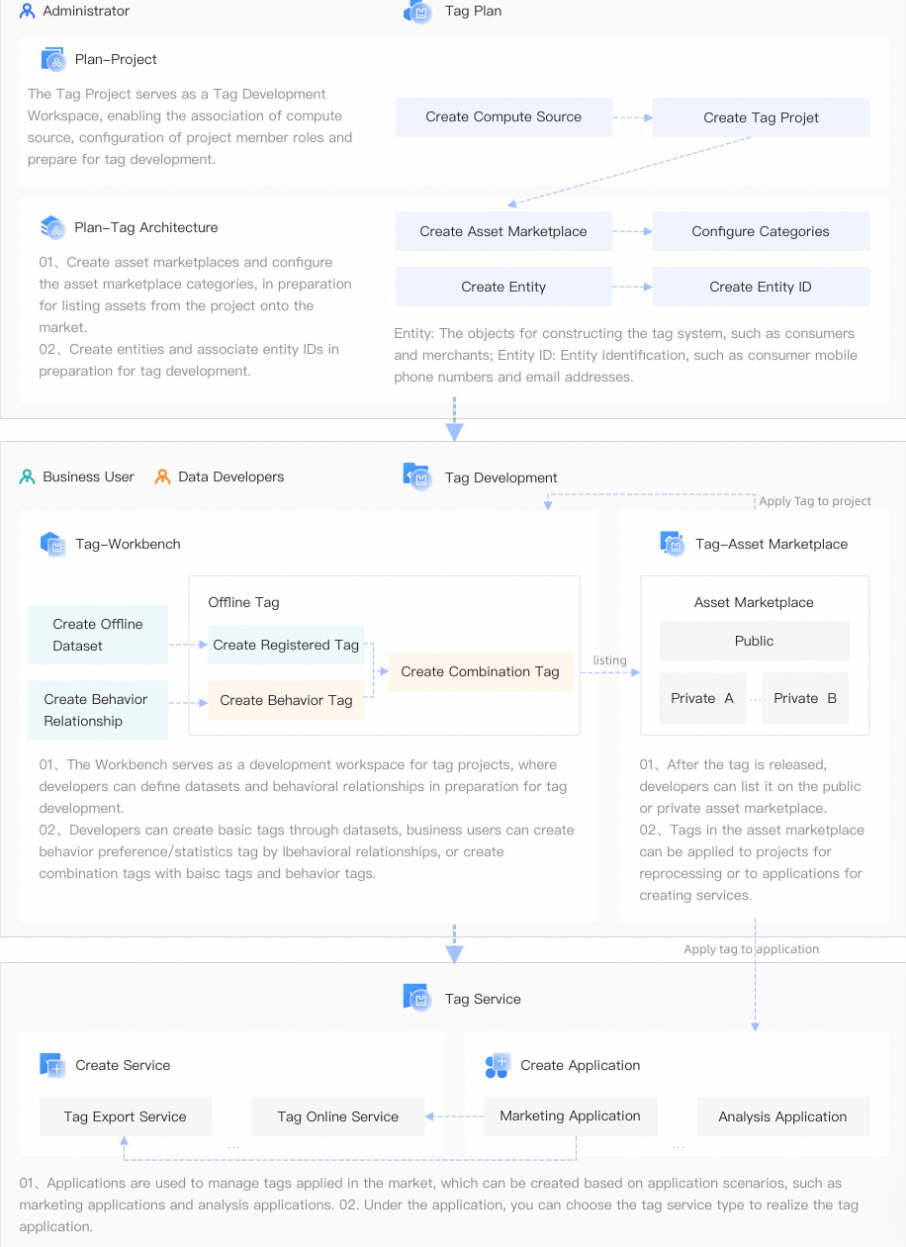
Tag Planning
Initial tag development requires the completion of tag project planning and tag architecture design.
Create a Tag Project: A tag project functions as a workspace for tag development. Within this project, you can link a computation resource, set up roles for project members, and lay the groundwork for tag creation. For detailed instructions, see Create a Tag Project.
NotePrior to initiating a tag project, establish a computation source to facilitate tag development. This involves executing the attachment operation to ensure foundational computational support for the tag development process. For detailed instructions, see Computing engines.
Tag Architecture: The tag architecture involves setting up an asset market and configuring market categories to facilitate the listing of project assets, along with creating new entities and entity IDs for tag development.
Asset Market: Tags and audience groups created within the workspace can be submitted for inclusion in the asset market. This allows applications and other projects to leverage specific operations. For details on these operations, see Create a New Asset Market.
Market category: This classification system organizes tags for more efficient management. For instructions on how to add a market category, see Add a Market Category.
Entity: A key component in the tag system structure, representing objects such as consumers and merchants. For detailed instructions on operations, refer to Manage Entities.
Entity ID: This refers to the unique identifier of an entity, such as a consumer's phone number or email address. For detailed instructions on specific operations, see Managing IDs.
Tag Development and Listing
With tag planning preparations complete, tag development can commence in the workspace. The workspace is the development area for tag projects, where developers can create datasets and develop basic tags, while business personnel can develop behavior statistics/preference tags or combine tags to create derivative tags.
Create Datasets and Behavior Relationships
Dataset: A dataset is essentially a collection used for tag processing. It allows you to encapsulate the logic behind tag processing, creating a virtual table that presents the technical aspects in a business-oriented view. Creating a dataset simplifies the process of generating new tags. For detailed instructions, see Offline dataset.
Behavior Relationship: A behavior relationship is the association between entities as defined by specific actions. For instance, the "user purchases product" scenario illustrates the connection between the "user" as the subject and the "product" as the object, linked by the "purchase" action. These defined behavior relationships are instrumental in developing statistics on behavior, understanding preferences, and creating rule-based tags. For detailed instructions on how to establish or manage these relationships, see Create and Manage Behavior Relationships.
Create and List Tags
Tag Factory enables the creation of tags based on datasets or behavioral relationships through various methods. Once tags are developed and published, they can be featured in either the public or private asset market, laying the groundwork for future tag service creation. For detailed instructions, see Offline tag.
Create Tag Applications or Services
Application management: An "application" in Tag Factory serves as the identity and authorization mechanism for your application. To utilize Tag Factory's tag and audience group services, you must first establish an application, which could be for marketing or analysis purposes. Application management involves overseeing these applications, which includes handling application administrators and members, processing join requests, and monitoring assets such as tags and audience groups associated with the applications. It also encompasses the management of services created by applications. For detailed instructions, see Create and Manage Applications.
Service Management: Within an application, you can assign tags and audience groups to suit various scenarios. For instance, offline services facilitate the export of tags and audience groups, APIs enable real-time entity tag value queries, and individual profile services provide access to entity profiles. Service management empowers you to create, manage, and maintain tag and audience group services, along with oversee service instances. For detailed instructions, see Create and Manage Tag Offline Service Tasks.