Dependency cycle | Dependency policy |
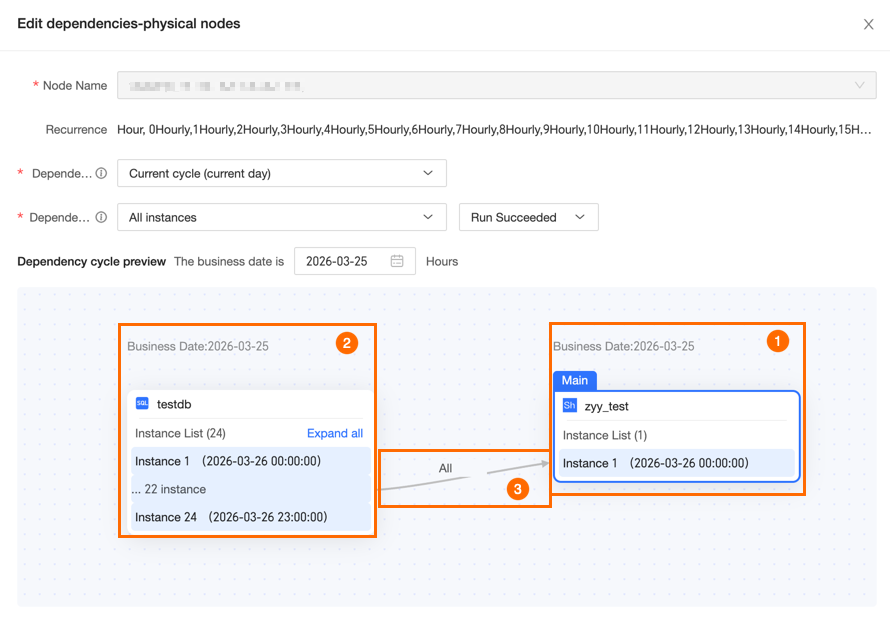
current cycle (same day) | When the dependency cycle is set to current cycle (same day), the dependency policies behave as follows: All Instances For an All Instances dependency, all instances of the upstream task for the current cycle (same day) must run successfully before the downstream nodes can run normally. For example, if the business date is 2024-03-02, the dependency task for the current cycle (same day) is the task instance for 2024-03-02. The execution of the instance nodes for the current task depends on all instances of the 2024-03-02 dependency node. If all instances of the 2024-03-02 dependency node run successfully, all instance nodes of the current task for 2024-03-02 can run normally. If an instance of the 2024-03-02 dependency node fails to run successfully, all instance nodes for the current task 2024-03-02 cannot run normally. The following image shows an example in the Node Dependency Cycle Preview.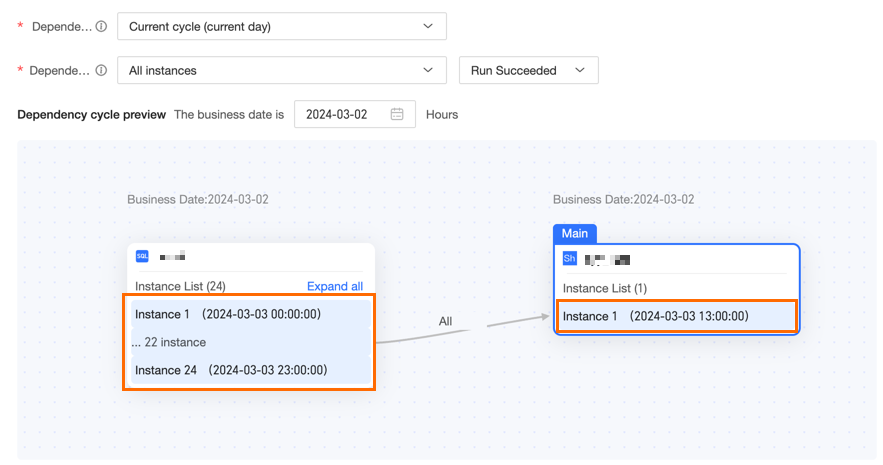 First Instance For the First Instance, subsequent nodes can run normally as long as the first instance of the dependency task in the current cycle (same day) succeeds. For example, if the business date is 2024-03-02, the current cycle (same day) is also 2024-03-02. The instance nodes of the current task for 2024-03-02 depend on the first instance of the dependency node for 2024-03-02. If the first instance of the dependency node for 2024-03-02 succeeds, all instance nodes of the current task for 2024-03-02 can run normally. If the first instance of the dependency node for 2024-03-02 does not succeed, none of the instance nodes of the current task for 2024-03-02 can run normally. The following is an example of a node dependency cycle preview for a scheduling dependency configuration. 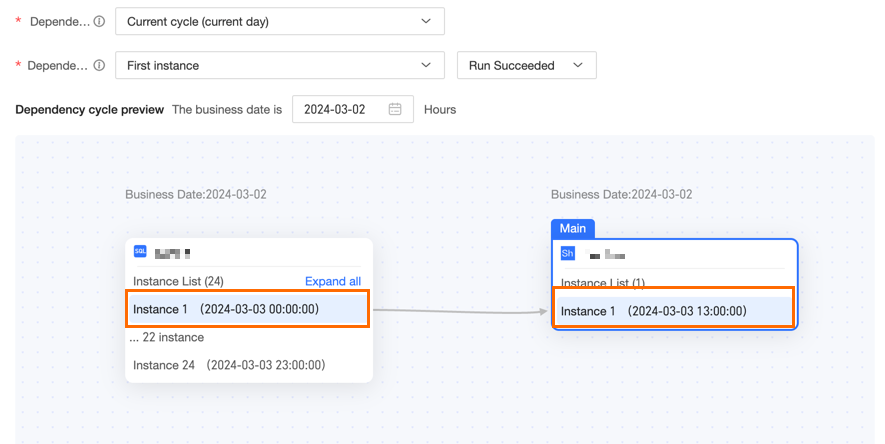
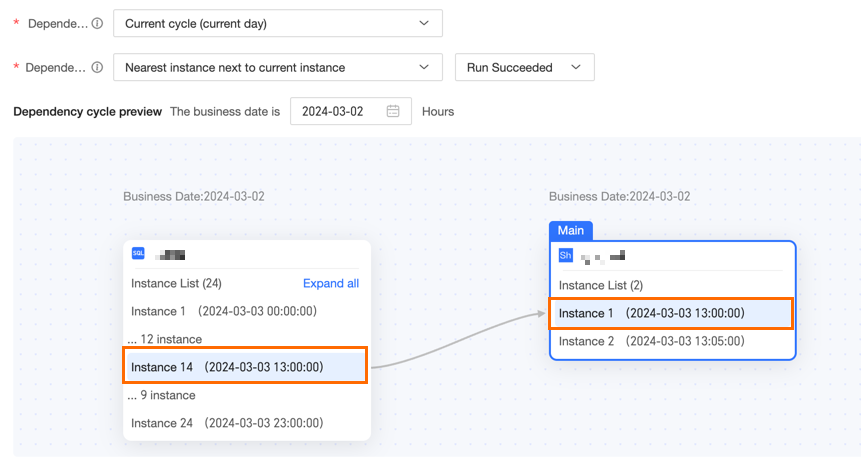
Last Instance For the Last Instance setting, a downstream node can run only after the last instance of its upstream task in the current cycle (same day) has Succeeded. For example, if the data timestamp is 2024-03-02, the current cycle (same day) is also 2024-03-02. The instance of the current task for 2024-03-02 depends on the last instance of the upstream node for 2024-03-02. If the last instance of the upstream node for 2024-03-02 has Succeeded, all instances of the current task for 2024-03-02 can run. If the last instance of the upstream node for 2024-03-02 has not Succeeded, all instances of the current task for 2024-03-02 cannot run. The following image shows an example of the node dependency cycle preview when you configure a scheduling dependency.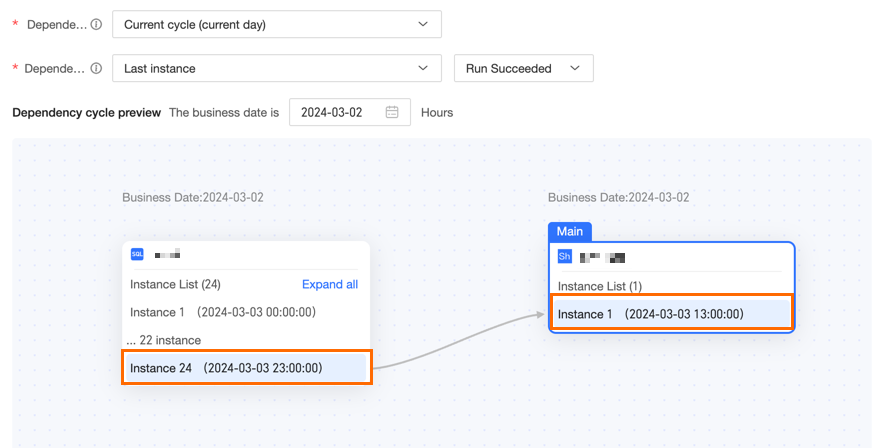 Next nearest instance This is the first instance within the selected interval that runs at or later than the current instance. If no such instance exists, the Last Instance is selected. For example, if the business date is 2024-03-02, the current cycle (same day) is also 2024-03-02. For a task instance node with a business date of 2024-03-02 and a scheduled time of 13:05:00, the next nearest instance is the instance scheduled at 14:00:00 on 2024-03-02. This means the 13:05:00 instance node of the current task on 2024-03-02 depends on the 14:00:00 instance of the dependent node in the current cycle (same day). For a task instance node with a business date of 2024-03-02 and a scheduled time of 13:00:00, the next nearest instance is the instance scheduled at 13:00:00 on 2024-03-02. This means the 13:00:00 instance node of the current task on 2024-03-02 depends on the 13:00:00 instance of the dependent node in the current cycle (same day). The same logic applies to other nodes. The following images show an example preview of the dependency cycle for a node. 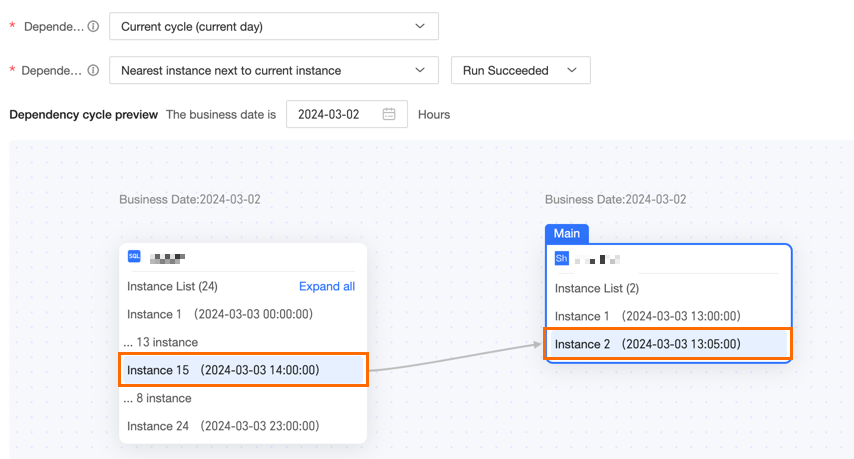 
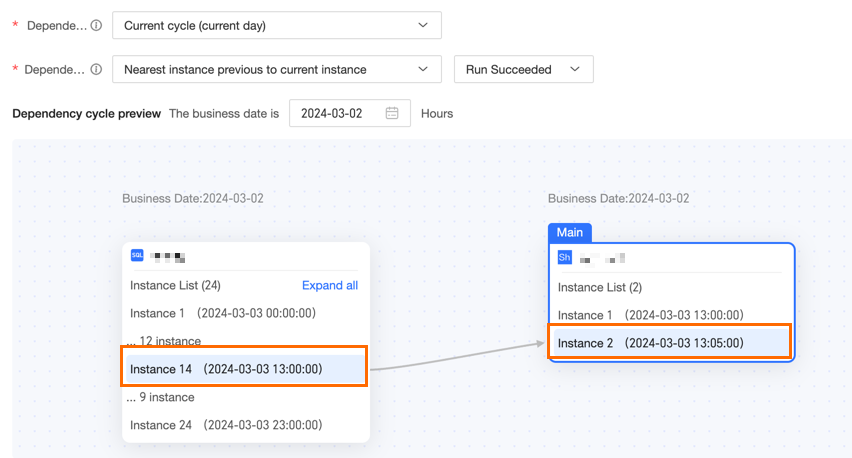
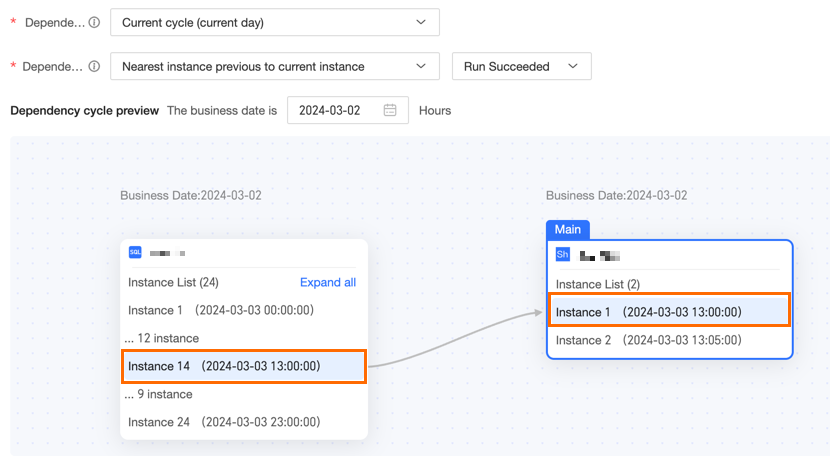
Previous nearest instance This is the instance in the selected range with a scheduled time closest to the current task's scheduled time. The system gives priority to the last instance with a scheduled time earlier than the current task. For example, if the business date is 2024-03-02, the current cycle (same day) is also 2024-03-02. For a task instance node with a business date of 2024-03-02 and a scheduled time of 13:05:00, the previous nearest instance is the instance scheduled at 13:00:00 on 2024-03-02. This means the 13:05:00 instance node of the current task on 2024-03-02 depends on the 13:00:00 instance of the dependency node in the current cycle (same day). For a task instance node with a business date of 2024-03-02 and a scheduled time of 13:00:00, the previous nearest instance is the instance also scheduled at 13:00:00 on 2024-03-02. This means the 13:00:00 instance node of the current task on 2024-03-02 depends on the 13:00:00 instance of the dependency node in the current cycle (same day). The same logic applies to other nodes. The following images show a preview of the node dependency cycle when you configure a scheduling dependency.
|
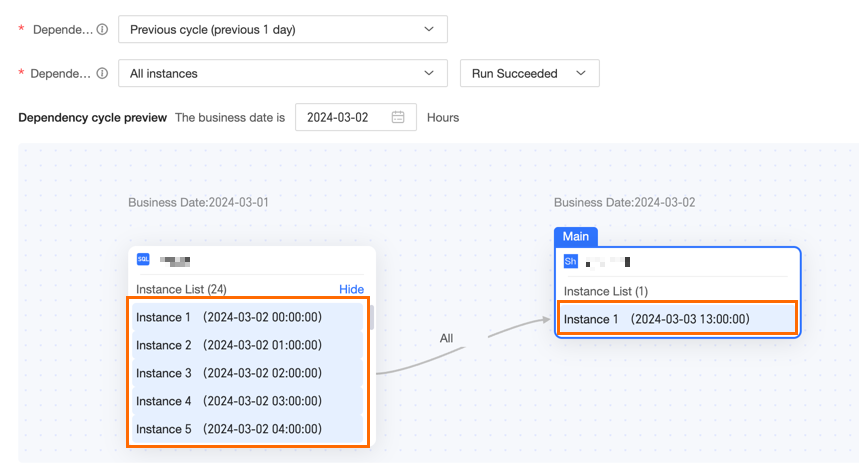
previous cycle (previous day) | When the dependency cycle is set to previous cycle (previous day), the dependency policies behave as follows: All Instances For the All Instances setting, all instances from the previous cycle (previous day) must run successfully before dependent downstream nodes can run. For example, if the business date is 2024-03-02, the previous cycle (previous day) is 2024-03-01. The instance nodes for 2024-03-02 depend on all instances from 2024-03-01. If all instances from 2024-03-01 run successfully, the instance nodes for 2024-03-02 can run normally. If even one instance from 2024-03-01 fails to run successfully, none of the instance nodes for 2024-03-02 can run normally. The following is an example of a node dependency cycle preview for configuring scheduling dependencies.
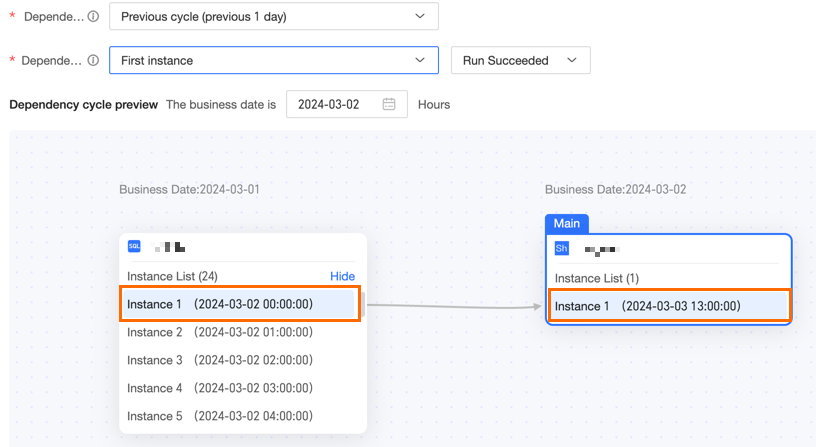
First Instance For the First Instance dependency, if the first instance of the previous cycle (previous day) succeeds, all dependent downstream nodes can run. For example, if the current business date is 2024-03-02, the previous cycle (previous day) is 2024-03-01. The instance for 2024-03-02 depends on the first instance of 2024-03-01. If the first instance for 2024-03-01 succeeds, all instances for 2024-03-02 can run. If the first instance for 2024-03-01 does not succeed, no instances for 2024-03-02 can run. The following image shows an example of the dependency cycle preview for a node.
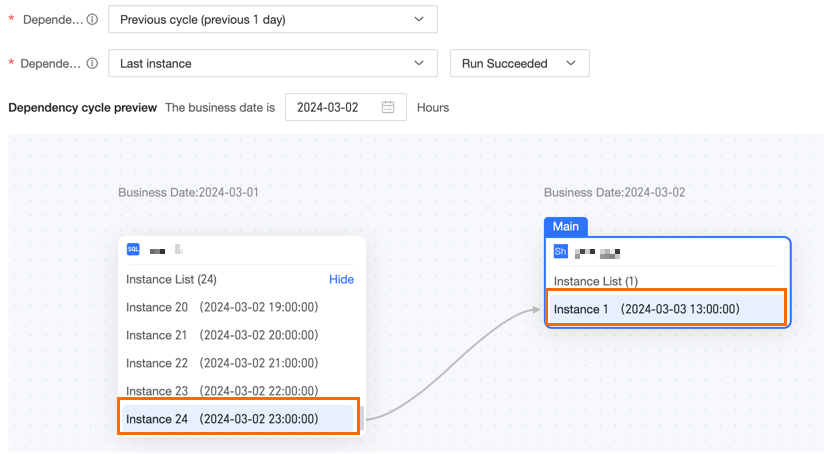
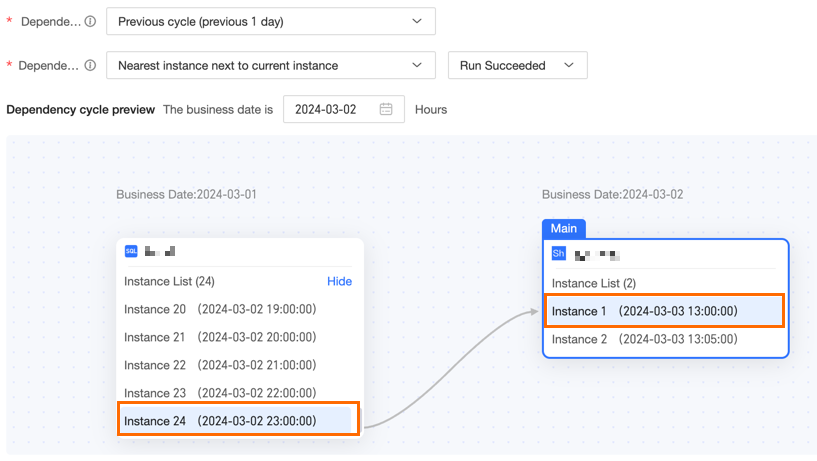
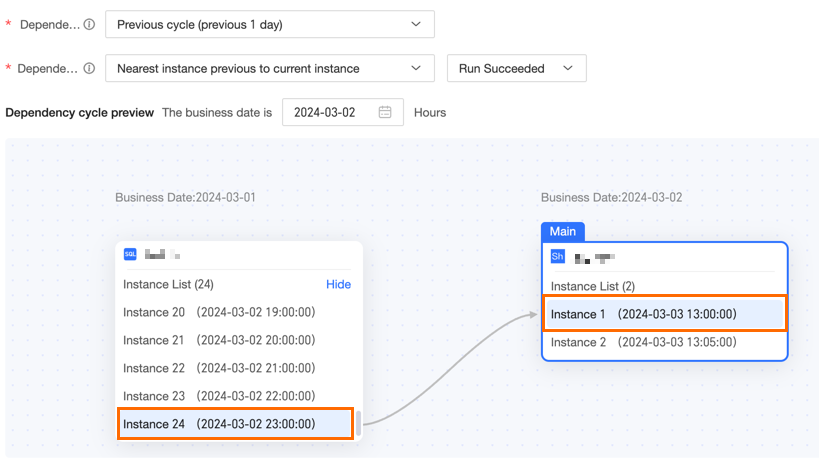
Last Instance With the Last Instance option, all subsequent dependent nodes run only if the last instance from the previous cycle (previous day) succeeded. For example, if the current business date is 2024-03-02, the previous cycle (previous day) is 2024-03-01. The instance nodes for 2024-03-02 depend on the last instance from 2024-03-01. If the last instance from 2024-03-01 succeeded, all instance nodes for 2024-03-02 run normally. If the last instance from 2024-03-01 did not succeed, all instance nodes for 2024-03-02 do not run. The following image shows an example of the node dependency cycle preview when you configure a scheduling dependency. Next nearest instance This is the first instance in the selected range that runs later than the current instance. If this instance does not exist, the Last Instance is selected. For example, if the business date is 2024-03-02, the previous cycle (previous day) is 2024-03-01. For a task instance node with a business date of 2024-03-02 and a scheduled time of 13:00:00, the next nearest instance is the instance with a business date of 2024-03-01 and a scheduled time of 23:00:00. This means the 13:00:00 instance of the current task on 2024-03-02 depends on the 23:00:00 instance of the dependency node from the previous cycle (previous day). The same logic applies to other nodes. The following figure shows an example of the node dependency cycle preview. Previous nearest instance The instance within the selected interval whose scheduled time is closest to the scheduled time of the current task. Priority is given to the last instance that is scheduled before the current task. For example, if the data timestamp for the current day is 2024-03-02, the previous cycle (previous day) is 2024-03-01. For a task instance node with a data timestamp of 2024-03-02 and a scheduled time of 13:00:00, the previous nearest instance is the instance with a data timestamp of 2024-03-01 and a scheduled time of 13:00:00. As a specific example, the 13:00:00 instance node of the current task on 2024-03-02 depends on the 23:00:00 instance of the dependent node from the previous cycle (previous day). The same logic applies to other nodes. The following image shows an example of the dependency cycle preview when you configure a scheduling dependency.
|
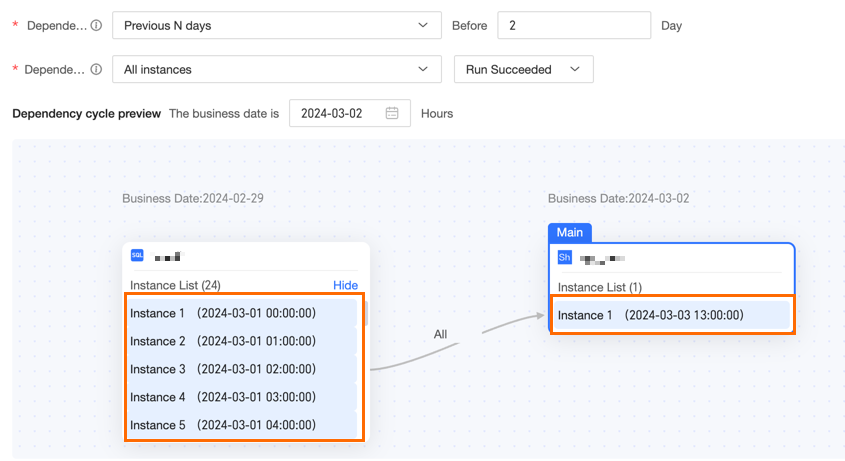
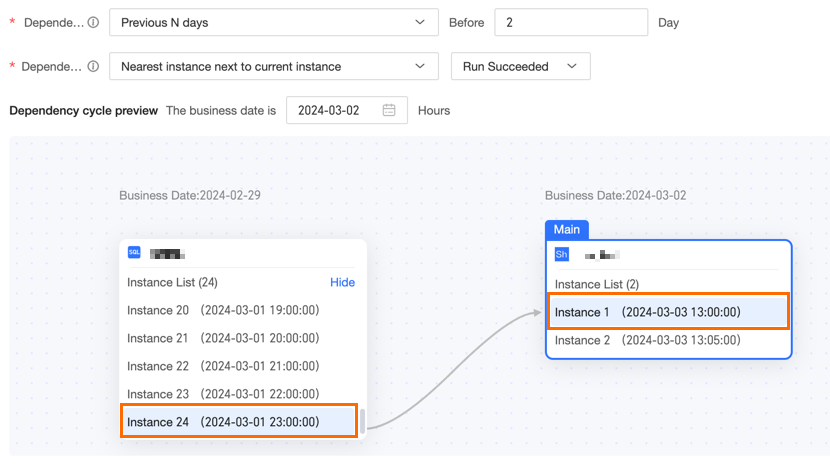
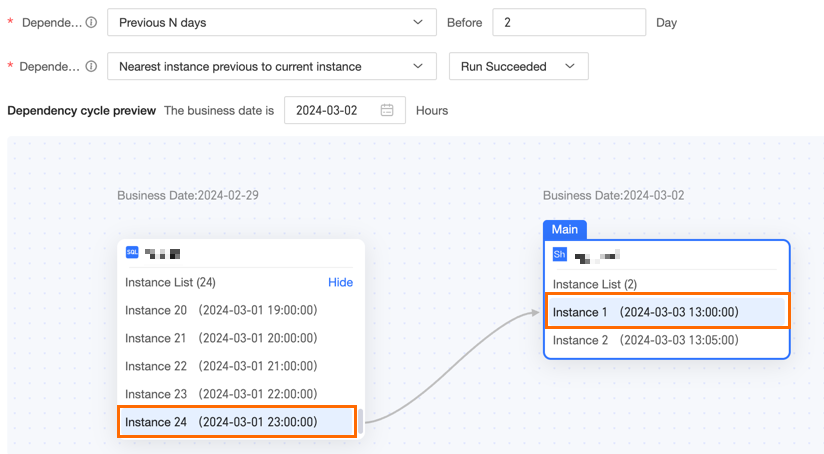
N days ago | When the dependency cycle is set to N days ago, the logic varies by policy. The following examples use 2 days ago to explain how different dependency policies select instances: All Instances For All Instances, dependent subsequent nodes can run normally only after all instances from two days prior have run successfully. For example, if the current business date is 2024-03-04, 'two days prior' is 2024-03-02. The instance nodes for 2024-03-04 depend on all instances from 2024-03-02. If all instances from 2024-03-02 run successfully, all instance nodes for 2024-03-04 can run normally. If even one instance from 2024-03-02 does not run successfully, none of the instance nodes for 2024-03-04 can run normally. The same logic applies to other nodes. The following is an example of the node dependency cycle preview when you configure scheduling dependencies.
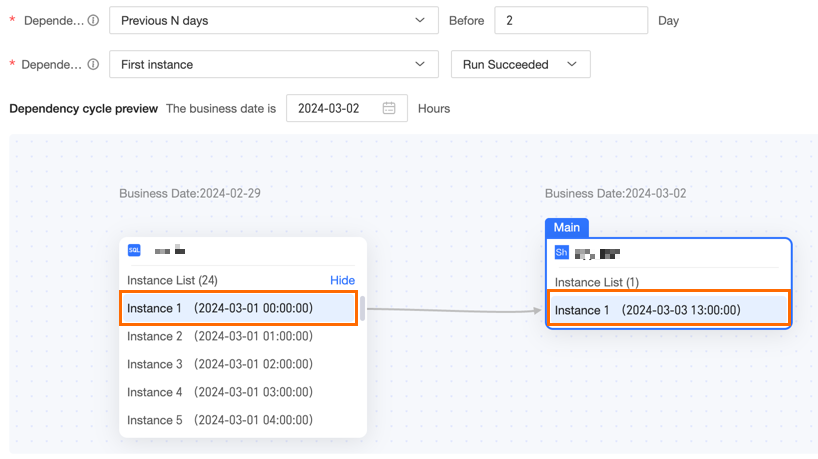
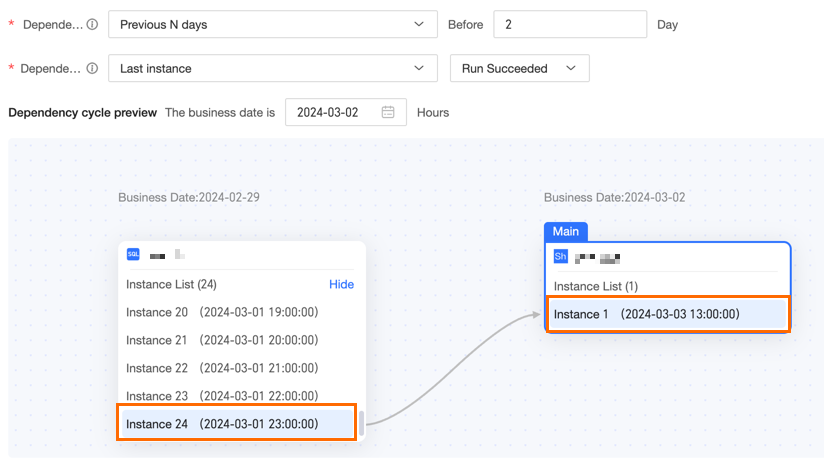
First Instance With the First Instance option, subsequent dependent nodes can run as expected only if the first instance from two days prior has succeeded. For example, if the current business date is 2024-03-04, then two days prior is 2024-03-02. The instance nodes for 2024-03-04 depend on the first instance of 2024-03-02. If the first instance of 2024-03-02 has succeeded, all instance nodes for 2024-03-04 can run as expected. If the first instance of 2024-03-02 has not succeeded, all instance nodes for 2024-03-04 cannot run as expected. When you configure a scheduling dependency, an example of the node dependency cycle preview is shown below. Last Instance For the Last Instance dependency, subsequent nodes can run only if the last instance from two days prior succeeded. For example, if the current business date is 2024-03-04, then two days prior is 2024-03-02. An instance for 2024-03-04 depends on the last instance from 2024-03-02. If the last instance from 2024-03-02 succeeded, all instances for 2024-03-04 can run. If the last instance from 2024-03-02 did not succeed, no instances for 2024-03-04 can run. The following figure shows an example preview of the node dependency cycle.
Next nearest instance This refers to the instance within the selected range whose scheduled time is closest to the current instance's scheduled time. If this instance does not exist, the Last Instance is selected. For example, consider a dependency set to two days prior. If the current business date is 2024-03-04, the dependency is on an instance from 2024-03-02. The next nearest instance for a task scheduled at 13:00:00 on 2024-03-04 is the instance scheduled at 13:00:00 on 2024-03-02. This means the 13:00:00 instance on 2024-03-04 depends on the 13:00:00 instance of the dependent node from two days prior. The same logic applies to other instances. When you configure a scheduling dependency, an example of the node dependency cycle preview is shown below.
Previous nearest instance This is the instance in the selected range whose scheduled time is closest to the current task's scheduled time. The last instance scheduled to run before the current task has priority. For example, a task depends on an instance from two days ago. The current data timestamp is 2024-03-04, so the dependency date is 2024-03-02. For a task instance scheduled at 13:00:00 on 2024-03-04, the previous nearest instance is the one scheduled at 13:00:00 on 2024-03-02. Therefore, the instance at 13:00:00 on 2024-03-04 depends on the upstream node's instance at 13:00:00 from two days prior. This logic applies to other nodes. The following image shows an example of the node dependency cycle preview for a scheduling dependency.
|
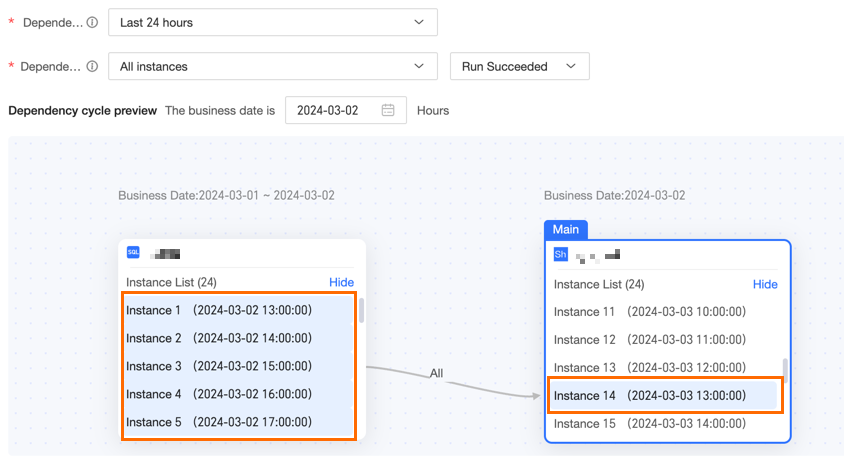
last 24 hours | When the dependency cycle is last 24 hours, each downstream instance depends on upstream instances within the 24-hour window immediately preceding its scheduled time. The specific behavior is determined by the dependency policy: All Instances For All Instances, the current node can run as normal only if all its dependent instances from the last 24 hours have run successfully. For example, if the business date is 2024-03-04, the dependent instances within 24 hours of the 13:00:00 instance include the 13:00:00, 14:00:00, and 15:00:00 instances from 2024-03-03. The dependent instances within 24 hours of the 14:00:00 instance include the 14:00:00 and 15:00:00 instances from 2024-03-03. When you configure scheduling dependencies, the following example shows a preview of the node dependency cycle.
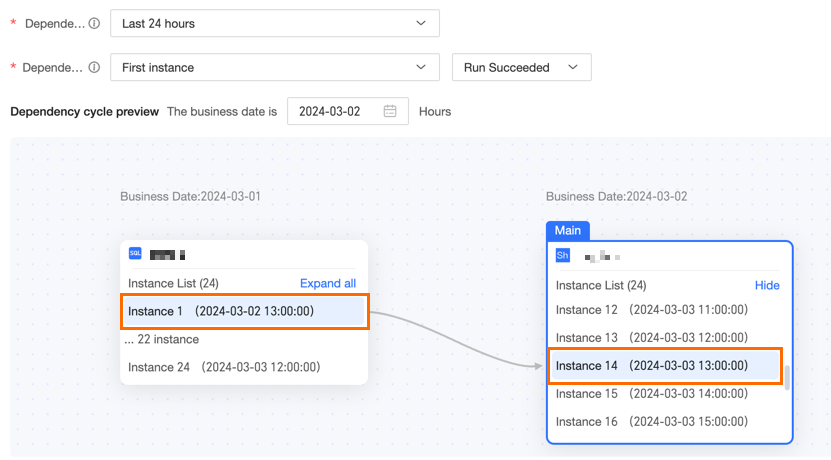
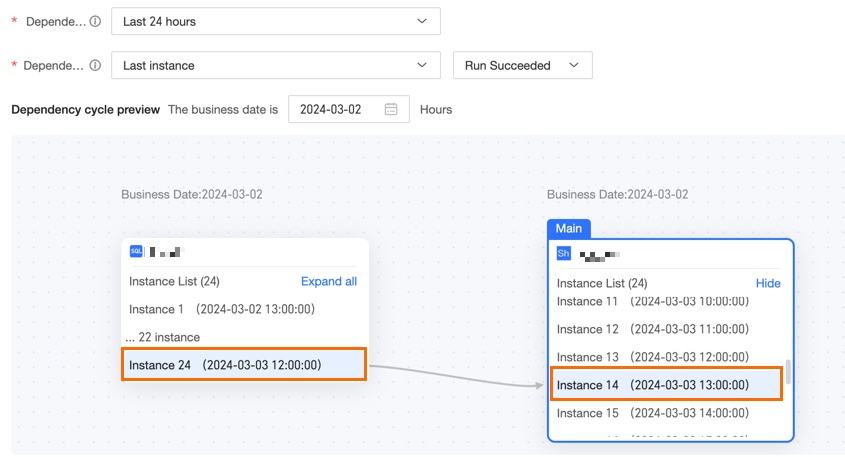
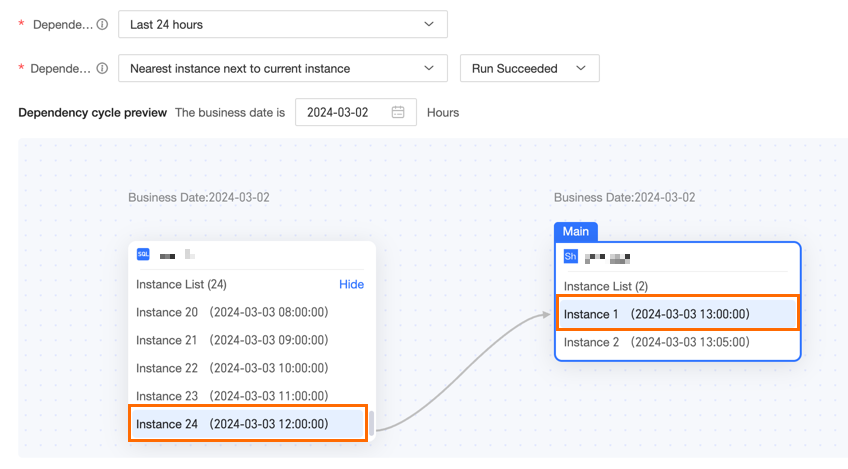
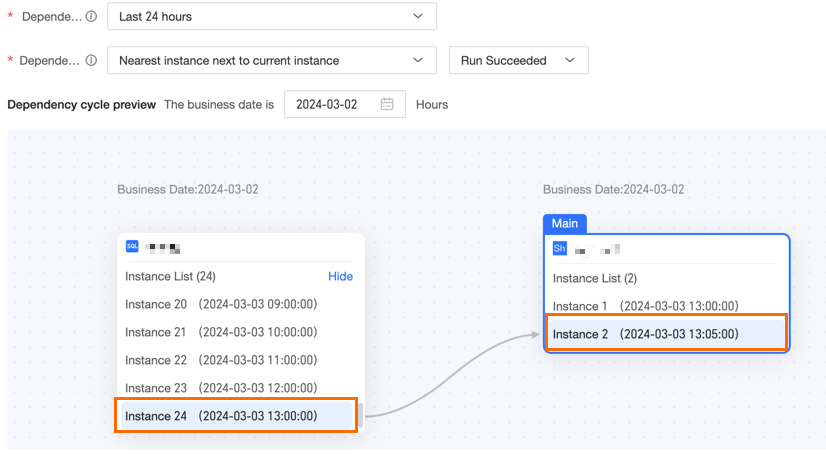
First Instance With the First Instance setting, the current node runs only after the first dependent instance from the last 24 hours runs successfully. For example, if the business date is 2024-03-04, the dependent instances for the 13:00:00 instance in the last 24 hours include 2024-03-03's 13:00:00, 14:00:00, and 15:00:00 instances. The first instance in this range is 13:00:00. For the 14:00:00 instance, the dependent instances in the last 24 hours include 2024-03-03's 14:00:00 and 15:00:00 instances. The first instance in this range is 14:00:00. The following image shows an example of the dependency cycle preview when you configure a scheduling dependency. Last Instance With the Last Instance setting, the current node runs only after the last dependent instance from the last 24 hours has run successfully. For example, if the business date is 2024-03-04 and the scheduled time of the current instance is 13:00:00, the time range for dependent instances in the last 24 hours is [2024-03-03 13:00 to 2024-03-04 13:00). The following image shows an example of the dependency cycle preview for a node. Next nearest instance This is the most recent instance within the selected interval that runs before the current instance's runtime. If no such instance exists, the Last Instance is selected. For example, the business date is 2024-03-04. When the current instance's scheduled time is 2024-03-04 13:00, the search range for the next nearest instance is [2024-03-03 13:00 to 2024-03-04 13:00 ), and the actual dependent instance is 2024-03-04 12:00. When the current instance's scheduled time is 2024-03-04 13:05, the search range is [2024-03-03 13:05 to 2024-03-04 13:05 ), and the actual dependent instance is 2024-03-04 13:00. The following examples show a preview of the node dependency cycle when you configure a scheduling dependency.
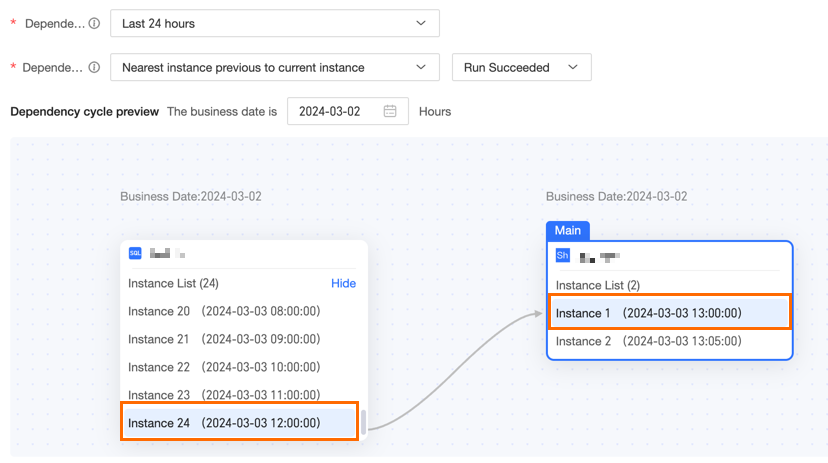
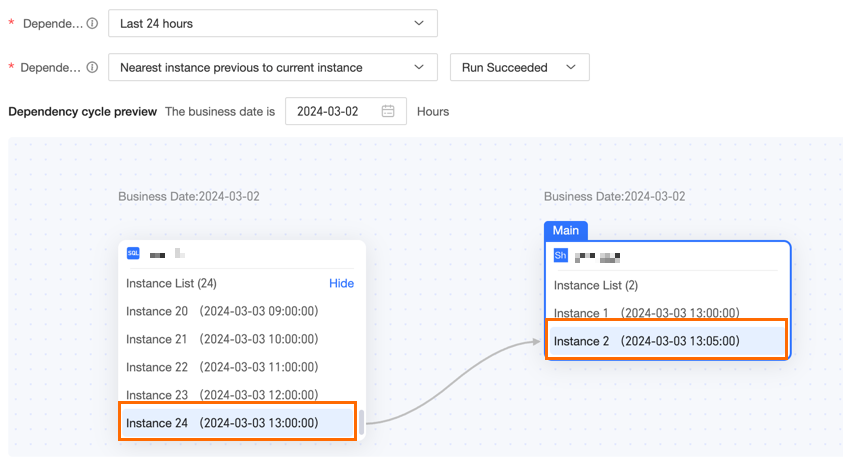
Previous nearest instance This is the instance within the selected range whose scheduled time is closest to the scheduled time of the current task. Priority is given to the last instance that is scheduled to run before the current task. For example, if the data date is 2024-03-04 and the current instance is scheduled for 2024-03-04 13:00, the search range is [2024-03-03 13:00 to 2024-03-04 13:00). The actual dependent instance is the one scheduled at 2024-03-04 12:00. If the current instance is scheduled for 2024-03-04 13:05, the search range is [2024-03-03 13:05 to 2024-03-04 13:05), and the actual dependent instance is the one scheduled at 2024-03-04 13:00.
|