Create an API in SQL mode (Dataphin table)
You can create an API in SQL mode by writing SQL statements based on a Dataphin logical table.
Prerequisites
To create an API based on a logical table, you must first create the logical table, which can be a dimension logical table, a fact logical table, or a summary logical table. For more information, see Standardized modeling.
You must configure a synchronization task for the logical table.
The synchronization task's destination must be a data source supported by the data service. You also need read permissions for it.
In the O&M > Scheduled Tasks module, select the task for the logical table and choose Backfill Data > Backfill Current and Downstream Tasks. In the task list, select all tasks up to the sixth layer and verify that the backfill instances have run successfully. For more information, see Backfill data for scheduled tasks.
In the Ad-hoc Query module, verify that the data is correct and that the logical table contains data. For more information, see Query and download data.
In the Integration module, configure a synchronization task. For the input component, select LogicalTable input configuration(LogicalTable). For the output component, select MySQL Output Component. For more information, see Configure the LogicalTable input component and Configure the MySQL output component.
After you configure and publish the synchronization task, you can create, submit, and publish a logical table API in the data service.
Limitations
APIs created from a logical table are limited by the compute engine. For more information about the supported compute engines, see Data sources and compute engines supported by data service.
Permissions
Project administrators and developers can create APIs.
Notes
The request and response parameters for an API must be retrieved from the same Dataphin logical table. Otherwise, API calls will fail.
Step 1: Select the creation mode
In the top navigation bar of the Dataphin homepage, choose Service > API Development.
In the upper-left corner, select your project. In the left-side navigation pane, click API Service. On the API page, click + New API.
In the New API dialog box, select Logical table API - SQL mode (Dataphin table).
Step 2: Configure API parameters
On the New API page, configure the basic information and parameters for the API.
API basic information
Parameter
Description
API name
The name can contain only Chinese characters, letters, digits, and underscores (_).
The name can contain only Chinese characters, letters, digits, and underscores (_).
Must be 4 to 100 characters in length.
Must start with a letter.
Must be globally unique.
Operation type
The operation type of the API. Valid values are GET and LIST.
GET: Requests the server to retrieve a specific resource.
LIST: Requests the server to retrieve a subset of resources.
Data update frequency
Defines the update frequency of the data that the API returns. This setting helps callers understand data freshness. Supported frequencies are Daily, Hourly, Per Minute, and Custom. If you select Custom, you can enter a string of up to 128 characters.
API group
Select an API group configured in the current project. To create an API group, see Create a service group.
Description
Enter a description for the API. The description can be up to 128 characters in length.
Protocol
The protocol for the data API. You can select HTTP or HTTPS.
HTTP: Hypertext Transfer Protocol (HTTP) is one of the most widely used network protocols.
HTTPS: You can select HTTPS if the gateway is configured as an Alibaba Cloud API Gateway instance (dedicated or shared). To prevent API call failures, ensure that the SSL certificate for the custom domain is valid. To configure an SSL certificate, choose Platform Management Network Configuration to go to the Network Configuration page.
Timeout
The timeout period for monitoring API call duration. The default value is 3 seconds. You can set the value to an integer from 3 to 60.
If an API call exceeds the specified timeout period, an error is reported. This allows you to promptly identify and handle API call exceptions. For information about how to view exceptions, see Manage O&M monitoring APIs.
Cache settings
You can Enable or Disable caching. If enabled, you must configure the Cache Duration. The default value is 300 seconds. You can set the value to an integer from 60 to 1,000,000 (approximately 277.78 hours).
Version
Enter the version number of the API. Each configuration has a version number to facilitate comparison with previous versions. The version number must be unique for the API. It must not exceed 64 characters.
It must not exceed 64 characters.
Can contain uppercase letters, lowercase letters, digits, underscores (_), periods (.), and hyphens (-).
Return type
The default value is JSON.
API request and response parameter configuration
When you configure API request parameters and response parameters, you need to first determine the source of the input and output parameters (Dataphin logical table), then write API SQL and parse the request parameters and response parameters, and finally configure the basic information for the request parameters and response parameters.
On the Parameter Configuration page, after you select a Mode and a Dataphin logical table, all fields from the selected logical table are displayed at the bottom of the page. You can use these fields as a reference when writing the SQL statement.
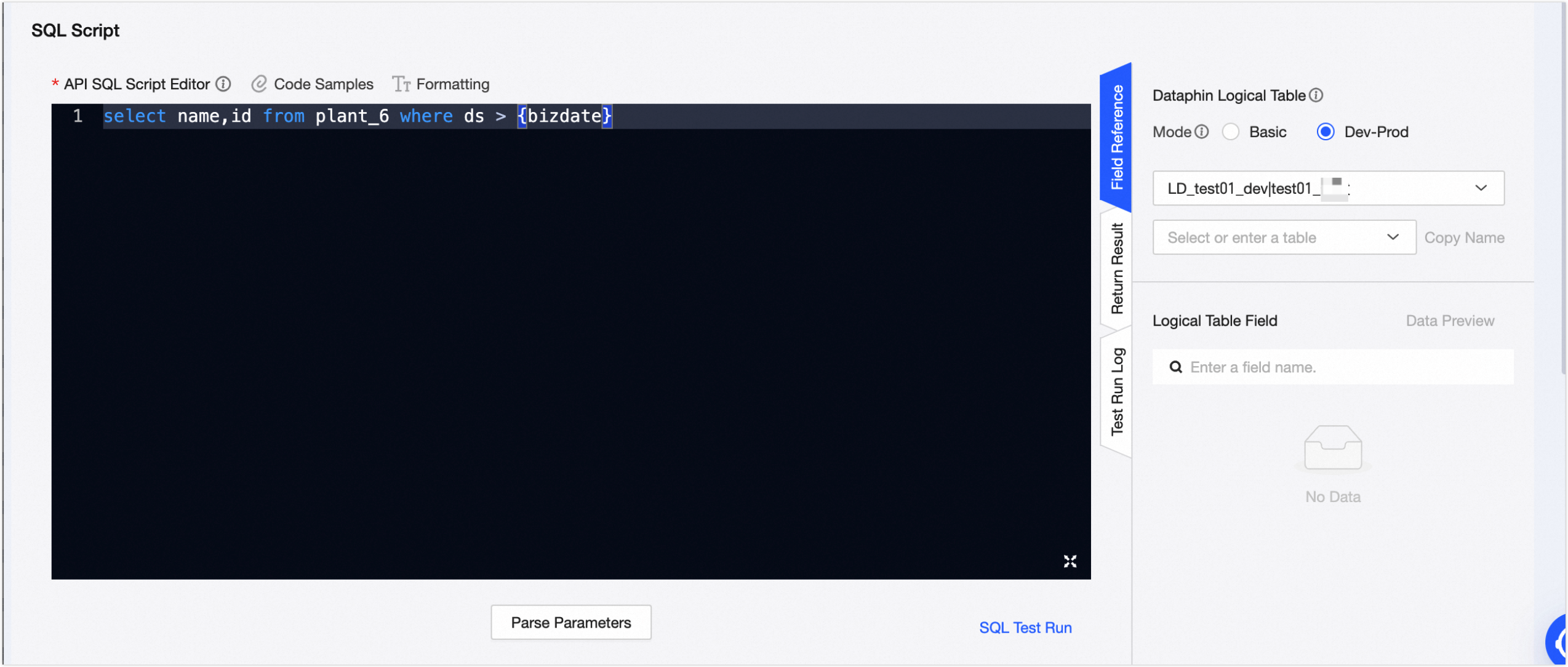
Parameter
Description
Mode
Select the business domain where the logical table resides and then select the logical table. Two modes are supported: Basic and Dev_Prod.
In Basic mode, read operations during development, submission, and online publishing all access the production database.
In Dev-Prod mode, development and submission operations read from the development database, while online publishing operations read from the production database.
Logical table fields
You can copy all fields in the table or individual fields.
You can write your SQL script based on the provided examples. Note the following rules for the script:
When you create an API from a logical table, the SQL script must follow MySQL syntax.
The following are not supported:
Multiple SQL statements
Non-SELECT statements, such as INSERT, UPDATE, CREATE, and DELETE
Multi-table joins and nested queries
Aliases for the query table
If you use an aggregate function such as Min, Max, Sum, or Count, you must use an alias for the response parameter name. Example:
sum(num) as total_num.
The following SQL script templates show how Dataphin can parse response parameters and request parameters:
Template 1: Query and return only the fields from the data table.
Format
select <response_parameter> from <table_name> where <request_parameter>=${request_parameter_value}Example
-- Returns the id_card and name from table_a where column c matches the ${id_card} parameter.
select table_a.id_card, table_a.name from business_domain_a.table_a where table_a.c=${id_card}
Template 2: Query fields using a list of values.
Format
select <response_parameter> from <logical_table_name> where <request_parameter> in (${request_parameter_value})Example
-- Returns the id_card and name from table_a where column c is in the list of values provided for the ${id_card} parameter.
select table_a.id_card, table_a.name from business_domain_a.table_a where table_a.c in (${id_card})
Template 3: Use aggregate functions such as MAX, SUM, MIN, and COUNT, and use the LIKE operator for wildcard matches.
Format
select max(<response_parameter1>) as <alias_c>,sum(<response_parameter1>) as <alias_b> ,min(<response_parameter1>) as <alias_d>,count(*) as <alias_e> from <logical_table_name> where <request_parameter_name1> like ${request_parameter_value1}Example
-- In table_a, when column c matches the wildcard pattern of ${id_card}, this query returns the maximum value of column a as c, the minimum value of a as d, the sum of a as b, and the total count as e.
select max(table_a.a) as c,sum(table_a.a) as b ,min(table_a.a) as d,count(*) as e from business_domain_a.table_a where table_a.c like ${id_card}
Template 4: Use arithmetic operators such as + (addition), - (subtraction), * (multiplication), / (division), and % (modulo), and logical operators such as AND and OR.
Format
select (<response_parameter1>+<response_parameter2>) as <alias>, (<response_parameter2>+<response_parameter3>) as <alias> from <logical_table_name> where <column_c>=${request_parameter_name1} and <column_b>>=${request_parameter_name2} or <column_c><=${request_parameter_name3}Example
-- In table_a, when column c equals ${id_card}, OR column b is greater than or equal to ${num} AND column c is less than or equal to ${num1}, this query returns the results of a+b and b+c as the parameter values acd and bcf, respectively.
select (table_a.a + table_a.b) as acd, (table_a.b + table_a.c) as bcf from business_domain_a.table_a where table_a.c=${id_card} AND table_a.b>=${num} OR table_a.c<=${num1}
ImportantIn the preceding four templates, the request and response parameters for the API must be from the same logical table. Otherwise, API calls will fail.
Click Parse Parameters. Dataphin automatically parses the input and output parameters from the SQL statement and adds them to the Request parameters and Response parameters sections.
The basic information for request parameters and response parameters is similar. The following table describes this information and the settings that you need to configure.
Parameter
Description
Parameter name
The parameter name that is exposed to callers.
Parameter type
The data type of the parameter. Valid values are DOUBLE, FLOAT, STRING, DATE(yyyy-MM-dd HH:mm:ss), BOOLEAN, INT, LONG, SHORT, BYTE, BIGDECIMAL, and BINARY. Select the type that corresponds to the bound field.
If the field type of the logical table is not in the list of available parameter types, we recommend that you select String.
Parameter value type
The type of the parameter value. You can select Single value or Multiple values.
Single value: The input parameter is parsed as a single value. Applicable operators are
=, like, >=, <=, >, <, !=, between.Multiple values: The input parameter is parsed as multiple values separated by commas (,). The applicable operator is
in.
Parameter processing
This setting must be configured when the operator is LIKE. If you do not select a processing method, you must manually enter wildcard characters in the input parameter for matching. Supported options are wildcard match (%keyword%), right-side match (%keyword), and left-side match (keyword%).
Example
Enter an example value for the request and response parameters to help developers understand them. You can enter up to 1,000 characters.
Description
Enter a description for the request and response parameters. You can enter up to 1,000 characters.
Required
Specifies whether the request parameter is required when you call the API.
If you select No, the API call can be executed even if the parameter is missing from the statement.
If you select Yes, the API call cannot be executed if the parameter is missing from the statement.
For example, assume the request parameter is id (required) and the response parameter is name. The following statements produce different results:
select name from tableA where id=5;: Returns the corresponding name field and data.select name from tableA;: The SQL statement fails.
Actions
The following batch operations are supported for request and response parameters:
Request parameters: You can perform batch modifications on the parameter type, parameter value type, parameter processing (only if the operator is LIKE), and Required setting.
Response parameters: You can perform batch modifications on the parameter type.
Click SQL test run. In the Request parameter input dialog box, configure the Parameter type, Parameter value type, Parameter processing, and Test run input value, and then click Confirm.
Run log: Shows the SQL statement executed during the test run.
Test run input value: You must provide a value for the bound field. You can view the field's values in the Data Preview panel.
Batch operations: You can perform batch modifications on the parameter type, parameter value type, and parameter processing (only if the operator is LIKE) for request parameters.
Click Fill with Sample Parameter Values. The system populates the request and response parameters with the values from the last successful test run. If sample values already exist, they are not overwritten. You can modify the populated values.
Click Submit to create the API.
Next steps
After an API is created, you must test it and publish it to the Data Service Marketplace so that applications can call it. For more information, see Test and publish an API.
To delete an API, manage its versions, or transfer ownership, see Manage APIs.