Configure throttling flow components
This topic describes how to configure throttling flow components.
Procedure
-
Go to the development page of the offline single pipeline script. For more information, see the offline pipeline component development entry.
-
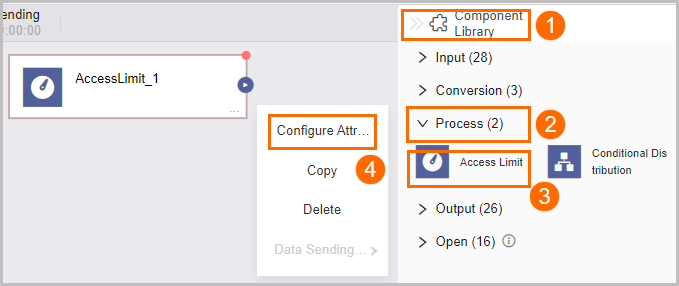
Refer to the instructions in the figure to access the Throttling Component Configuration page.
-
In the Throttling Component Configuration dialog box, set the parameters as follows:
Parameter
Description
Step Name
Specify the component name according to the current scenario.
Speed Limit
Choose the data transmission speed limit:
For Based On Data Volume, select from 1M/s, 2M/s, 5M/s, or 10M/s.
For Based On The Number Of Data Entries, input the desired limit, e.g., 30 entries/s.
-
Click OK to finalize the configuration of the throttling flow component properties.