View and manage analysis platform tables
Analysis platform tables are a set of tables created with the create table statement within the analysis platform's dedicated computation source. The analysis platform table page provides basic information and management operations for these tables, enabling you to effectively view and manage your analysis platform tables. This topic describes the table list and the management operations available.
Permission description
Access privileges for analysis platform tables created with the create table statement are exclusive to the account that created them.
Analysis platform table entry
On the Dataphin homepage, click Analysis in the top menu bar.
In the left-side navigation pane, click My Analysis Platform Tables to access the My Analysis Platform Tables page.
Introduction to the analysis platform table list
The analysis platform table page primarily features a filter area, an analysis platform table list, and a batch operation area. On the analysis platform table list page, you can view the tables you've created and manage them accordingly.
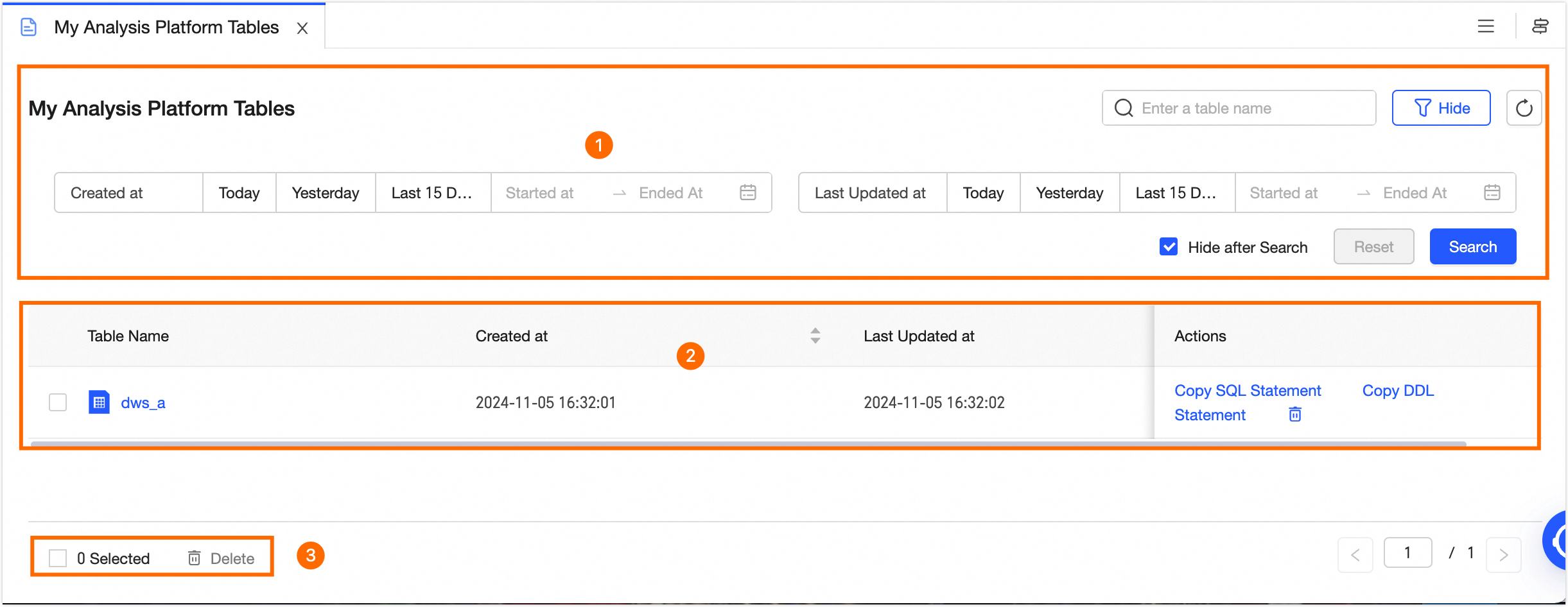
Area | Description |
①Search and filter area | Support searching by entering the table name or filtering the target table based on Created At and Latest Updated Time. Click Filter to expand the filter area. The filter options include the following:
If you need to re-filter, click Reset to quickly clear all filter conditions and restore the system default. |
②Analysis platform table list | The analysis platform table list displays the created analysis platform tables, including Table Name, Created At, and Latest Updated Time information. In the list, you can perform the following operations.
|
③Batch operations | After selecting multiple tables, click Batch Delete at the bottom of the list to batch delete the selected tables. |
 to sort the list in ascending or descending order based on creation time or latest updated time.