Section | Description |
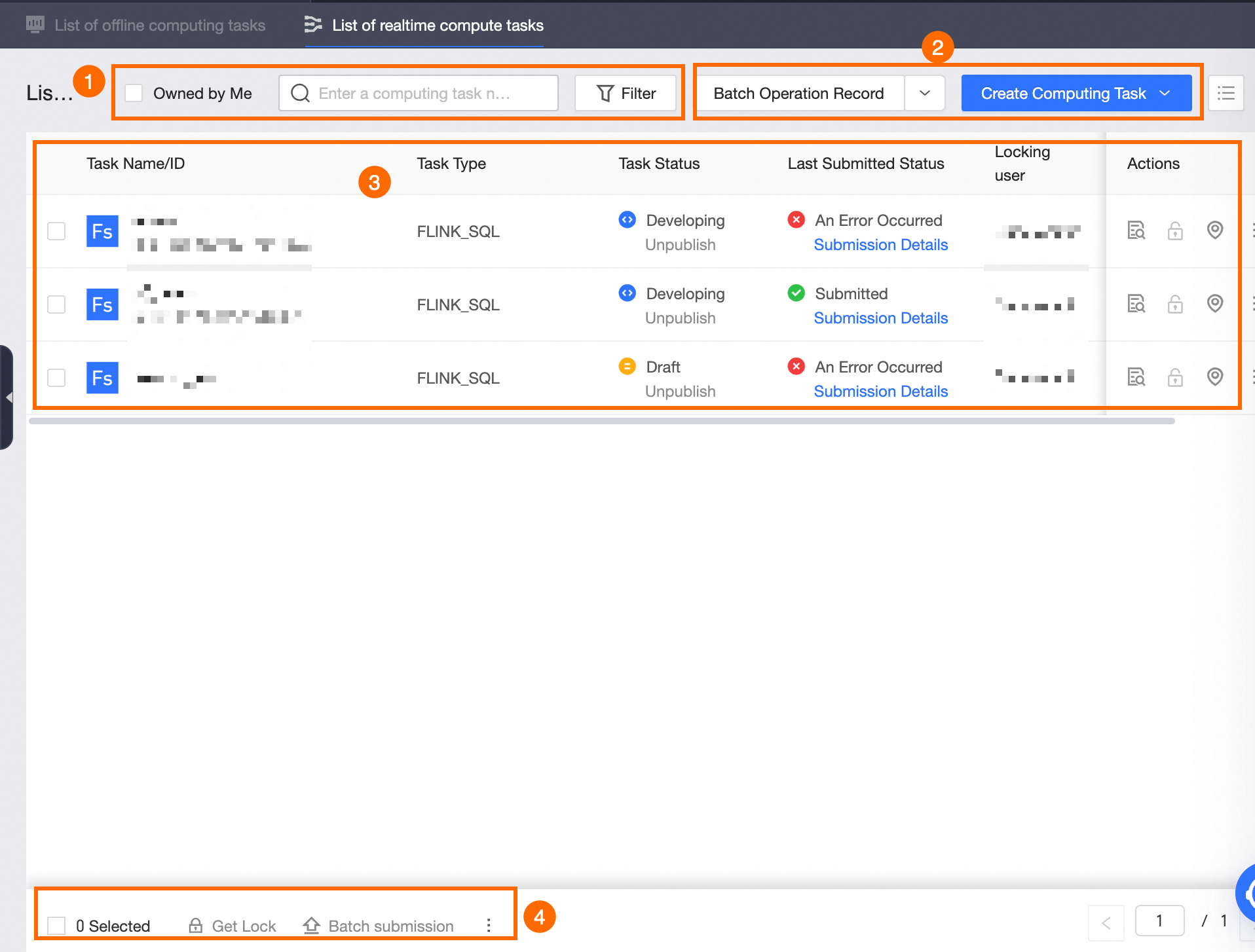
①Search and filter area | Supports filtering computing tasks by entering the computing task ID or computing task name, which is suitable for quickly filtering the required periodic tasks when you know the task ID or task name. You can also select My Tasks for filtering. Set computing task list display items: Click  to select the display items for the current computing task list. The display items supported by real-time computing tasks include the following: to select the display items for the current computing task list. The display items supported by real-time computing tasks include the following: Basic Information: Task Name/ID, Task Type, Task Status, Latest Submission Status, Current Lock Owner, Owner. Configuration Information: Enabled Mode. Other Information: Creation Time, Last Modified Time, Operations.
Refresh: Click  to refresh the current computing task list. to refresh the current computing task list. Click  to expand the filter area. to expand the filter area. Supported filter items include the following: Task Type: Filter by the task types supported by the current compute engine. Owner: Filter by the task owner. Published: Filter by whether the real-time computing task is published. Last Modified Time: Filter by the last modification time of the real-time computing task. Options include Last 3 Days, Last 7 Days, Last Month, or Custom Time Range. Task Status: Filter by the development status of the computing task. Options include Draft, Developing, Submitting, Submitted. Latest Submission Status: Filter by the latest submission status of the task. Options include Submitting, Submission Successful, Submission Failed. Created At: Filter by the creation time of the real-time computing task.
If you need to filter again, you can click Reset to quickly clear all filter conditions and restore the system defaults.
|
②Function area | View Batch Operation Records: Click View Batch Operation Records to view the record information of batch Submit or Other Operations. For more information, see View batch operation records. Create Computing Task: Click Create Computing Task to create a new computing task for the current computing task list.
|
③Real-time computing task list | The real-time computing task list displays the information of currently created real-time computing tasks and supported operations. The information displayed for real-time computing tasks is determined by the display items set in the task list. The operations supported by real-time computing tasks are as follows: Open Task: Open the current computing task in the code editor. Get Edit Lock: Obtain and lock the edit lock for the current real-time computing task.
Note The list does not support releasing the lock. Please go to the editing area to release it. Locate in Directory: Locate the computing task in the left navigation tree. Submit: Submit the current computing task. You can go to the publishing center to publish the submitted computing task. For more information, see Manage publishing tasks. Clone: Copy the current real-time computing task code. You can modify the name and directory of the new task. Move: Move the current computing task to another directory. Change Owner: Transfer the ownership of the current computing task to another owner. Go to Publish: Jump to the publishing center to publish the computing task. To publish a computing task, see Manage publishing tasks. Go to O&M: Jump to the Operation Center to perform O&M management operations on the computing task. For more information, see Operation Center. Unpublish: Perform unpublish operations on published computing tasks.
Note If there are downstream dependent nodes in the offline computing task, the unpublish operation will not take effect. After the unpublish is successfully submitted, you can go to the to-be-published list to publish the object to the production environment.
Delete: Support deleting computing tasks with the status of Draft.
Note If the current tenant has not enabled the Development Platform Settings > Unpublish and Delete > Development Environment Can Delete Published Objects configuration, in Dev-prod projects, if a draft development object has a corresponding production object, deletion is not supported. Unpublish and Delete: Perform unpublish and delete operations on published computing tasks.
Note If there are downstream dependent nodes in the real-time computing task, the unpublish and delete operation will not take effect. Tasks that have been published to production will only be unpublished, not deleted. After the unpublish and delete is successfully submitted, you can go to the to-be-published list to publish the object to the production environment. If the current tenant has not enabled the Development Platform Settings > Unpublish and Delete > Development Environment Can Delete Published Objects configuration, in Dev-prod projects, published development objects do not support unpublish and delete operations.
|
④Batch operation area | You can use the batch operation functions provided in the batch operation area to process computing tasks in batches, improving operational efficiency. The batch operations supported by real-time computing tasks are as follows: Batch Get Lock: Support obtaining and locking the edit locks for multiple computing tasks simultaneously. Batch Submit: Support submitting multiple computing tasks simultaneously. Batch Unpublish: Support unpublishing multiple computing tasks simultaneously. Batch Unpublish and Delete: Support unpublishing and deleting multiple computing tasks simultaneously. Batch Move: Support moving multiple computing tasks to the same code directory simultaneously. Batch Change Owner: Support transferring the ownership of multiple computing tasks to another owner simultaneously. Batch Running Parameter Configuration: Support configuring running parameters for multiple computing tasks simultaneously. For more information, see:
|
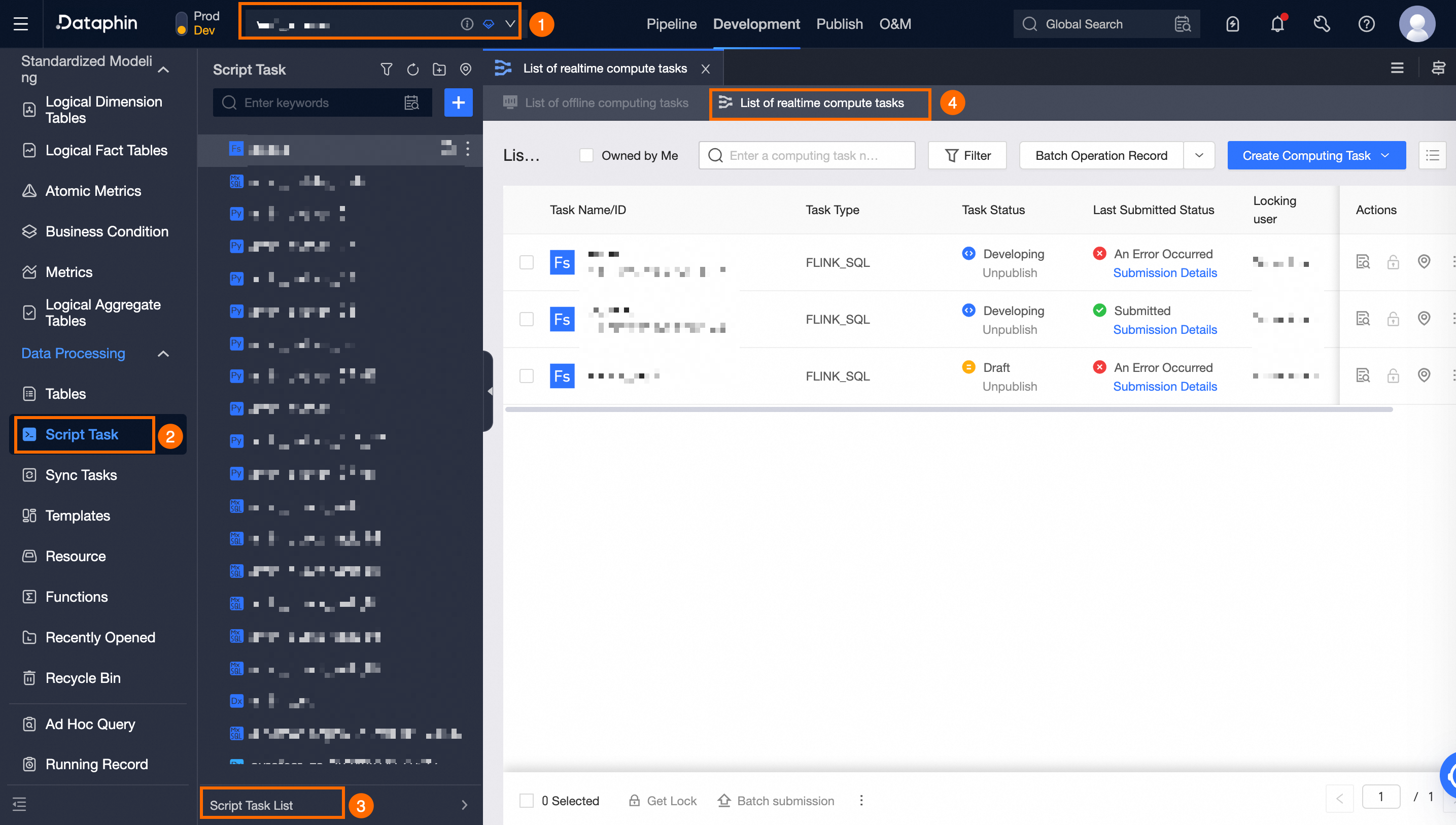
 icon to view the latest submission details of the computing task.
 icon to view the latest submission details of the computing task.