Watermark settings
Dataphin enables customization of system page watermarks to cater to individual preferences. This topic outlines the process for configuring page watermarks.
Usage instructions
To configure page watermarks, the Intelligent R&D Edition must be activated.
Please note that the watermark feature is not applicable to the resource administration module page.
Permission description
Super administrators and system administrators are authorized to set the page watermark style.
Regular members are permitted to view the page watermark style.
Page watermark settings
Navigate to the Dataphin home page and single click the Management Center in the top menu bar.
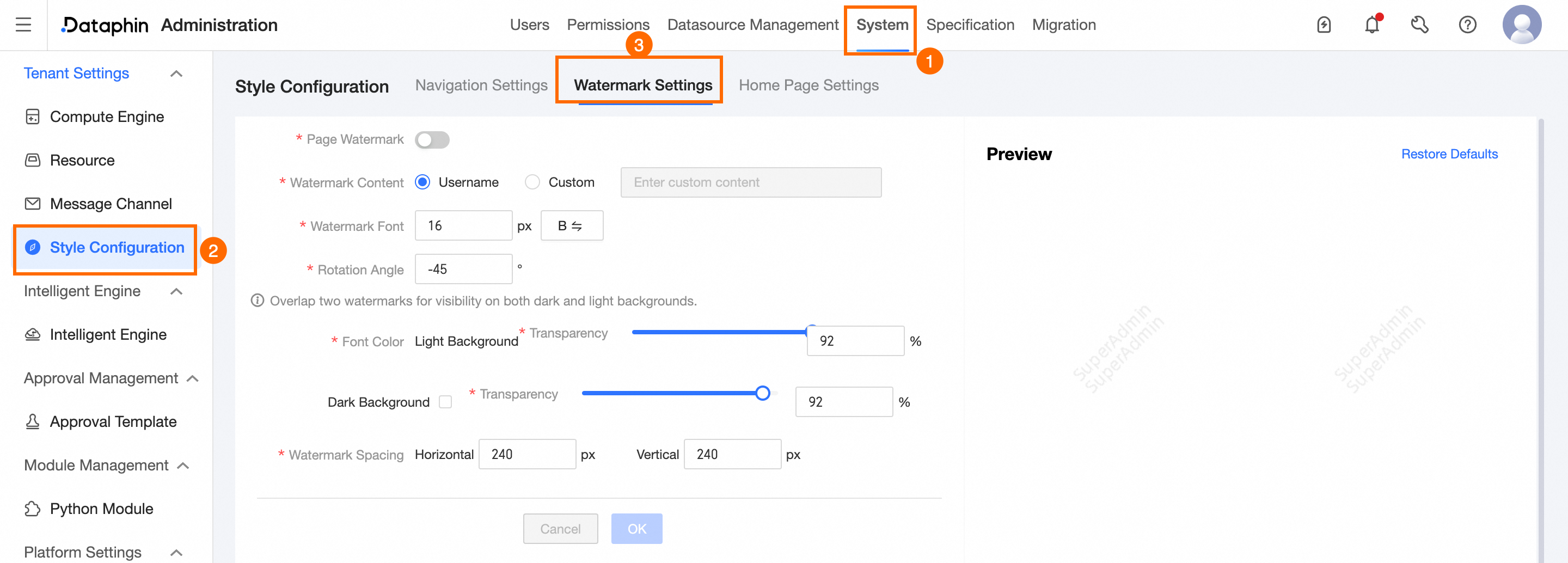
In the Management Center page, use the following illustration as a guide to access the Watermark Settings tab.
Parameter
Description
Page Watermark
Enabled by default, this setting allows you to modify the page watermark style. Confirm your changes and refresh the browser to apply the new settings immediately for the tenant. If disabled, the page watermark will not be visible for the tenant.
Watermark Content
Specify the content for the page watermark, with options for Username and Customize.
Username: Displays the username and user account of the tenant.
Customize: Allows for custom watermark text, limited to 100 characters.
Watermark Font
Adjust the font size and boldness of the watermark text.
Font size: Default is 16px, with a range of 8~80px available for customization.
Bold: Toggle the boldness of the font by single clicking the
 button.
Rotation Angle
Set the rotation angle for the watermark text, with a default of -45° and a customizable range from -360° to 360°.
Font Color, Transparency
Configure dual-layer watermarks to ensure visibility against both light and dark backgrounds.
Font Color: Black (#000000) for light backgrounds and white (#ffffff) for dark backgrounds, with no option for modification.
Transparency: Default transparency is set at 92%, with a customizable range of 0% to 100% for both dark and light backgrounds.
Watermark Pitch
Customize the horizontal and vertical spacing of the watermark, with a default pitch of 240px and an adjustable range of 0~500px.
Effect Preview
Preview the watermark effect in real-time after configuration.
NoteTo revert to the system's default settings, simply single click the Restore Default Configuration button in the upper right corner.
Confirm your settings by single clicking the Confirm button. Refresh the browser page to apply the changes immediately for the tenant.