Create an offline custom source type
You can use Dataphin to create custom offline data sources for data synchronization in various business scenarios.
Prerequisites
For an RDBMS, you must have the database driver.
For other database types, you must have the data source JSON and the required reader/writer plugin.
Background
An RDBMS is a relational database, such as MySQL, Oracle, or SQL Server. Typically, relational databases share a common connection method that requires a database driver and connection parameters, such as a connection URL, username, and password. Dataphin provides default connection parameters for RDBMS types. To create a custom RDBMS source type, you only need to provide the database driver.
For non-RDBMS types, connection methods and parameters can vary significantly. To create a custom non-RDBMS source type, define the required connection parameters in JSON and upload a reader/writer plugin package.
Integration component generation
After you create an offline custom source type, Dataphin automatically generates a corresponding integration component in the component library of your integration pipeline. Use this component for data integration development. Dataphin generates components as follows:
For a custom RDBMS source type, Dataphin automatically generates both a reader and a writer component in the Open directory of the component library.
For other custom source types, Dataphin generates components in the Open directory of the component library based on the reader/writer plugins you upload.
Access point
See Data Source Management entry point and go to the Data Source Management page.
On the Data Source Management page, open the Create Offline Custom Source Type dialog box as shown in the following figure.
Create an RDBMS source type
In the Create Offline Custom Source Type dialog box, configure the parameters.
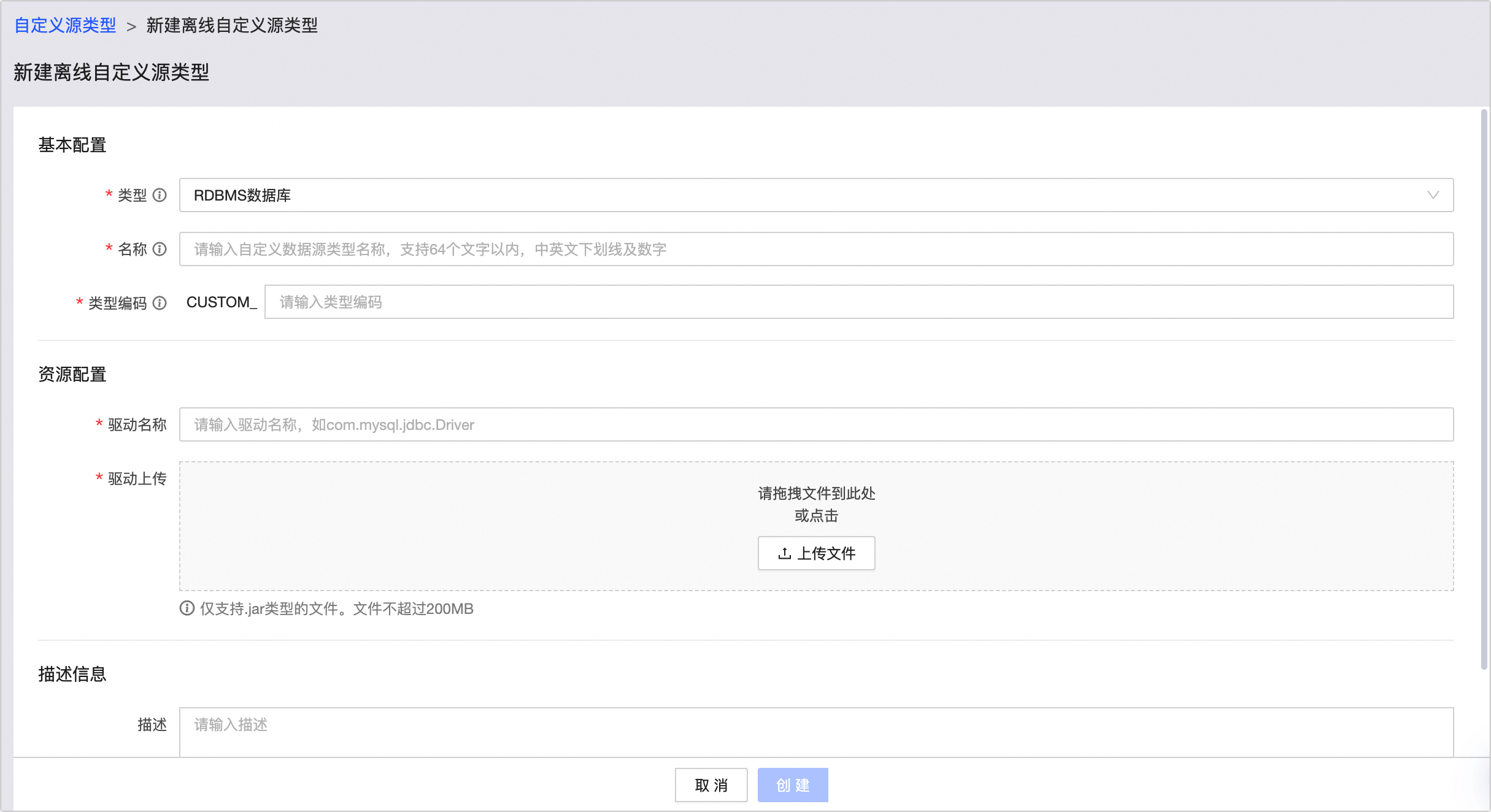
Section
Parameter
Description
Basic configuration
Type
Select RDBMS.
Name
The name of the custom source type. The name can contain up to 64 characters, including letters, digits, and underscores (_).
Type code
The type code is for backend use and cannot be modified after creation.
Resource configuration
Driver Name
Enter the database driver name, for example,
com.mysql.jdbc.Driver.Upload Driver
Select and upload the database driver.
NoteOnly .jar files are supported. The maximum file size is 200 MB.
Description
Description
Enter a brief description of the custom data source type, up to 128 characters long.
Click Create.
Create a non-RDBMS source type
In the Create Offline Custom Source Type dialog box, configure the parameters.
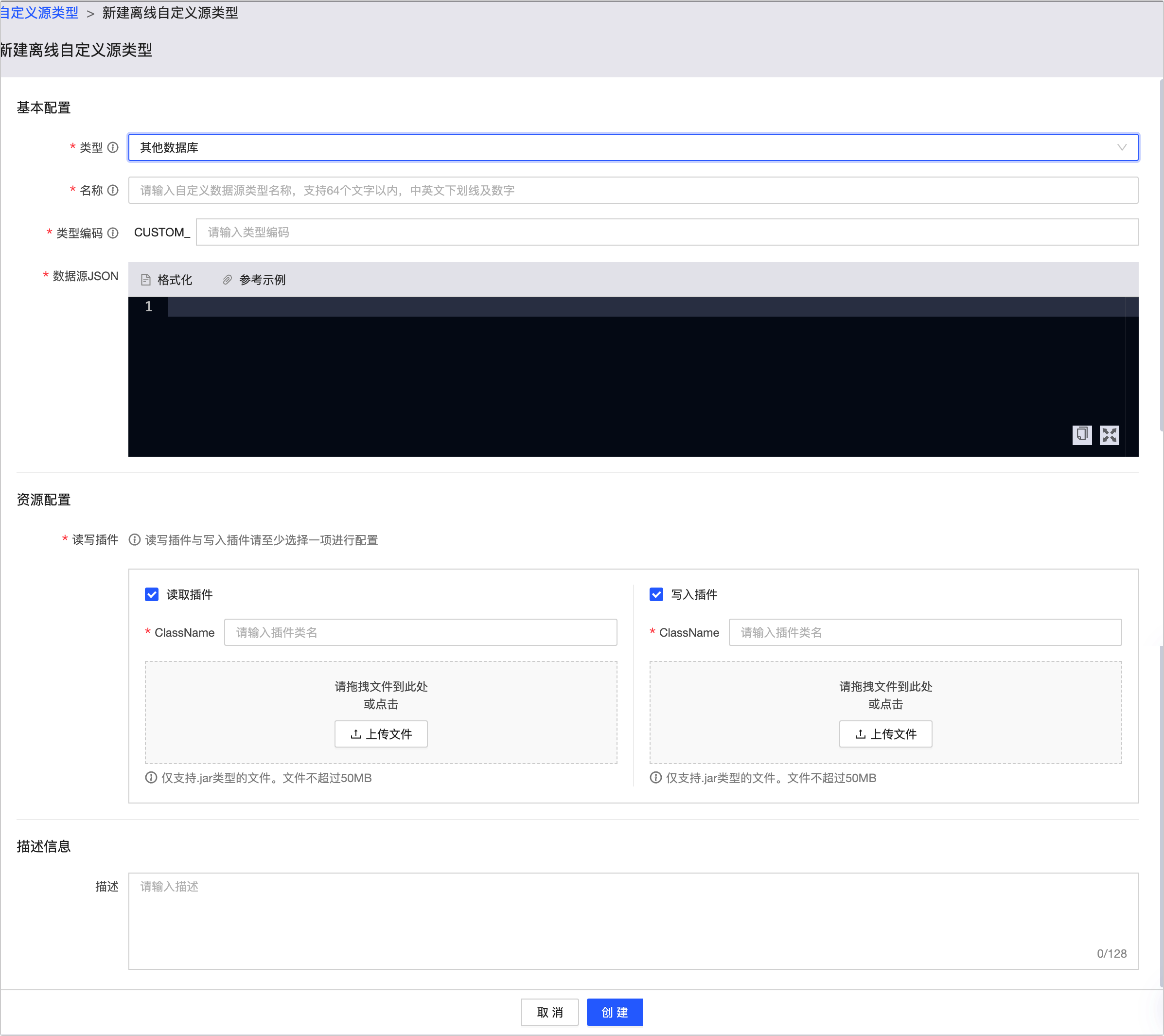
Section
Parameter
Description
Basic configuration
Type
Select Other database.
Name
The name of the custom source type.
Type code
The type code is for backend use and cannot be modified after creation.
Data source JSON
Enter the JSON code that defines the connection parameters for the data source.
The following code is an example:
[
  {
    "columnName": "url",
    "columnType": "NORMAL",
    "text": {
      "zh_CN": "链接地址",
      "en_US": "address",
      "zh_TW": "繁体"
    },
    "placeholder": {
      "zh_CN": "请输入链接地址",
      "en_US": "input address",
      "zh_TW": "繁体"
    }
  },
  {
    "columnName": "username",
    "columnType": "NORMAL",
    "text": {
      "zh_CN": "用户名",
      "en_US": "username",
      "zh_TW": "繁体"
    },
    "placeholder": {
      "zh_CN": "请输入用户名",
      "en_US": "input username",
      "zh_TW": "繁体"
    }
  },
  {
    "columnName": "password",
    "columnType": "ENCRYPT",
    "text": {
      "zh_CN": "密码",
      "en_US": "password",
      "zh_TW": "繁体"
    },
    "placeholder": {
      "zh_CN": "请输入密码",
      "en_US": "input password",
      "zh_TW": "繁体"
    }
  }
]
Resource configuration
Reader/writer plugin
Select the type of plugin to upload, enter its ClassName, and upload the plugin.
Only .jar files are supported. The maximum file size is 50 MB.
You must configure at least a reader plugin or a writer plugin.
Selecting a reader plugin generates a reader component, and selecting a writer plugin generates a writer component.
Description
Description
Enter a brief description of the custom data source type, up to 128 characters long.
Click Create.
Next steps
After you create an offline custom source type, Dataphin generates the necessary connection parameters. You can then add a data source of this new type. For more information, see Create a custom data source.