Create and manage application systems
Application systems can serve as data sources for metadata collection or be enabled for asset consumption. This topic describes how to create and manage application systems.
Prerequisites
To use DataWorks application systems to collect metadata, you must purchase the metadata collection value-added service.
Only standalone deployments of Quick BI V5.5.1 or later are supported.
You must purchase the asset consumption feature to configure asset consumption settings.
Limitations
Only standalone deployments of Quick BI V5.5.1 or later are supported.
Asset consumption can be enabled for only one application system.
To obtain organization information for a Quick BI application system, you must have the required OpenAPI permissions. For more information, see OpenAPI dependencies for Quick BI and DataWorks.
Only Quick BI application systems in a standalone deployment of V5.5.1_feature_2509 support consuming tables from AnalyticDB for PostgreSQL.
You can create a maximum of 100 application systems per tenant.
If the system type is DataWorks and the collection source is MaxCompute, you can collect metadata only from the projects configured for that data source.
Permissions
Super administrators and system administrators can create and manage application systems.
OpenAPI dependencies for Quick BI and DataWorks
Dataphin integrates with Quick BI and DataWorks systems via their respective OpenAPI. This integration supports metadata collection from DataWorks, as well as dashboard metadata collection and asset consumption (available for Quick BI application systems in standalone deployments of V5.5.1_feature_2507, V6.0, or later). Different modules have different OpenAPI dependencies. Before you configure the system, grant permission to the specified AccessKey to call the following OpenAPI:
OpenAPI for dashboard metadata collection:
OpenAPI for dashboard asset consumption:
OpenAPI for DataWorks metadata collection:
Create an application system
In the top menu bar of the Dataphin homepage, choose Management Center > Data Source Management.
In the left-side navigation pane, choose Application System > Application System. On the Application System page, click Create Application System.
In the Create Application System dialog box, configure the parameters.
Quick BI
Parameter
Description
Basic information
System type
Select the Quick BI application system.
Deployment environment
Only standalone Quick BI deployments are supported.
System name
The system name defaults to the selected system type, but you can change it. The name can be up to 64 characters long and must be globally unique.
NoteThe name of the consumption channel is a combination of the System name and the Channel type to distinguish between channels from different systems of the same type, such as
Quick BI-Dashboard.System contact
Enter the contact person for the application system. The value can contain up to 256 characters.
This information helps you contact the person for details such as the access address, endpoint, AccessKey ID, and AccessKey Secret.
System description
Enter a description for the application system, such as its use cases. The description can contain up to 1,024 characters.
Connection configuration
Access address
Enter the access address of the application system. The URL must start with
httporhttpsand can contain up to 512 characters.AccessKey ID/AccessKey Secret
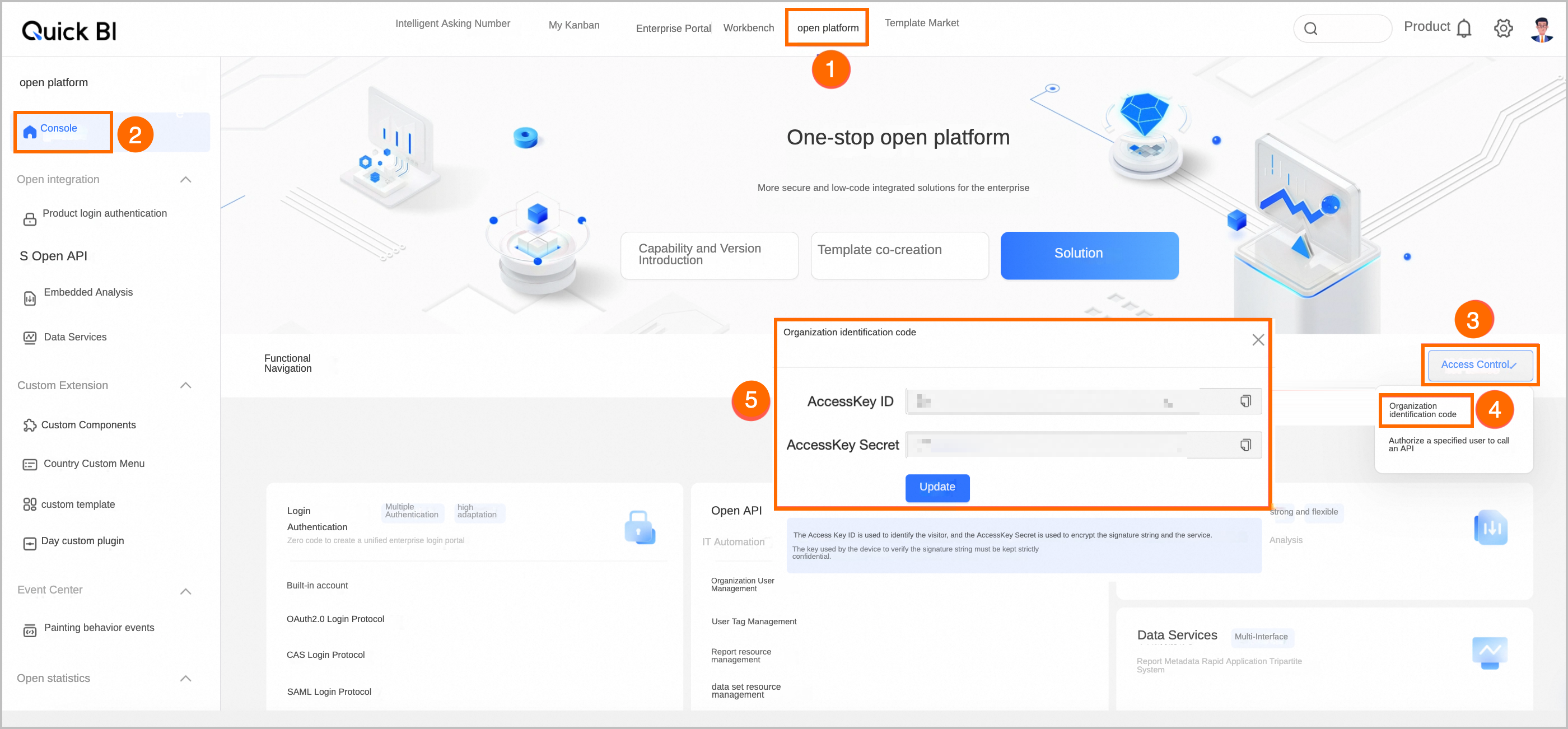
Enter the AccessKey ID and AccessKey Secret for the Organization Identifier. Each value can contain up to 128 characters. Asterisks (*) are not allowed in the secret. The AccessKey ID/AccessKey Secret configured here is used only to automatically create datasets or data sources during asset consumption. Data queries are still subject to individual consumption permissions.
You can obtain these credentials in Quick BI. Go to Open Platform > Console>Access Control>Organization Identifier, as shown in the following figure.
Consumption configuration
Use for asset consumption
This option is disabled by default. If you enable it, you can configure consumption channels in Assets > Asset Consumption.
Consumption channel
Select the consumption channels supported by the application system. Options include dashboard, self-service data retrieval, and spreadsheet. When you select a channel, it is automatically enabled in Assets > Asset Consumption > Consumption Channel Management. If a channel is not selected, it remains disabled but you can enable it manually later.
You must select at least one consumption channel.
Account integration method
Select the method for integrating accounts between Dataphin and the consumption channel's application system. The supported methods are Third-party system account ID or name and Account name.
Third-party system account ID or name: This method is available only when Dataphin and the selected application system are integrated with the same account system. A query error can occur if one account's ID is identical to another account's name.
Account name: This method uses the account name as the unique identifier and is suitable for scenarios where the two systems use different account systems, such as their own built-in accounts. You must select the specific account type used in the Quick BI system. Quick BI account is selected by default. Other options include Alibaba Cloud RAM user, Quick BI account, WeCom, DingTalk account, Lark, Lark Third-party, and Third-party system account.
Operation proxy user
Based on the selected account integration method, enter the name or ID of the proxy user. The value can contain up to 256 characters.
NoteWhen creating a dataset, Quick BI verifies if the operation proxy user has read permission for the specified table in Dataphin. We recommend that you configure an account with broad data permissions.
The operation proxy user needs permission to create the corresponding data sources and datasets for consumed assets in the specified Quick BI workspace. Grant this permission as needed.
Default workspace
Select the default workspace to use when creating analysis tasks in the current channel.
NoteThe system queries available workspaces in the Quick BI system based on the specified AccessKey.
You must select a workspace where the operation proxy user is a member and has permissions to create data sources and datasets.
DataWorks
Parameter
Description
Basic information
System type
Select the DataWorks application system.
Deployment environment
Only the DataWorks public cloud environment is supported.
System name
The system name defaults to the selected system type, but you can change it. The name can be up to 64 characters long and must be globally unique.
System contact
Enter the contact person for the application system. The value can contain up to 256 characters.
This information helps you contact the person for details such as the access address, endpoint, AccessKey ID, and AccessKey Secret.
System description
Enter a description for the application system, such as its use cases. The description can contain up to 1,024 characters.
Connection configuration
Endpoint
Enter the endpoint for the application system in the format
[product_code].[region_id].aliyuncs.com. You can select an endpoint based on the region where your DataWorks instance is deployed. For more information, see Endpoint.Authentication method
You can access the target source by using a RAM role proxy or AccessKey authentication.
RAM role proxy: Dataphin uses the Security Token Service (STS) temporary credential mechanism to grant the service-linked role the required permissions to access the target source, which provides enhanced security.
service-linked role: The system provides the AliyunServiceRoleForDataphinOnCs service-linked role and grants it permissions for DataWorks metadata collection. This role is used only to collect metadata from the DataWorks instance, such as workspace lists, data source lists, table lists, and table details.
AccessKey authentication: Enter the AccessKey ID/AccessKey Secret that you obtained from the Alibaba Cloud console. These keys are used to call the OpenAPI required for DataWorks metadata collection. You can go to the DataWorks official website and click User Center > AccessKey in the upper-right corner to obtain the AccessKey ID/AccessKey Secret.
Click OK to create the application system.
Manage application systems
On the Application System page, the application systems you create are displayed as cards. You can view the name, description, type, contact, access address, and update time of an application system, as well as whether it is used for asset consumption.
You can search for an application system by its name or use the Available for Consumption filter for a quick search.
You can perform the following operations on an application system:
Edit: Modify the configured information. If a consumption channel is already enabled for an application system, you cannot edit the consumption configuration. If you change the account integration method, you can view the analysis tasks that are associated with the new account system.
Delete: You cannot delete an application system if it has associated collection tasks. You must first delete these tasks before deleting the application system. If you recreate the system, its previous analysis tasks are restored.
Test: Click Test to verify that the domain name is accessible and the AccessKey ID/AccessKey Secret are valid.
Next steps
When you create a collection task, you can select an application system as the data source. For more information about the configuration, see Create and manage metadata collection tasks.
If asset consumption is enabled for the application system, you can enable consumption channels and create analysis tasks. To learn how to enable consumption channels, see Consumption Channel Management. To learn how to create analysis tasks, see My BI Analysis.