Overview of logical table scheduling configuration
For logical table tasks, you need to define scheduling properties, upstream dependencies, and scheduling parameters.
Entry to logical table scheduling configuration
-
Navigate to the Dataphin home page, click Development -> Data Development.
-
To access the Scan Configuration dialog box for logical tables, follow these steps:
Select Project (Dev-Prod pattern requires selecting an environment) -> click Logical Dimension Table or Logical Fact Table -> click the desired logical table -> click Scan Configuration.
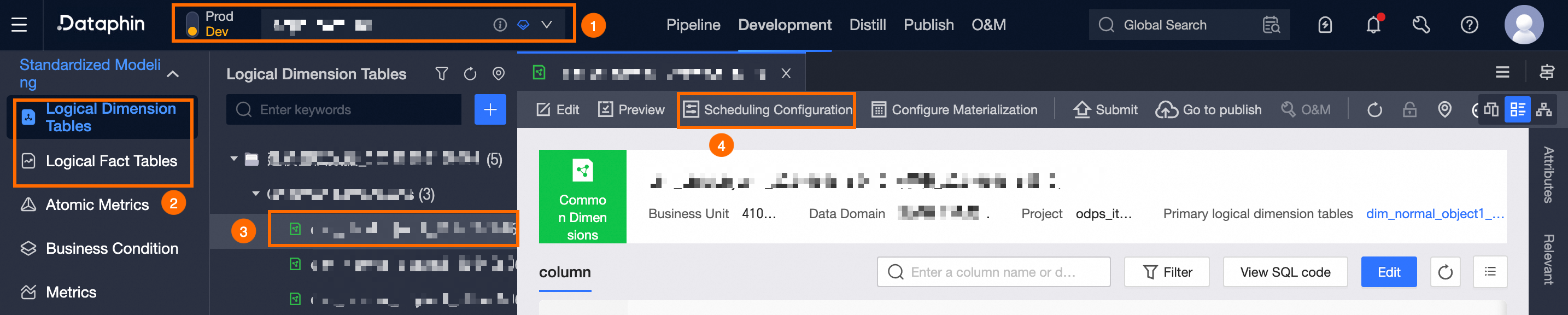
Logical table scheduling configuration
In the Scan Configuration dialog box, configure the following scheduling items for the logical table.
|
Configuration Item |
Description |
|
Automatically reruns all data within the specified Maximum Latency Days for logical tables. |
|
|
Scheduling properties define the rules that govern a logical table task's scheduling process, including scheduling type, cycle, and conditions. |
|
|
Configure upstream dependencies for logical table tasks to ensure orderly execution and timely data production. |
|
|
Assign values to variables in logical tables for automatic substitution during scheduling. |
|
|
Configure run timeout and rerun policies for logical dimension tables to prevent resource waste and improve reliability. |
|
|
Assign a logical table task to a resource group for task scheduling. |