View identification rule execution records
Each execution of an identification rule or lineage-based inheritance task generates a record. You can view and manage these execution records in Dataphin.
Permission description
Security administrators have access to detailed execution records, while all users can view the execution record list.
Manage identification rule execution records
-
On the Dataphin home page, navigate to the top menu bar and select Administration > Data Security.
-
In the left-side navigation pane, choose Data Identification > Identification Execution Records to open the Identification Execution Records page.
The execution record list displays the task name, classification, status, number of successful/failed tables, and the start and end times.
-
(Optional) Search for execution records by task name keyword or filter them by task type, status, or table scan results.
-
Perform the following actions on the desired execution record:
Operation item
Description
Stop
Click the stop button to terminate a scan. This action is available only when the task is in progress.
NoteExecuting identification rules consumes computing resources. Stopping unnecessary executions promptly helps conserve resources.
View Task Details
View the identification results of the task. For more information, see Identification result details.
View task identification details--table
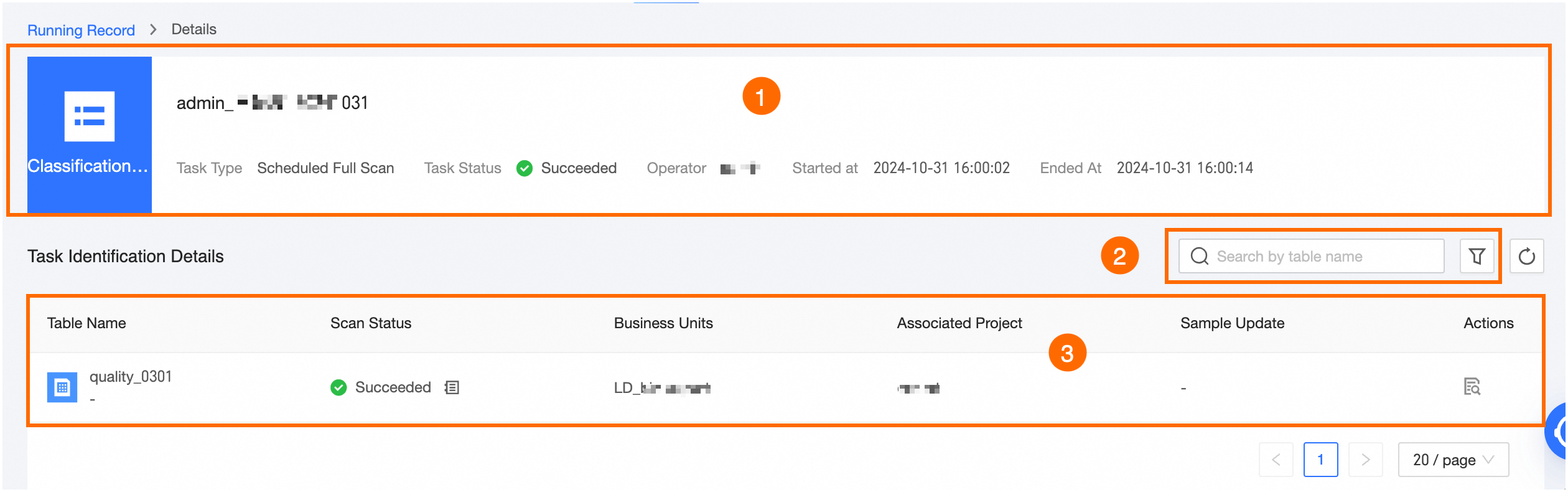
Click the view  icon under the execution record to examine the table's task identification details.
|
Ordinal number |
Description |
|
①Basic information |
Displays basic information about the identification task, including task name, type, status, operator, start time, and end time. |
|
②Filter and search area |
Search tasks by table name, or filter by data section (Dataphin tables only), associated project (Dataphin tables only), scan status, or data source (data sources only). |
|
③List area |
Displays the table name, scan status, asset source, and sampling update information. Click the Actions column to view the Asset source: Dataphin tables display associated project and section information. Data source tables display associated Database/Schema and data source information. |
View task identification details--field
Field identification details are available when a field meets the current task's rule-based classification tagging conditions and has not been tagged in previous tasks. For previously tagged fields, refer to Identification Results.
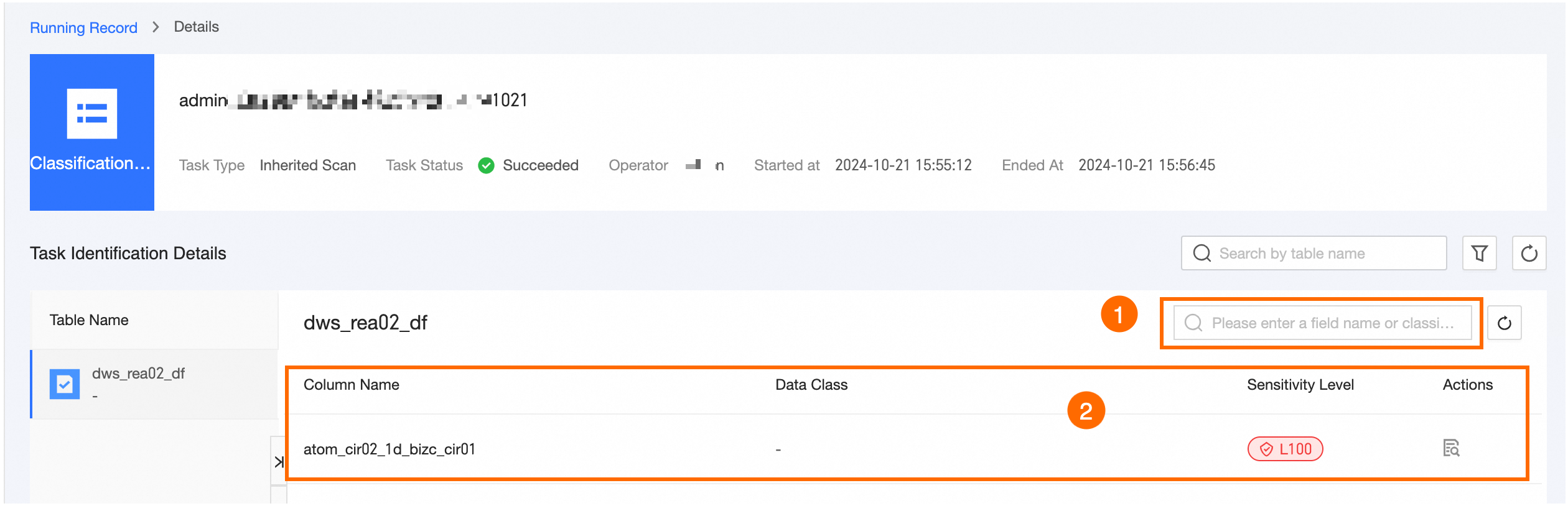
To view field details, click the Actions column of the task, then click the view icon or the table name.
|
Ordinal number |
Description |
|
①Search area |
Search for fields by field name or data classification. |
|
②List area |
Displays field name, data classification, and data grading information. Click the view |
Field identification details
Shows the field's basic information, effective results, and identification records. For further details, see View Identification Details.
-
Basic Information: Shows the table and field names.
-
Effective Results: Displays data classification, grading, identification method, priority, actual matching degree, classification modification time, and update time. You can perform operations such as Specify Data Classification (available when data classification is unspecified) and Edit Identification Results (available when data classification is specified) on the identification results.
-
The Classification Record section shows data classification, grading, identification method, priority, matching degree, classification modification time, and update time. You can apply the Specify As Effective Result action to identified results.
Note-
The tagging method hierarchy is manual specification, followed by automatic identification, and then automatic inheritance based on lineage.
-
For automatically identified results, the priority order is data classification priority, data grading, update time, matching degree, and data classification modification time.
-
For automatically inherited results, the highest data grading level is inherited, giving it the highest priority. If multiple gradings at the same level have different classifications, the priority order is classification priority, identification record update time, and classification modification time.
-
If the identification rule scan does not meet the threshold conditions, it will not proceed to arbitration.
-