Offline mode operation configuration
Configure task-level operation timeouts and rerun policies for real-time tasks in offline mode to prevent resource waste from prolonged task execution and improve task reliability.
Procedure
-
On the Dataphin home page, click Development in the top menu bar. The Development page appears by default.
-
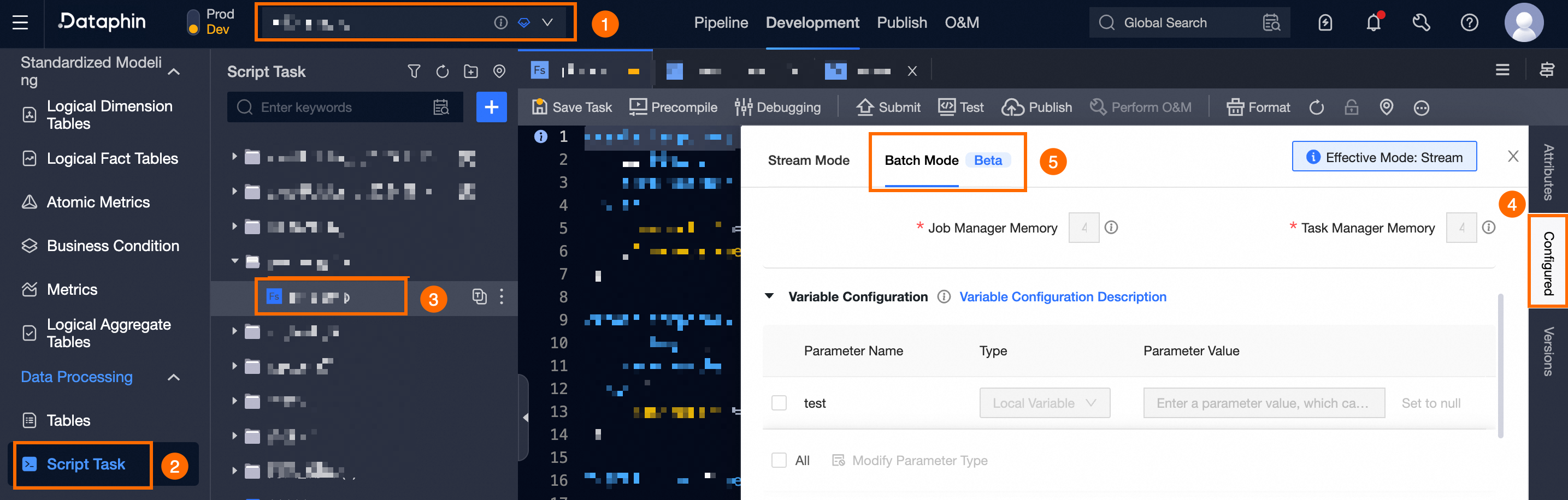
Navigate to the Offline Mode configuration page for the real-time task:
Click Development -> Project (Dev-Prod mode requires environment selection) -> Computing task -> Select the target real-time task -> Configuration -> Offline Mode.
-
In the Configuration drawer, configure the following parameters in the Operation Configuration area.
Parameter
Description
Operation timeout
Operations that exceed the specified duration are automatically terminated and marked as failed.
-
System Configuration: Uses the auto triggered node parameter from the tenant-level operation settings in the O&M module. For more information, see global configuration.
-
Customize: Enter a value from 0 to 168, with up to 2 decimal places.
Automatic rerun on failure
If a task instance or data backfill instance fails, the system automatically reruns it based on this configuration.
-
Default option: Uses the automatic rerun on failure setting from the tenant-level operation configurations in the O&M module. For more information, see: operation configuration.
-
Customize: Enter an integer from 0 to 10 for the number of reruns and an interval of 1 to 60 minutes.
-
-
Click Confirm to save the offline mode operation configuration for the real-time task.