Submitting real-time computing tasks
When you submit a real-time computing task, Dataphin parses the data lineage for tables and fields, confirms the change type and content of the task object, and runs pre-checks to ensure the task meets submission requirements.
Data lineage parsing
Dataphin parses the data lineage in the development environment during task submission and in the production environment during publication. A maximum of 100,000 data lineage records can be parsed. Records that exceed this limit are not saved and cannot be displayed in the asset directory.
Submission details
When you submit a real-time computing task, the Submit dialog box opens, where you can view the submission content, pre-check results, and add submission notes.
-
Submission content
Displays the object type, task pattern, change type, and change details of the submitted task object. Change details include Basic Information and Task Details.
-
Pre-check
Dataphin performs the following pre-checks when you submit a real-time computing task. The task cannot be submitted if any check item fails.
Check item
Description
Real-time pattern
Variable configuration
Checks the variables used in the computing task's code, including whether local variables are set and whether parameter names are valid. For more information, see Configure variables for the real-time pattern.
Offline pattern
Scheduling dependencies
Dataphin uses the scheduling dependency configurations of each node to run nodes in a business flow in the correct order, ensuring that business data is generated on time. For more information, see Configure scheduling for the offline pattern.
Variable configuration
Checks the variables used in the computing task's code, including whether local variables are set and whether parameter names are valid. For more information, see Configure variables for the offline pattern.
-
Submission notes
You can add notes for the task submission. The notes must be 128 characters or less.
Check items
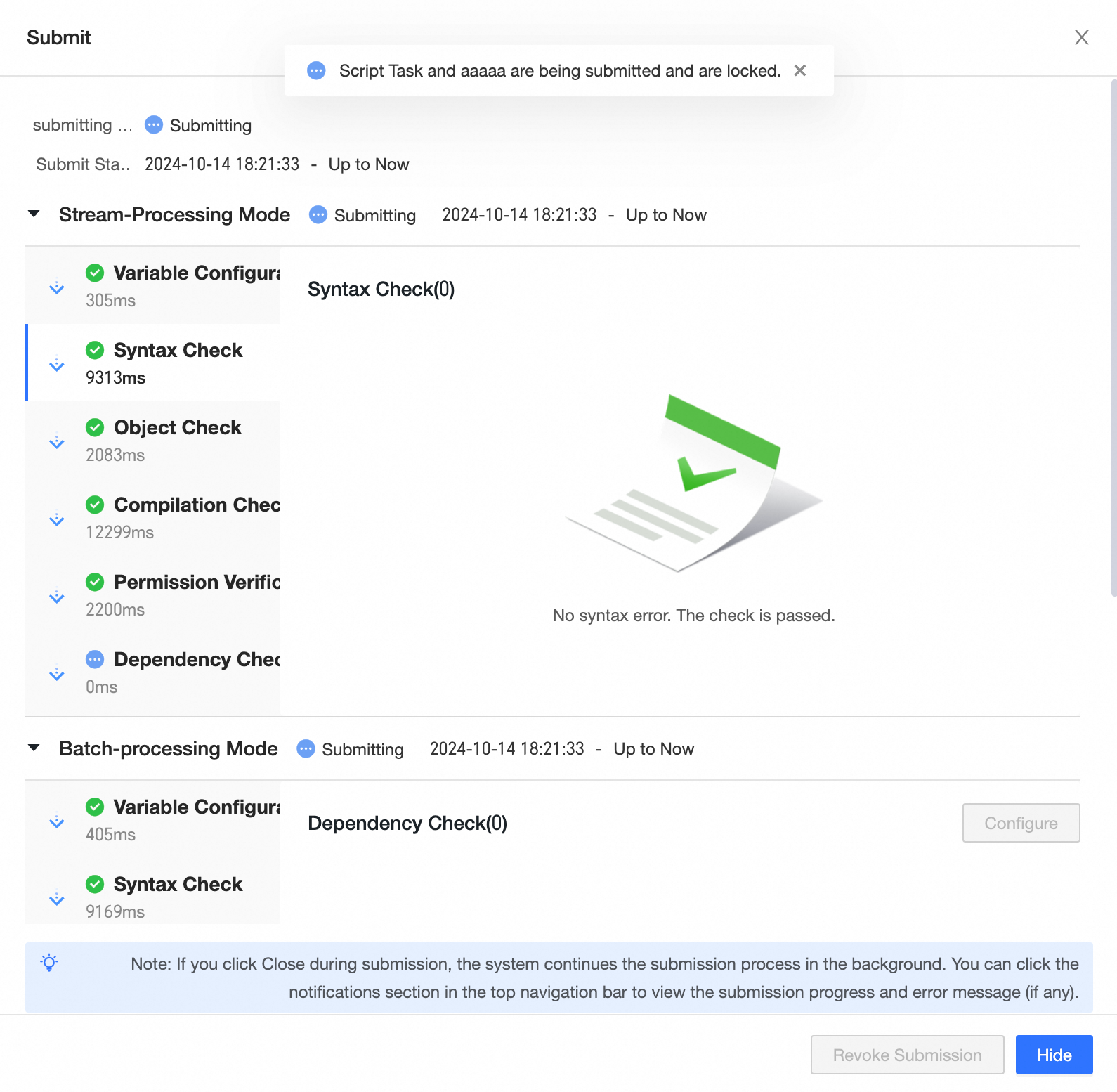
After you submit a real-time computing task, you can view the check items and their results in the Submit dialog box.
|
Check item |
Description |
|
Variable configuration |
Parses all variables in the code and displays them in a list. Checks whether parameter names are valid (only letters, numbers, and underscores are supported) and whether local variables have been assigned a value. |
|
Syntax check |
Flink_SQL tasks undergo a syntax check to verify SQL syntax. If a syntax error is detected in a Flink_SQL task, click Locate Error to navigate to the line with the error in the editor. Note
If Dataphin cannot locate a syntax error in the code, it displays an error message. |
|
Object check |
For Flink_SQL tasks, verifies that all referenced objects are submitted and published to the production environment. The system parses referenced objects in the code and lists each object's name, type, and check result.
|
|
Compilation check |
Checks whether tables and fields exist in the code, whether functions are used correctly, and whether field types are supported. |
|
Permission verification |
Parses all objects in the code and checks whether the current user has the required permissions. If verification fails, a list of objects with missing permissions is displayed.
|
|
Dependency check |
Checks the dependency configuration and output configuration.
|
|
Code review |
If a task references content that requires code review, such as a global variable with code review enabled, Dataphin triggers a code review check. A code review automatically generates a ticket and submits it to the reviewer. You can perform Revoke and Open Ticket operations on the code review request. |
 icon in the Actions column of the target object. The default validity period is 30 days.