Runtime analysis
Use runtime analysis to view various monitoring metrics for real-time instances of the open-source Flink real-time computing engine and for real-time workflows.
Permissions
To view the runtime analysis for a project, you must have project space permissions.
Accessing the Apache Flink Dashboard requires a username and password. Users with the roles of super administrator, system administrator, task owner, or project O&M lead can view the credential information.
Access runtime analysis
On the Dataphin home page, in the top menu bar, select Develop > task O&M.
In the left-side navigation pane, select instance O&M > Real-time Instances. On the Real-time Instances page, click the
 icon in the Actions column for the target instance.
Runtime analysis dashboard
On the runtime analysis page, you can view various metrics, as shown in the following figure.
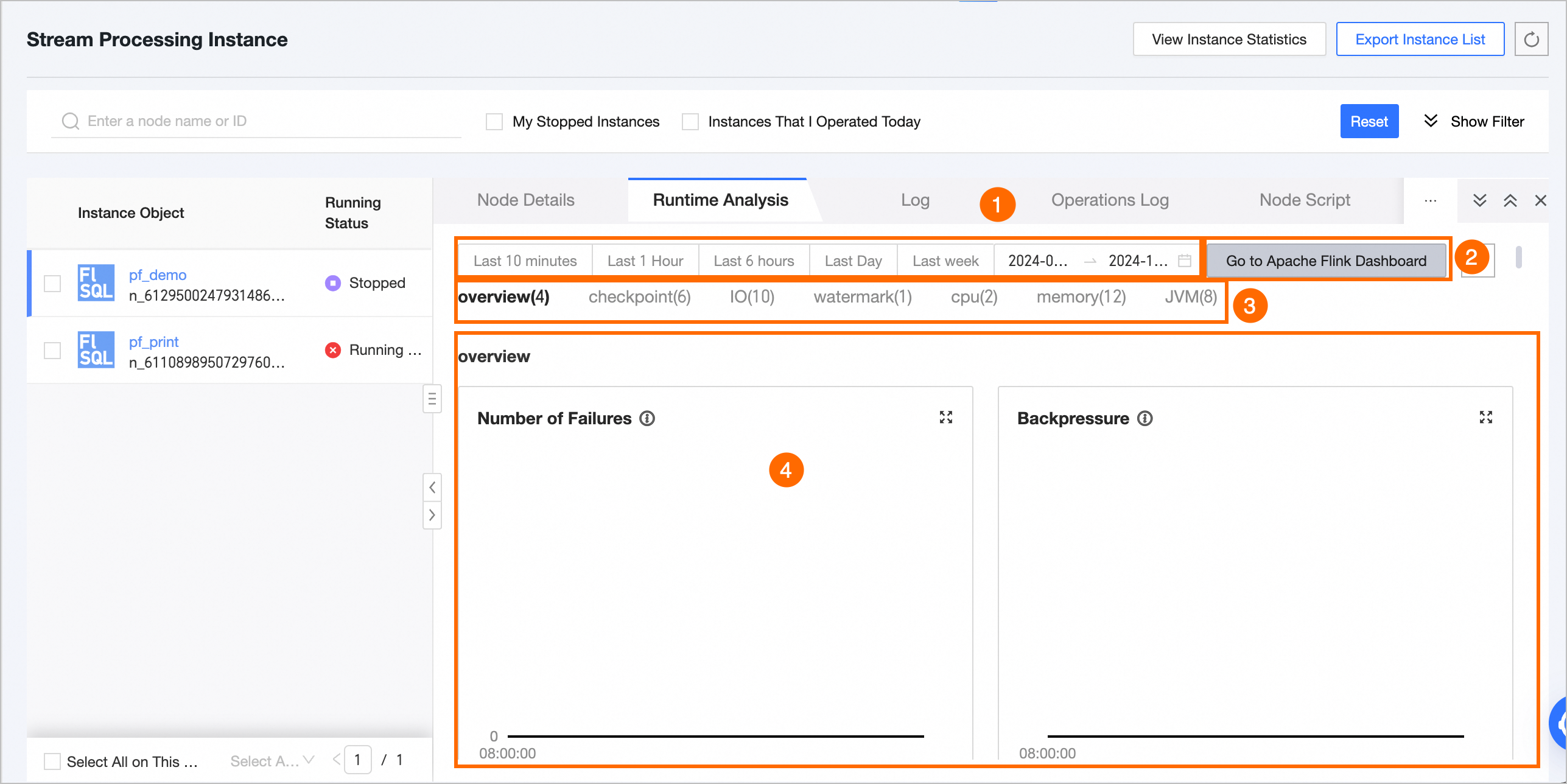
Feature | Description |
① Time range selector |
|
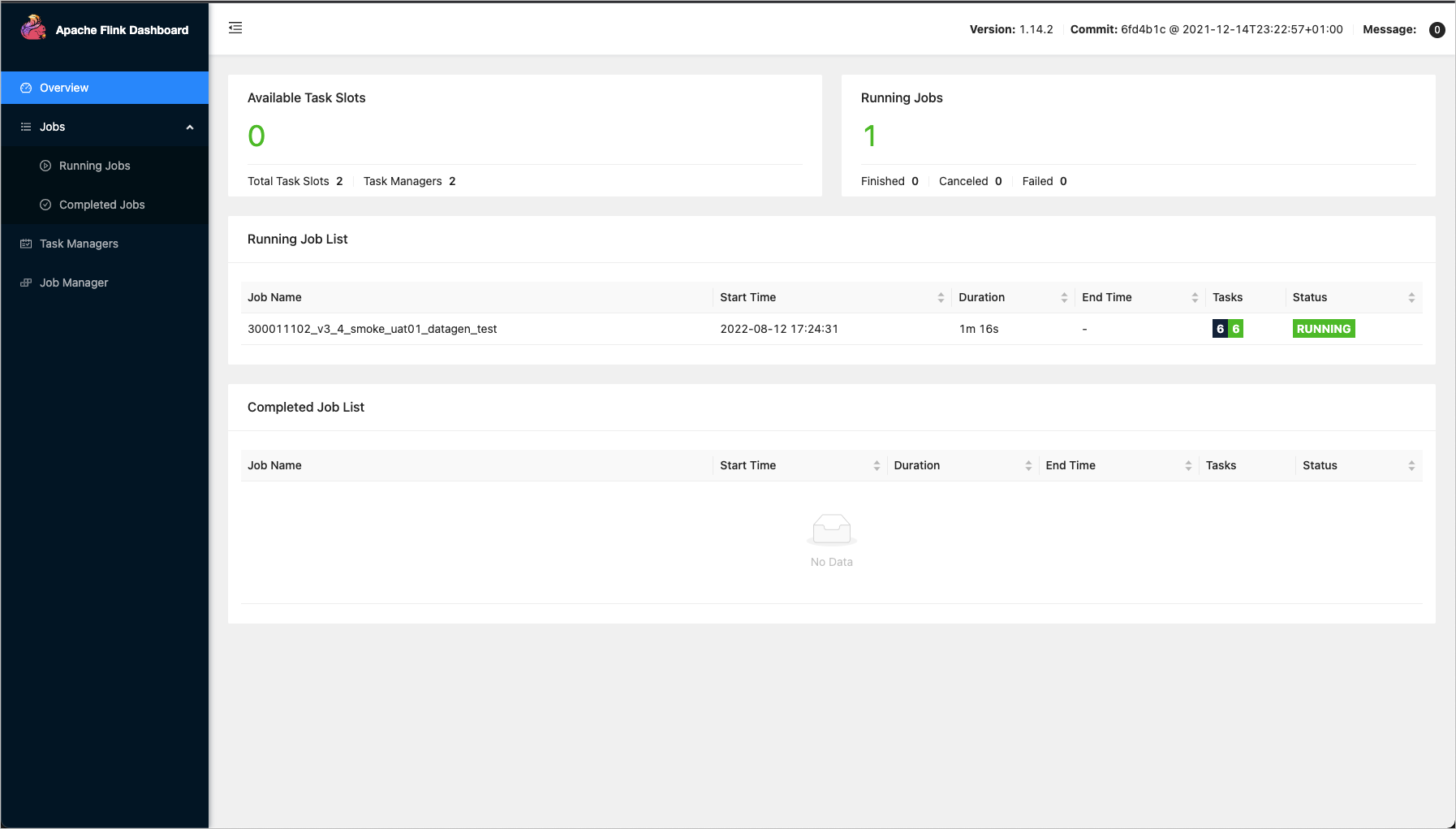
② Go to Apache Flink Dashboard and Refresh |
|
③ Real-time monitoring metrics | For Flink SQL or Flink Datastream tasks, you can view metrics for the following categories: Overview, checkpoint, IO, watermark, CPU, memory, and JVM. For real-time workflow tasks, the overview and operator metrics are available. For a detailed description of each metric, see Real-time monitoring metric descriptions. |
④ Metric data charts | Displays charts showing the data for each metric over the selected time range. |
Metric data aggregation
If the selected time range is 6 hours or less, data points are displayed at a 1-minute granularity.
If the selected time range is longer than 6 hours but no more than 24 hours, data is aggregated into 5-minute intervals starting from the top of the hour. Each data point represents the preceding 5 minutes.
If the selected time range is longer than 24 hours, data is aggregated into 10-minute intervals starting from the top of the hour. Each data point represents the preceding 10 minutes.
Real-time monitoring metrics
Flink SQL and DataStream tasks
For Flink SQL and Flink DataStream tasks running on open-source Flink, Ververica Flink, or FusionInsight Flink engines, you can view the following monitoring metrics.
Overview
Metric
Description
Unit
Number of Failures
The number of times the task failed within the selected time range.
Count
Back Pressure Status
Indicates whether back pressure is occurring in the task during the selected time range. Back pressure occurs when an upstream task produces data faster than a downstream task can consume it.
Yes/No
Data Output of Each Sink
The output transactions per second (TPS) of each sink.
records/s
Checkpoint Failure Count
The number of failed task checkpoints in the selected time range.
Count
Checkpoint
Metric
Sub-type
Description
Unit
Total Number of Checkpoints
Total Number of Checkpoints
(
totalNumberOfCheckpoints)The total number of checkpoints for the task in the selected time range.
Count
Number of Failed Checkpoints
(
numberOfFailedCheckpoints)The number of failed checkpoints for the task in the selected time range.
Count
Number of Completed Checkpoints
(
numberOfCompletedCheckpoints)The number of completed checkpoints for the task in the selected time range.
Count
Number of In-Progress Checkpoints
(
numberOfInProgressCheckpoints)The number of checkpoints in progress for the task in the selected time range.
Count
Last Checkpoint Duration (
lastCheckpointDuration)Last Checkpoint Duration
(
lastCheckpointDuration)The duration of the last checkpoint.
A long or timed-out checkpoint can be caused by a large state size, network issues, barrier misalignment, or back pressure.
Milliseconds (ms)
Last Checkpoint Size
(
lastCheckpointSize)Last Checkpoint Size
(
lastCheckpointSize)The actual size of the data uploaded for the last checkpoint. This helps you analyze checkpoint performance when bottlenecks occur.
Bytes
IO
Metric
Description
Metric
Description
Unit
Total bytes in per second.
(
numBytesInPerSecond)Use this metric to monitor the upstream data input rate and observe job traffic.
Bytes in from local per second
(
numBytesInLocalPerSecond)The number of bytes read locally per second.
Bytes/s
Bytes in from remote per second
(
numBytesInRemotePerSecond)The number of bytes read from remote sources per second.
Bytes/s
Buffers in from local per second
(
numBuffersInLocalPerSecond)The number of bytes read from local network buffers per second.
Bytes/s
Buffers in from remote per second
(
numBuffersInRemotePerSecond)The number of bytes read from remote network buffers per second.
Bytes/s
Total bytes out per second.
(
numBytesOutPerSecond)Use this metric to monitor the upstream throughput and observe job traffic.
Bytes out per second
(
numBytesOutPerSecond)The number of bytes written per second.
Bytes/s
Buffers out per second
(
numBuffersOutPerSecond)The number of bytes written to network buffers per second.
Bytes/s
Total records in and out per second per subtask.
(
TaskNumRecordsIOPerSecond)Use this metric to determine if a job has an IO bottleneck and assess its severity based on the rate.
Records in per second
(
numRecordsInPerSecond)The number of records received per second.
records/s
Records out per second
(
numRecordsOutPerSecond)The number of records sent per second.
records/s
Total records in and out per subtask.
(
TaskNumRecordsIO)Use this metric to determine if a job has an IO bottleneck.
Total records in
(
numRecordsIn)The total number of records received.
Count
Total records out
(
numRecordsOut)The total number of records sent.
Count
Watermark
Metric
Description
Unit
Task Input Watermark
(
TaskInputWatermark)The time of the most recent watermark received by each task. This indicates data latency at the TM.
Milliseconds (ms)
CPU
Metric
Description
Unit
JM CPU Load
(
JMCpuLoad)The CPU load of a single JM. A value consistently over 100% indicates high CPU utilization, which can degrade system performance and cause sluggishness or long response times.
%
TM CPU Load
(
TMCpuLoad)The CPU load of a single TM. This reflects Flink's CPU time slice usage. A 100% value means one CPU core is fully utilized; 400% means four cores are fully utilized. A value consistently over 100% indicates high CPU usage. If the load is high but CPU utilization is low, it might be due to an excessive number of processes in an uninterruptible sleep state caused by frequent IO operations.
%
Memory
Metric
Sub-type
Description
Unit
JM Heap Memory
(
JMHeapMemory)JM heap memory Used
(
JMHeapMemoryUsed)The amount of JM heap memory in use.
Bytes
JM heap memory Committed
(
JMHeapMemoryCommitted)The amount of JM heap memory that is guaranteed to be available for use by the JVM.
Bytes
JM heap memory Max
(
JMHeapMemoryMax)The maximum amount of heap memory that can be used by the JM.
Bytes
JM Off-Heap Memory
(
JMNonHeapMemory)JM off-heap memory Used
(
JMNonHeapMemoryUsed)The amount of JM off-heap memory in use.
Bytes
JM off-heap memory Committed
(
JMNonHeapMemoryCommitted)The amount of JM off-heap memory that is guaranteed to be available for use by the JVM.
Bytes
JM off-heap memory Max
(
JMNonHeapMemoryMax)The maximum amount of off-heap memory that can be used by the JM.
Bytes
TM Heap Memory
(
TMHeapMemory)TM heap memory Used
(
TMHeapMemoryUsed)The amount of TM heap memory in use.
Bytes
TM heap memory Committed
(
TMHeapMemoryCommitted)The amount of TM heap memory that is guaranteed to be available for use by the JVM.
Bytes
TM heap memory Max
(
TMHeapMemoryMax)The maximum amount of heap memory that can be used by the TM.
Bytes
TM Off-Heap Memory
(
TMNonHeapMemory)TM off-heap memory Used
(
TMNonHeapMemoryUsed)The amount of TM off-heap memory in use.
Bytes
TM off-heap memory Committed
(
TMNonHeapMemoryCommitted)The amount of TM off-heap memory that is guaranteed to be available for use by the JVM.
Bytes
TM off-heap memory Max
(
TMNonHeapMemoryMax)The maximum amount of off-heap memory that can be used by the TM.
Bytes
JVM
Metric
Description
Unit
JM Threads
(
JMThreads)The total number of active threads in the JM. An excessive number of threads can consume too much memory and reduce job stability.
Count
TM Threads
(
TMThreads)The total number of active threads in the TM, aggregated by TM. Multiple TMs appear as separate lines on the chart.
Count
JM Young Generation GC Time
(
JMGCTime)The time spent by the JM's young generation garbage collector. Long garbage collection (GC) pauses can consume significant memory and impact job performance. Use this metric to diagnose job-level failures.
Milliseconds (ms)
TM Young Generation GC Time
(
TMGCTime)The time spent by the TM's young generation garbage collector. Long GC pauses can consume significant memory and impact job performance. Use this metric to diagnose job-level failures.
Milliseconds (ms)
JM Young Generation GC Count
(
JMGCCount)The number of times the JM's young generation garbage collector has run. Frequent GC can consume significant memory and impact job performance. Use this metric to diagnose job-level failures.
Count
TM Young Generation GC Count
(
TMGCCount)The number of times the TM's young generation garbage collector has run. Frequent GC can consume significant memory and impact job performance. Use this metric to diagnose task-level failures.
Count
TM Total Loaded Classes
(
TMClassLoader)The total number of classes loaded by the TM's JVM since startup. An excessive number of loaded or unloaded classes can consume too much memory and affect job performance.
Count
JM Total Loaded Classes
(
JMClassLoader)The total number of classes loaded by the JM's JVM since startup. An excessive number of loaded or unloaded classes can consume too much memory and affect job performance.
Count
Real-time workflow tasks
After you enable the unstructured data feature, the following monitoring metrics are available for real-time workflow tasks.
Overview
Metric
Description
Unit
Number of Failures
The number of times the workflow failed to process an event during the selected time range.
Count
Business Latency
The time difference between when an event occurs and when it is processed by the system. The metric is reported once per minute based on the last processed event.
Seconds (s)
Event Processing Throughput
The number of events successfully processed per second.
events/s
Operator
Metric
Description
Unit
Operator Execution Failures
The number of execution failures for each operator. Each operator is shown as a separate line on the chart.
Count
Operator Execution Time Distribution
The P50, P95, and P99 execution durations for each operator. Each operator is shown as a separate line on the chart.
Milliseconds (ms)
Operator QPS
The number of queries processed per second (QPS) by each operator.
queries/s
Operator Queue Wait Time
The time an event waits in a queue from submission until the operator begins execution.
Milliseconds (ms)
Dataset Write TPS
The rate at which records are written to a dataset, measured in transactions per second (TPS). Each dataset is shown as a separate line on the chart.
records/s
Dataset Write Latency
The time taken for a single dataset write operation.
Milliseconds (ms)