Search for Configurations
Updated at:
The search asset configuration feature allows you to quickly locate the corresponding configuration items of an asset and modify the configuration style on the Search for Configurations page. You can also reuse the configuration style of the same type.
Procedure
Log on to the DataV console.
- On the My Visualizations page, click Edit above the project that you created.
- In Canvas Editor, click an asset in the Layer column or on the canvas.
Important Before searching for asset configurations, make sure that the corresponding assets have been added to your visualization application project. Otherwise, you need to add the assets first. For more information, see Asset management (Enterprise Edition).
- In the upper-right corner of the Settings tab, click Search for Configurations.
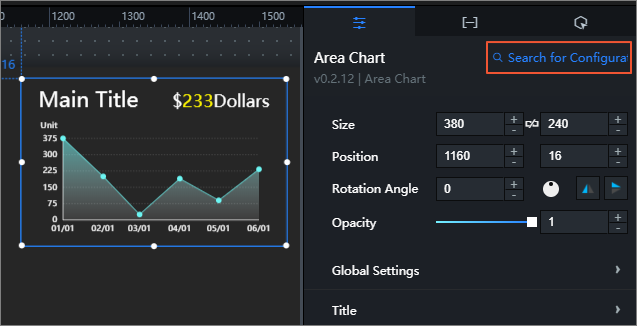
- On the Search for Configurations page, enter a configuration items name in the search box.
After the input is complete, press the Enter key or click the
 on the right. The system automatically searches for the configuration items content that meets the conditions (fuzzy match is supported) and displays it on the current search page.
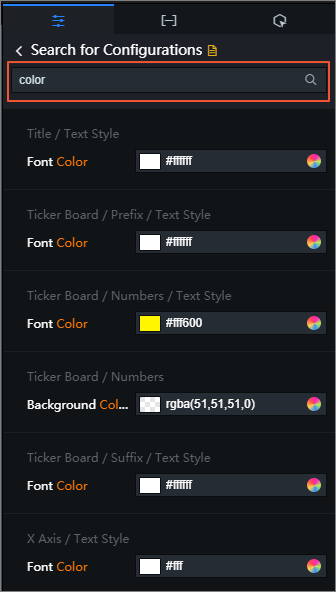
- In the list of Search for Configurations configuration items, you can also modify and copy the configuration style and locate the jump to configuration items.
- Select a configuration item and modify the configuration style.
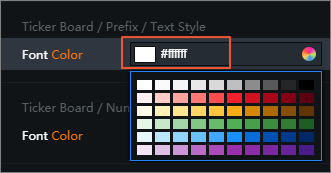
After the modification, the configurations are directly applied to the corresponding assets in the visualization application.
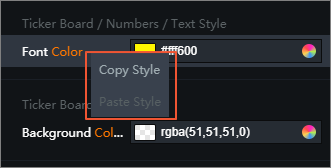
- Right-click a configuration and select Copy Style to copy the configuration style of the asset. Right-click one or hold down the shift key multiple times to select several configuration items of the same type and select Paste Style to apply the copied style to the configuration items.
- Click the directory bar of a configuration items or the
 on the right to go to a specific location in the configuration panel where the configuration items is located.
 The configuration item that you find is displayed in blue on the Settings tab.
- Select a configuration item and modify the configuration style.
 on the right to go to a specific location in the configuration panel where the configuration items is located.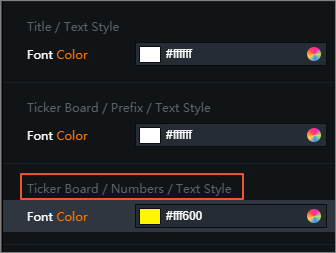
Is this page helpful?