Video stream access FAQ
Troubleshoot common video stream access issues in DataV.
Video stream access overview
Symptoms
Video stream access involves browsers, streams, and players. DataV integrates video players as widgets but has limited ability to diagnose issues that originate from the browser, stream, or player. Due to the variety of monitoring vendors, stream formats, and proprietary protocols, no single player supports all video streams.
Solution
Deploy a transcoding server to convert video streams into web-compatible formats. This approach is proven and widely adopted.
Troubleshoot playback issues
Video playback stutters or fails
If playback stutters or fails, check the following:
-
Check your network connection. Verify that bandwidth supports concurrent playback, and upgrade if necessary.
NoteSmooth playback on monitoring software or VLC does not guarantee smooth playback in a browser. Test concurrent multi-stream playback with the EZVIZ Cloud player.
-
Check machine performance. Browsers rely on CPU for decoding, and concurrent streams compete for CPU resources. Use a high-clock-speed CPU such as an i9.
NoteVideo transcoding and video-on-demand services can also resolve format and performance issues.
-
Check the browser console for Cross-Origin Resource Sharing (CORS) errors. If the video stream endpoint does not allow cross-origin access, configure the server to permit it.
NoteThe visualization application endpoint typically differs from the video stream endpoint.
-
Check the HTTP protocol version. HTTP/1.1 limits concurrent requests per domain (typically six in Chrome). Playing multiple videos simultaneously can cause stuttering. Use HTTP/2.0 or different domain names for video stream endpoints.
-
For FLV streams, verify that the URL has the .flv file extension.
NoteUse video stream vendors that support browser-native formats such as FLV and HLS.
DataV video player widgets
Alibaba Cloud Player (Recommended)
Alibaba Cloud Player is recommended. The integration document covers setup details.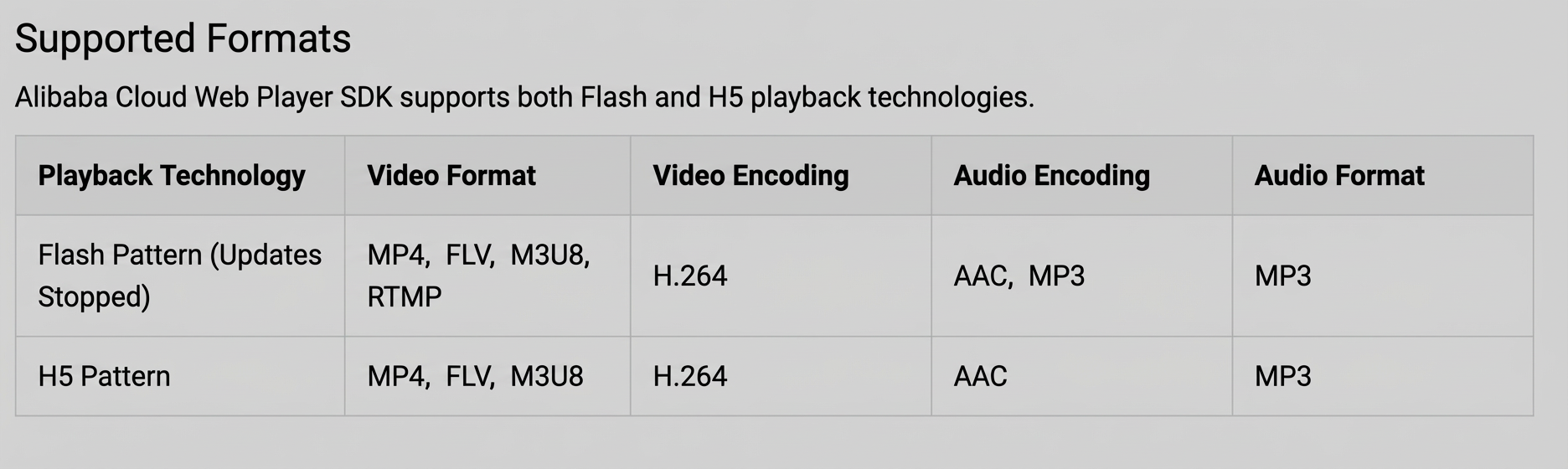
Video widget
The Video widget uses the HTML video tag and supports MP4, OGG, and WebM formats. The following figure shows the supported encoding methods.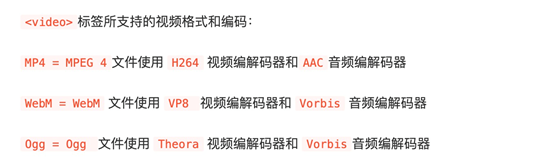
EZVIZ Cloud
EZVIZ Cloud is a third-party player similar to Alibaba Cloud Player. Alibaba Cloud Player is recommended instead.
RTMP Video Stream Player (Not recommended)
This player supports RTMP but relies on Flash, which modern browsers no longer support.
Custom Components
If the preceding widgets do not meet your needs, a frontend developer can build a custom widget. Getting started with widget development.
Video stream formats
-
Camera video streams typically use RTSP or the GB/T 28181 standard. In large-scale projects, vendors provide an aggregation platform to distribute streams.
-
Common playback clients on computers:
-
Vendor monitoring software with a client/server (C/S) architecture. Good usability and performance.
-
Video playback software such as VLC. Uses hardware decoding with medium performance.
-
Browser-based large-screen display software. More dependent on web player compatibility and CPU performance than the other options.
-
-
Some vendors previously provided ActiveX plugins for proprietary video formats in Internet Explorer, but IE has been phased out. Mainstream browsers such as Chrome cannot directly play RTSP or GB/T 28181 streams.
-
Web-supported video stream formats include RTMP, HLS, and FLV. RTMP relies on Flash, which performs poorly and is no longer supported by modern browsers. HLS is an Apple format that works well in Safari but uses segmented delivery, which causes latency, prevents real-time playback, and may produce black screens when switching segments in Chrome. FLV is the most widely adopted format for live streaming and is used by most major video websites. It uses the browser's native player and offers the best performance.