device-input
Configure the Input Device Class node in Blueprint Editor. Currently, the only supported input device node is the keyboard.
The keyboard
The Keyboard node monitors keyboard input.
Scenarios: Use the Keyboard node for keyboard-driven interactions. For example, you can use arrow keys to move an image across the canvas.
Add a keyboard node to the blueprint canvas to view its supported events, actions, and configuration parameters. For more information, see Use logical nodes.
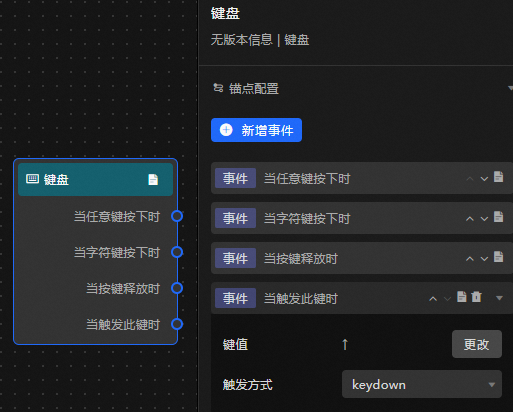
Event /action parameters
|
Event /Action |
Description |
|
When any key is pressed |
Raised when any key on the keyboard is pressed. |
|
When a character key is pressed |
Raised when a character key on the keyboard is pressed. |
|
When the key is released |
Raised when a key is released. |
|
When this key is triggered |
Raised when a specific key is triggered. You can configure multiple key values and their trigger methods.
|