Configure MySQL Reader
The MySQL Reader captures data changes from MySQL tables in real time by subscribing to the binary log. This topic describes how to configure a MySQL Reader, including the required network connections and account permissions.
Prerequisites
Before you configure the MySQL Reader, complete the following prerequisites:
-
Grant the necessary permissions to the synchronization account. For more information, see Configure account permissions.
Real-time synchronization accesses MySQL by using an account that you configure in the data source. This account must have the
SELECT,REPLICATION SLAVE, andREPLICATION CLIENTpermissions for the database. -
The MySQL binary log service is enabled. For more information, see Enable MySQL Binlog.
Data Integration uses real-time subscriptions to the MySQL binary log to synchronize incremental data. You must enable the MySQL binary log service before you configure a synchronization task in DataWorks.
-
You have purchased an exclusive resource group for Data Integration with appropriate specifications. For more information, see Use an exclusive resource group for Data Integration.
-
Network connectivity is configured between the data synchronization resource group and the database. For more information, see Network Connectivity Solutions.
Limitations
-
Data Integration does not support synchronizing data from read-only MySQL instances.
-
Data Integration in DataWorks synchronizes MySQL data in real time based on real-time subscriptions. This feature currently supports only ApsaraDB RDS for MySQL instances that run MySQL
5.xor8.x. If you need to synchronize data from a DRDS database, configure it as a DRDS data source, not a MySQL data source. For more information, see Configure a DRDS data source. -
Functional indexes are not supported.
Configure the MySQL Reader
Log on to the DataWorks console. In the target region, click in the left-side navigation pane. Select a workspace from the drop-down list and click Go to Data Development.
Hover over the
 icon and choose .
 Alternatively, expand a scheduled workflow, right-click it, and choose .
In the Create Node dialog box, set Synchronization Method to Single Table (Topic) to Single Table (Topic) ETL, enter a Name, and select a Path.
Click Confirm.
-
On the configuration page of the real-time synchronization node, click and drag it to the canvas.
-
Click the MySQL node and configure the parameters in the Node Configuration dialog box.
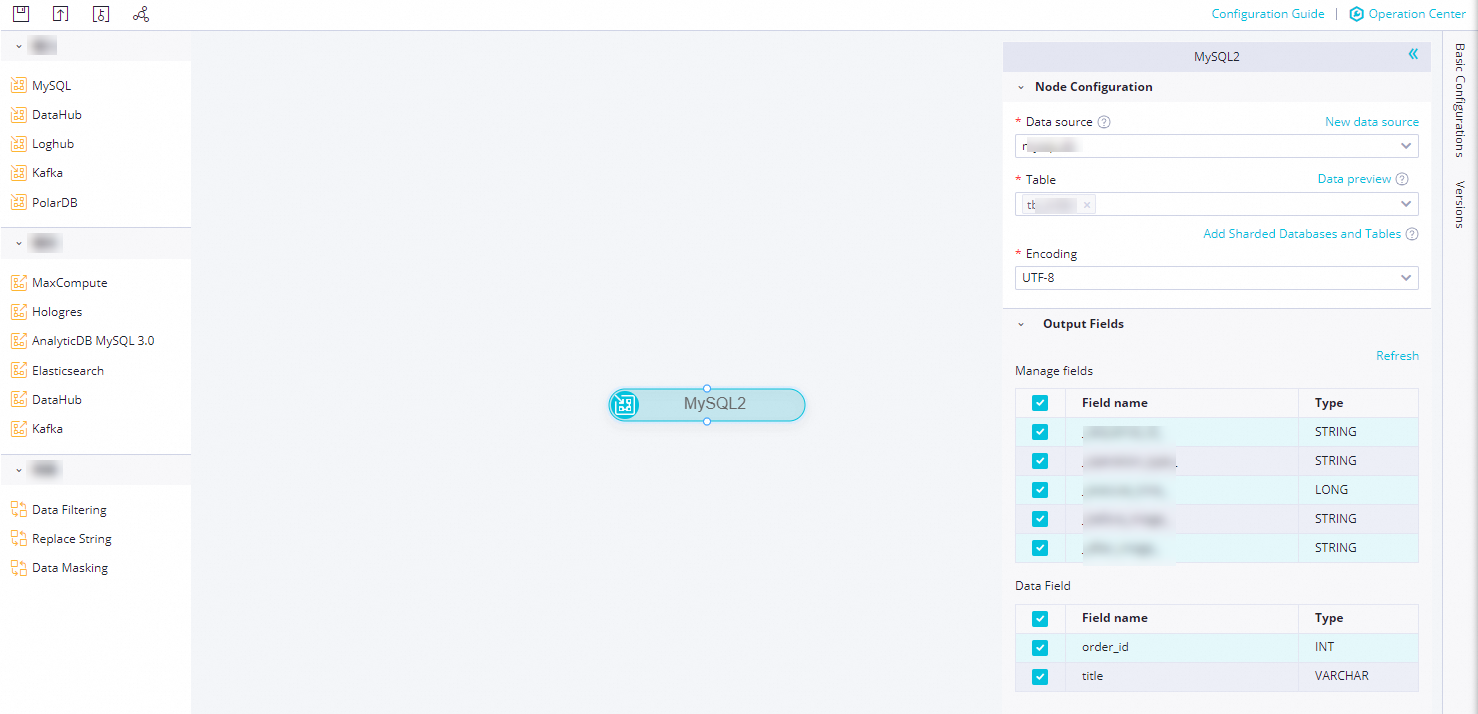
Parameter
Description
Data Source
Select a configured MySQL data source. Only MySQL data sources are supported.
If no data source is configured, click New data source on the right to go to the page and create one.
Table
Select the table that you want to synchronize from the current data source. You can click Data Preview on the right to confirm your selection.
You can implement sharding. The configured databases and tables are synchronized in real time in the task.
ImportantThe schemas of the sharded tables must be identical to prevent errors. A schema defines the table structure, which includes the number of fields, field types, field names, and the order of fields.
Output Field
Select the fields that you want to synchronize. The fields include Manage fields and Data Field:
-
Manage fields: Additional fields are automatically added to the destination to facilitate data management operations such as sorting and deduplication.
-
Data Field: The fields from the source table that you want to synchronize.
For more information, see Real-time synchronization field formats.
The MySQL node supports sharding. You can click Add Sharded Databases and Tables and select the target Data Source and Table from the drop-down lists to add multiple data sources for simultaneous synchronization.
-
-
Click the
 icon in the toolbar.
Frequently asked questions
-
What should I do if a real-time synchronization task for a MySQL data source stops reading data after a period of successful operation?
-
Run the following command in the database to view the binary log file that the database instance is currently writing to.
show master status -
Compare the binary log file read in the logs. Search for
journalName=MySQL-bin.000001,position=50in the logs to check if data is being written to the database. -
If data is being written but the binary log does not advance, contact your Database Administrator (DBA) for assistance.
-
-
MySQL real-time synchronization error:
Cannot replicate because the master purged required binary logs.-
Answer: The MySQL real-time synchronization error
Cannot replicate because the master purged required binary logs. Replicate the missing transactions from elsewhere, or provision a new slave from backup.may occur because the binary log record for the consumption offset cannot be found in MySQL. Check the binary log retention period for your MySQL database. When you start the synchronization task, configure the offset to be within this retention period. If you cannot subscribe to the binary log, try resetting the offset to the current time.
-
-
MySQL real-time synchronization error:
MySQLBinlogReaderException-
Answer: The MySQL real-time synchronization error
MySQLBinlogReaderException: The database you are currently syncing is the standby database, but the current value of log_slave_updates is OFF, you need to enable the binlog log update of the standby database first.may occur because the binary log is not enabled on the secondary database. If you want to synchronize a secondary database, you must enable the binary log for cascading replication on the secondary database. Contact your DBA for help.For more information about how to enable the binary log, see Enable the binary log for MySQL.
-
-
MySQL real-time synchronization error:
show master status' has an error!-
Answer: The MySQL real-time synchronization error
show master status' has an error!with the detailCaused by: java.io.IOException: message=Access denied; you need (at least one of) the SUPER, REPLICATION CLIENT privilege(s) for this operation, with command: show master statusmay occur because the data source account does not have the required permissions for the database.The account configured for the data source must have the
SELECT,REPLICATION SLAVE, andREPLICATION CLIENTpermissions for the database. For more information about how to grant permissions to the data source account, see Step 2: Create an account and grant permissions.
-
-
MySQL real-time synchronization error:
parse.exception.PositionNotFoundException: can't find start position for xx-
Answer: The synchronization offset was not found. Reset the offset.
-
-
MySQL real-time synchronization error:
The database offset has expired. Please select a new offset. The earliest available offset in the source database is xxx.-
Reset the offset: When you start the real-time synchronization task, reset the offset and select the earliest available offset in the source database.
-
Adjust the binary log retention period: If the database offset expires, consider adjusting the binary log retention period in the MySQL database. For example, set it to 7 days.
-
Data synchronization: If data is lost, consider performing a full synchronization again, or configure an offline synchronization task to manually synchronize the lost data.
-
-
Does real-time synchronization support merging different fields from multiple tables in a single database? For example, if Table A has fields a and b, and Table B has fields a and c, can they be synchronized into a single table with fields a, b, and c?
-
No. Real-time synchronization is supported only for multiple tables that have identical schemas.
-