Configure PolarDB Reader
The PolarDB Reader supports PolarDB for MySQL databases. It does not support PolarDB for PostgreSQL.
Procedure
Log on to the DataWorks console. In the target region, click in the left-side navigation pane. Select a workspace from the drop-down list and click Go to Data Development.
Hover over the
 icon and choose .
 Alternatively, expand a scheduled workflow, right-click it, and choose .
In the Create Node dialog box, set Synchronization Method to Single Table (Topic) to Single Table (Topic) ETL, enter a Name, and select a Path.
Click Confirm.
-
On the configuration tab of the Real-time synchronization node, drag the node to the canvas.
-
Click the PolarDB Reader node. In the Node Configuration panel, configure the parameters.
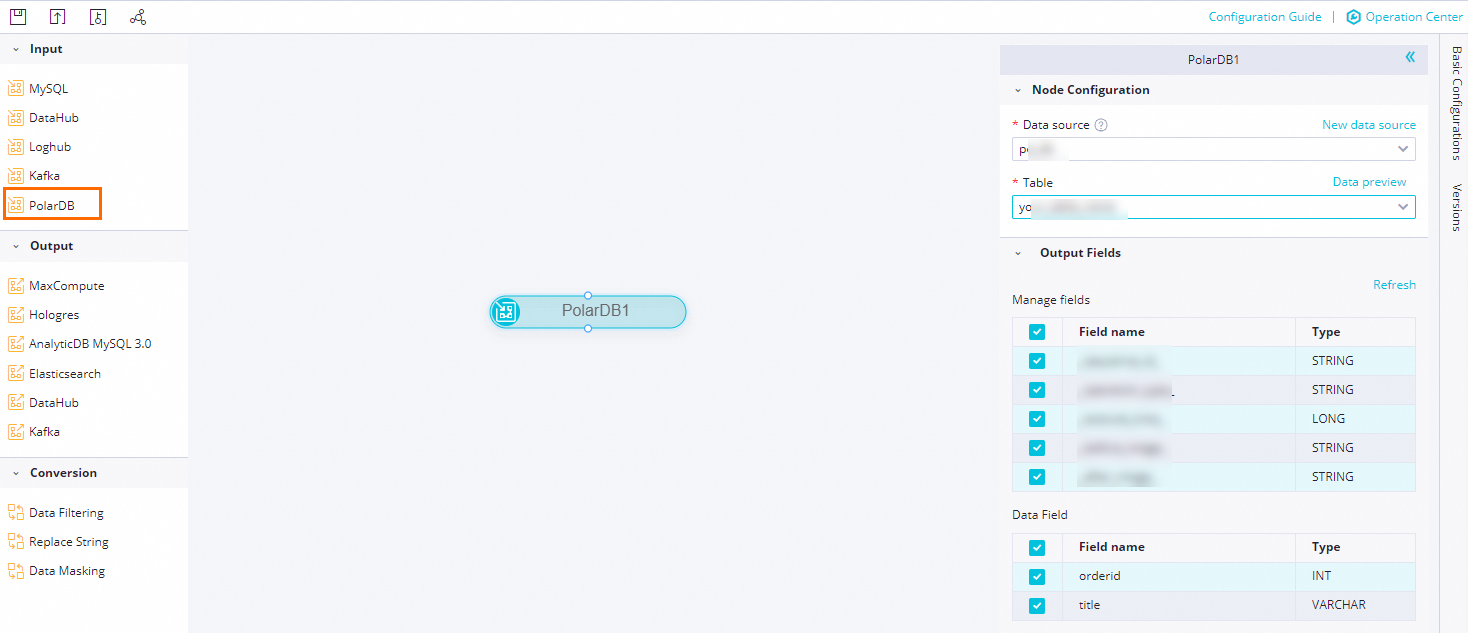
Parameter
Description
Data Source
Select a PolarDB data source.
If no data source is available, click New data source to create one on the page.
Table
Select the source table. To verify the content, click Data Preview.
Output Field
Select the fields to synchronize.
Click the
 icon in the toolbar to save the configuration.