Custom policies for DataWorks
When the built-in system policies for DataWorks don't meet your access control requirements, create custom policies to enforce least-privilege permissions. Custom policies give you fine-grained control over which RAM identities can perform which operations on which DataWorks resources.
System policies vs. custom policies
Resource Access Management (RAM) provides two types of policies:
| Dimension | System policy | Custom policy |
|---|---|---|
| Who creates it | Alibaba Cloud | You |
| Who manages it | Alibaba Cloud | You |
| Modification | Not modifiable | Fully editable |
| Version control | Not applicable | Supported via RAM version management |
| Typical use | Broad access grants | Targeted, least-privilege access |
How custom policies work
-
Attach a custom policy to a RAM user, RAM user group, or RAM role to grant or deny the permissions defined in that policy.
-
Detach a custom policy from all principals before deleting it. Policies not attached to any principal can be deleted directly.
-
Manage multiple versions of a custom policy using the version management mechanism in RAM.
Prerequisites
Before creating a custom policy, understand the DataWorks authorization model. See RAM authorization.
Policy structure
All DataWorks custom policies use this JSON structure:
{
  "Version": "1",
  "Statement": [
    {
      "Sid": "<statement-identifier>",
      "Effect": "Allow | Deny",
      "Action": "dataworks:<ActionName>",
      "Resource": "acs:dataworks:$regionid:$accountid:<resource-type>/<resource-name>",
      "Condition": { }
    }
  ]
}
Resource ARN placeholders:
| Placeholder | Description | Example |
|---|---|---|
$regionid |
Region ID | cn-hangzhou |
$accountid |
Alibaba Cloud account UID | 123456789 |
Use * as a wildcard. For example, replace workspace/* with workspace/<workspaceName> to scope the policy to a specific workspace.
Scope-level policies
Use the dataworks:Scope condition key to restrict access at the scope level, independently controlling console access and API access.
Deny all operations
Prevents a RAM user from using any DataWorks feature: console operations, service features, and API operations.
{
  "Version": "1",
  "Statement": [
    {
      "Sid": "DenyAllDataWorksAccess",
      "Effect": "Deny",
      "Action": "dataworks:*",
      "Resource": "*"
    }
  ]
}
Deny API operations only
Prevents a RAM user from calling DataWorks API operations. Console access is not affected.
{
  "Version": "1",
  "Statement": [
    {
      "Sid": "DenyOpenAPIAccess",
      "Effect": "Deny",
      "Action": "dataworks:*",
      "Resource": "*",
      "Condition": {
        "StringEquals": {
          "dataworks:Scope": "OpenAPI"
        }
      }
    }
  ]
}
Deny console access only
Prevents a RAM user from accessing DataWorks services through the console. API operation permissions are not affected.
This policy restricts console (page) access only. If the RAM user has permissions to call API operations for a specific service, those API permissions remain in effect.
{
  "Version": "1",
  "Statement": [
    {
      "Sid": "DenyConsoleAccess",
      "Effect": "Deny",
      "Action": "dataworks:*",
      "Resource": "*",
      "Condition": {
        "StringEquals": {
          "dataworks:Scope": "Page"
        }
      }
    }
  ]
}
Resource-level policies
Resource-level policies control permissions for specific entity types in the DataWorks console. Before configuring the Resource element, replace all $-prefixed placeholders with actual values.
Workspaces
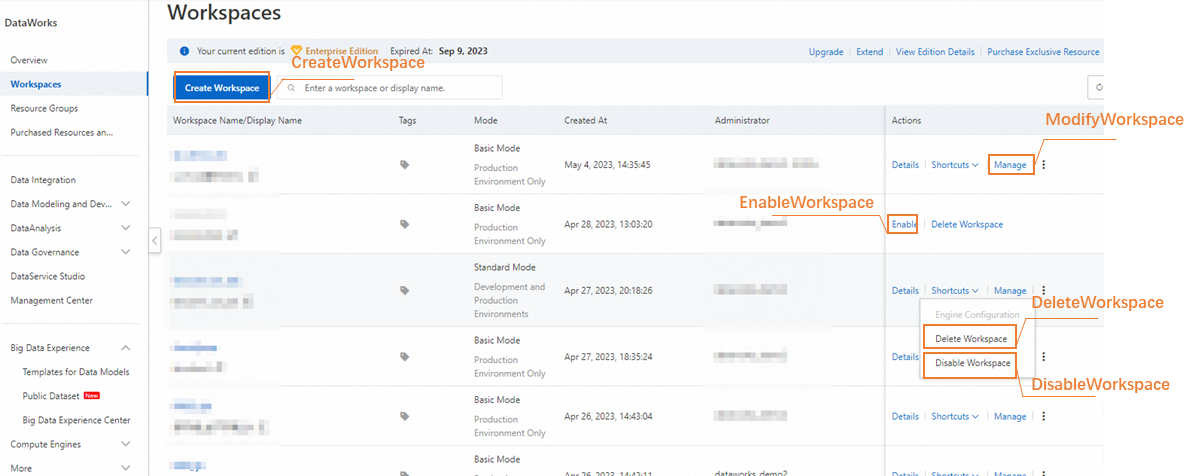
| Action | Resource | Description |
|---|---|---|
|
CreateWorkspace |
acs:dataworks:$regionid:$accountid:workspace/* |
Creates a workspace. |
|
ModifyWorkspace |
acs:dataworks:$regionid:$accountid:workspace/$workspaceName |
Modifies a workspace. |
|
DeleteWorkspace |
acs:dataworks:$regionid:$accountid:workspace/$workspaceName |
Deletes a workspace. |
|
DisableWorkspace |
acs:dataworks:$regionid:$accountid:workspace/$workspaceName |
Disables a workspace. |
|
EnableWorkspace |
acs:dataworks:$regionid:$accountid:workspace/$workspaceName |
Enables a workspace. |
Example: Allow modifying a specific workspace
{
  "Version": "1",
  "Statement": [
    {
      "Sid": "AllowModifySpecificWorkspace",
      "Effect": "Allow",
      "Action": "dataworks:ModifyWorkspace",
      "Resource": "acs:dataworks:$regionid:$accountid:workspace/$workspaceName"
    }
  ]
}
Exclusive resource groups
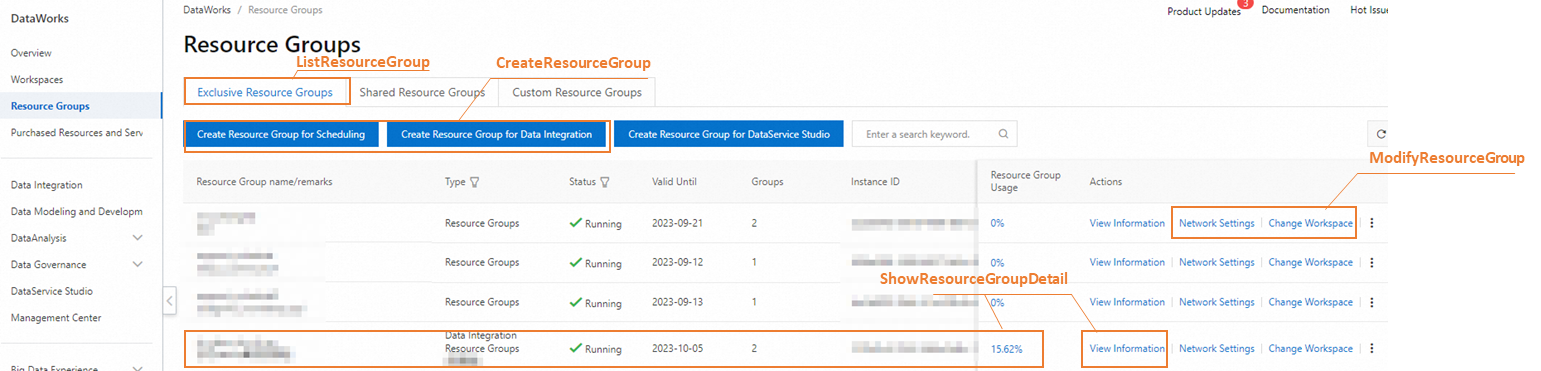
| Action | Resource | Description | Notes |
|---|---|---|---|
|
ListResourceGroup |
acs:dataworks:$regionid:$accountid:exclusive_resource_group/* |
Displays the Exclusive Resource Groups tab in the DataWorks console. Without this permission, the tab is invisible to the RAM user. |
Use
ListResourceGroup before ShowResourceGroupDetail. ShowResourceGroupDetail alone has no effect. The AliyunDataWorksReadOnlyAccess policy includes both permissions.
|
|
ShowResourceGroupDetail |
acs:dataworks:$regionid:$accountid:exclusive_resource_group/$resourceGroupName |
Shows details of the specified exclusive resource groups. |
- |
|
CreateResourceGroup |
acs:dataworks:$regionid:$accountid:exclusive_resource_group/* |
Creates an exclusive resource group in the DataWorks console. |
This action allows the RAM user to create a resource group from a purchase order ID. It does not grant permission to purchase, scale, renew, or change the specifications of a resource group. To allow those operations, attach both |
|
ModifyResourceGroup |
acs:dataworks:$regionid:$accountid:exclusive_resource_group/$resourceGroupName |
Modifies an exclusive resource group. |
- |
Example 1: Allow viewing and managing a specific exclusive resource group
{
  "Version": "1",
  "Statement": [
    {
      "Sid": "ListAllResourceGroups",
      "Effect": "Allow",
      "Action": "dataworks:ListResourceGroup",
      "Resource": "acs:dataworks:*:1111:exclusive_resource_group/*"
    },
    {
      "Sid": "ViewSpecificResourceGroupDetail",
      "Effect": "Allow",
      "Action": "dataworks:ShowResourceGroupDetail",
      "Resource": "acs:dataworks:*:11111:exclusive_resource_group/resourceGroupName2"
    },
    {
      "Sid": "ModifySpecificResourceGroup",
      "Effect": "Allow",
      "Action": "dataworks:ModifyResourceGroup",
      "Resource": "acs:dataworks:*:111:exclusive_resource_group/resourceGroupName2"
    }
  ]
}
Example 2: Allow viewing all resource groups and creating or modifying resource groups in the China (Shanghai) region
The RAM user can create a resource group from a purchase order ID but cannot purchase exclusive resources.
{
  "Version": "1",
  "Statement": [
    {
      "Sid": "ListAllResourceGroups",
      "Effect": "Allow",
      "Action": "dataworks:ListResourceGroup",
      "Resource": "acs:dataworks:*:$accountid:exclusive_resource_group/*"
    },
    {
      "Sid": "ViewAllResourceGroupsInShanghai",
      "Effect": "Allow",
      "Action": "dataworks:ShowResourceGroupDetail",
      "Resource": "acs:dataworks:cn-shanghai:$accountid:exclusive_resource_group/*"
    },
    {
      "Sid": "CreateResourceGroupInShanghai",
      "Effect": "Allow",
      "Action": "dataworks:CreateResourceGroup",
      "Resource": "acs:dataworks:cn-shanghai:$accountid:exclusive_resource_group/*"
    },
    {
      "Sid": "ModifyResourceGroupName1InShanghai",
      "Effect": "Allow",
      "Action": "dataworks:ModifyResourceGroup",
      "Resource": "acs:dataworks:cn-shanghai:$accountid:exclusive_resource_group/resourceGroupName1"
    },
    {
      "Sid": "ModifyResourceGroupName2InShanghai",
      "Effect": "Allow",
      "Action": "dataworks:ModifyResourceGroup",
      "Resource": "acs:dataworks:cn-shanghai:$accountid:exclusive_resource_group/resourceGroupName2"
    }
  ]
}
Alert information

| Action | Resource | Description |
|---|---|---|
|
ListContacts |
acs:dataworks:$regionid:$accountid:contacts_ram_user/* |
Lists alert contacts. |
|
ModifyContacts |
acs:dataworks:$regionid:$accountid:contacts_ram_user/* |
Modifies alert contact information. |
|
ListAlarmResource |
acs:dataworks:$regionid:$accountid:alarm_resource/* |
Lists alert resources. |
|
SetUpperLimits |
acs:dataworks:$regionid:$accountid:alarm_resource/* |
Sets upper limits for alert resource usage. |
Example: Allow viewing and managing alert resources and contacts
{
  "Version": "1",
  "Statement": [
    {
      "Sid": "ListAlertResources",
      "Effect": "Allow",
      "Action": "dataworks:ListAlarmResource",
      "Resource": "*"
    },
    {
      "Sid": "SetAlertResourceLimits",
      "Effect": "Allow",
      "Action": "dataworks:SetUpperLimits",
      "Resource": "acs:dataworks:$regionid:$accountid:alarm_resource/*"
    },
    {
      "Sid": "ListAlertContacts",
      "Effect": "Allow",
      "Action": "dataworks:ListContacts",
      "Resource": "acs:dataworks:$regionid:$accountid:contacts_ram_user/*"
    },
    {
      "Sid": "ModifyAlertContacts",
      "Effect": "Allow",
      "Action": "dataworks:ModifyContacts",
      "Resource": "acs:dataworks:$regionid:$accountid:contacts_ram_user/*"
    }
  ]
}