DLF data access control
DataWorks provides visual permission requests, approvals, and audits for Data Lake Formation (DLF) and DLF-Legacy, enabling unified permission management for your data lake. You can view request records on the My Applications page, and approve requests or view approval records on the My Approval Tasks page.
Prerequisites
-
You have configured DLF as the metadata service for your compute engine.
For example, if you use an EMR compute engine, you must set DLF as its metadata service and enable the DLF-Auth component to use the permission features of DLF-Legacy. For more information, see DLF-Auth.
-
You are familiar with DLF data permissions. For more information, see Overview of data permissions.
Background
When you first use DataWorks to manage permissions for Data Lake Formation (DLF), you are prompted to grant DataWorks access to DLF. When you grant the permissions, a service-linked role named AliyunServiceRoleForDataWorksAccessDLF is automatically created. For more information about the policy for the AliyunServiceRoleForDataWorksAccessDLF role, see Service-linked role for DataWorks to access DLF.
DataWorks supports the following DLF engine types:
-
Data Lake Formation (DLF): DLF 3.0, which provides more fine-grained permission management and supports permission requests at the metabase, table, and column levels.
-
DLF-Legacy: An earlier version of DLF that uses the original permission management method.
DLF 3.0 and DLF-Legacy differ in their capabilities. Choose the procedure that matches your version.
|
Item |
Data Lake Formation (DLF 3.0) |
DLF-Legacy |
|
Application granularity |
Metabase / Table / Column |
Catalog / Schema / Table / Column |
|
Scope of column-level permission |
Only internal Paimon tables in DLF support column-level permission management. |
For requests at the Column level, only the Select permission is available. |
|
Permission duration |
Permanent only (cannot be changed) |
Custom duration is supported. Permissions are automatically revoked upon expiration. |
|
Renewal |
Not supported |
Supported (approved requests can be renewed on the My Applications page before they expire) |
|
Permission audit |
Not supported (the Permission Audit tab currently supports only MaxCompute) |
Not supported (the Permission Audit tab currently supports only MaxCompute) |
DLF data access permission management process
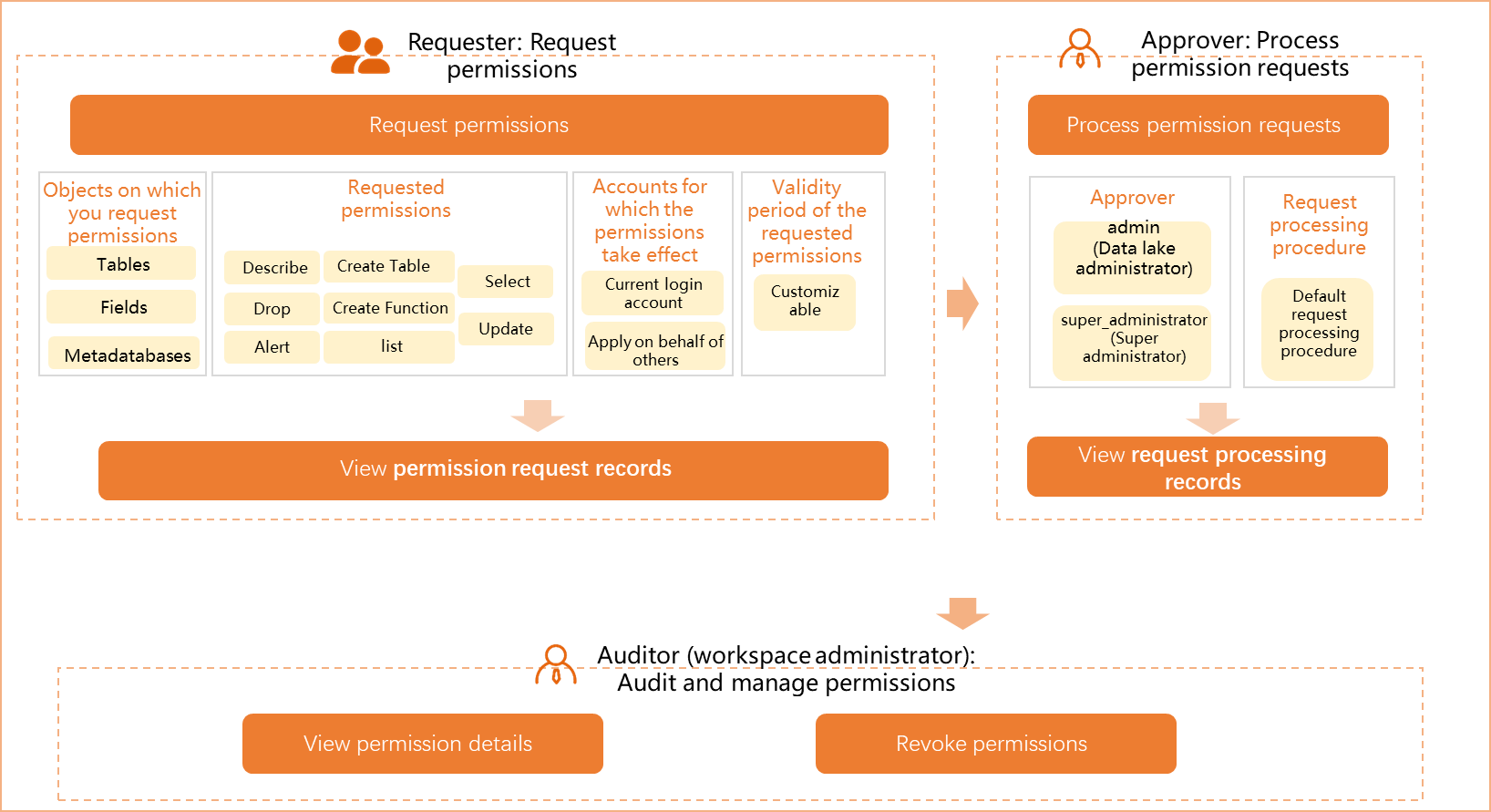
|
Role |
Description |
|
Permission requester |
Request table permissions on the Permission Application page. After submitting a request, view the request records of the current Alibaba Cloud account on the My Applications page. |
|
Permission approver |
View table permissions pending your approval and review approval history on the My Approval Tasks page. Note
RAM users must have the Admin (data lake administrator) or super_administrator role to perform approval operations. For more information about DLF role management, see DLF role management. |
|
Permission auditor |
The Alibaba Cloud account owner or workspace administrator can go to the Permission Audit page to view workspace members and their table permissions, and revoke permissions as needed. |
Go to data access control
Log on to the DataWorks console. In the target region, click in the left-side navigation pane. On the page that appears, click Go to Security Center.
Permission request
-
Click Data Platform Security > Data access control > Permission Application to go to the Permission Application tab. In the Application Content section, select an Engine Type.
DLF-related data source types include:
-
Data Lake Formation (DLF): DLF 3.0.
-
DLF-Legacy: An earlier version of DLF.
NoteThe following steps use Data Lake Formation (DLF) as an example. If you select DLF-Legacy, the operations are similar. The authorization granularity includes four levels: Catalog / Schema / Table / Column. The permission duration supports custom duration, and approved requests can be renewed. Other procedures are the same as those for DLF 3.0.
-
-
Set Granularity of authorization and Catalog, and then select the objects for which you want to request permissions.
The following three authorization granularity levels are available:
-
Metabase-level permissions: Select the metabases for which you want to request permissions, and select the desired permissions in the Metabase permissions column.
Available permissions include:
Describe,Alter,Drop,CreateTable,CreateFunction, andList. -
Table-level permissions: In the Tables to Be Added section, select the target tables. After you select a table, its information is displayed on the right side. Select the desired permissions in the corresponding permission columns.
Available permissions include:
Select,Update,Alter,Drop, and others. -
Column-level permissions: In the Tables to Be Added section, select the target tables. After you select a table, the table and its column information are displayed on the right side. Click the expand icon next to the table name to display all columns, and then select the desired column permissions in the Select column.
NoteOnly internal Paimon tables in DLF support column-level permission management.
-
-
Configure Application information.
Parameter
Description
User
Select the user for whom you want to request permissions.
-
Current login account: Request permissions on the target tables for the Alibaba Cloud account that is currently logged on to the DataWorks workspace.
-
Apply on Behalf of Others: Request permissions on the target tables for another Alibaba Cloud account. If you select this option, configure the Username parameter.
-
DLF role: Request permissions for a DLF role. If you select this option, you can select multiple DLF roles from the drop-down list. This option is available only for the Data Lake Formation (DLF) data source type.
Application duration
Select the permission duration.
-
If the data source type is Data Lake Formation (DLF), only Permanent is supported.
-
If the data source type is DLF-Legacy, you can specify a custom duration. Permissions are automatically revoked upon expiration.
Reason for Application
Enter the reason for requesting permissions on the target tables.
-
-
Click Apply for Permissions to submit the request.
You can view the approval details and approval records of the current request on the Permission Application Records tab.
Permission approval
RAM users must have the Admin (data lake administrator) or super_administrator role to perform approval operations.
-
View pending requests.
In the left-side navigation pane, choose Applications & Approvals > My Approval Tasks and click the Data Access Control tab. Select the engine type Data Lake Formation (DLF) or DLF-Legacy, and use the filter conditions to view the requests pending approval for the current Alibaba Cloud account.
NoteIf a single request contains permission requests for multiple tables, the request is automatically split into multiple requests based on the table owners.
-
View approval details.
Click Approval in the Operation column of the target request. In the Approval details dialog, you can view details such as Application Details and Approval record.
-
Approve or reject the request.
Based on the request details and your requirements, decide whether to approve the request. Enter Approval Comments and click Agree or Reject.
You can also select all requests on the My Approval Tasks page and click Batch Agree or Batch Reject. Enter Approval Comments to process requests in batches.
View permission request and approval records
-
DLF permission request records support Withdraw (only for requests in the Pending Approval status). Renewal capabilities vary by version: Data Lake Formation (DLF 3.0) permissions are permanent and do not support renewal; DLF-Legacy supports custom validity periods and renewal. You can renew approved requests by navigating to Applications & Approvals > My Applications.
-
The Permission Audit tab on the Data Access Control page currently supports only the MaxCompute engine. Permission auditing and revocation for DLF are not available on this tab. To manage permissions for DLF resources, use the built-in permission management capabilities of DLF.
-
The original tab entries for Permission Application Records and Permission Approval Records will be migrated to the My Applications and My Approval Tasks pages under the Applications & Approvals section. We recommend that you use the new page entries. The original Permission Approval Records tab list has been taken offline and only displays a migration notice. Go to Applications & Approvals > My Approval Tasks and set the task status to All to view the records.
View permission approval records
The Permission Approval Records tab on the Data Access Control page has been deprecated. The list has been migrated to the Application & Approval > My Approval Tasks page. The original tab no longer displays the approval record list and only shows a migration notice. Follow the steps below to view permission approval records.
In the left-side navigation pane, choose Application & Approval > My Approval Tasks, and then click the Data Access Control tab. Set the task status to All. You can filter by Application account number, Approval Results, Workspace, and other conditions to view the approval records under the current Alibaba Cloud account.
You can also click View details in the Operation column of the target request to view the detailed information.