DataWorks on MaxCompute
Use DataWorks with MaxCompute to build an offline data warehouse and analytics system — visually configure task workflows, schedule periodic jobs, and manage metadata in one place.
Prerequisites
DataWorks is activated. For more information, see Activate DataWorks.
MaxCompute is activated. For more information, see Activate MaxCompute.
A DataWorks workspace is created. For more information, see Create a workspace.
Usage notes
The following table describes key development topics.
Category | Description |
MaxCompute task development in DataWorks incurs fees for both DataWorks and related services. | |
Before developing MaxCompute tasks in DataWorks, purchase the required DataWorks edition and resource groups for your business needs and associate the MaxCompute data source. | |
DataWorks provides product-level and module-level permission management, and supports visual permission requests and approvals for MaxCompute data sources. | |
Data Integration reads data from and writes data to MaxCompute, supporting batch synchronization, real-time synchronization, and full and incremental synchronization. | |
DataWorks provides the Data Modeling service to structure and manage large amounts of complex, disorganized data. It also provides the DataStudio feature to develop scheduling tasks. DataStudio works with Operation Center to monitor and maintain these tasks. | |
DataWorks provides metadata management and data governance for MaxCompute. | |
DataAnalysis provides data analysis and service sharing for MaxCompute. | |
DataWorks provides open capabilities that let you quickly integrate various application systems. This facilitates development process control, data governance, and O&M, and helps you quickly respond to business status changes from integrated systems. |
Billing
DataStudio and Operation Center let you schedule MaxCompute data synchronization and processing tasks periodically. These features incur the following fees.
1. DataWorks charges
These charges appear on your DataWorks bill. For more information about DataWorks billing, see Billable items of DataWorks.
Charge | Description |
DataWorks edition fee | Before you can develop tasks, you must activate DataWorks. Standard Edition, Professional Edition, and Enterprise Edition require a paid subscription. |
Scheduling resource fee | Tasks require scheduling resources to run on a schedule. You can use a serverless resource group (recommended) or an old-version exclusive resource group. Note A serverless resource group can be used for both task scheduling and data synchronization. |
Synchronization resource fee | Data synchronization tasks require dedicated synchronization resources in addition to scheduling resources. You can use a serverless resource group (recommended) or an old-version exclusive resource group for data integration. |
No scheduling fees are charged for tasks that are run using the Run or Run with Parameters feature on the DataStudio page.
No scheduling fees are charged for tasks that fail to run or are run as dry runs.
For information about how DataWorks dispatches scheduling tasks to help you better understand the billing details, see How DataWorks dispatches scheduling tasks.
2. Non-DataWorks-related fees
These charges do not appear on your DataWorks bill. You may incur the following charges when developing and running tasks:
Fees from other services follow their own billing rules. For details, see each service's billing documentation. For MaxCompute billing, see Billable items of MaxCompute.
Fee | Description |
Database fees | Reading from or writing to upstream and downstream databases during data synchronization may incur database fees. |
Computing and storage fees | Running a task on a compute engine may incur computing and storage fees. For example, a MaxCompute SQL task that creates a table and writes data incurs MaxCompute computing and storage fees. |
Network service fees | Network connections between DataWorks and related services may incur fees. For example, using Express Connect, Internet Shared Bandwidth, or Elastic IP Address (EIP) incurs fees from the corresponding services. |
Environment preparation
1. Resource preparation
DataWorks offers Standard, Professional, and Enterprise editions, along with tenant-specific serverless resource groups. Select an edition and resource group that meets your needs.
Category | Description | Related documentation |
Edition selection | DataWorks Basic Edition covers basic data migration, development, scheduling, and simple data governance for MaxCompute. For advanced data governance and security features, select Standard, Professional, or Enterprise Edition. | |
Resource group selection |
|
2. Development environment preparation
Create a MaxCompute project as a data source for a DataWorks workspace, associate it with DataStudio, and optionally add workspace members for collaborative development.
Category | Description | Related documentation |
Data synchronization environment | Before running MaxCompute synchronization tasks, add the MaxCompute project as a data source to the workspace. You can then run synchronization tasks against it. | |
Data development and analysis environment | Before running MaxCompute scheduling tasks, add the MaxCompute project as a data source to the workspace and associate it with DataStudio. Once associated, you can develop, analyze, and periodically schedule tasks. | |
Collaborative development environment | To let RAM users collaborate on development in a workspace, add them as workspace members and assign a development-related role. |
Permission management
DataWorks supports product-level and module-level permission management, with visual permission requests and approvals for MaxCompute data sources. The following sections describe permission management in detail.
1. Data access and permission management
You can query MaxCompute table data by using a MaxCompute SQL node or an ad hoc query node. A workspace in basic mode does not support fine-grained permission management or isolation between development and production environments. The following example uses a workspace in standard mode.
Default permissions
After a RAM user is added to a workspace, their default data access permissions are:
Permission type
Description
MaxCompute development project permissions
DataWorks maps predefined workspace-level roles to MaxCompute data source roles in the development environment. A RAM user with a workspace role inherits the mapped data source role permissions. By default, the RAM user has permissions on the development project but not on the production project.
MaxCompute production project permissions
Only RAM users that are granted the scheduling access identity have broad permissions on the MaxCompute project in the production environment. Other RAM users do not have permissions on the production project. To operate on production tables, go to Security Center to request permissions.
DataWorks provides a default approval process, and also allows administrators to customize approval workflows.
For more information about MaxCompute data access control, see MaxCompute data permission management.
Data access behavior
MaxCompute supports cross-project table queries. In DataStudio, you can query production data across projects by specifying the project name. The following table describes cross-project table access and the accounts used.
NoteYou can view the data sources created for different environments and the execution accounts configured for them in the workspace's data source information. For more information, see Associate a MaxCompute compute engine with a workspace.
In a DataWorks workspace in standard mode, tasks in the development environment are run using the personal identity of a task executor by default. Tasks in the production environment are run by using a specific Alibaba Cloud account, which is the scheduling access identity. For more information, see Associate a MaxCompute compute engine with a workspace.
Code example
Execution in development
Execution in production
Access a development table in a development project:
select col1 from projectname_dev.tablename;The task executor's personal Alibaba Cloud account accesses the development table.
If a RAM user runs the task, the RAM user's personal account is used.
If the primary Alibaba Cloud account runs the task, that account is used.
The scheduling access identity accesses the development table.
Access a production table in a production project:
select col1 from projectname.tablename;The task executor's personal Alibaba Cloud account accesses the production table.
NoteBy default, personal accounts do not have permission to access production tables due to security controls. You must go to Security Center to request permission. DataWorks provides a default approval process and also supports custom approval workflows.
The scheduling access identity accesses the production table.
Access a table in the current environment (for example, a development table in the development environment):
select col1 from tablename;When run in the development environment, the task uses the task executor's personal Alibaba Cloud account to access the target table in the development data source.
When run in the production environment, the task uses the scheduling access identity to access the target table in the production data source.
2. Feature module permission management
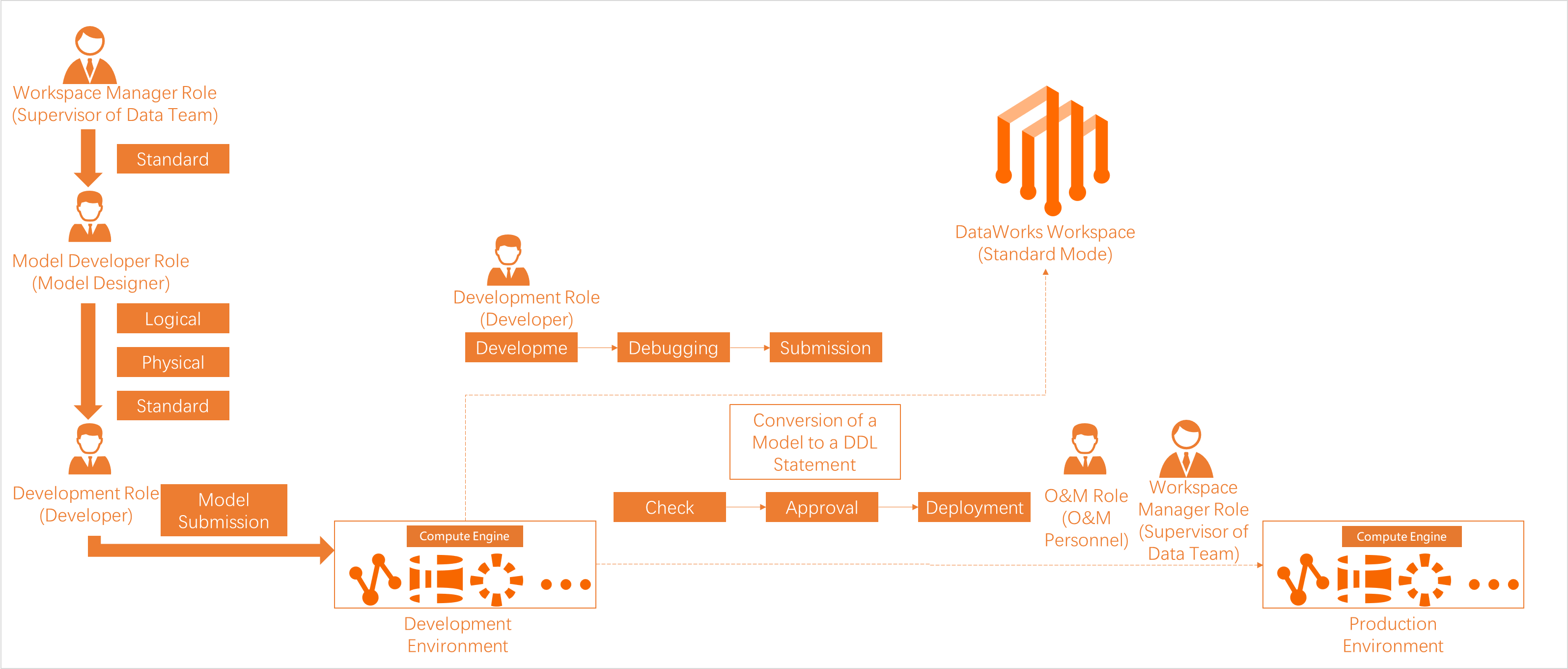
Before starting data development, assign workspace roles to users to grant them appropriate operation permissions. The following permission models are available:
The RAM policy-based authorization model manages permissions on DataWorks feature modules (for example, denying access to Data Map) and console operations (for example, allowing users to delete workspaces).
The RBAC model manages permissions on workspace-level modules (for example, allowing users to access DataStudio for development) and global modules (for example, denying access to the Data Security Guard module).
Get started
DataWorks offers multiple feature modules. Develop scheduling tasks in DataStudio, then monitor and manage them in Operation Center. DataWorks also provides development process control to standardize operations and ensure security.
1. Data Integration
Data Integration reads data from and writes data to MaxCompute. You can synchronize data between MaxCompute and other data sources in batch, real-time, and full or incremental modes. For more information, see Data Integration.
2. Data development and O&M
Module | Description | Related documentation |
Data Modeling | Using Alibaba's data middle platform methodology, it helps you define your data warehouse plan, data standards, dimensional models, and data metrics. This helps enterprises understand and use data quickly and consistently. | |
DataStudio | DataWorks encapsulates MaxCompute compute engine capabilities, letting you run data synchronization and development tasks.
|
|
Combine general-purpose nodes and compute engine nodes to handle complex logic. Major nodes include:
| ||
After you develop a node task, you can perform the following operations as needed:
| ||
Operation Center | Operation Center is a one-stop O&M and monitoring platform for big data tasks. It provides real-time task status monitoring, intelligent diagnosis, and rerun for abnormal tasks. Its intelligent baseline feature helps ensure timely task output by addressing unpredictable completion times and simplifying large-scale task monitoring. | |
Data Quality | Data Quality ensures data availability throughout the entire data development lifecycle. By efficiently validating data quality rules and tightly integrating with the task scheduling process, it helps you detect quality issues as early as possible and prevent data quality problems from spreading. This provides an efficient, reliable, and trustworthy data source for your business. |
3. Data governance
After you associate a MaxCompute data source, DataWorks automatically collects its metadata. Use Data Map to view metadata, or use Data Governance Center to view and resolve detected issues.
Module | Description | Related documentation |
Data Map | Using a unified metadata foundation, it helps you manage, inventory, find, and understand data objects. | |
Security Center Data Security Guard Approval Center | Security Center is a one-stop data security governance platform that integrates data asset classification, sensitive data identification, data authorization, sensitive data masking, access auditing, and risk identification and response. | |
Data Governance Center | Data Governance Center helps you proactively and systematically perform data governance. It uses data domain rule templates, automatically identifies assets that require optimization, and provides both pre-event and post-event governance strategies. |
4. Data analysis and services
DataWorks provides data processing, analysis, and service capabilities, with centrally managed APIs for efficient data sharing.
Module | Description | Related documentation |
DataAnalysis | Run online SQL queries, gain business insights, and edit and share data. You can also save query results as chart cards to build visual data reports. | |
DataService Studio | DataService Studio provides comprehensive data service and sharing capabilities, helping enterprises centrally manage API services for internal and external use. |
5. Open Platform
DataWorks Open Platform helps you integrate application systems with DataWorks for development process control, data governance, O&M, and real-time response to business status changes.
Category | Description | Related documentation |
OpenAPI | OpenAPI provides APIs for interaction between on-premises services and DataWorks, improving big data processing efficiency while reducing manual operations, O&M overhead, data risks, and costs. | |
OpenEvent | OpenEvent provides a message subscription service. By subscribing to DataWorks events, your applications receive real-time status changes for timely responses and personalized decision-making. | |
Extensions | Extensions let you register a service program to intercept and respond to subscribed OpenEvent messages, enabling notifications and process control for specific events. |
Appendix: Relationship between DataWorks and MaxCompute
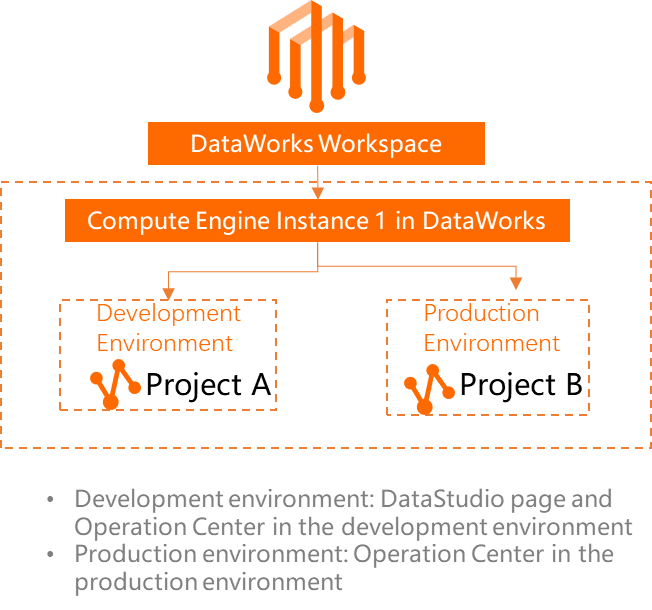
A workspace in basic mode has only one production environment and corresponds to a single MaxCompute project. The following example uses a workspace in standard mode.
DataWorks provides task scheduling, metadata management, data governance, and data security control for MaxCompute, while computation and storage occur within MaxCompute. In standard mode, DataWorks associates separate MaxCompute projects with the development and production environments to isolate storage and resources.
For information about creating a MaxCompute data source in a DataWorks workspace, associating it with DataStudio, and viewing the MaxCompute projects used in each environment, see Associate a MaxCompute compute engine with a workspace.
For information about how DataWorks dispatches scheduling tasks, see How DataWorks dispatches scheduling tasks.