RAM role-based authorization: Configure a data source
This topic uses an OSS data source as an example to explain how to configure a data source using the RAM role-based authorization mode to enhance cloud data security.
Prerequisites
To use a RAM user to perform the operations in this topic, you must first grant the AliyunDataWorksFullAccess and AliyunRAMFullAccess policies to the RAM user. For more information, see Manage RAM user permissions.
If you are using an Alibaba Cloud account, you can skip this prerequisite.
To add permissions, perform the following steps.
In the Add Permissions panel, set Resource scope to Account level, search for and select the two required system policies in the Policies section, and then click Add Permissions.
Background
Data sources are fundamental to data synchronization tasks and crucial for securing your enterprise data. DataWorks lets you use the more secure RAM role authorization mode to configure and access certain data sources, such as OSS, AnalyticDB for MySQL 2.0, LogHub, Tablestore, and Hologres. This mode enhances the security of your cloud data and helps prevent risks such as data source misuse and AccessKey pair leaks.
You can configure a data source using either the RAM role-based authorization mode or the AccessKey pair-based authorization mode. This topic describes how to configure a data source by using the RAM role-based authorization mode. You can select a mode based on your business requirements. The following sections describe how each mode works:
Access Key mode
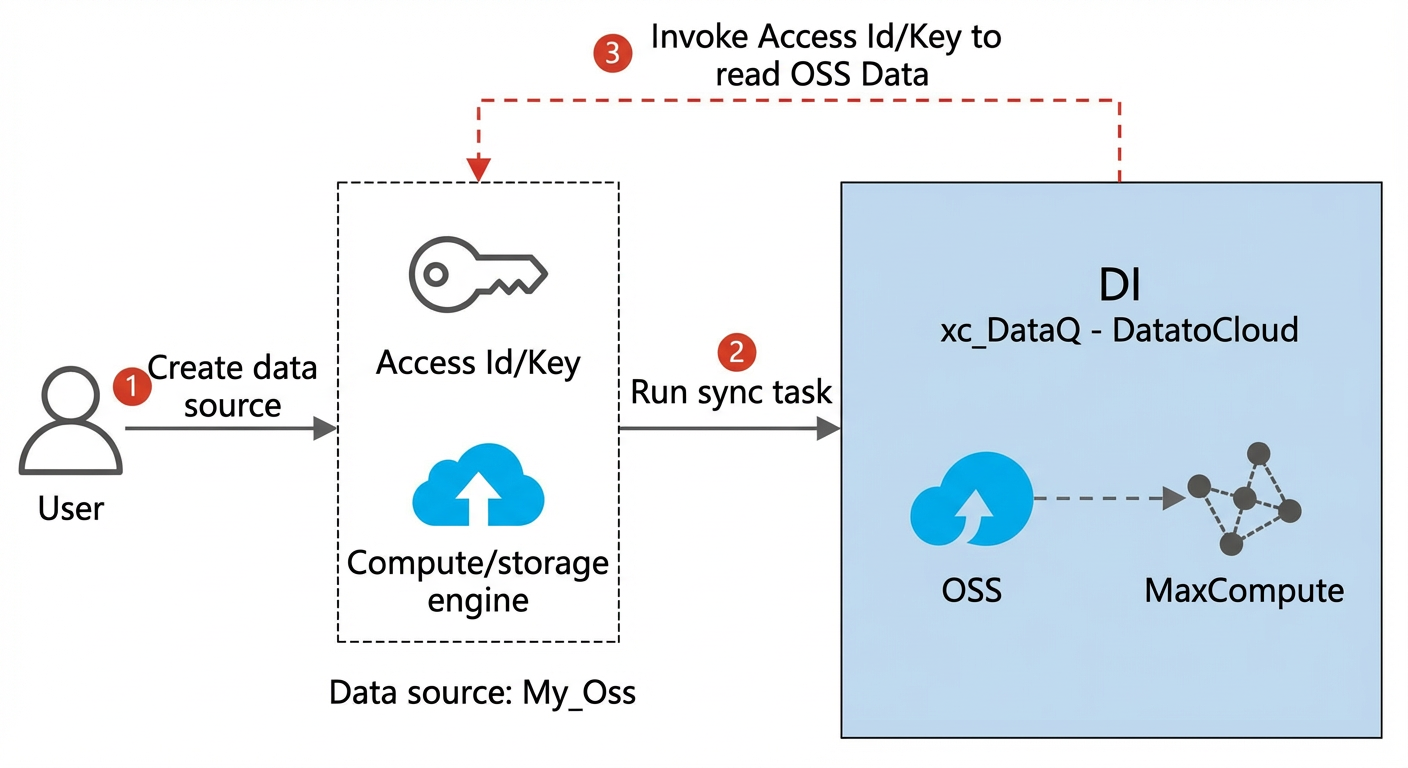
In the less secure AccessKey pair-based authorization mode, you only need to enter the AccessKey pair of an Alibaba Cloud account or a RAM user to complete the configuration.
For example, to configure an OSS data source, you enter the AccessKey pair of an account with the required permissions on the Configure Data Source page.
Select AccessKey pair-based authorization mode for Access mode, fill in connection details such as Region, Endpoint, and Bucket, and then click Connection Configuration to select a resource group and run a connectivity test. After the test passes, click Complete Creation.
When a synchronization task runs, DataWorks uses this AccessKey pair to access OSS to read or write data.
 Note
NoteIn Access Key mode, if the AccessKey pair of an Alibaba Cloud account is leaked, the associated OSS data may be compromised.
RAM role authorization mode
The RAM role authorization mode provides a more secure method for accessing data sources. It does not require an AccessKey pair, effectively eliminating the risk of key leaks.
In RAM role authorization mode, you only need to authorize the DataWorks service account to assume a role that has OSS access permissions. This allows DataWorks to access the OSS data source without an AccessKey pair.
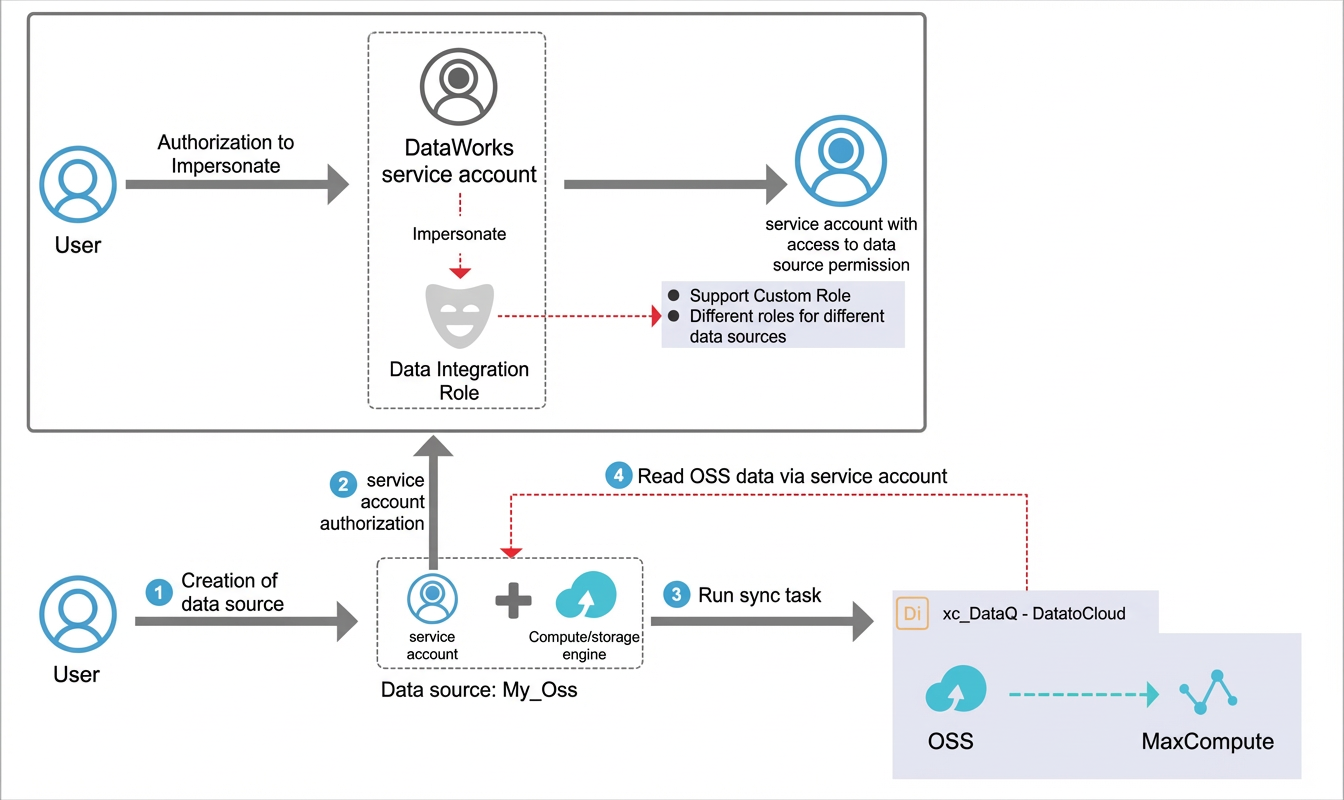
In addition, to meet the needs of enterprise users, you can assign roles with different permission scopes to different data sources to achieve more refined permission management.
Procedure overview
To allow a RAM user to complete the end-to-end operations instead of the Alibaba Cloud account, this section describes the conditions under which a RAM user can perform each step. The following procedure describes how to use the RAM role-based authorization mode.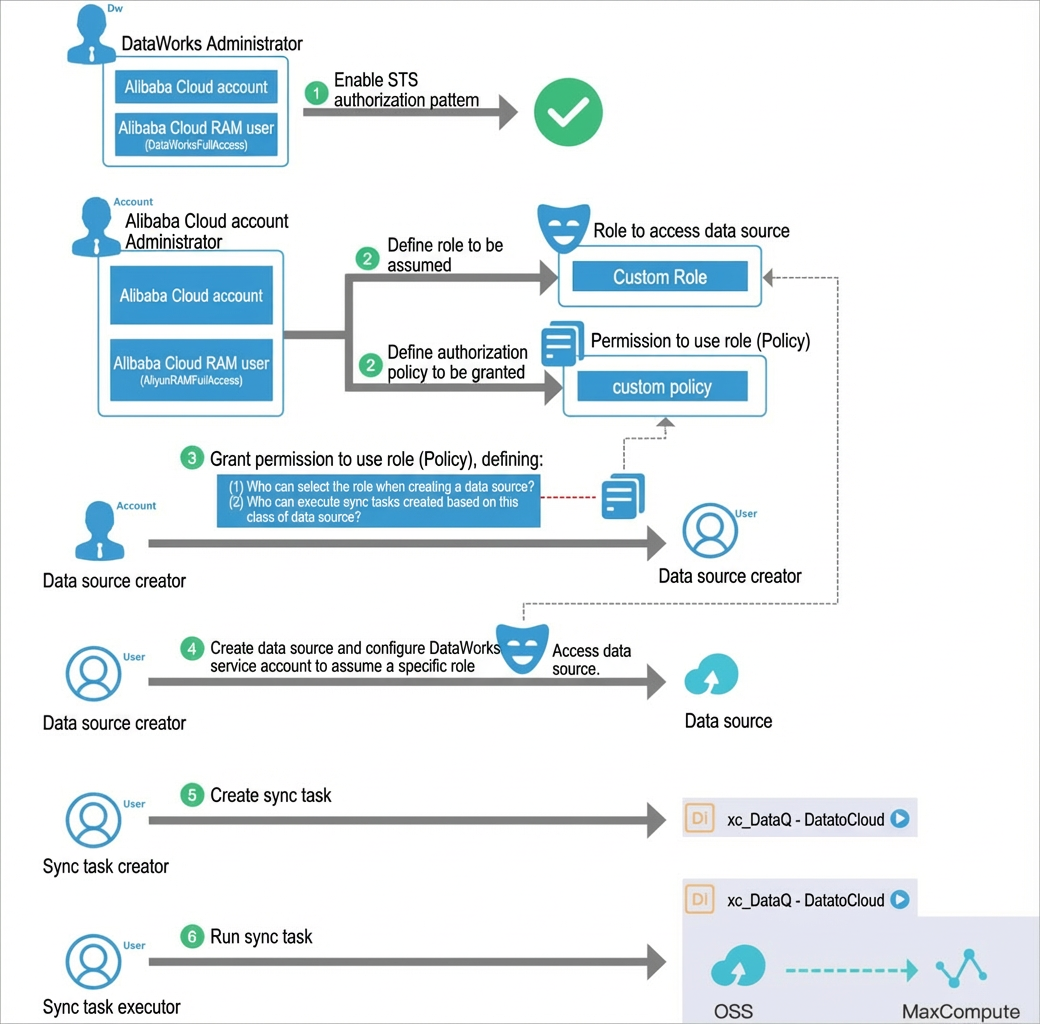
Use an Alibaba Cloud account or a RAM user that is granted the AliyunRAMFullAccess policy to go to the RAM console and define the role to be assumed and the policy to be authorized.
Role to be assumed: You must create a custom role for the DataWorks service account to assume. After the role is assumed, the DataWorks service account can access the OSS data source within the permission scope of the role.
Policy to be authorized: You must create a policy that contains PassRole-related permissions. This policy is used to authorize a user to create data sources or run synchronization tasks by using a specific role.
Use an Alibaba Cloud account or a RAM user that is granted the AliyunRAMFullAccess policy to go to the RAM console and authorize the RAM users in Step 3 and Step 5 to use the role.
NoteIf an unauthorized RAM user creates a data source by using the RAM role authorization mode, all synchronization tasks configured with this data source will fail.
The data source creator goes to DataWorks Data Integration and creates a data source by using the RAM role authorization mode. This enables the DataWorks service account to assume the specified role to access the OSS data source when a synchronization task runs.
NoteThe data source creator can perform this step only after being authorized in Step 2.
The synchronization task creator goes to Data Studio and creates a synchronization task based on the configured data source.
The task executor runs the data synchronization task in Data Studio or Operation Center.
NoteThe task executor can perform this step only after being authorized in Step 2.
Procedure
Create a role to be assumed.
You must create custom roles to match different data sources based on your security requirements. This topic uses the following scenario as an example to describe how to create a role to be assumed.
NoteOnly an Alibaba Cloud account or a RAM user that is granted the AliyunRAMFullAccess policy can perform this step.
An enterprise has 100 buckets that store all data of the enterprise. However, the big data team only needs to use data in one specific bucket. If the preset AliyunDataWorksAccessingOSSRole role is used, the big data team may access the other 99 buckets, which poses a management risk.
Therefore, the Alibaba Cloud account administrator can create a custom role named BigDataOssRole for the big data team and restrict who can use this role to only relevant members of the big data team, achieving permission management across teams.
Create a custom role.
In this example, a custom role is created with the trusted entity set to Alibaba Cloud Account and the role name set to BigDataOssRole. For more information about how to create a role, see Create a RAM role for a trusted Alibaba Cloud account.
Create a custom policy.
In this example, a policy is created that allows read and write access only to data in a specified bucket. For more information about how to create a policy, see Create a custom policy. The policy content is as follows.
{
    "Version": "1",
    "Statement": [
        {
            "Effect": "Allow",
            "Action": [
                "oss:GetObject",
                "oss:ListObjects",
                "oss:GetObjectMetadata",
                "oss:GetObjectMeta",
                "oss:GetBucketAcl",
                "oss:GetBucketInfo",
                "oss:PutObject",
                "oss:DeleteObject",
                "oss:PutBucket"
            ],
            "Resource": [
                "acs:oss:*:*:bucket_name_1",
                "acs:oss:*:*:bucket_name_1/*"
            ]
        }
    ]
}
Authorize the role with the specified policy.
Modify the trust policy of the BigDataOSSRole role and grant the policy created in Step 2 to the BigDataOSSRole role. This allows users who are later authorized with the BigDataOSSRole role to read data from the two specified buckets.
ImportantThis step is required. Otherwise, the role cannot be used.
Modify the role policy. For more information, see Edit the trust policy of a RAM role. The policy content is as follows.
{
    "Statement": [
        {
            "Action": "sts:AssumeRole",
            "Effect": "Allow",
            "Principal": {
                "Service": [
                    "di.dataworks.aliyuncs.com"
                ]
            }
        }
    ],
    "Version": "1"
}
Authorize users who can use the role.
After you confirm all roles to be assumed, you must grant the policy that contains the PassRole permission to the relevant users. Only then can these users create data sources and run synchronization tasks by using the role. You can also configure the mapping between users and roles based on your security requirements, specifying which users can use which roles.
Policy template 1: You can use the following template to create a policy. This template allows the authorized user to use all roles related to DataWorks Data Integration. Grant this policy with caution.
{
    "Version": "1",
    "Statement": [
        {
            "Action": "ram:PassRole",
            "Resource": "*",
            "Effect": "Allow",
            "Condition": {
                "StringEquals": {
                    "acs:Service": "di.dataworks.aliyuncs.com"
                }
            }
        }
    ]
}
Policy template 2: You can create a custom policy that contains the PassRole permission based on your security requirements to configure the mapping between users and roles.
NoteOnly an Alibaba Cloud account or a RAM user that is granted the AliyunRAMFullAccess policy can perform this step.
Scenario example: As described in the preceding scenario for the role to be assumed, after the Alibaba Cloud account administrator defines the BigDataOssRole role for the big data team, the administrator needs to specify that only relevant members can use this role. You can create a custom policy named BigDataOssRoleAllowUse and grant it to the relevant users.
Create a policy named BigDataOssRoleAllowUse. For more information, see Create a custom policy. The policy script is as follows:
{ "Version": "1", "Statement": [ { "Action": "ram:PassRole", "Resource": "acs:ram::19122324****:role/BigDataOssRole", "Effect": "Allow", "Condition": { "StringEquals": { "acs:Service": [ "oss.aliyuncs.com", "di.dataworks.aliyuncs.com" ] } } } ] }NoteReplace the UID (19122324****) in the policy with the UID of the Alibaba Cloud account that you are currently logged on to.
The administrator grants the BigDataOssRoleAllowUse policy to the RAM users who are allowed to use the BigDataOssRole role. RAM users who are granted the BigDataOssRoleAllowUse policy can use the BigDataOssRole role to create data sources (using BigDataOssRole as the access identity for the data source) and run synchronization tasks.
Create a data source.
After the Alibaba Cloud account administrator authorizes the data source creator, you can create a data source.
Use an Alibaba Cloud account or a RAM user that is granted the DataWorksFullAccess policy to create and configure an OSS data source.
During configuration, set Access mode to RAM role authorization mode. Configure other parameters as described below. If you use a standard mode workspace, you can configure the Development or Production environment based on your business requirements.
NoteThis topic uses an OSS data source as an example. In actual use, refer to the configuration page of the data source you need. For more information about how to configure an OSS data source, see Configure an OSS data source.
Parameter
Description
Data Source Name
The data source name must be a combination of letters, digits, and underscores (_), and cannot start with a digit or underscore (_).
Description
A brief description of the data source. The description cannot exceed 80 characters.
Endpoint
The OSS endpoint, in the format of
http://oss.aliyuncs.com. The endpoint of an OSS service varies based on the region. You must enter different endpoints when you access different regions.NoteThe correct format for the endpoint is
http://oss.aliyuncs.com. However,http://oss.aliyuncs.comwith the bucket name prepended to "oss" and connected by a period, such ashttp://xxx.oss.aliyuncs.com, can pass the connectivity test but will cause errors during synchronization.Bucket
The OSS bucket, which is a storage space used as a container for storing objects.
You can create one or more buckets, and each bucket can contain one or more files.
You can search for files in the buckets specified here in a data synchronization task. Files in buckets that are not specified here cannot be searched.
Access mode
Select RAM role authorization mode. This mode uses STS-based authorization to allow the cloud service account to assume the relevant role to access the data source, providing higher security.
Select Role
Select a RAM role from the Select Role drop-down list.
Region
Select a region from the Region drop-down list.
Test network connectivity.
In the Connection Configuration section, click Test Connectivity next to the desired resource group.
During data synchronization, a task can use only one type of resource group. You must test the connectivity for each resource group type to ensure that the Data Integration resource group used by the synchronization task can connect to the data source. Otherwise, the data synchronization task cannot run properly. To test multiple resource groups at the same time, select the desired resource groups and click Batch test connectivity. For more information, see Configure network connectivity for a data source.
After the connectivity test passes, click Complete.
Create a synchronization task.
After the data source is created, a developer can go to the DataStudio page and create a synchronization task based on the data source. For more information, see Configure a synchronization task.
Run the synchronization task.
The task executor runs the data synchronization task in Data Studio or Operation Center.
NoteWhen you run a task in DataStudio, make sure that the task executor has been authorized in Step 2 (authorize users who can use the role) to prevent task execution failures.