Migrate an ECS instance from a DDH to a shared host
If your business no longer requires dedicated resources or stronger isolation, you can migrate an ECS instance from a Dedicated Host (DDH) to a shared host to reduce costs.
Prerequisites
The ECS instance must meet the following requirements:
Only Stop and Migrate is supported. The ECS instance must be in the Stopped state. For more information, see Stop an instance.
WarningStopping an instance interrupts your services. Proceed with caution.
The instance must use the pay-as-you-go billing method. If the instance is subscription-based, you must first convert it to pay-as-you-go. For more information, see Convert a subscription instance to a pay-as-you-go instance.
Limitations
ECS instances with local SSDs are not supported.
Billing
After migration to a shared host, the instance's compute resources, such as vCPU and memory, are billed separately and are no longer covered by the DDH. Make sure that your account has a sufficient balance. For more information, see Pay-as-you-go.
Procedure
Log on to the ECS console.
In the left-side navigation pane, choose Instances & Images >
 > Dedicated Hosts.
In the upper-left corner of the page, select a region and resource group.
On the Dedicated Hosts page, find the DDH that contains the instance to be migrated, and then click Details in the Actions column.
Find the instance to migrate, and then click Change Host in the Actions column.
In the Change Host dialog box, configure the following parameters.
Parameter
Description
Target Host
Select Shared Host.
Target instance type
Enter the target instance type, such as ecs.g6.large. For the features and specifications of each instance type, see Instance family.
The target instance type must meet the following conditions. Otherwise, the migration fails.
The change from the current to the target instance type must be supported. For more information about the rules for changing instance types, see Instance type change rules and prechecks.
The target instance type must be in stock in the DDH's zone.
Migration Method
Only Stop and Migrate is supported. This requires the instance to be in the Stopped state.
Click OK.
After the migration is complete, the instance automatically starts, and its status changes to Running.
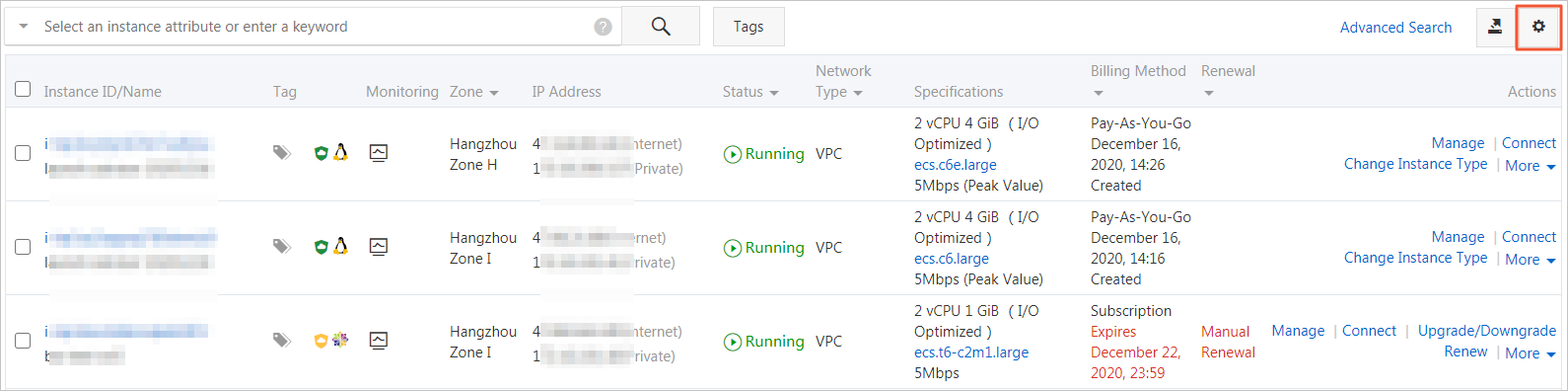
Optional:On the Instances page, verify the host of the ECS instance.
In the upper-right corner of the page, click the
 icon.
icon.
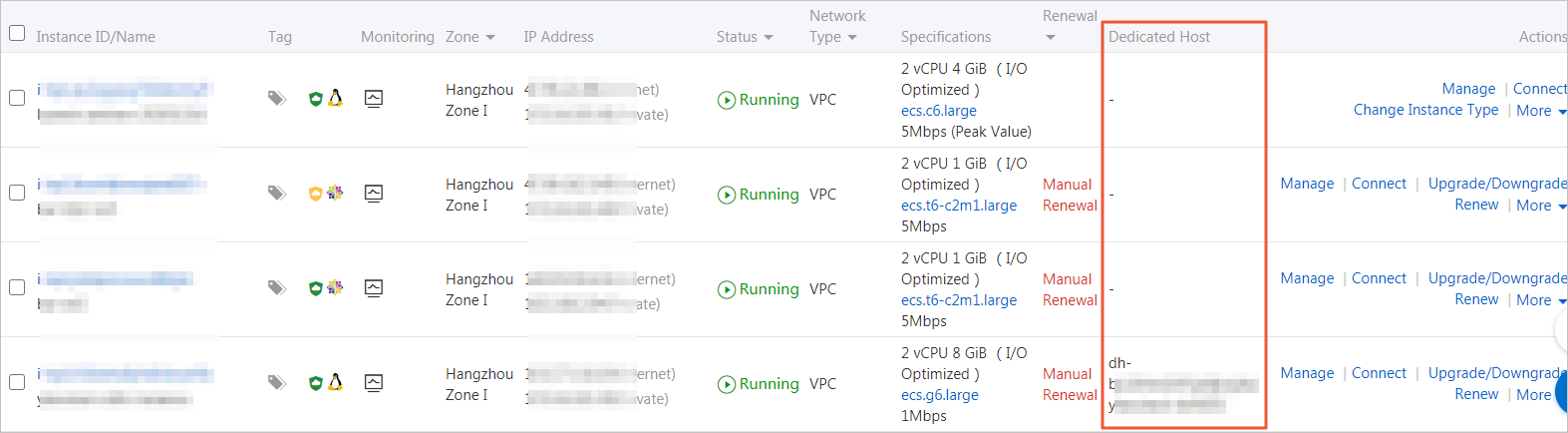
Select Dedicated Host and then click OK.
In the Dedicated Host column, check the instance's host.
If a DDH ID and name are displayed, the instance is on a DDH.
If System-assigned is displayed, the instance is on a shared host.