Permissions
This topic describes the permission model of Data Lake Formation (DLF) and explains how to grant appropriate permissions to a RAM user to use and access DLF features.
The permission model for Data Lake Formation (DLF) consists of two main layers: RAM permissions and DLF data permissions. To access DLF pages or data, a user must typically pass checks for both permission layers to access data resources.
-
RAM permissions: Control access to all DLF OpenAPI operations and determine which DLF OpenAPI operations or pages a RAM user can access.
-
DLF data permissions: Control access to and use of internal DLF resources, including databases, tables, columns, functions, and data catalogs, as well as permissions for data authorization operations.
The following figure shows the DLF permission verification process:
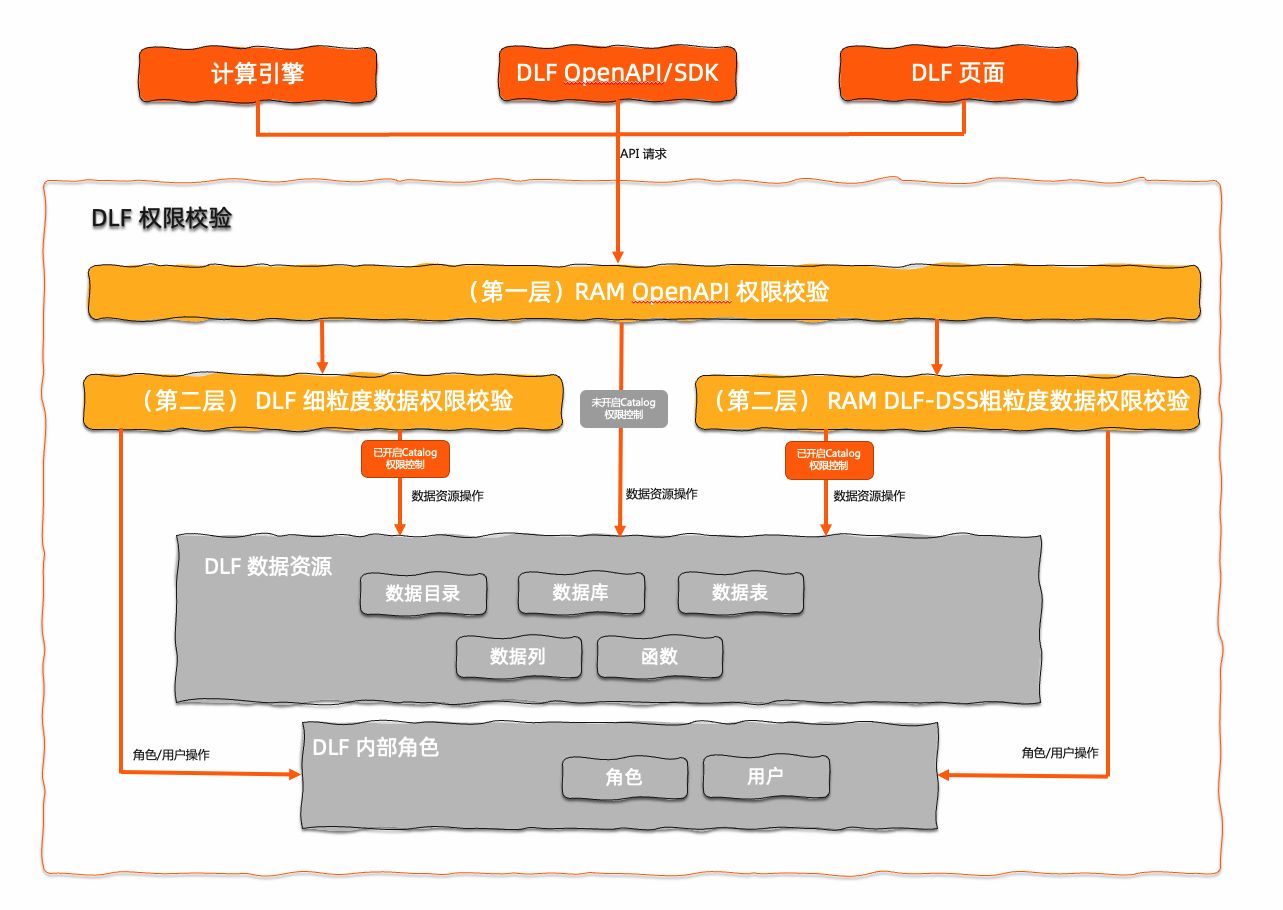
Layer 1: RAM OpenAPI permissions
This layer controls access to all DLF OpenAPI operations and determines whether a RAM user can access specific DLF OpenAPI operations or pages. The RAM console provides two built-in authorization policies:
-
AliyunDLFFullAccess: Grants permission to call all DLF OpenAPI operations. -
AliyunDLFReadOnlyAccess: Grants permission to call read-only DLF OpenAPI operations, such as API operations that start withListorGet. This policy does not grant permission for write operations such asCreateorDelete.ImportantThe
SubmitQueryoperation is a write operation and requires theAliyunDLFFullAccesspermission.
You can also create custom RAM authorization policies for more fine-grained control at the OpenAPI level.
Layer 2: DLF fine-grained data permissions
This layer controls access to and use of internal DLF resources, including databases, tables, columns, functions, and data catalogs, as well as permissions for operations like role management, user management, and authorization.
-
Layer 2 permission control is divided into two types: DLF fine-grained data permissions and RAM DLF-DSS coarse-grained data permissions. These types have an OR relationship. A user gains access by passing the permission check for either type, and access is denied only if both checks fail.
-
Permission checks for data resources, such as databases, tables, columns, functions, and data catalogs, take effect only after enabling the permission setting for the data catalog. However, permission verification for management operations, such as role, user, and authorization management, is always enforced by fine-grained data permissions, regardless of whether the setting is enabled.
To simplify data permission management, DLF provides built-in data administrator roles. You can find these roles on the Data Permission > Role page and assign them to specific users:
-
admin(data lake administrator): Has all data and authorization permissions in Data Lake Formation. -
super_administrator(super administrator): Has all data and authorization permissions in Data Lake Formation and can modify users with theadminrole.
For more information about configuring fine-grained permissions, see Data permissions overview.
Layer 2: RAM DLF-DSS coarse-grained data permissions
This layer controls access to and use of internal DLF resources, including databases, tables, columns, functions, and data catalogs, as well as permissions for operations like role management, user management, and authorization. The RAM console provides two built-in authorization policies:
-
AliyunDLFDSSFullAccess: Grants access to all fine-grained DLF resources. -
AliyunDLFDSSReadOnlyAccess: Grants read-only access to all fine-grained DLF resources, including for operations likeList,Get,Select, andExecute.
-
We recommend using DLF fine-grained data permissions for granular data permission control.
-
Permission checks for data resources, such as databases, tables, columns, functions, and data catalogs, take effect only after enabling the permission setting for the data catalog. However, permission verification for management operations, such as role, user, and authorization management, is always enforced by DLF-DSS coarse-grained data permissions, regardless of whether the setting is enabled.
-
A RAM user with the RAM
AdministratorAccesspolicy also has all DLF-DSS permissions, which is equivalent to having theAliyunDLFDSSFullAccesspolicy.
Common scenarios
-
Use case: Querying DLF metadata without requiring data permission control.
-
Grant "Layer 1: RAM OpenAPI permissions" to the RAM user by attaching either the built-in
AliyunDLFFullAccessorAliyunDLFReadOnlyAccessauthorization policy.
-
-
Use case: Using DLF for fine-grained data authorization.
-
Step 1: Grant "Layer 1: RAM OpenAPI permissions" to the RAM user by attaching either the built-in
AliyunDLFFullAccessorAliyunDLFReadOnlyAccessauthorization policy. -
Step 2: Enable the permission setting for the data catalog.
-
Step 3 (Optional): If you use other services like E-MapReduce (EMR) to query and modify data, you must also enable the DLF-Auth permission switch in the EMR cluster.
-
Step 4: Grant the RAM user the required data permissions. Use one of the following methods:
-
Assign an administrator role: Use your Alibaba Cloud account to grant the
adminorsuper_administratorrole to a RAM user. This gives the RAM user full data and authorization management permissions. For more information, see Manage roles. -
Assign database administrator permissions: Grant a user all permissions on a specific database. For more information, see Grant permissions.
-
Assign table or column access permissions: Grant a user specific permissions on a table or column. For more information, see Grant permissions.
-
-
FAQ
-
Problem 1: An error message indicates that the user does not have the required RAM permission to call a DLF API.
Symptom: The page displays an error message indicating that RAM authorization is required for a
dlf:xxxpermission. This means the user needs Layer 1 OpenAPI permissions. Grant the required permissions by attaching the built-inAliyunDLFFullAccessorAliyunDLFReadOnlyAccesspolicy in the RAM console. -
Problem 2: An error message indicates that the user lacks permission for a resource when attempting to grant permissions.
Symptom: When a user attempts to grant a permission, an error message indicates that they lack the required
dlf permission.-
Grant the user authorization permissions for the specific resource. You can also grant these permissions by assigning a role. For more information, see Grant permissions.
-
Grant the user the
adminorsuper_administratorrole. For more information, see Manage roles. -
Grant the user
dlf-dsspermissions. For example, grantingdlf-dss:BatchGrantPermissionsanddlf-dss:SelectTableallows the user to grant theSELECTpermission on all tables to other users.
Example error pop-up: The title is Error Occurred, and the error message is
Authorization Failed [4019]. The message indicates that the user does not have the All permission on the resourceacs:dlf:cn-hangzhou:{accountId}:metastore/catalogs/{catalogName},databases/default. The error code isNoPermission, and a message indicates that the Principal failed the dlf permission check. -
-
Problem 3: An error message indicates that the user does not have permission to call a control-plane API operation, such as
ListPermissionsorListRoles.Symptom: An error with the
NoPermissionerror code occurs when a user calls a control-plane API operation, such as an operation for querying permissions or managing roles. The error message indicates that the user does not have permission for the operation. To resolve this issue, use one of the following methods:Example error pop-up: The title is Error Occurred. The error message indicates that the user does not have permission to perform an operation when calling a control-plane API like
ListPermissionsorListRoles. The error code isNoPermission, and a message indicates that the Principal failed the dlf permission check.-
Grant the user the
adminorsuper_administratorrole. For more information, see Manage roles. -
Grant the user
dlf-dsspermissions. DLF provides the built-inAliyunDLFDSSFullAccessandAliyunDLFDSSReadOnlyAccesspolicies in the RAM console. For example:-
dlf-dss:ListRoles: Allows the user to view all roles in DLF. -
dlf-dss:ListPermissions: Allows the user to view all granted permissions in DLF.
-
-