Deploy access points in multiple regions, such as the Chinese mainland and overseas, connected to a single back-end data service. DNS intelligently routes user requests to different access points based on location, and the access points serve as mutual backups to ensure high availability during failures.
How it works
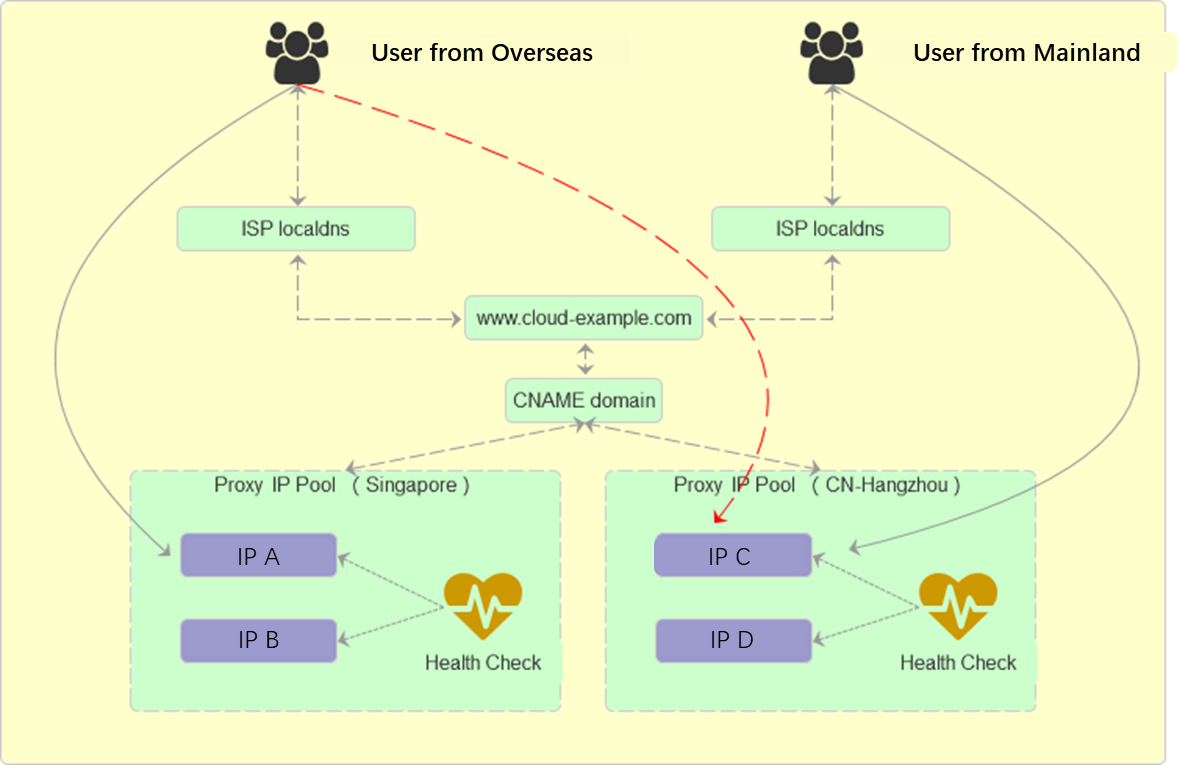
Procedure
Address pool configuration
Create four address pools: North China and South China as mutual backups for the Chinese mainland, and China (Hong Kong) and Singapore as mutual backups for regions outside the Chinese mainland.
Steps
-
Log on to the Alibaba Cloud DNS - Global Traffic Manager console. In the list of instances, find the target instance and click Actions in the Configure column.
-
On the Basic Configuration page, click Address Pool Configuration and then click Add Address Pool. Configure parameters such as Address Pool Name, Address Pool Type, Load Balancing Policy, Address, and Mode, then click Confirm. Repeat this process to create the four address pools.
For all four address pools, set Address Pool Type to IPv4 and Load Balancing Policy to Return All Addresses.
Health checks
Steps
-
On the Address Pool Configuration page, click the + icon next to the address pool name, then click Add next to Health Check.
-
Configure the health check settings, for example, a TCP health check. For IP addresses outside the Chinese mainland, select International Nodes for Monitoring Node. Enable health checks for all four address pools.
Access policy configuration
Configure access policies to route traffic from different locations to specific address pools. Each policy defines a primary and backup address pool set, so traffic automatically fails over to the backup set when the primary set becomes unavailable.
Steps
-
On the Basic Configuration page, in the Access Policy Type section, select Geo-location Based Access Policy and then click Configure.
-
On the Geo-location Based Access Policy page, click Add Access Policy and create the following policies:
-
Access Policy 1: Set Resolution Request Source to Global. Set Primary Address Pool Set to North China. Set Backup Address Pool Set to South China. This policy ensures that requests not matching any other policy are routed to the North China address pool. If the North China pool fails, traffic is redirected to the South China pool.
-
Access Policy 2: Set Resolution Request Source to South China. Set Primary Address Pool Set to South China. Set Backup Address Pool Set to North China. This policy routes requests from the South China region to the South China address pool. If the South China pool fails, traffic is redirected to the North China pool.
-
Access Policy 3: Set Resolution Request Source to Outside the Chinese mainland. Set Primary Address Pool Set to China (Hong Kong). Set Backup Address Pool Set to Singapore. This policy routes requests from users outside the Chinese mainland (excluding requests from Singapore, which are handled by the next policy) to the China (Hong Kong) address pool. If the China (Hong Kong) pool fails, traffic is redirected to the Singapore pool.
-
Access Policy 4: Set Resolution Request Source to Singapore. Set Primary Address Pool Set to Singapore. Set Backup Address Pool Set to China (Hong Kong). This policy routes requests from Singapore to the Singapore address pool. If the Singapore pool fails, traffic is redirected to the China (Hong Kong) pool.
After you configure the policies, the Details column on the Access Policy Configuration page displays the Policy Name, Resolution Request Source, Currently Active Address Pool Set, and Address Pool Type. You can also Modify or Delete each policy.
Basic configuration
Steps
-
On the Basic Configuration page, click Edit and configure the parameters as described in Basic configuration.
On the basic configuration page, copy the value of the CNAME Access Domain (Public) field. You need this CNAME address to configure DNS resolution.
CNAME access configuration
-
Navigate to the Alibaba Cloud DNS - Hosted Public Zone console. In the domain list, find your domain name and click Settings.
-
Click Add DNS Record. Create a CNAME record that points your service hostname to the CNAME access domain provided by GTM. After you add the record, GTM manages your application traffic.