Run the demo of RTC SDK for macOS
Updated at:
This topic describes how to run the demo of Real-Time Communication (RTC) SDK for macOS.
Prerequisites
You have obtained your authentication information from the console. For more information, see Access tools.
Note The token obtained from the console is for development and testing only. Using this token in a production environment poses a security threat. For production environments, you must set up your own server to generate tokens and use the HTTPS protocol. For more information, see
Generate a token on the server-side.
Environment requirements
| Type | Description |
| Device | If you use a device that does not have a built-in camera and microphone, such as a Mac mini, you need to connect the device to a webcam and microphone. |
| macOS version | macOS 10.12 or later. |
Procedure
- Download and decompress the software development kit (SDK) and sample code. For more information, see SDK download.
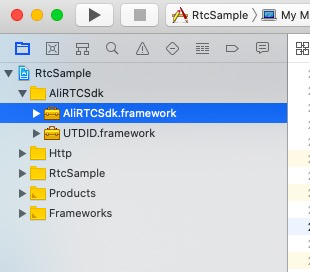
- Copy the SDK file to the following directory of the sample code.
- Configure the parameters.
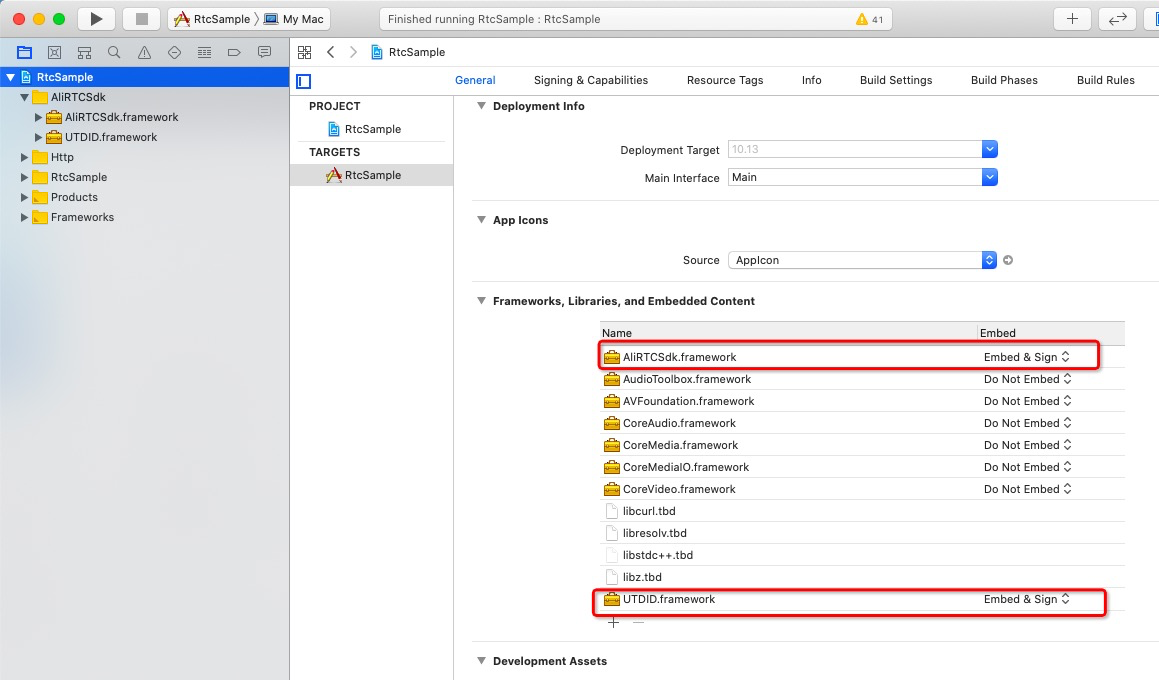
- Add AliRTCSdk.framework as a dynamic framework. The following figure shows that AliRTCSdk.framework is added as a dynamic framework.
- Open the ViewController.m file and configure the AliRtcAuthInfo authentication parameter in the
sureButtonClickmethod./* NSString *AppID = @"aoe****"; NSString *userID = @"f303d****"; NSString *channelID = @"23****"; NSString *nonce = @"AK-7c8f947b-e55e-4ed5-ab09-bc849efe5bee"; long long timestamp = 1585119606; NSString *token = @"70f77b873****"; NSArray <NSString *> *GSLB = @[@"https://rgslb.rtc.aliyuncs.com"]; NSArray <NSString *> *agent = @[@""]; */
- Add AliRTCSdk.framework as a dynamic framework. The following figure shows that AliRTCSdk.framework is added as a dynamic framework.
- Run the demo.
- After you start the demo, on the homepage, enter a channel number and click OK.
- On the channel page that appears, the local preview window is displayed. Click Start to join the channel. When another user joins the channel, you can start a real-time audio or video call.
You can also click Screen Sharing to share your screen with remote users.
Is this page helpful?